Freedom251 › Pomodoro Timer Apps
PomoDial
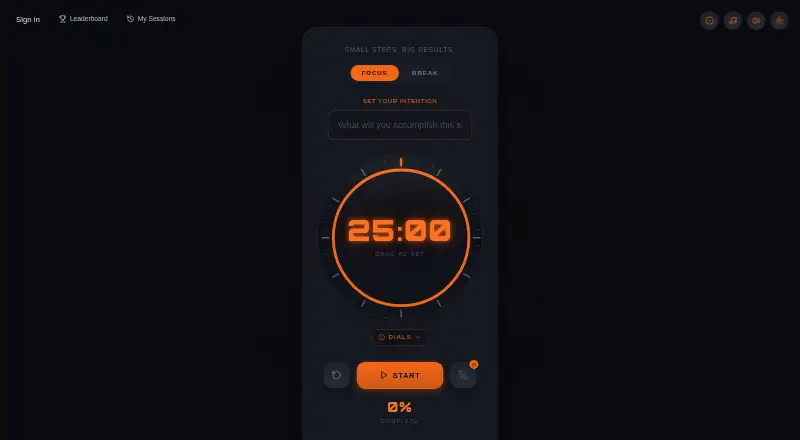
What PomoDial is
PomoDial is a browser-based Pomodoro timer that lets users state an intention before starting a focus session. Its dial sets the session length, with homepage presets from 5 minutes to 2 hours and support for custom intervals. The timer works in mobile browsers without an app download and is also listed as a Chrome extension. Users can run sessions without an account, but saving them requires a free sign-in. PomoDial can import Todoist tasks as session intentions and mark a linked task complete when the session ends. ChatGPT and Claude connectors support starting and completing sessions and viewing productivity summaries. The free tier costs nothing. PomoDial Pro costs $2.99 a month and adds unlimited session history, an intention journal, focus streaks, 11 dial faces unlocked through use, phone-free focus mode with distraction tracking, a community leaderboard, and CSV export. PomoDial presents workflows including studying, writing, coding, deep work, and remote work.
Who it suits
It suits people who want a browser timer for studying, writing, coding, deep work, or remote work. Todoist users can link tasks to sessions.
What it does well
- Can be used without an account.
- Custom intervals and presets from 5 minutes to 2 hours.
- Imports Todoist tasks as session intentions.
- Works in mobile browsers without an app download.
- Free tier available.
What to know first
- Saving sessions requires a free sign-in.
- Unlimited history and CSV export require the paid plan.
Limits
The free tier requires a sign-in to save sessions. Unlimited session history, the full intention journal, focus streaks, CSV export, phone-free focus mode, and the 11 dial faces are included with Pro, which costs $2.99 a month.
Plans
| Plan | Billed and limits | Price |
|---|---|---|
| Free | Timer use without account · free account saves sessions | Free |
| PomoDial Pro | $2.99/month · Unlimited session history and intention journal · focus streaks · 11 unlockable dial faces · phone-free focus mode with distraction tracking · community leaderboard · CSV export | $2.99 a month |
As pomodial.com lists them, read 15 Oct 2026. The maker's own page has the final word.
Getting started
- Open https://www.pomodial.com/ in a web or mobile browser.
- Choose a preset duration or set a custom interval with the dial.
- Enter an intention for the focus session.
- Start without an account, or sign in free to save sessions.
- Connect Todoist, ChatGPT, or Claude if you want those integrations.
- Choose PomoDial Pro for its additional tracking and focus features.
Verdict
PomoDial covers basic focus sessions in a browser and adds task links for Todoist users. Pro may be useful if you want saved history, streaks, or its phone-free mode.
Questions
Is PomoDial free?
Yes. Its Free tier costs nothing. Pro costs $2.99 a month.
Can I use PomoDial without an account?
Yes, the timer can be used without an account. Saving sessions requires a free sign-in.
What platforms does PomoDial support?
It is browser-based and works in mobile browsers without an app download. A Chrome extension is also listed among its connected tools.
Does PomoDial integrate with Todoist?
Yes. It can import Todoist tasks as session intentions and automatically mark a linked task complete when a session ends.
What does PomoDial Pro include?
Pro costs $2.99 a month and includes unlimited session history, a full intention journal, focus streak tracking, 11 unlockable dial faces, phone-free focus mode, a community leaderboard, and CSV export.
Facts from PomoDial's own pages
- Account use
- The timer can be used without an account, while saving sessions requires a free sign-in. · pomodial.com, 9 Oct 2026
- AI connectors
- PomoDial offers ChatGPT and Claude connectors for starting sessions, completing them, and viewing productivity summaries. · pomodial.com, 9 Oct 2026
- API and SDK documentation
- The reviewed maker pages expose connectors and an extension but do not state a public REST API, SDK, open-source licence or self-hosting option. · pomodial.com, 15 Oct 2026
- Browser support
- PomoDial describes its timer as browser-based and says it works in mobile browsers without an app download. · pomodial.com, 9 Oct 2026
- ChatGPT connector
- The ChatGPT plugin starts sessions with prefilled intentions, completes them, updates streaks and returns productivity summaries. · pomodial.com, 15 Oct 2026
- ChatGPT listing developer
- The ChatGPT plugin directory identifies the developer as JAMES WELDON and lists version 1.0.0. · chatgpt.com, 15 Oct 2026
- Chrome extension
- The homepage lists a Chrome Extension among its connected tools. · pomodial.com, 9 Oct 2026
- Chrome extension features
- The extension supports intention entry, 1–240 minute durations, completion chimes, a side panel and synchronization with PomoDial, ChatGPT and Claude. · chromewebstore.google.com, 15 Oct 2026
- Chrome privacy declaration
- The extension developer declares that it will not collect or use user data and will not sell or transfer it outside approved uses. · chromewebstore.google.com, 15 Oct 2026
- Chrome release
- The extension listing identifies version 1.0.0, updated September 3, 2026. · chromewebstore.google.com, 15 Oct 2026
- Chrome users
- The Chrome listing showed 12 users when opened. · chromewebstore.google.com, 15 Oct 2026
- Claude connector
- The Claude connector exposes tools to start sessions, complete them and retrieve focus statistics. · pomodial.com, 15 Oct 2026
- Custom duration
- The timer page says users can set any interval from 1 to 60 minutes with the dial. · pomodial.com, 15 Oct 2026
- Developer-reported issues
- In a Reddit build post, the maker reported OAuth token expiry, SSE-versus-JSON and cold-start problems still needing fixes. · reddit.com, 15 Oct 2026
- Developer-reported traction
- The same maker post reported about 80 users and one paying customer at that point. · reddit.com, 15 Oct 2026
- Dial collection
- The Pro plan includes 11 dial faces that users unlock through use. · pomodial.com, 9 Oct 2026
- Dial controls
- The timer uses a dial to set session length, with the homepage listing presets from 5 minutes to 2 hours. · pomodial.com, 9 Oct 2026
- Dial presets
- The homepage offers presets from 5 minutes through 2 hours, including 25, 52, 60 and 90 minutes. · pomodial.com, 15 Oct 2026
- Focus timer
- The free browser timer includes ambient music, intention entry and visual progress tracking without signup or downloads. · pomodial.com, 15 Oct 2026
- Intended users
- PomoDial presents itself for workflows including studying, writing, coding, deep work, and remote work. · pomodial.com, 9 Oct 2026
- Intention tracking
- Sessions can be saved with their stated intentions and used to build a searchable work journal. · pomodial.com, 15 Oct 2026
- Limit: browser dependence
- The product is presented as browser-based with no native desktop or mobile download listed on its own pages. · pomodial.com, 15 Oct 2026
- Limit: limited task management
- The maker’s comparison says users wanting built-in task lists may need another tool for structured tracking. · pomodial.com, 15 Oct 2026
- Limit: no blocking
- PomoDial’s own Forest-alternative page says it does not block websites or apps. · pomodial.com, 15 Oct 2026
Where PomoDial stands on Freedom251
- Pomodoro Timer Apps#17 of 28