Freedom251 › Pomodoro Timer Apps

PomodoroTimers
What PomodoroTimers is
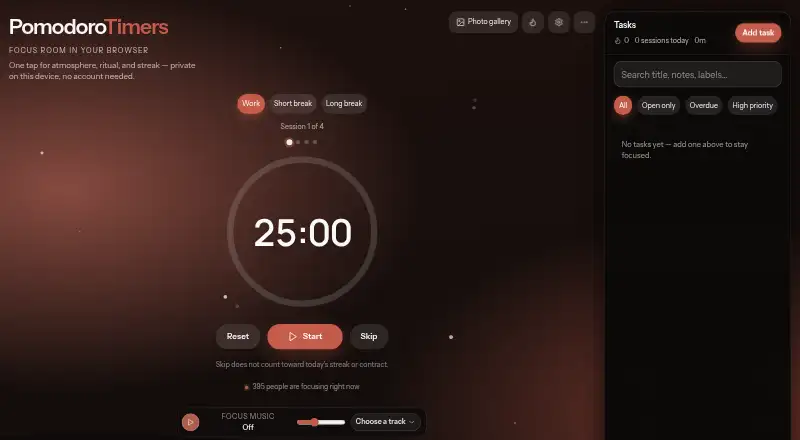
PomodoroTimers is a browser-based focus workspace for organizing timed work sessions, breaks, and tasks. Its cadence presets include Sprint 15/3/10, Classic 25/5/15, Deep 50/10/20, and Ultradian 90/20/30. The task list supports priorities, due dates, estimates, labels, notes, search, and filters. Focus tools include soundscapes, music, rituals, a daily focus contract, streaks, and break companions. Local reports provide a seven-day chart, a 30-day heatmap, session history, a weekly review, and CSV export. Tasks, sessions, preferences, and reports stay in the browser unless exported or a feature explicitly sends data elsewhere. After the page has loaded once with a network connection, the timer can continue running if Wi-Fi drops. The responsive web experience works on phones, tablets, and desktops without an app download, and can be added to an iPhone or iPad home screen. A compact work-and-break cycle is also available as an iframe embed. Core focus tools are free to use.
Who it suits
PomodoroTimers suits students, professionals, creators, developers, designers, and freelancers who want timed focus sessions and task tracking in a browser. It also suits people who want to review local focus reports or use the timer on mobile without downloading an app.
What it does well
- Four cadence presets cover different work-and-break rhythms.
- Tasks support priorities, due dates, notes, and filters.
- Reports include a 30-day heatmap and CSV export.
- Core focus tools are free to use.
- Timer can continue after Wi-Fi drops.
What to know first
- Timer requires an initial page load with a network connection.
- Hosting provider may record IP address and browsing details.
Limits
The Free plan provides core focus tools; advanced options may appear later as optional extras. Tasks, sessions, preferences, and reports stay in the browser unless exported or a feature explicitly sends data elsewhere.
Plans
| Plan | Billed and limits | Price |
|---|---|---|
| Free | Core focus tools are free to use; advanced options may appear later as optional extras | Free |
As pomodorotimers.com lists them, read 4 Oct 2026. The maker's own page has the final word.
Getting started
- Open https://pomodorotimers.com/ in a browser with a network connection.
- Choose a cadence preset: Sprint 15/3/10, Classic 25/5/15, Deep 50/10/20, or Ultradian 90/20/30.
- Add tasks and organize them with priorities, due dates, estimates, labels, notes, search, or filters.
- Use focus tools and review local reports; export reports as CSV if needed.
- On iPhone or iPad, add the web app to the home screen if desired.
- Embed the compact work and break cycle using the site’s iframe option, if needed.
Verdict
PomodoroTimers combines configurable work cycles, task management, focus tools, and local reports in a browser workspace. Its timer can keep running after an initial online load, while the hosting provider may still record basic access logs.
Questions
Is PomodoroTimers free?
Yes. The Free plan costs nothing and includes core focus tools.
Which platforms can I use it on?
The responsive web experience works on phones, tablets, and desktops without downloading an app. The web app can also be added to an iPhone or iPad home screen.
What timer rhythms does it offer?
Its presets are Sprint 15/3/10, Classic 25/5/15, Deep 50/10/20, and Ultradian 90/20/30.
Can I export focus reports?
Yes. Local reports include CSV export, as well as a seven-day chart, 30-day heatmap, session history, and weekly review.
Where are tasks and reports stored?
Tasks, sessions, preferences, and reports stay in the browser unless exported or a feature explicitly sends data elsewhere.
Can the timer work offline?
After the page has loaded once with a network connection, the timer can keep running if Wi-Fi drops.
Facts from PomodoroTimers's own pages
- Focus tools
- Features include soundscapes, focus music, focus rituals, a daily focus contract, streaks, and break companions. · pomodorotimers.com, 4 Oct 2026
- Integrations
- The site offers an iframe embed for a compact work and break cycle that runs in the visitor’s browser. · pomodorotimers.com, 4 Oct 2026
- Intended users
- The About page says PomodoroTimers is intended for students, professionals, creators, developers, designers, and freelancers. · pomodorotimers.com, 4 Oct 2026
- Mobile access
- The responsive Home experience works on phones, tablets, and desktops without downloading an app, and the web app can be added to an iPhone or iPad home screen. · pomodorotimers.com, 4 Oct 2026
- Offline use
- After the page has loaded once with a network connection, the timer can keep running if Wi-Fi drops. · pomodorotimers.com, 4 Oct 2026
- Privacy
- Tasks, sessions, preferences, and reports stay in the browser unless exported or a feature explicitly sends data elsewhere. · pomodorotimers.com, 4 Oct 2026
- Purpose
- PomodoroTimers is a browser based focus workspace built around Pomodoro work sessions and breaks. · pomodorotimers.com, 4 Oct 2026
- Reports
- Local focus reports include a 7 day chart, 30 day heatmap, session history, weekly review, and CSV export. · pomodorotimers.com, 4 Oct 2026
- Server logs
- The hosting provider may record IP address, user agent, URL, and timestamp for security and reliability; the site says it does not use these logs to build marketing profiles. · pomodorotimers.com, 4 Oct 2026
- Support
- The site lists support at [email protected] and general contact at [email protected]. · pomodorotimers.com, 4 Oct 2026
- Task tracking
- Users can manage tasks with priorities, due dates, estimates, labels, notes, search, and filters. · pomodorotimers.com, 4 Oct 2026
- Timer rhythms
- It offers Sprint 15/3/10, Classic 25/5/15, Deep 50/10/20, and Ultradian 90/20/30 cadence presets. · pomodorotimers.com, 4 Oct 2026
Where PomodoroTimers stands on Freedom251
- Pomodoro Timer Apps#15 of 28