Textadept
by Textadept
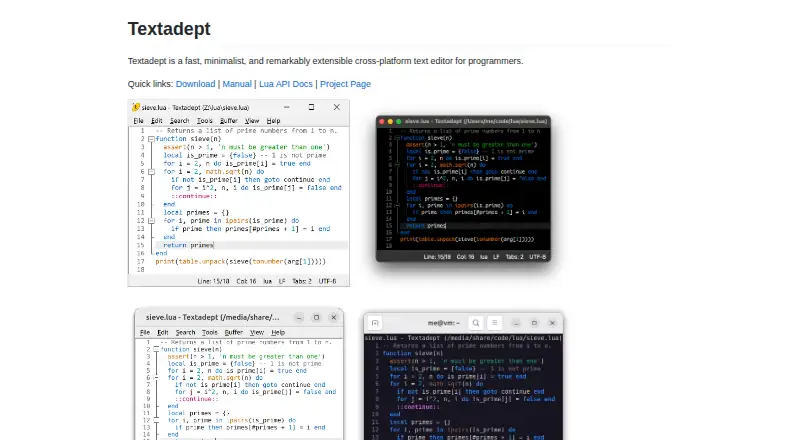
What Textadept is
Textadept is a free, open-source text editor for programmers, available with graphical and terminal interfaces on Windows, macOS, Linux, and BSD. It supports more than 100 programming languages and offers multiple carets and selections, split views, configurable key bindings, nested snippets, column editing, macro recording, and large-file handling. Lua can be used to script and customize nearly every aspect of the editor. Shell commands let users run code, build projects, and execute tests; optional modules add tools such as language debuggers, file comparison, formatting, an LSP client, scratch buffers, and spell checking. The project states that the editor does not connect to the internet. Pre-built binaries are self-contained and require no installation, and source code is available under the MIT License. Requirements vary: the Linux GUI needs Qt 5 or GTK 3, while the terminal version needs ncurses. Pre-built macOS binaries are for Apple Silicon only; on Linux, manual compilation may be needed if a binary does not run.
Who it suits
Textadept suits programmers who want a customizable editor with both graphical and terminal interfaces. It may also fit users who want to script their editor with Lua or work with optional programming tools.
What it does well
- Supports more than 100 programming languages
- Graphical and terminal interfaces
- Lua customization and extension support
- Self-contained binaries require no installation
What to know first
- macOS binaries are for Apple Silicon only
- Linux binaries may require manual compilation
- Linux GUI requires Qt 5 or GTK 3
Limits
The free Textadept plan is the open-source editor under the MIT License. Pre-built binaries require Windows 10 or later, macOS 13 or later, or Linux with Qt 5 or GTK 3 for the graphical interface and ncurses for the terminal version; macOS binaries are Apple Silicon only.
Plans
| Plan | Billed and limits | Price |
|---|---|---|
| Textadept | Open-source text editor · MIT License | Free |
As orbitalquark.github.io lists them, read 7 Oct 2026. The maker's own page has the final word.
Getting started
- Visit the Textadept website.
- Choose a pre-built binary for Windows 10 or later, macOS 13 or later, or Linux; the binaries are self-contained and require no installation.
- For Linux graphical use, ensure Qt 5 or GTK 3 is available; for the terminal version, ensure ncurses is available.
- If a Linux binary does not run correctly, compile Textadept manually from the available source code.
- Use the manual and Lua API documentation to learn the editor and its customization options.
Textadept is a fast, minimalist editor for programmers who want both a graphical workspace and a terminal interface. It is best suited to developers comfortable shaping tools with Lua, while its zero price and open-source license make it accessible to anyone willing to handle platform-specific setup. The trade-off is a highly configurable environment that may demand more decisions than a fixed, integrated editor.
Overview
Textadept supports more than 100 programming languages and presents sensible defaults in both GUI and terminal modes. Its design favors speed, compactness, and control rather than a broad, prescriptive application suite. Developers who regularly switch between desktop and command-line work get one editor model across both contexts.
Pre-built binaries are self-contained and need no installation, which simplifies trying the editor where a compatible build exists. The project also publishes source code for users who need to compile it themselves. Textadept is open source under the MIT License, and the project says the editor does not connect to the internet, a useful property for offline or privacy-conscious workflows.
Key features
Multiple carets and selections, column editing, nested snippets, unlimited split views, configurable key bindings, and macro recording cover both precision work and repetitive changes. Large-file handling is another practical strength when source or text files are substantial. These tools reward users who invest in a tailored editing routine rather than those looking for a narrowly defined, ready-made interface.
Lua scripting reaches almost every part of the editor, allowing it to be extended and customized deeply. Extension support makes that approach viable, but it also means the best experience depends on configuring the environment to match your needs. Optional modules add language debuggers, file comparison, source-code formatting, an LSP client, scratch buffers, and spell checking. Those additions broaden the editor considerably, while requiring you to select and manage the modules relevant to your work.
Shell commands can run code, build projects, and execute tests from within the editor. That keeps common development actions close to editing without turning Textadept into a larger project-management suite.
Pricing
Textadept is free, with no trial period because the software is already available at no cost.
| Plan | Price | What it includes |
|---|---|---|
| Textadept | free | Open-source text editor released under the MIT License |
There are no paid tiers, seat charges, quotas, or renewal terms stated for this plan. It fits individual developers, teams, and organizations that want an editor they can use and modify without a subscription budget.
Platforms
Textadept supports Windows, macOS, Linux, and BSD. Pre-built Windows binaries require Windows 10 or later. macOS binaries require macOS 13 or later and are built for Apple Silicon only, so Intel Mac users need another route.
The GUI requires Qt 5 or GTK 3 on Linux, while the terminal version requires ncurses. The FAQ cautions that one binary cannot run correctly on every Linux system and recommends compiling Textadept manually when the supplied binary fails. These requirements make Linux compatibility something to check before adopting it, rather than an incidental installation detail.
Who it's for
Choose Textadept if you are a programmer who values a terminal option, large-file support, extensive keyboard and editing controls, and the ability to script an editor in Lua. It also suits users who prefer self-contained software, offline operation, and an MIT-licensed codebase.
It is less suitable if you want a turnkey editor with a fixed feature set, or if you rely on an Intel Mac binary or a Linux package that runs without compilation work. Optional modules can provide advanced capabilities, but users who do not want to configure extensions may find that flexibility more obligation than benefit.
Pros and cons
Pros
- Free and MIT-licensed: There is no subscription or paid tier, and the source can be used and modified under a permissive open-source license.
- Deep Lua customization: Nearly every aspect can be scripted, giving experienced users unusually fine control over their workflow.
- Strong editing toolkit: Multiple carets, column mode, unlimited splits, snippets, macros, and large-file handling support demanding source and text editing.
- GUI and terminal interfaces: The same editor is available for desktop and command-line workflows, with shell commands for builds, code runs, and tests.
- Offline orientation: The project says Textadept does not connect to the internet.
Cons
- Platform caveats: macOS pre-built binaries are Apple Silicon only, and Linux may require manual compilation when the binary does not run correctly.
- Configuration overhead: Lua scripting and optional modules offer power, but users must shape the environment and choose additions such as debugging or LSP support.
- Not a fixed, all-in-one experience: Capabilities supplied through optional modules may not be present until you configure them.
Alternatives
For a broader directory of editors, see Text Editors. Developers choosing a JavaScript package-management tool instead should compare JavaScript Package Managers.
JSPM is a free, open-source import-map package-management tool with CDN services, so choose it for dependency and browser-module distribution rather than text editing. Bun is a free, MIT-licensed JavaScript runtime and toolkit for running JavaScript workloads. npm offers a free tier for public package authors and paid plans, making it the more relevant choice for publishing packages and using a public registry.
Pantry is a freemium package service with public packages, analytics, artifact storage, and build-queue allowances. Rush is a free, open-source JavaScript monorepo manager installed through npm. Yarn and Bower are free package managers with no paid plans or usage limits stated. Deno Sandbox is a freemium API and web service for sandbox execution, not a desktop text editor.
Verdict
Textadept is a strong choice for programmers who want a free, offline-oriented editor that can be reshaped extensively with Lua and used from either a GUI or terminal. Its main reason to look elsewhere is platform friction—especially Apple Silicon-only macOS binaries and Linux cases that call for manual compilation—combined with the configuration effort its extensibility invites.
Verdict
Textadept combines broad editing features with Lua-based customization and command-line tools. Check its platform requirements first, particularly for Linux and macOS.
Questions
How much does Textadept cost?
The listed plan is free. There is no free trial.
Which platforms does it support?
The listed platforms are Linux, macOS, and Windows; supported platforms also include BSD.
Does it have graphical and terminal interfaces?
Yes. Textadept provides both interfaces.
Is Textadept open source?
Yes. It is released under the MIT License, and source code is available.
What requirements apply to the pre-built binaries?
They require Windows 10 or later, macOS 13 or later, or Linux. Linux graphical use needs Qt 5 or GTK 3, and terminal use needs ncurses; macOS binaries are for Apple Silicon only.
What support resources are available?
The project provides a manual, Lua API documentation, an issue tracker, discussions, a wiki, and a FAQ.
Facts from Textadept's own pages
- Column editing
- Yes · orbitalquark.github.io, 24 Sept 2026
- Command line tools
- Users can invoke shell commands to run code, build projects, and execute tests. · orbitalquark.github.io, 7 Oct 2026
- Customization
- Almost every aspect of the editor can be scripted, extended, and customized with Lua. · orbitalquark.github.io, 7 Oct 2026
- Distribution
- Pre-built binaries are self-contained and require no installation; source code is also available. · orbitalquark.github.io, 7 Oct 2026
- Editing features
- Features include multiple carets and selections, unlimited split views, configurable key bindings, and nested snippets. · orbitalquark.github.io, 7 Oct 2026
- Extension support
- Yes · orbitalquark.github.io, 24 Sept 2026
- Founded
- 2007 · orbitalquark.github.io, 28 Sept 2026
- Free plan
- Yes · orbitalquark.github.io, 24 Sept 2026
- Interfaces
- It provides graphical and terminal interfaces with sensible defaults. · orbitalquark.github.io, 7 Oct 2026
- Language support
- It supports over 100 programming languages. · orbitalquark.github.io, 7 Oct 2026
- Large-file handling
- Yes · orbitalquark.github.io, 24 Sept 2026
- License
- Textadept is an open-source project released under the MIT License. · orbitalquark.github.io, 7 Oct 2026
- Linux limitation
- The FAQ says a single binary cannot run correctly on all Linux systems and advises compiling Textadept manually when it fails to run. · orbitalquark.github.io, 7 Oct 2026
- macOS limitation
- All pre-built macOS binaries are for Apple Silicon only. · orbitalquark.github.io, 7 Oct 2026
- Macro recording
- Yes · orbitalquark.github.io, 24 Sept 2026
- Multi-cursor editing
- Yes · orbitalquark.github.io, 24 Sept 2026
- Network and privacy
- The project states that Textadept does not connect to the internet. · orbitalquark.github.io, 7 Oct 2026
- Optional modules
- Optional modules add language debuggers, file comparison, source code formatting, an LSP client, scratch buffers, and spell checking. · orbitalquark.github.io, 7 Oct 2026
- Purpose
- Textadept is a fast, minimalist, extensible cross-platform text editor for programmers. · orbitalquark.github.io, 7 Oct 2026
- Requirements
- Pre-built binaries require Windows 10 or later, macOS 13 or later, or Linux with Qt 5 or GTK 3 for the GUI and ncurses for the terminal version. · orbitalquark.github.io, 7 Oct 2026
- Support
- The project provides a manual, Lua API documentation, issue tracker, discussions, wiki, and FAQ. · orbitalquark.github.io, 7 Oct 2026
- Supported platforms
- Windows,macOS,Linux,BSD · orbitalquark.github.io, 24 Sept 2026
Where Textadept stands on Freedom251
- Text Editors#20 of 82
- Editor Software#18 of 32
- JavaScript Package Managers#12 of 19