
CudaText
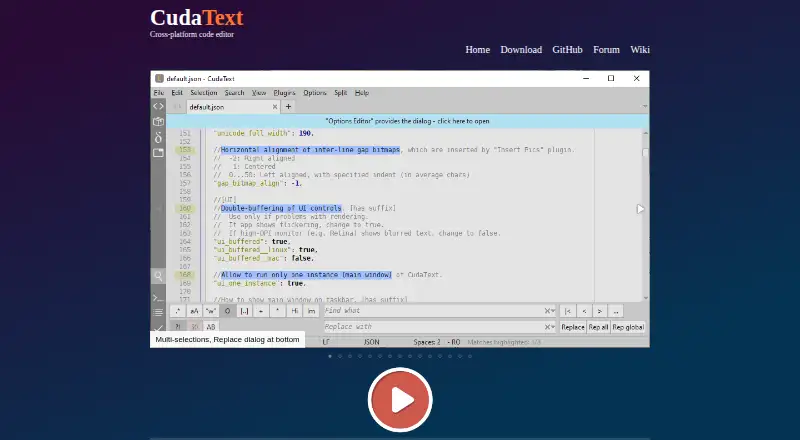
What CudaText is
CudaText is a free, open-source text editor written in Object Pascal, with builds for Windows, Linux, and macOS. It provides syntax highlighting for more than 300 languages, along with code folding, multiple carets and selections, regular-expression find and replace, and customizable hotkeys. A code tree can display functions and classes when the lexer supports them, while a fuzzy-matching command palette helps locate commands. Its binary and hex viewer supports files of unlimited size; the site says it can show 10 GB logs. HTML and CSS features include smart auto-completion, HTML tag completion through the Snippets plugin, and in-editor image display. Python add-ons can provide plugins, linters, code tree parsers, and external tools. Listed plugin options include LSP support, project and session managers, an FTP panel, spell checking, and formatters. Configuration files use JSON and can contain lexer-specific settings. The project uses the MPL-2.0 license and may be used for business. Linux Qt5 and Qt6 builds require libqt5pas or libqt6pas; Python is not included in Linux and Unix builds and must be installed separately on macOS to use plugins.
Who it suits
CudaText suits developers and advanced users who want a free editor with syntax highlighting, multi-cursor editing, and extension options. It may also suit people working with large files or using multiple desktop operating systems.
What it does well
- Syntax highlighting for more than 300 languages
- Binary and hex viewer supports unlimited file sizes
- Free to use for business
- Python add-ons can provide plugins and tools
What to know first
- Linux Qt builds require libqt5pas or libqt6pas
- Python is not included in Linux and Unix builds
- macOS users must install Python separately for plugins
Plans
| Plan | Billed and limits | Price |
|---|---|---|
| CudaText | Free of charge · May be used for business · Open source | Free |
As cudatext.github.io lists them, read 8 Oct 2026. The maker's own page has the final word.
Getting started
- Visit the CudaText website.
- Choose a build for Windows, Linux, or macOS.
- Install libqt5pas or libqt6pas if using the Linux Qt5 or Qt6 build.
- Install Python separately on Linux or Unix, or on macOS if you want to use plugins.
- Use the editor's JSON configuration files to set options, including lexer-specific settings.
Verdict
CudaText offers a wide set of editing and plugin options at no charge. Check the stated platform requirements if you plan to use Linux Qt builds or Python plugins.
Questions
How much does CudaText cost?
CudaText is free of charge, and its plan is listed as free. The free plan may be used for business.
Which operating systems does it support?
Builds are listed for Windows, Linux, macOS, FreeBSD, OpenBSD, NetBSD, DragonFlyBSD, Solaris, and Haiku.
Is CudaText open source?
Yes. The project identifies its license as MPL-2.0.
Does CudaText support extensions?
Yes. Python add-ons can provide plugins, linters, code tree parsers, and external tools. Listed plugin features include LSP protocol support and formatters.
What does the Linux build require?
The Linux Qt5 and Qt6 builds require libqt5pas or libqt6pas. Python is not included in Linux and Unix builds.
Can I use plugins on macOS?
Yes. Python must be installed separately on macOS to use plugins.
Facts from CudaText's own pages
- Configuration
- Configuration files use JSON format and can include lexer-specific settings. · cudatext.github.io, 8 Oct 2026
- Downloads
- The download page lists builds for Windows, Linux, and macOS, as well as FreeBSD, OpenBSD, NetBSD, DragonFlyBSD, Solaris, and Haiku. · cudatext.github.io, 8 Oct 2026
- Editing
- Features include code folding, multiple carets and selections, regular-expression find and replace, and customizable hotkeys. · cudatext.github.io, 8 Oct 2026
- Extensions
- Python add-ons can provide plugins, linters, code tree parsers, and external tools. · cudatext.github.io, 8 Oct 2026
- Extension support
- Yes · cudatext.github.io, 22 Sept 2026
- Free plan
- Yes · cudatext.github.io, 22 Sept 2026
- HTML and CSS
- HTML and CSS features include smart auto-completion, HTML tag completion through the Snippets plugin, and in-editor image display. · cudatext.github.io, 8 Oct 2026
- Intended users
- SourceForge lists its intended audience as advanced end users, developers, and desktop end users. · sourceforge.net, 8 Oct 2026
- Languages
- It provides syntax highlighting for more than 300 languages. · cudatext.github.io, 8 Oct 2026
- Large-file handling
- Yes · cudatext.github.io, 22 Sept 2026
- Large files
- Its binary and hex viewer supports files of unlimited size, and the site says it can show 10 GB logs. · cudatext.github.io, 8 Oct 2026
- License
- The project's GitHub repository identifies its license as MPL-2.0. · github.com, 8 Oct 2026
- Multi-cursor editing
- Yes · cudatext.github.io, 22 Sept 2026
- Navigation
- It includes a code tree for functions and classes when the lexer supports it, plus a fuzzy-matching command palette. · cudatext.github.io, 8 Oct 2026
- Platform requirement
- The download page says the Linux Qt5/Qt6 build requires libqt5pas or libqt6pas. · cudatext.github.io, 8 Oct 2026
- Plugin features
- Listed plugin features include LSP protocol support, project and session managers, FTP panel, spell checker, and formatters. · cudatext.github.io, 8 Oct 2026
- Plugin requirement
- The download page says Python is not included in Linux/Unix builds and must be installed separately on macOS to use plugins. · cudatext.github.io, 8 Oct 2026
- Product
- CudaText is a cross-platform text editor written in Object Pascal. · cudatext.github.io, 8 Oct 2026
- Supported platforms
- Windows,Linux,macOS · cudatext.github.io, 22 Sept 2026
Where CudaText stands on Freedom251
- Editor Software#5 of 32
- Text Editors#18 of 82
- Code editors#11 of 45