
Fresh
What Fresh is
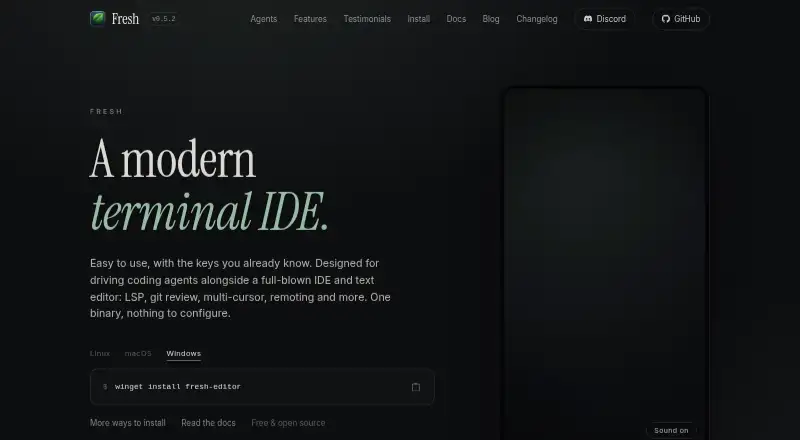
Fresh is a free, open-source terminal IDE and text editor for developers who want coding tools alongside a full IDE. Its Orchestrator creates a separate Git worktree, tabs, terminals, and agent for each task. It can run terminal agents such as Claude Code, Codex, and OpenCode, or a command you supply. Workspaces can run locally, over SSH, in Kubernetes, or in a dev container. For code review, Fresh supports staging, unstaging, or discarding individual Git hunks, side-by-side diffs, and notes exportable to Markdown. Editing tools include multi-cursor support, keyboard macros, Vim mode, regex search and replace, and project-wide search. It supports multiple language servers per language, with listed configurations for Python, TypeScript, Rust, Go, Java, C/C++, and Ruby, among others. Fresh also includes an integrated terminal and says it can open multi-gigabyte files without blocking the interface. Plugins are written in TypeScript and run sandboxed inside its single binary. It is available for Linux, macOS, and Windows.
Who it suits
Fresh suits developers who want IDE-style editing, Git review, and coding-agent workflows in a terminal environment. Its local and remote workspace options may suit teams working across different development setups.
What it does well
- Free and open source under GPL-3.0-or-later
- Creates a separate Git worktree for each task
- Runs terminal agents or a user-supplied command
- Supports local, SSH, Kubernetes, and dev-container workspaces
- Includes hunk-level Git review and Markdown-exportable notes
What to know first
- Anonymous telemetry is enabled unless disabled
- No paid tiers or usage limits are stated
Plans
| Plan | Billed and limits | Price |
|---|---|---|
| Free and open source | No paid tiers or usage limits stated · GPL-3.0-or-later | Free |
As getfresh.dev lists them, read 2 Oct 2026. The maker's own page has the final word.
Getting started
- Visit https://getfresh.dev/.
- Choose the build for Linux, macOS, or Windows.
- Start Fresh and create a task workspace with its own Git worktree, tabs, terminals, and agent.
- Run Claude Code, Codex, OpenCode, or a command you supply.
- For remote work, use a workspace over SSH, in Kubernetes, or in a dev container.
Fresh is a terminal-based editor and IDE companion for developers who want coding agents and Git work woven into their workflow. It is especially suited to people juggling parallel tasks or remote workspaces. Its main appeal is combining task orchestration with detailed Git review; it is a weaker fit if you want a conventional desktop IDE.
Overview
Fresh is designed to work alongside a full IDE, rather than necessarily replace one. Its Orchestrator gives each task a separate Git worktree, tab, terminal, and agent. That separation can help developers manage parallel work without mixing changes, particularly when coding agents are part of the process. Developers who mainly need a straightforward editor may find less value in the orchestration model.
Workspaces can run locally, over SSH, in Kubernetes, or in a dev container. That breadth makes Fresh relevant to developers moving between local and remote environments, while keeping the interface and workflow terminal-oriented.
Key features
Agents and Git review
Fresh can run Claude Code, Codex, OpenCode, or a command you supply. This choice is useful for developers who already have a preferred terminal agent and want to keep it within a per-task workspace. Git review tools include hunk-level staging, unstaging, and discarding, side-by-side diffs, and review notes that can be exported to Markdown. The granular controls are a particular strength when reviewing changes from an agent or another contributor; users who do not need agent orchestration or detailed Git review have less reason to choose Fresh.
Editing and language tools
Multi-cursor editing, keyboard macros, Vim mode, regex search and replace, and project-wide search cover a substantial range of editing needs. Fresh supports multiple language servers per language and provides configurations for Python, TypeScript, Rust, Go, Java, C/C++, and Ruby, among others. Compiler diagnostics and Rust navigation are supported, which makes it more than a terminal for launching agents. Its role as a companion to a full IDE is still important for developers who want a traditional IDE environment.
Fresh includes an integrated terminal with multiple tabs, split placement, scrollback, and keyboard capture mode. Its product page says it can open multi-gigabyte files without blocking the interface, a useful capability for developers who inspect very large files. Plugins are written in TypeScript and run sandboxed inside Fresh’s single binary, giving users an extension mechanism within that packaging model.
Privacy and support
Fresh sends anonymous telemetry containing its version, operating system and architecture, and terminal type. The maker says it does not collect personal data, file contents, or usage behavior. Upgrade checks and telemetry can both be disabled with fresh --no-upgrade-check or the check_for_updates setting. Community contact and support are available through Discord, GitHub Issues, and GitHub Discussions.
Pricing
Fresh is free and open source under GPL-3.0-or-later, priced at $0. No paid tiers or usage limits are stated, so there is no paid plan to weigh against the free edition. This is a straightforward choice for individual developers and teams comfortable with the license; the license terms may matter to organizations incorporating or distributing the software.
Platforms
Fresh supports Linux, macOS, and Windows. It also supports remote development, with workspaces able to run over SSH, in Kubernetes, or in a dev container as well as locally. Self-hosted is included among its platform categories, but the described remote-work options are the concrete deployment modes.
Who it's for
Fresh is best for developers who prefer terminal-centered work and want IDE-style editing, Git review, and coding agents in the same environment. It is particularly relevant to people coordinating separate tasks or working across local and remote environments. Developers who want a conventional desktop IDE as their primary workspace, or who do not need its agent and Git workflow, may be better served by a more conventional editor or IDE.
Pros and cons
- Pros: Per-task Git worktrees, terminals, tabs, and agents provide a clear structure for parallel coding work.
- Pros: Hunk-level Git controls, side-by-side diffs, and Markdown review-note export support detailed review without leaving the editor.
- Pros: Local, SSH, Kubernetes, and dev-container workspaces suit developers working across varied environments.
- Pros: It is free and open source, with no paid tiers or usage limits stated.
- Cons: Its terminal-first design is not the natural fit for developers seeking a conventional desktop IDE.
- Cons: Anonymous telemetry is enabled as described by the maker, although upgrade checks and telemetry can be disabled.
- Cons: The GPL-3.0-or-later license may not fit every organization's software distribution requirements.
Alternatives
Choose Zed if you want a free code editor with external-agent or API-key support and a plan that includes 2,000 accepted edit predictions. Qt Creator is an alternative if you want a free open-source version and are prepared to account for the Qt framework's LGPL/GPL obligations. CodeLite is a free GPLv2 IDE, with a plugin exception allowing separately developed plugins to use any license.
RustRover offers a free non-commercial plan for eligible uses such as learning, self-education, qualifying open-source contributions, content creation, and hobby development. Kate is a free text editor for Linux, Windows, and macOS. Lapce is a free open-source code editor. GNOME Builder is a free Linux option for x86_64 and aarch64. Huly Code is free to use.
For more options, browse Rust IDEs or Text Editors.
Verdict
Choose Fresh if you want a free, open-source terminal IDE companion that organizes agent-driven tasks into separate Git workspaces and gives you fine-grained review tools. Its remote workspace support and editor capabilities make it a strong fit for terminal-oriented development. Look elsewhere if a conventional desktop IDE is central to how you work, or if the GPL license and telemetry policy do not suit your requirements.
Verdict
Fresh brings editing, Git review, terminal agents, and remote workspaces into a terminal-oriented environment. It is free and supports Linux, macOS, and Windows, with telemetry and upgrade checks configurable.
Questions
How much does Fresh cost?
Fresh is free and open source. The listed plan is free, under GPL-3.0-or-later.
Which platforms does Fresh support?
Fresh supports Linux, macOS, and Windows. Workspaces can run locally, over SSH, in Kubernetes, or in a dev container.
Which coding agents can Fresh run?
It can run Claude Code, Codex, OpenCode, or a command supplied by the user.
Does Fresh collect telemetry?
Fresh sends anonymous telemetry with its version, operating system and architecture, and terminal type. The maker says it does not collect personal data, file contents, or usage behavior; upgrade checks and telemetry can be disabled with `fresh --no-upgrade-check` or the `check_for_updates` setting.
Where can I get help with Fresh?
The site links to Discord, GitHub Issues, and GitHub Discussions for community contact and support.
Facts from Fresh's own pages
- Agent support
- Fresh can run terminal coding agents including Claude Code, Codex, and OpenCode, or a user-supplied command. · getfresh.dev, 2 Oct 2026
- Audience
- The maker describes Fresh as suited to developers who want IDE-style features while working in a terminal. · getfresh.dev, 2 Oct 2026
- Editing
- Features include multi-cursor editing, keyboard macros, Vim mode, regex search and replace, and project-wide search. · getfresh.dev, 2 Oct 2026
- Git review
- The editor provides hunk-level staging, unstaging and discarding, side-by-side diffs, and review notes exportable to Markdown. · getfresh.dev, 2 Oct 2026
- Git workspaces
- Its Orchestrator gives each task its own Git worktree, tabs, terminals, and agent. · getfresh.dev, 2 Oct 2026
- Language support
- Fresh supports multiple language servers per language and lists configurations for Python, TypeScript, Rust, Go, Java, C/C++, and Ruby, among others. · getfresh.dev, 2 Oct 2026
- Large files
- The product page says Fresh can open multi-gigabyte files without blocking the interface. · getfresh.dev, 2 Oct 2026
- Plugins
- Plugins are written in TypeScript and run sandboxed inside Fresh’s single binary. · getfresh.dev, 2 Oct 2026
- Privacy
- Fresh sends anonymous telemetry consisting of its version, operating system and architecture, and terminal type; the maker says it collects no personal data, file contents, or usage behavior. · getfresh.dev, 2 Oct 2026
- Product
- Fresh is a modern terminal IDE and text editor designed to work alongside a full IDE and to drive coding agents. · getfresh.dev, 2 Oct 2026
- Remote work
- Workspaces can run locally, over SSH, in Kubernetes, or in a dev container. · getfresh.dev, 2 Oct 2026
- Support
- The site links to Discord, GitHub Issues, and GitHub Discussions for community contact and support. · getfresh.dev, 2 Oct 2026
- Telemetry controls
- Upgrade checks and telemetry can both be disabled with `fresh --no-upgrade-check` or the `check_for_updates` setting. · getfresh.dev, 2 Oct 2026
- Terminal
- Fresh includes an integrated terminal with multiple terminal tabs, split placement, scrollback, and keyboard capture mode. · getfresh.dev, 2 Oct 2026
Where Fresh stands on Freedom251
- Text Editors#17 of 82
- Rust IDEs#3 of 13