
Zed
by Zed
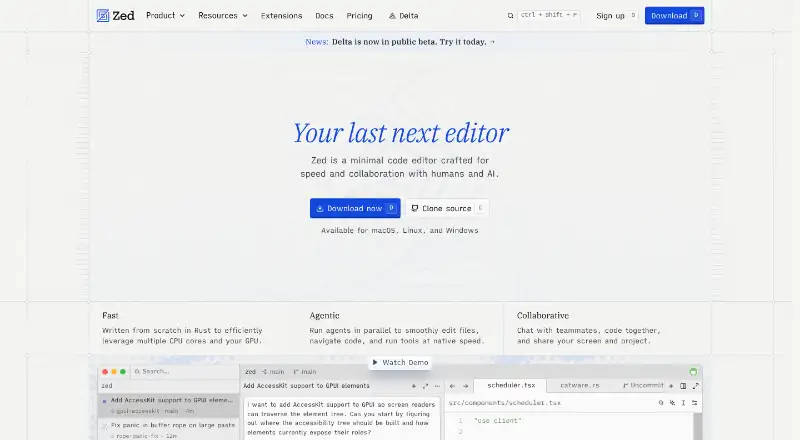
What Zed is
Zed is a code editor for Linux, macOS, and Windows, with tools for editing, debugging, remote development, and working with Git. It supports extensions, multi-cursor and column editing, macro recording, and language servers. Its Git features include staging, committing, pulling, pushing, and viewing diffs. Users can chat with teammates, code together, and share screens and projects. Zed supports providers including Amazon Bedrock, Anthropic, GitHub Copilot, Google AI, and OpenAI; its extension ecosystem has hundreds of extensions for language support, themes, and more. The Personal plan is free forever and includes 2,000 accepted edit predictions, with unlimited use through API keys or external agents. Pro costs $10.00 per month and includes unlimited edit predictions and $5 of tokens; additional usage is billed at API list price plus 10%. Its 14-day Pro trial requires no credit card. Business costs $30.00 per month, with order forms available at 25 or more seats. SSO, SAML, and SCIM are planned but not currently available.
Who it suits
Zed suits developers looking for an editor with Git, debugging, remote development, and extension support. Its collaboration features and Business organization controls may suit teams.
What it does well
- Free Personal plan with 2,000 accepted edit predictions
- Supports Linux, macOS, and Windows
- Built-in debugger and remote development
- Git tools include staging, commits, and diffs
- Team chat, coding, and screen sharing
What to know first
- Personal plan limits accepted edit predictions to 2,000
- Pro usage beyond $5 is billed separately
- SSO, SAML, and SCIM are not currently available
Limits
Personal includes 2,000 accepted edit predictions. Pro includes $5 of tokens; usage beyond that amount is billed at API list price plus 10%, and its trial ends after 14 days or when its $5 balance is used.
Plans
| Plan | Billed and limits | Price |
|---|---|---|
| Personal | Free forever · 2,000 accepted edit predictions | Free |
| Pro | billed monthly · $5 of tokens included | $10 a month |
| Business | Order forms available at 25+ seats · 25+ seats for order forms | $30 a month |
| Pro Free Trial | 14 days or until the $5 balance is used | Free |
As zed.dev lists them, read 28 Sept 2026. The maker's own page has the final word.
Getting started
- Visit zed.dev.
- Choose Personal, Pro, or Business.
- For Pro, start the 14-day trial, which requires no credit card.
- Use Zed on macOS, Windows, or Linux.
Overview
Zed is a minimal code editor for developers who want editing, Git, debugging, remote development, and AI tools in one workspace. It is best suited to people who value an integrated editor and flexible AI connections; the main trade-off is that Personal limits accepted edit predictions, while Pro token use can exceed its included allowance.
Multi-cursor and column editing, macro recording, and language server support give Zed a substantial editing foundation. Its native Git operations and built-in debugger reduce the need to leave the editor for routine development work, while remote development extends its usefulness beyond local projects.
The extensions ecosystem has hundreds of options for language support, themes, and more. AI providers include Amazon Bedrock, Anthropic, GitHub Copilot, Google AI, and OpenAI, among others, and users can also connect API keys or external agents. That breadth is valuable if you want choice in how AI is supplied, but it does not make hosted AI costs predictable beyond the included token balance.
For collaboration, users can chat with teammates, code together, and share screens and projects. Zed’s team describes 15 years of work on tools including Atom, Electron, and Tree-sitter; the maker is based in Denver, Colorado.
Key features
- Editing and extensions: Multi-cursor editing, column editing, macro recording, language server support, and hundreds of extensions cover common customization and language needs.
- Git and debugging: Staging, committing, pulling, pushing, and viewing diffs are built in, alongside a debugger. This is a strong fit for developers who want everyday source control and debugging close to editing.
- AI options: Hosted providers, API keys, and external agents offer flexibility. The distinction between unlimited Personal use with your own API keys or external agents and metered hosted-token use is important when budgeting.
- Team collaboration: Chat, shared coding, screen sharing, and project sharing support team work. Business adds organization controls, governance, billing visibility, and role-based access.
- Business administration: Admins can restrict hosted models, disable edit predictions, and lock data-sharing settings. SSO, SAML, and SCIM are planned, not currently available, so organizations requiring those identity features now should look elsewhere.
Pricing
- Personal — free, Free forever: The free editor plan includes 2,000 accepted edit predictions. Personal AI use is unlimited with API keys or external agents, making this the sensible starting point if you can use those routes or do not need more predictions.
- Pro — $10 a month, billed monthly: Includes unlimited edit predictions and $5 of tokens. Usage beyond the included $5 is billed at API list price plus 10%, so the monthly price is a base rather than a cap for hosted-token use.
- Pro Free Trial — free: Runs for 14 days or until its $5 balance is used, with unlimited accepted edit predictions and $5 of GPT-5.6 Luna usage. No credit card is required. The balance-based cutoff means the trial may end before 14 days if used up.
- Business — $30 a month: Includes organization controls, governance, billing visibility, and role-based access controls. There is no minimum seat count and it is available to organizations of any size; order forms are available at 25+ seats. Choose it for administrative controls, not for SSO, SAML, or SCIM, which are not currently available.
Platforms
Zed supports macOS, Windows, and Linux. It also supports remote development, giving it a place in workflows that are not limited to local development.
Who it's for
Zed is a good fit for developers seeking an editor that combines serious editing tools with Git, debugging, extensions, remote development, and collaboration. It particularly suits individuals who can stay within Personal’s prediction allowance or bring their own API keys, and teams that value shared coding and Business administration.
It is less suitable for users who need a fixed ceiling on hosted AI spending, or organizations that require SSO, SAML, or SCIM today. Personal’s 2,000 accepted edit predictions may also be restrictive for developers who depend heavily on predictions but do not want Pro’s token overage exposure.
Pros and cons
- Pro: Native Git operations, a built-in debugger, and remote development sit alongside a broad editing and extension feature set.
- Pro: AI provider choice plus API-key and external-agent support lets users choose how to connect AI rather than relying on one route.
- Pro: The trial requires no credit card and includes unlimited accepted edit predictions.
- Con: Personal caps accepted edit predictions at 2,000, while Pro charges API list price plus 10% beyond its $5 token inclusion.
- Con: Business lacks SSO, SAML, and SCIM at present, which can be a decisive gap for organizations with identity requirements.
Alternatives
For broader browsing, compare Code editors and Text Editors; developers focused on collaboration can browse Pair Programming Software. Language-focused directories include Rust IDEs, PHP IDEs, and Go IDEs.
- Qt Creator is worth considering if you want a freemium option with a free plan and trial; its open-source edition comes with LGPL/GPL obligations for Qt framework use.
- CodeLite is a free GPLv2 IDE for readers who prefer a free option across Linux, macOS, and Windows.
- Fresh is a free, open-source choice for readers who want no paid tiers or usage limits stated.
- Kate is a free text editor for Linux, Windows, and macOS if an editor rather than Zed’s wider development and collaboration feature set is the priority.
- Lapce is a free open-source code editor for readers looking for that alternative.
- RustRover is another freemium option with a free non-commercial plan for qualifying uses.
- Huly Code is free to use.
- Eclipse Corrosion is a free option for Linux, macOS, and Windows.
Verdict
Choose Zed if you want a capable code editor that keeps Git, debugging, remote development, extensions, AI choices, and team collaboration together. Personal makes it easy to start, and Pro removes the prediction cap, but its token overage terms deserve attention. Look elsewhere if your organization needs SSO, SAML, or SCIM now, or if you need hosted AI costs to stay within a fixed monthly ceiling.
Verdict
Zed combines code editing with Git tools, debugging, remote development, extensions, and team collaboration. Check the Personal prediction limit and Pro token overage billing against your needs.
Questions
Is Zed free?
Yes. Personal costs nothing and is free forever.
What does Personal include?
It includes 2,000 accepted edit predictions and unlimited use with API keys or external agents.
How much does Pro cost?
Pro costs $10 a month. It includes unlimited edit predictions and $5 of tokens; additional usage is billed at API list price plus 10%.
Which platforms does Zed support?
Zed is available for macOS, Windows, and Linux.
Does Zed have a free trial?
The Pro trial lasts 14 days or until its $5 balance is used. No credit card is required.
Does Business include SSO?
SSO, SAML, and SCIM are planned but are not currently available. Business includes organization controls, governance, billing visibility, and role-based access controls.
Facts from Zed's own pages
- Business admin controls
- Admins can restrict hosted models, disable edit predictions, and lock data-sharing settings. · zed.dev, 28 Sept 2026
- Identity features
- SSO, SAML, and SCIM are planned but not currently available. · zed.dev, 28 Sept 2026
- Business seat policy
- Business has no minimum seat count and is available to organizations of any size. · zed.dev, 28 Sept 2026
- Collaboration features
- Users can chat with teammates, code together, and share screens and projects. · zed.dev, 28 Sept 2026
- Column editing
- Yes · zed.dev, 22 Sept 2026
- Company experience
- The team describes 15 years of work on tools including Atom, Electron, and Tree-sitter. · zed.dev, 28 Sept 2026
- Extension ecosystem
- The extensions ecosystem has hundreds of extensions for language support, themes, and more. · zed.dev, 28 Sept 2026
- Extension support
- Yes · zed.dev, 22 Sept 2026
- Free plan
- Yes · zed.dev, 22 Sept 2026
- Free plan limits
- Personal includes 2,000 accepted edit predictions. · zed.dev, 28 Sept 2026
- Headquarters
- Denver, Colorado, United States · zed.dev, 23 Sept 2026
- LLM providers
- Supported providers include Amazon Bedrock, Anthropic, GitHub Copilot, Google AI, OpenAI, and others. · zed.dev, 28 Sept 2026
- Macro recording
- Yes · zed.dev, 22 Sept 2026
- Multi-cursor editing
- Yes · zed.dev, 22 Sept 2026
- Native Git support
- Zed supports staging, committing, pulling, pushing, viewing diffs, and other Git operations. · zed.dev, 28 Sept 2026
- Personal AI usage
- Personal allows unlimited use with API keys or external agents. · zed.dev, 28 Sept 2026
- Personal price
- The Personal plan costs $0 forever. · zed.dev, 28 Sept 2026
- Pro overage billing
- Usage beyond the included $5 is billed at API list price plus 10%. · zed.dev, 28 Sept 2026
- Paid from
- 10 · zed.dev, 22 Sept 2026
- Supported platforms
- Zed is available for macOS, Linux, and Windows. · zed.dev, 28 Sept 2026
- Support resources
- The site lists FAQ, Community Support, Discussions, and status resources. · zed.dev, 28 Sept 2026
- Trial card requirement
- No credit card is required for the Pro trial. · zed.dev, 28 Sept 2026
- Trial duration
- The Pro trial lasts 14 days or until its $5 balance is used. · zed.dev, 28 Sept 2026
Where Zed stands on Freedom251
- Text Editors#10 of 82
- Code editors#6 of 45
- Front End Tools#13 of 28
- PHP IDEs#12 of 23
- Pair Programming Software#16 of 26
- Agentic Ides#13 of 21
- Editor Software#24 of 32
- AI Code Generators#41 of 54
- Coding Tool#19 of 25
- Developer Tools#26 of 33
- AI Code Editors#21 of 26
- Go IDEs#20 of 24
- Rust IDEs#11 of 13
- AI Code Generation Software#23 of 27