Vim
by Vim
What Vim is
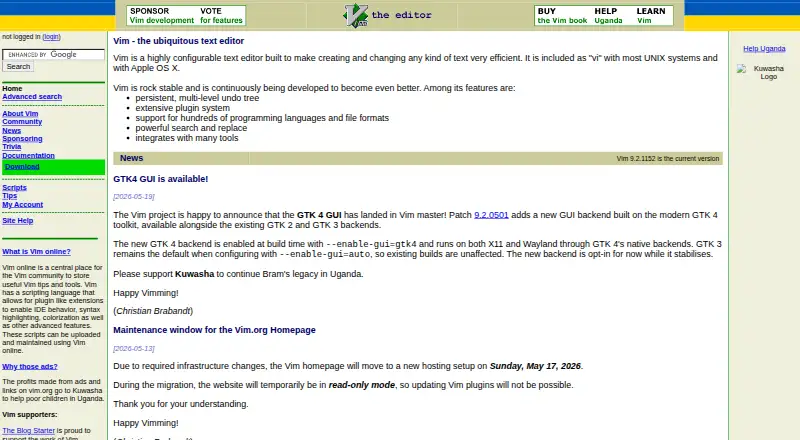
Vim is a configurable text editor for creating and changing text, with uses that include programming, email composition, and editing configuration files. It supports hundreds of programming languages and file formats, with search and replace, column editing, macro recording, and a persistent, multi-level undo tree. An extensive plugin system and scripting language support plugin-like extensions, and Vim integrates with many tools. It runs on Linux, macOS, and Windows. The software is distributed freely under a GPL-compatible license as charityware; users who find it useful are asked to consider donating to help children in Uganda through Kuwasha. Windows downloads include installers and zip packages for x64, x86, and ARM, plus links to Winget packages. For macOS, the download page links to MacVim for a graphical version and Homebrew for a terminal version. Vim recommends source installation on Unix and links a daily-built AppImage for many Linux systems. The maker says Vim takes learning and is not a WYSIWYG word processor for typeset documents.
Who it suits
Vim suits people who want a text editor for programming, email, or configuration files and are willing to learn its use. It is not designed for WYSIWYG typeset-document editing.
What it does well
- Free distribution under a GPL-compatible license
- Supports hundreds of languages and file formats
- Includes persistent, multi-level undo
- Runs on Linux, macOS, and Windows
- Offers plugins and a scripting language
What to know first
- Takes learning to use
- Not a WYSIWYG word processor for typeset documents
Limits
Vim is free, with donations requested to support Kuwasha. The maker says it takes learning and is not a WYSIWYG word processor for typeset documents.
Plans
| Plan | Billed and limits | Price |
|---|---|---|
| Vim | Distributed freely · Donations requested to support Kuwasha charity | Free |
As vim.org lists them, read 7 Oct 2026. The maker's own page has the final word.
Getting started
- Visit the Vim website.
- For Windows, choose an installer or zip package for x64, x86, or ARM, or follow the Winget link.
- For macOS, use the linked MacVim option for a graphical version or Homebrew for a terminal version.
- For Unix, obtain Vim from source; the download page also links to a daily-built AppImage for many Linux systems.
- Use the community mailing lists for user help, development discussion, Mac-specific discussion, or announcements.
Vim is a highly configurable editor for code, email, and configuration files. It suits experienced users and teams prepared to learn a keyboard-centered workflow and tailor it with extensions. Choose it for durable, precise text manipulation across major desktop platforms; choose another tool if you need visual document layout or a gentle first session.
Overview
Vim has been developed since 1991 as an editor focused on efficient text creation and modification. It runs on Linux, macOS, and Windows, so projects can keep a consistent editor across mixed desktop environments. Its charityware model makes the software free under a GPL-compatible license, while users who find it useful are encouraged to donate to support children in Uganda through Kuwasha.
This is an editor rather than a conventional word processor. Vim’s own guidance makes the learning requirement explicit, and its workflow is not aimed at WYSIWYG typeset documents. That trade-off favors programmers, administrators, and other users who work directly with text; it is a poor match for print-oriented writing that depends on immediate visual page layout.
Key features
- Configurable workflow: Extensive configuration lets users shape commands and behavior around personal or team practices. Column editing and macro recording are valuable for structured or repetitive changes, but they pay off only after learning Vim’s operating model.
- Persistent undo: A multi-level undo tree preserves editing history, allowing users to move back through changes instead of treating the last undo as the only safety net. That is particularly useful during risky refactoring or configuration edits.
- Search and replacement: Powerful search and replace supports broad, precise changes across text. It is a practical advantage for source code and large configuration files where manual selection would be slow or error-prone.
- Plugins and scripting: An extensive plugin system, together with a scripting language for plugin-like extensions, gives Vim unusual room for customization. Users can build a specialized environment, although maintaining that setup adds its own learning and administration work.
- Language coverage: Support for hundreds of programming languages and file formats keeps the editor useful across varied repositories and text projects rather than limiting it to one ecosystem.
- Tool integration: Vim integrates with many tools, helping it fit into established development and command-line workflows instead of forcing a separate process.
- Community support: Mailing lists cover user help, development discussion, Mac-specific topics, and announcements. That gives learners and maintainers several channels for guidance, though the community format is less immediate than a graphical help system.
Pricing
| Plan | Price | What it includes |
|---|---|---|
| Vim | free | Distributed freely; donations requested to support Kuwasha charity. |
There is no paid tier or trial period to manage, and no seat or usage quota is attached to the free plan. The zero price makes Vim practical for individual users, classrooms, and teams standardizing on an editor without procurement costs. Donations are optional support for the charityware project, not a condition of use.
Platforms
Vim supports Linux, macOS, and Windows. Windows downloads include installers and zip packages for x64, x86, and ARM, plus Winget package links. On macOS, users can choose MacVim for a graphical version or Homebrew for a terminal installation. Unix users are directed toward building from source, while a daily-built AppImage is offered for many Linux systems. This breadth is useful for mixed-platform teams, although installation paths differ by operating system and may require more technical involvement than a single app-store package.
A security issue that could have enabled account takeover was reviewed, patched, and validated as fixed in November 2025. Organizations with formal security processes can treat that resolution as part of their deployment assessment.
Who it's for
Vim is a strong choice for programmers, system administrators, and advanced text users who want deep control, repeatable edits, broad format coverage, and an extensible environment. It also suits teams that value the same editor on Linux, macOS, and Windows. New users should expect a meaningful learning period, and writers producing visually typeset documents should choose a word processor instead.
Pros and cons
Pros
- Free across platforms: No purchase, subscription, seat charge, or trial expiry stands between users and deployment.
- Deep editing control: Macros, column editing, powerful search and replace, and a persistent undo tree support precise, repeatable work.
- Highly extensible: Plugins and scripting can turn the editor into a specialized environment.
- Broad file support: Hundreds of languages and formats cover diverse development and configuration tasks.
Cons
- Steep learning requirement: Users must learn Vim’s editing approach before its productivity features become useful.
- No WYSIWYG typesetting: It is unsuitable for conventional page-layout writing and visually formatted documents.
- Setup varies by platform: Source builds, AppImage, MacVim, Homebrew, installers, and packages demand different installation choices.
Alternatives
Visual Studio Code is a free option for Linux, macOS, Windows, and the web when a graphical, cross-platform code editor is preferable.
Neovim is another free Vim-derived choice, including Android and self-hosted platforms, for users who want that broader deployment model.
Kate is a free Linux, Windows, and macOS text editor for readers seeking a conventional cross-platform alternative.
Zed suits users who want a free personal plan with 2,000 accepted edit predictions and external-agent or API-key support.
Notepad++ is a free Windows-only editor for text and source code, with support for several programming and natural languages.
BBEdit is a macOS alternative with a permanent free mode and a separate paid license.
EmEditor is a Windows freemium option with a Professional monthly subscription at $6 a month, licensed per computer.
jEdit is free software with full source code under GPL 2.0 for Linux, macOS, and Windows.
Browse more options in Text Editors, Code editors, or Go IDEs.
Verdict
Choose Vim if you want a free, extensible editor with serious control over code and other plain-text work, and you are willing to learn its methods. Its main reason to choose it is the combination of deep editing primitives, durable undo, and broad platform and format support. Look elsewhere if you need immediate visual document formatting or a shorter path to productivity.
Verdict
Vim offers extensive editing and extension capabilities across Linux, macOS, and Windows, with no listed charge. Its learning requirement and lack of WYSIWYG typesetting make it less suited to users seeking a conventional word processor.
Questions
How much does Vim cost?
The Vim plan is free. Donations are requested to support Kuwasha.
Is there a free plan or trial?
Vim is distributed freely. There is no free trial.
Which platforms does Vim support?
Vim runs on Linux, macOS, and Windows.
Is Vim open source?
It is distributed under a GPL-compatible license.
Who makes Vim?
The maker is Vim, founded in 1991.
Does Vim support extensions?
Yes. It has an extensive plugin system and a scripting language for plugin-like extensions.
Facts from Vim's own pages
- Column editing
- Yes · github.com, 22 Sept 2026
- Editing features
- The maker lists powerful search and replace among Vim's features. · vim.org, 7 Oct 2026
- Extensions
- Vim has an extensive plugin system and a scripting language that allows plugin-like extensions. · vim.org, 7 Oct 2026
- Extension support
- Yes · github.com, 22 Sept 2026
- Founded
- 1991 · vim.org, 28 Sept 2026
- Free plan
- Yes · github.com, 22 Sept 2026
- Integrations
- The maker says Vim integrates with many tools. · vim.org, 7 Oct 2026
- Languages and formats
- Vim supports hundreds of programming languages and file formats. · vim.org, 7 Oct 2026
- Learning curve
- The maker says Vim is a tool users must learn and that it is not a word processor designed for WYSIWYG typeset-document editing. · vim.org, 7 Oct 2026
- License and donations
- Vim is charityware, is distributed freely under a GPL-compatible license, and asks users who find it useful to consider donating to help children in Uganda through Kuwasha. · vim.org, 7 Oct 2026
- Linux and Unix downloads
- The download page recommends obtaining Vim from source on Unix and links to a daily-built AppImage for many Linux systems. · vim.org, 7 Oct 2026
- macOS downloads
- The download page links to MacVim for a GUI version and Homebrew for a terminal version. · vim.org, 7 Oct 2026
- Macro recording
- Yes · github.com, 22 Sept 2026
- Product
- Vim is a highly configurable text editor built to make creating and changing text efficient. · vim.org, 7 Oct 2026
- Security
- The security page says an issue that could have caused account takeover was reviewed, patched, and validated as fixed in November 2025. · vim.org, 7 Oct 2026
- Support
- The Vim community page lists mailing lists for user help, development discussion, Mac-specific discussion, and announcements. · vim.org, 7 Oct 2026
- Supported platforms
- Windows,macOS,Linux · github.com, 22 Sept 2026
- Undo
- Vim includes a persistent, multi-level undo tree. · vim.org, 7 Oct 2026
- Use cases
- The maker describes Vim as useful for programming, composing email, and editing configuration files. · vim.org, 7 Oct 2026
- Windows downloads
- The download page lists Windows installers and zip packages for x64, x86, and ARM, and links to Winget packages. · vim.org, 7 Oct 2026
Where Vim stands on Freedom251
- Text Editors#9 of 82
- Code editors#8 of 45
- Editor Software#22 of 32
- Go IDEs#18 of 24