
CodeLite
What CodeLite is
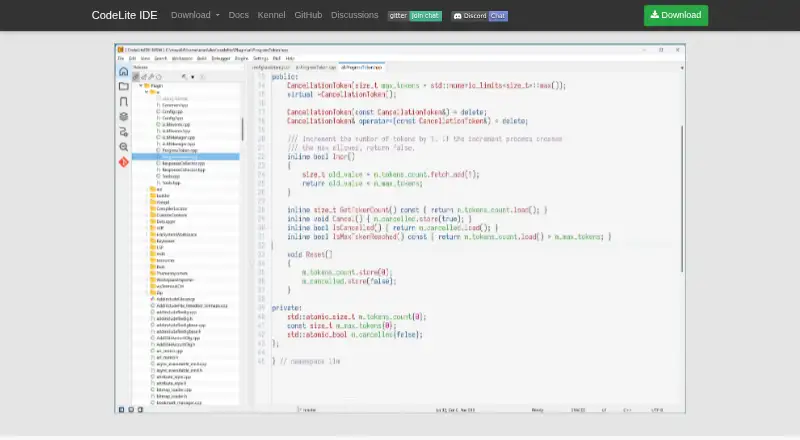
CodeLite is a free, open-source IDE for C, C++, Rust, PHP, and Node.js; project materials also describe a focus on Python. It runs on Linux, macOS, and Windows. Its listed tools include smart code completion, code navigation, a built-in debugger, Git integration, and a plugin system. Configured language servers can add completion, go-to-definition, and reference-finding features. The Git plugin covers repository work such as cloning, staging, commits, pushes, pulls, branches, diffs, and history. PHP tooling includes XDebug debugging, syntax checks, project management, refactoring, and SFTP synchronization. For remote development, the Remoty plugin supports completion, formatting, search, builds, execution, debugging, Git, and project management. Clickable references from Claude Code and Kiro CLI can open classes, functions, and files in the editor. CodeLite uses GPLv2, with an exception allowing third-party plugins to use other licenses. Git must be installed separately to use the Git plugin.
Who it suits
CodeLite suits developers working in its listed languages who want a free IDE with debugging, Git, and plugin options. Its remote and PHP tools may also suit developers with those specific workflows.
What it does well
- Free IDE distributed under GPLv2.
- Runs on Linux, macOS, and Windows.
- Built-in debugger and smart code completion.
- Remoty supports remote debugging and project management.
- PHP tools include XDebug and SFTP synchronization.
What to know first
- Git must be installed separately.
- Some language-server features require configured language servers.
Plans
| Plan | Billed and limits | Price |
|---|---|---|
| Free | GPLv2 IDE; plugin exception allows separately developed plugins to use any license | Free |
As codelite.org lists them, read 4 Oct 2026. The maker's own page has the final word.
Getting started
- Open https://codelite.org/.
- Choose a linked installer or download for your platform, or follow the source build instructions.
- Install Git separately if you plan to use the Git plugin.
- Configure language servers to use their completion and navigation features.
CodeLite is a free, open-source IDE for developers working across C, C++, Rust, PHP and Node.js, with project materials also focused on Python. It is a practical fit for people who want editing, building and debugging in one cross-platform environment, provided they are comfortable configuring plugins and language servers.
Overview
CodeLite brings smart completion and code navigation together with project management, build and testing tools, and an integrated debugger. That breadth makes it more suitable for substantial development work than a basic editor, while its GPLv2 license keeps the IDE open source. A stated exception lets third-party plugins use other licenses, which gives plugin authors flexibility without changing the core license.
The main trade-off is that some capabilities depend on plugins or external setup. The Git plugin, for example, requires a separate Git installation, and language-server features rely on configured servers. CodeLite suits developers willing to assemble their workflow; those seeking a ready-to-go experience for a particular language should check the relevant plugin and server requirements first.
Key features
Editing and debugging
Smart completion, navigation, an integrated debugger, and build and testing tools put core development tasks in one environment. This is a useful combination for developers who want to manage and debug projects without relying on a separate editor for those functions.
Git and language servers
The Git plugin covers cloning, staging, commits, pushes, pulls, branches, diffs and commit history. Its reach is substantial, but the separate Git installation is an extra setup step. The Language Server Protocol plugin can provide completion, go-to-definition and find-all-references through configured language servers, making it adaptable but dependent on the server setup for a given language.
Remote work, PHP and AI references
Remoty supports remote completion, formatting, search, building, execution, debugging, Git and project management, extending CodeLite to remote workflows. PHP users get completion, XDebug debugging, syntax checking, project management, refactoring and SFTP synchronization. The site also describes clickable references to classes, functions and files from Claude Code and Kiro CLI that open those locations in the editor.
Pricing
CodeLite is free: its Free plan costs nothing. The GPLv2 IDE and the plugin licensing exception make it an option for individual developers and teams seeking an open-source tool without a subscription. There are no paid tiers to compare.
Platforms
CodeLite supports Linux, macOS and Windows. Downloads include installers for Windows 10 and 11, Ubuntu 24 and macOS, alongside FreeBSD downloads and source-build instructions. Documentation, tutorials, an API reference and platform-specific build guides support users who need to configure or build the IDE themselves.
Who it's for
Choose CodeLite if you want a free IDE with integrated building, testing and debugging, and work in its supported language areas. It is particularly relevant to PHP developers who want the documented XDebug, refactoring and SFTP tools, and to users who value remote development through Remoty. Developers who prefer not to install Git separately or configure language servers may find the setup less convenient.
Pros and cons
- Pros: Free and open source, with no paid tier required to use its IDE.
- Pros: Build, testing and debugging tools accompany completion and navigation in one environment.
- Pros: Git, PHP and remote-development plugins provide concrete workflow features, including history and diffs, XDebug and SFTP, and remote execution and debugging.
- Cons: The Git plugin depends on a separately installed Git client.
- Cons: Language-server features require configured servers, adding setup work before they are useful.
Alternatives
For a Rust-focused IDE, compare Rust IDEs; for C++ options, see C++ IDEs, and for PHP options, PHP IDEs. Broader comparisons are available in IDE Software and Integrated Development Environments.
Qt Creator is worth considering if you want a freemium IDE with a free open-source version and support across mobile, desktop and web platforms; Qt framework use carries LGPL/GPL obligations. Choose Zed instead if a free editor plan with 2,000 accepted edit predictions and external-agent or API-key support better matches your needs.
Fresh is another free, open-source option, with no paid tiers or usage limits stated. Kate, Lapce, RustRover, GNOME Builder and Huly Code are also alternatives to compare.
Verdict
CodeLite is a strong choice for developers who want a free, cross-platform IDE with integrated build, test and debug tools plus extensible Git, PHP and remote workflows. Its main drawback is the setup required by external Git and configured language servers; look elsewhere if you want those dependencies handled without extra configuration.
Verdict
CodeLite combines a broad set of language and workflow tools in a free, cross-platform IDE. Check the separate Git requirement and configure language servers where needed.
Questions
Is CodeLite free?
Yes. The Free plan costs nothing, and CodeLite is distributed under GPLv2.
Which operating systems does CodeLite support?
CodeLite runs on Linux, macOS, and Windows. The site links installers for Windows 10 and 11, Ubuntu 24, and macOS, along with FreeBSD downloads.
Which programming languages does it support?
The product description names C, C++, Rust, PHP, and Node.js. Project materials also describe a focus on Python development.
Is CodeLite open source?
Yes. CodeLite is distributed under GPLv2. An exception allows separately developed third-party plugins to use any license.
Does the Git plugin require a separate installation?
Yes. Git must be installed separately to use the Git plugin.
What development tools does CodeLite include?
Listed tools include smart code completion, code navigation, a built-in debugger, Git integration, and a plugin system. Configured language servers can add completion, go-to-definition, and reference searches.
Facts from CodeLite's own pages
- AI tools
- The site says Claude Code and Kiro CLI references to classes, functions, and files can be clicked to open them in the editor. · codelite.org, 4 Oct 2026
- Core features
- The site lists smart code completion, code navigation, a built-in debugger, Git integration, and a plugin system. · codelite.org, 4 Oct 2026
- Downloads
- The site links installers for Windows 10 and 11, Ubuntu 24, and macOS, plus FreeBSD downloads and source build instructions. · codelite.org, 4 Oct 2026
- Git features
- The Git plugin documentation lists cloning, staging, commits, pushes, pulls, branches, diffs, and commit history. · docs.codelite.org, 4 Oct 2026
- Languages
- The project repository also describes CodeLite as focused on Python development. · github.com, 4 Oct 2026
- Language servers
- The Language Server Protocol plugin supports features such as auto-completion, go-to-definition, and find-all-references through configured language servers. · docs.codelite.org, 4 Oct 2026
- License
- CodeLite is distributed under GPLv2, with an exception allowing third-party plugins to remain closed source and use any license. · codelite.org, 4 Oct 2026
- Limit
- The Git plugin requires Git to be installed separately. · docs.codelite.org, 4 Oct 2026
- PHP features
- The PHP plugin documentation lists completion, XDebug debugging, syntax checking, project management, refactoring, and SFTP synchronization. · docs.codelite.org, 4 Oct 2026
- Product
- CodeLite is a free, open-source, cross-platform IDE for C, C++, Rust, PHP, and Node.js. · codelite.org, 4 Oct 2026
- Remote development
- The Remoty plugin supports remote code completion, formatting, search, building, execution, debugging, Git, and project management. · docs.codelite.org, 4 Oct 2026
- Security
- The official homepage and repository pages reviewed do not state security certifications or compliance claims. · codelite.org, 4 Oct 2026
- Support resources
- The repository links to CodeLite documentation, tutorials, an API reference, and platform-specific source build guides. · github.com, 4 Oct 2026
Where CodeLite stands on Freedom251
- Rust IDEs#2 of 13
- PHP IDEs#4 of 23
- IDE Software#10 of 53
- Integrated Development Environments#14 of 65
- C++ IDEs#7 of 24