Freedom251 › JavaScript Package Managers

Bun
What Bun is
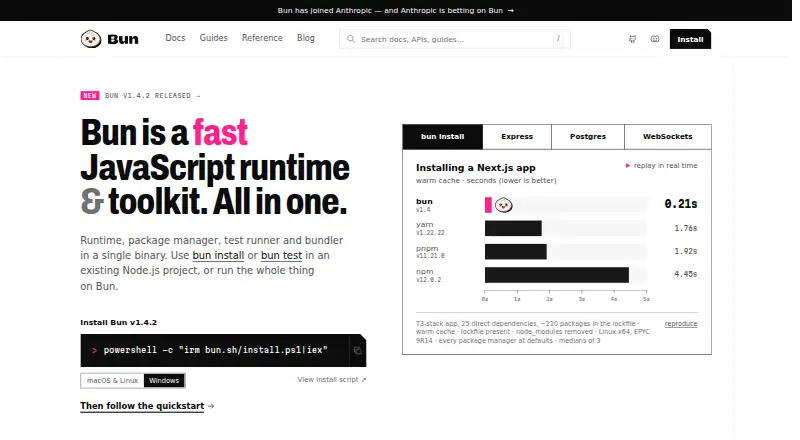
Bun combines a JavaScript and TypeScript runtime, package manager, test runner, and bundler in one binary. Its runtime uses JavaScriptCore and supports Node.js APIs and node_modules. The npm-compatible package manager supports workspaces, catalogs, overrides, patches, and a readable lockfile, as well as private registry authentication and offline installation. The test runner includes Jest-compatible expectations, mocks, snapshots, DOM testing, and coverage. Bun’s bundler handles TypeScript, JSX, CSS, and HTML for browsers and servers, and includes a development server with hot module reloading and single-file executables. Built-in APIs cover PostgreSQL, MySQL, SQLite, Redis, S3-compatible storage, HTTP, and WebSockets. The site names Next.js, Remix, Nuxt, Astro, SvelteKit, Hono, and Elysia as frameworks that run on Bun. It also lists APIs for password hashing, CSRF tokens, and OS keychain secrets. Bun is free, open-source, and MIT-licensed, with installation options including an official script, npm, Homebrew, Windows package managers, and Docker.
Who it suits
It suits developers looking for a single toolkit for JavaScript and TypeScript runtime, package management, testing, and bundling. Bun supports macOS, Linux, and Windows, subject to minimum system requirements.
What it does well
- Runtime supports Node.js APIs and node_modules.
- Package manager supports offline installation.
- Test runner includes coverage and snapshots.
- Bundler handles TypeScript, JSX, CSS, and HTML.
- Free and MIT-licensed.
What to know first
- Requires macOS 13.0 or later.
- Windows support requires version 1809 or later.
- x64 CPUs need SSE4.2 support.
Plans
| Plan | Billed and limits | Price |
|---|---|---|
| Bun | Open-source JavaScript runtime and toolkit · MIT-licensed | Free |
As bun.sh lists them, read 7 Oct 2026. The maker's own page has the final word.
Getting started
- Visit the Bun website.
- Choose an installation route: the official script, npm, Homebrew, a Windows package manager or Docker.
- Use a supported Linux, macOS or Windows system with an x64 CPU that supports SSE4.2.
- Use Bun’s package manager with supported package sources such as npm packages, Git repositories, tarballs or file dependencies.
Bun is a JavaScript and TypeScript runtime that also bundles package management, testing and bundling into one toolkit. It suits developers who want those jobs together and work on compatible macOS, Linux or Windows systems. Its breadth is compelling, but older operating systems and CPUs without SSE4.2 support rule it out.
Overview
Bun brings a runtime, package manager, test runner and bundler into a single binary. That consolidation can simplify a JavaScript development setup: the package manager handles dependency resolution, lockfiles and workspaces, while the test runner and bundler cover common build and verification tasks. The trade-off is that choosing Bun means adopting a broad toolkit rather than a package manager alone.
The runtime executes JavaScript and TypeScript on JavaScriptCore and supports Node.js APIs and node_modules. Bun also names Next.js, Remix, Nuxt, Astro, SvelteKit, Hono and Elysia among the frameworks that run on it. That gives developers a substantial set of familiar options, though framework compatibility alone does not establish that every project will work without changes.
Key features
Runtime and package management
Bun’s npm-compatible package manager supports workspaces, catalogs, overrides and patches, with a readable lockfile. It accepts npm packages, Git and GitHub repositories, tarballs, file dependencies and npm aliases; private registry authentication and offline installation are also supported. Together, those capabilities make Bun relevant to projects with more than simple public-registry dependencies, including workspace-based codebases.
Testing and bundling
The test runner includes Jest-compatible expectations, mocks, snapshots, DOM testing and coverage. Teams using those testing patterns can keep testing within the same toolkit as their runtime and package manager. The bundler handles TypeScript, JSX, CSS and HTML for browsers and servers; its development server offers hot module reloading, and it can produce single-file executables. That is a notably wide remit, although developers seeking only one of these functions may prefer a more focused tool.
Built-in APIs
Bun includes APIs for PostgreSQL, MySQL, SQLite, Redis, S3-compatible storage, HTTP and WebSockets. Its listed security APIs include Argon2 and bcrypt password hashing, CSRF tokens and OS keychain secrets storage. These integrations give applications access to useful building blocks in the Bun environment, without requiring a separate tool for each one.
Pricing
Bun is free and open source under the MIT license. The Bun plan costs free and includes the open-source JavaScript runtime and toolkit. There is no paid tier or usage cap to weigh against a cheaper plan in the pricing presented here.
Platforms
Bun supports macOS, Linux and Windows, but compatibility depends on the machine: it requires macOS 13.0 or later, Windows 10 version 1809 or later, and an x64 CPU with SSE4.2 support. Those processor and operating-system requirements are a practical exclusion for older hardware or systems that fall below the stated minimums. Installation options include an official script, npm, Homebrew, Windows package managers and Docker.
Who it's for
Bun is a strong fit for JavaScript and TypeScript developers who value one toolkit for runtime execution, dependencies, tests and bundling, especially those using workspaces or the supported frameworks. Its range of package sources and private registry authentication also suit projects with varied dependency needs. It is a poor fit when the target machine misses Bun’s minimum requirements or when a project specifically needs a narrower tool rather than a combined environment.
Pros and cons
- Pros: One binary covers runtime, package management, testing and bundling, reducing the number of separate development tools to assemble.
- Pros: Workspaces, private registry authentication, offline installation and multiple dependency sources support more involved project setups.
- Pros: The test runner and bundler include capabilities such as coverage, DOM testing, hot module reloading and single-file executables.
- Cons: The x64 and SSE4.2 requirement, alongside minimum OS versions, excludes some machines despite support for all three major desktop operating systems.
- Cons: Developers who need only package management or another single function may not benefit from adopting a toolkit that combines four roles.
Alternatives
For a focused comparison of tools in this category, see the JavaScript Package Managers, Monorepo Management Tools and Package Managers directories.
- JSPM is a free, open-source option for import-map package management; choose it when that specific approach matters more than Bun’s combined runtime and toolkit.
- npm offers a free plan for public package authors with unlimited public packages and public registry access. Choose it when publishing or using public packages is the priority.
- Pantry is another freemium option for Linux, macOS and Windows; choose it if its package-management offering better matches your needs.
- Rush is a free, open-source JavaScript monorepo manager installable via npm. Choose it when monorepo management, rather than a full JavaScript toolkit, is the central need.
- Textadept is a free, MIT-licensed open-source text editor; consider it if you are looking for an editor rather than a JavaScript runtime and toolkit.
- Yarn is a free, open-source package manager. Choose it when a package manager alone is the objective.
- Bower is a free command-line utility; consider it as another option if that is what you need.
- Deno Sandbox offers an API- and web-based freemium sandbox with a free tier of 1M requests per month and 10 hours of active CPU. Choose it when a hosted sandbox is a better fit than Bun’s local runtime and toolkit.
Verdict
Choose Bun if you want a free, MIT-licensed environment that combines JavaScript and TypeScript runtime support with package management, testing and bundling. Its strongest case is the breadth of that toolkit, including workspace support and useful built-in integrations. Look elsewhere if your hardware misses its requirements or you need a more specialized tool instead.
Verdict
Bun brings several JavaScript development tools together in one free, MIT-licensed binary. Check its operating system and processor requirements before choosing it.
Questions
How much does Bun cost?
The Bun plan is free. Bun is open source and MIT-licensed.
Which operating systems does Bun support?
Bun supports Linux, macOS and Windows. It requires macOS 13.0 or later, Windows 10 version 1809 or later, and an x64 CPU with SSE4.2 support.
What does Bun include?
It combines a JavaScript and TypeScript runtime, package manager, test runner and bundler in one binary.
How can I install Bun?
Installation options include an official script, npm, Homebrew, Windows package managers and Docker.
Is Bun open source?
Yes. Bun is MIT-licensed and developed publicly on GitHub.
Where can I get support?
Bun directs users to its Discord for support and discussion.
Facts from Bun's own pages
- Built-in integrations
- Bun includes APIs for PostgreSQL, MySQL, SQLite, Redis, S3-compatible storage, HTTP, and WebSockets. · bun.sh, 7 Oct 2026
- Bundling
- Bun’s bundler handles TypeScript, JSX, CSS, and HTML for browsers and servers, and supports a dev server with hot module reloading and single-file executables. · bun.sh, 7 Oct 2026
- Company
- Bun says it has joined Anthropic, which is investing in Bun as infrastructure for Claude Code, Claude Agent SDK, and future AI coding products. · bun.sh, 7 Oct 2026
- Dependency resolution
- Yes · bun.sh, 21 Sept 2026
- Framework compatibility
- The site names Next.js, Remix, Nuxt, Astro, SvelteKit, Hono, and Elysia as frameworks that run on Bun. · bun.sh, 7 Oct 2026
- Install options
- The install page offers installation through an official script, npm, Homebrew, Windows package managers, and Docker. · bun.sh, 7 Oct 2026
- Lockfile support
- Yes · bun.sh, 21 Sept 2026
- Offline installation
- Yes · bun.sh, 21 Sept 2026
- Open source
- Bun says it remains open-source and MIT-licensed and continues to be developed in public on GitHub. · bun.sh, 7 Oct 2026
- Package formats
- npm packages,Git repositories,GitHub repositories,tarballs,file dependencies,npm aliases · bun.sh, 21 Sept 2026
- Package manager
- Bun’s npm-compatible package manager supports workspaces, catalogs, overrides, patches, and a readable lockfile. · bun.sh, 7 Oct 2026
- Platform limits
- Bun requires macOS 13.0 or later, Windows 10 version 1809 or later, and x64 CPUs with SSE4.2 support. · bun.sh, 7 Oct 2026
- Private registry auth
- Yes · bun.sh, 21 Sept 2026
- Runtime
- Bun runs JavaScript and TypeScript on JavaScriptCore and supports Node.js APIs and node_modules. · bun.sh, 7 Oct 2026
- Security features
- Bun lists password hashing with Argon2 and bcrypt, CSRF tokens, and OS keychain secrets storage among its built-in APIs. · bun.sh, 7 Oct 2026
- Support
- Bun directs users to its Discord for support and discussion. · bun.sh, 7 Oct 2026
- Supported platforms
- macOS,Linux,Windows · bun.sh, 21 Sept 2026
- Testing
- Bun’s test runner offers Jest-compatible expectations, mocks, snapshots, DOM testing, and coverage. · bun.sh, 7 Oct 2026
- What it does
- Bun combines a JavaScript runtime, package manager, test runner, and bundler in a single binary. · bun.sh, 7 Oct 2026
- Workspace support
- Yes · bun.sh, 21 Sept 2026
Where Bun stands on Freedom251
- JavaScript Package Managers#2 of 19
- Package Managers#18 of 93
- Monorepo Management Tools#12 of 33