Freedom251 › JavaScript Package Managers
Pantry
What Pantry is
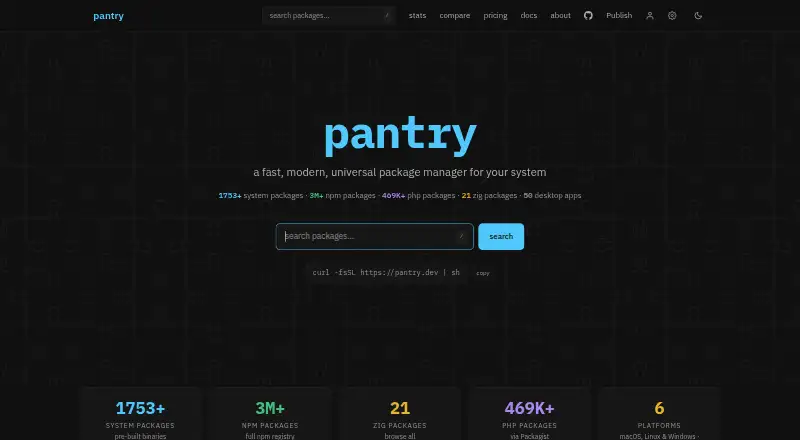
Pantry is a package manager for system-level binaries and JavaScript/TypeScript packages on macOS, Linux, and Windows, with ARM64 and x86_64 support. Its listed catalog includes 1,753+ system packages, 3M+ npm packages, 469K+ PHP packages, 21 Zig packages, and 50 desktop apps. The CLI is installed with a shell command, and the maker says it has no runtime dependencies. System packages are pre-built and distributed as tarballs through a CDN-backed registry.
For JavaScript projects, Pantry works as an npm client with access to the full npm registry, including workspaces and monorepos. It also supports lockfiles, global installation, offline package caching, and package publishing. The Free plan includes public packages, 50MB of artifacts, one seat, standard builds and downloads, 30 days of full analytics, and a point-in-time audit. Pro costs $9.00 per month; Team costs $29.00 per month and includes 10 seats. Both paid plans include build insurance, continuous CVE and licence alerts, and SBOM export. Pantry is built and maintained by the Stacks.js team.
Who it suits
Pantry suits developers managing system binaries or JavaScript/TypeScript packages across supported operating systems. Pro and Team may suit users who need private packages or the listed security and SBOM features.
What it does well
- Supports macOS, Linux, and Windows on ARM64 and x86_64.
- Works with npm workspaces and monorepos.
- Supports lockfiles and offline package caching.
- Pro and Team include build insurance and SBOM export.
- Team plan includes 10 seats.
What to know first
- Free plan limits artifacts to 50MB.
- Free plan provides only 30 days of full analytics.
- Package sales have plan-dependent fees, plus a stated site-sale fee.
Limits
The Free plan allows public packages, 50MB of artifacts, and one seat. Full analytics are available for 30 days, and the plan includes a point-in-time audit with no SBOM export.
Plans
| Plan | Billed and limits | Price |
|---|---|---|
| Free | Public packages · 30 days of full analytics · 50MB artifacts · Standard build queue · 1 seat · Standard downloads · Point-in-time audit · No SBOM export | Free |
| Team | $29/mo · Private and unlisted packages · Lifetime full analytics · 1024MB artifacts · Priority builds · 10 seats · Build insurance · Continuous CVE and licence alerts · SBOM export | $29 a month |
| Pro | $9/mo · Private and unlisted packages · Lifetime full analytics · 250MB artifacts · Priority builds · 1 seat · Build insurance · Continuous CVE and licence alerts · SBOM export | $9 a month |
As pantry.dev lists them, read 30 Sept 2026. The maker's own page has the final word.
Getting started
- Open the Pantry website.
- Install the CLI using the shell command provided by Pantry.
- Use Pantry with a supported macOS, Linux, or Windows system.
- Choose Free, Pro, or Team based on package visibility, artifact storage, seats, and included features.
Overview
Pantry is a package manager for developers who want system binaries and JavaScript or TypeScript packages under one CLI. It is most compelling for npm users who also need system packages or package-publishing controls; the free plan is a capable starting point, but its small artifact allowance and limited analytics make it less suitable for sustained publishing.
Key features
Pantry’s catalog spans 1,753+ system packages, 3M+ npm packages, 469K+ PHP packages, 21 Zig packages and 50 desktop apps. System packages are pre-built and delivered as tarballs through a CDN-backed registry, which avoids making users manage those builds themselves. The CLI installs with a shell command and has no runtime dependencies. Pantry supports macOS, Linux and Windows on ARM64 and x86_64.
For JavaScript and TypeScript projects, Pantry is a drop-in npm client with access to the full npm registry. Workspaces and monorepos, lockfiles, global installation and an offline package cache cover common project and installation needs. Package publishing is supported too, though sellers should account for a fee on each sale.
Pro and Team add build insurance, continuous CVE and licence alerts, and CycloneDX or SPDX SBOM export. Pantry describes build insurance as mirroring resolved build artifacts and checking them against the lockfile integrity hash. Those safeguards are relevant to teams monitoring dependencies and reproducibility; Free has only a point-in-time audit and no SBOM export.
Pricing
Free — free. Public packages, 30 days of full analytics, 50MB of artifacts, a standard build queue, one seat, standard downloads and a point-in-time audit make this a sensible way to start or publish public packages at modest scale. The trade-offs are meaningful for regular publishers: private and unlisted packages are excluded, analytics are time-limited, and the artifact cap is the smallest of the plans.
Pro — $9 a month, billed $9/mo. Pro adds private and unlisted packages, lifetime full analytics, 250MB of artifacts, priority builds, build insurance, continuous CVE and licence alerts, and SBOM export. It retains one seat, so it suits an individual publisher who needs private distribution or ongoing security features, not a shared team workspace.
Team — $29 a month, billed $29/mo. Team includes the same private-package and security features as Pro, raises the artifact allowance to 1024MB and provides 10 seats. Paid package purchases cover the whole team. This is the more fitting paid plan for a group sharing package workflows, though its higher price is difficult to justify for a solo user who does not need the extra capacity.
Pantry charges 10% per sale on Free and 5% per sale on Pro or Team, with an additional stated 3% for sales that start on the site. That fee matters to anyone treating publishing as a revenue channel. No free-trial term is stated for the paid plans.
Platforms
Pantry supports Linux, macOS and Windows, including ARM64 and x86_64 systems. That cross-platform support makes it relevant to mixed development environments, rather than only to a single desktop operating system.
Who it's for
Choose Pantry if you want npm-compatible workflows alongside system-level binaries, or if publishing packages and managing their security are part of your work. Free fits public-package use with a small artifact footprint; Pro fits an individual who needs private packages and continuous oversight; Team is for up to 10 seats and larger artifact needs. Look elsewhere if your work does not benefit from Pantry’s system-package catalog or if the stated artifact caps do not fit your publishing needs.
Pros and cons
- Pros: Combines system packages with full npm-registry access, workspaces and monorepos, so JavaScript teams can use one manager across those needs.
- Pros: Pre-built system-package tarballs, a CLI with no runtime dependencies, and an offline cache support practical installation across supported systems.
- Pros: Pro and Team provide build insurance, ongoing CVE and licence alerts, and SBOM export rather than limiting security work to a point-in-time audit.
- Cons: Free is limited to public packages, 50MB of artifacts and 30 days of full analytics, constraining private or sustained publishing.
- Cons: Pro remains a one-seat plan; teams needing shared seats must pay for Team.
- Cons: Sales incur a percentage fee, including an additional stated 3% for sales originating on the site.
Alternatives
For other options in the same broad category, see JavaScript Package Managers. Choose JSPM instead if you want its free open-source import-map package-management tools and free jspm.io CDN services. Bun is a free, open-source JavaScript runtime and toolkit, a better fit if that is what you need rather than Pantry’s combined package-manager focus. npm is worth considering for public package publishing and registry access on its free plan. Rush is a free JavaScript monorepo manager if monorepo management is your primary need. Textadept is a free, open-source text editor, not a like-for-like package manager. Yarn and Bower are free package-management alternatives with no paid plans or usage limits stated. Deno Sandbox offers a free plan for sandbox requests and active CPU time, so consider it when sandbox execution is the need.
Verdict
Pantry is a strong fit for developers who want npm-compatible workflows and system binaries in one manager, especially package publishers who value private packages and ongoing supply-chain safeguards. Its free plan is useful for public, modest-scale use, but the 50MB artifact cap and one-seat paid Pro tier are real constraints. Choose Team for shared use and higher capacity; look elsewhere if you need a different primary tool or the sales fees and plan limits outweigh the convenience of Pantry’s combined workflow.
Verdict
Pantry combines system package management with npm-compatible workflows and package publishing. Compare the Free plan's artifact and analytics limits with the paid plans' added features and seat counts.
Questions
Is Pantry free?
Yes. The Free plan costs nothing and includes public packages, 50MB of artifacts, and one seat.
What do Pantry's paid plans cost?
Pro is $9.00 per month. Team is $29.00 per month.
Which systems does Pantry support?
Pantry supports macOS, Linux, and Windows on ARM64 and x86_64.
Does Pantry work with npm workspaces and monorepos?
Yes. It acts as a drop-in npm client with access to the full npm registry and supports workspaces and monorepos.
What security features do Pro and Team include?
Both plans include build insurance, continuous CVE and licence alerts, and SBOM export in CycloneDX or SPDX formats.
Who makes Pantry?
Pantry is built and maintained by the Stacks.js team.
Facts from Pantry's own pages
- Build insurance
- Pantry says it mirrors resolved build artifacts and verifies them against the lockfile integrity hash. · pantry.dev, 30 Sept 2026
- Community and support
- The maker links to GitHub contributions, a Discord community, and Bluesky updates. · pantry.dev, 30 Sept 2026
- Installation
- The CLI is installed with a shell command and the maker says it has no runtime dependencies. · pantry.dev, 30 Sept 2026
- Maker
- Pantry is built and maintained by the Stacks.js team. · pantry.dev, 30 Sept 2026
- npm compatibility
- Pantry acts as a drop-in npm client with access to the full npm registry and support for workspaces and monorepos. · pantry.dev, 30 Sept 2026
- Package catalog
- The site lists 1,753+ system packages, 3M+ npm packages, 469K+ PHP packages, 21 Zig packages, and 50 desktop apps. · pantry.dev, 30 Sept 2026
- Package delivery
- System packages are pre-built and distributed as tarballs through a CDN-backed registry. · pantry.dev, 30 Sept 2026
- Product
- Pantry is a package manager for system-level binaries and JavaScript/TypeScript packages. · pantry.dev, 30 Sept 2026
- Selling fees
- Selling a package costs 10% per sale on Free and 5% per sale on Pro or Team, with a stated additional 3% for sales that start on the site. · pantry.dev, 30 Sept 2026
- Supported systems
- Pantry supports macOS, Linux, and Windows on ARM64 and x86_64. · pantry.dev, 30 Sept 2026
- Team limit
- The Team plan includes 10 seats, and paid package purchases cover the whole team. · pantry.dev, 30 Sept 2026
- Team security features
- Pro and Team plans include build insurance, continuous CVE and licence alerts, and CycloneDX or SPDX SBOM export. · pantry.dev, 30 Sept 2026
Where Pantry stands on Freedom251
- JavaScript Package Managers#8 of 19