Freedom251 › AI Personal Assistants
Tana
What Tana is
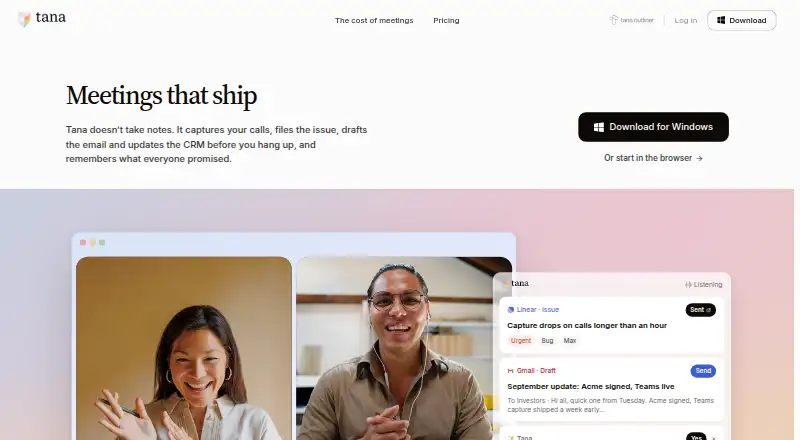
Tana is a meeting platform that uses AI agents to propose work during video calls. It can prepare issues, follow-up emails, CRM updates, and decision records for a person to accept, edit, or dismiss. Tana says it captures calls locally, without adding a bot participant to Zoom, Teams, or Google Meet. Integrations listed include Google Calendar, Outlook, GitHub, Linear, Jira, Slack, HubSpot, Pipedrive, Claude, Cursor, Codex, GitHub Copilot, Lovable, and MCP. Its MCP server and API let tools and agents read and write a workspace, with proposals subject to review. A free plan allows five meetings per month, one calendar, and 50 AI queries; paid plans start at $30/user/mo, and a 30-day trial is listed. Tana is available on web and desktop for Mac, Windows, and Linux, but no mobile apps are listed. The company says it has completed a SOC 2 Type 2 examination and is GDPR compliant, with HIPAA in progress. Users can retain access to and export their data after cancelling or downgrading.
Who it suits
Tana may suit product and technology teams, consultants, investors, creatives, founders, customer success teams, and sales teams that want meeting actions proposed for human review. Its integrations and workspace API may also suit teams connecting meeting work with other tools.
What it does well
- Proposed meeting actions require human review.
- Captures calls locally without a meeting bot.
- Integrates with calendars, issue trackers, and CRMs.
- Desktop apps support Mac, Windows, and Linux.
- Users can export data after cancelling.
What to know first
- Free plan limits use to five meetings monthly.
- No mobile apps are listed.
- Pro starts at $30/user/mo.
- HIPAA compliance is in progress.
Plans
| Plan | Billed and limits | Price |
|---|---|---|
| Free | 5 meetings/month · 1 calendar · 50 AI queries | Free |
| Pro | per user/month · early bird · 20× more AI than Free · unlimited hosted meetings · botless Zoom, Teams, and Google Meet agent · integrations and full MCP | $2,030 a month |
| Max | per user/month · early bird · 5× more AI than Pro · dedicated support and onboarding · unlimited agents, skills, and types · integration support | $80,120 a month |
| Business | yearly · SAML SSO · advanced security and controls · audit logs · custom DPA and data residency/retention policy control | On request |
As tana.inc lists them, read 4 Oct 2026. The maker's own page has the final word.
Tana turns live meetings into proposed follow-up work through AI agents. It is best for product, technology, revenue, and advisory teams that need meeting outcomes connected to calendars, project systems, and CRMs, with a person checking every change. Its botless capture and reviewable automation are compelling, but the free quotas and lack of mobile apps limit its reach.
Overview
Tana’s agents work during native video calls, proposing actions such as filing an issue, drafting a follow-up email, updating a CRM, or recording a decision. Each proposal can be accepted, edited, or dismissed before it is applied. That safeguard suits consequential work, although teams wanting completely automatic execution will have an extra approval step.
Calls are captured locally from the computer, so no bot joins Zoom, Teams, or Google Meet as a visible participant. Tana offers web access and desktop applications for Mac, Windows, and Linux. Mobile apps are not offered, making it less suitable for people who regularly manage meetings away from a computer.
Key features
Reviewable meeting actions
The product goes beyond transcription-style capture by connecting discussion to issues, email, CRM records, and decision logs. Human approval keeps an agent from silently changing a system, which is valuable for customer, sales, and product operations. The trade-off is that someone must process the proposals.
Integrations and developer access
Connections include Google Calendar, Outlook, GitHub, Linear, Jira, Slack, HubSpot, Pipedrive, Claude, Cursor, Codex, GitHub Copilot, Lovable, and MCP. Tana’s MCP server and API allow tools and agents to read and write a workspace, while using the same proposal-and-review pattern as its built-in AI. This breadth is most useful when a team already depends on several of these services.
Security and data control
Tana says it has completed a SOC 2 Type 2 examination and is GDPR compliant, with HIPAA in progress. Its privacy policy says user content is not used to train, improve, or develop AI models unless users receive advance notice and an opportunity to opt out. Data remains accessible after cancellation or downgrade, and users can export it to other systems.
Pricing
Tana uses a freemium model with a 30-day trial. Free costs nothing and permits five meetings per month, one calendar, and 50 AI queries. That is enough to evaluate the workflow, but the meeting and query caps make regular team use difficult.
Pro costs $2,030 per user/month on the early-bird rate. It adds 20 times more AI than Free, unlimited hosted meetings, a botless Zoom, Teams, and Google Meet agent, integrations, and full MCP. It fits individuals or small teams that need sustained meeting volume and connected systems.
Max costs $80,120 per user/month on the early-bird rate. It provides five times more AI than Pro, dedicated support and onboarding, unlimited agents, skills, and types, plus integration support. This is aimed at organizations with demanding automation needs rather than casual users.
Business has custom pricing and is billed yearly. SAML SSO, advanced security and controls, audit logs, and custom DPA and data-residency or retention policies make it the enterprise option. Paid plans give up the simplicity of Free in exchange for substantially higher usage and administration capabilities.
Platforms
Tana runs on the web and has desktop apps for Linux, macOS, and Windows. There is no mobile app, so phone-first workflows are a poor match.
Who it's for
Product and technology teams can turn decisions into tracked issues; consultants, advisors, investors, founders, creatives, customer-success groups, and sales teams can route meeting outcomes into their operational tools. It is strongest where calendars, collaboration systems, and CRMs already form a connected workflow. Solo users with occasional meetings may find Free too constrained, while mobile-dependent users should look elsewhere.
Pros and cons
Pros
- Local, botless capture avoids adding a participant to Zoom, Teams, or Google Meet.
- Every proposed issue, email, CRM update, and decision remains under human review.
- Broad integrations and MCP/API write access support connected workflows.
- SOC 2 Type 2, GDPR compliance, export, and continued data access support organizational control.
Cons
- Free is capped at five meetings, one calendar, and 50 AI queries per month.
- No mobile apps restrict use outside Mac, Windows, Linux, or the web.
- Reviewing each proposal adds an approval step for teams seeking hands-off automation.
- The early-bird Pro and Max prices are high for light or occasional meeting use.
Alternatives
Choose Dynalist for a freemium outliner with Android and iOS apps, unlimited items and documents on Free, and a 9.99 USD monthly Pro plan. Legend suits users wanting panes, plugins, and documents across mobile and desktop, with a 5.00 USD monthly Basic plan. Logseq is the better choice for free personal use across mobile and desktop, with optional 5.00 USD monthly Sync Backer access.
Workflowy offers a freemium cross-platform outliner whose Basic tier includes 100 nodes per month and 100 MB uploads. Bulletlist is a free option with no caps or locked tiers. outl is free, MIT licensed, and has no paid tier. CarbonFin Outliner fits Apple-focused users who want a 4.99 USD one-time iPhone and iPad app with an online companion. Checkvist provides freemium hierarchical lists, sharing, collaboration, and email task capture.
For broader browsing, see Outlining Software, Outliner Software, Personal Knowledge Management Software, AI Personal Assistants, and AI Note-Taking Apps.
Verdict
Tana is a strong choice for teams that want meeting conversations converted into actionable work while retaining approval over every change. Choose it for local botless capture, extensive integrations, and controlled agent automation; look elsewhere if you need mobile apps, generous free usage, or fully automatic execution without review.
Verdict
Tana combines call capture with proposed follow-up work that people can review before it is applied. Check its free-plan limits and the lack of listed mobile apps against your workflow.
Facts from Tana's own pages
- AI data use
- Tana's privacy policy says it does not use user content to train, improve, or develop AI models unless it gives advance notice and an opportunity to opt out. · tana.inc, 4 Oct 2026
- Call capture
- Tana says it captures calls locally from the user's computer, so no bot appears as a participant in Zoom, Teams, or Google Meet. · tana.inc, 4 Oct 2026
- Company location
- The company page refers to the team's Oslo office. · tana.inc, 4 Oct 2026
- Developer access
- Tana says its MCP server and API let tools and agents read and write a workspace, with proposal review matching its built-in AI. · tana.inc, 4 Oct 2026
- Export and cancellation
- Tana says users retain access to their data after downgrading or cancelling and can export it to other systems. · tana.inc, 4 Oct 2026
- Headquarters
- Palo Alto, California, United States · tana.inc, 28 Sept 2026
- Human review
- Tana says every issue, email, CRM update, and decision is proposed for a person to accept, edit, or dismiss. · tana.inc, 4 Oct 2026
- Integrations
- The integrations page lists Google Calendar, Outlook, GitHub, Linear, Jira, Slack, HubSpot, Pipedrive, Claude, Cursor, Codex, GitHub Copilot, Lovable, and MCP. · tana.inc, 4 Oct 2026
- Intended users
- The site describes use cases for product and technology teams, consultants and advisors, investors, creatives, founders, customer success, and sales. · tana.inc, 4 Oct 2026
- Meeting actions
- Tana says it can file issues, draft follow-up emails, update a CRM, and log decisions during a meeting. · tana.inc, 4 Oct 2026
- Product
- Tana describes itself as an agentic meeting platform where AI agents do work during native video calls. · tana.inc, 4 Oct 2026
- Security
- Tana says it has completed a SOC 2 Type 2 examination, is GDPR compliant, and has HIPAA in progress. · tana.inc, 4 Oct 2026
- Supported desktop systems
- The download page offers desktop apps for Mac, Windows, and Linux. · tana.inc, 4 Oct 2026
Where Tana stands on Freedom251
- AI Personal Assistants#25 of 54
- Outlining Software#11 of 22
- Outliner Software#16 of 31
- Personal Knowledge Management Software#19 of 32
- Note And Writing Apps#21 of 32
- AI Note-Taking Apps#28 of 42