Freedom251 › Outlining Software

Legend
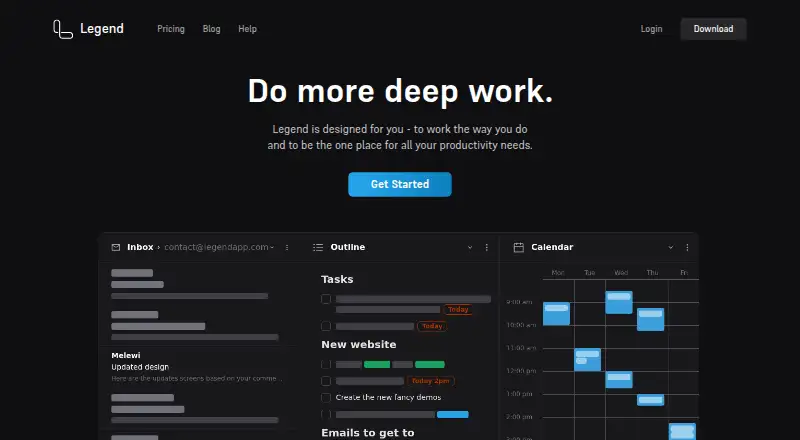
What Legend is
Legend brings documents, notes, tasks, email, files, outlines, and projects into a single productivity interface. Users arrange work in Boards with multiple Panes, then switch contexts or choose Outline, grouped, List, and Calendar views. Writing and organization tools include Markdown, formatting hotkeys, an outliner, backlinks, and mirrors that connect notes with tasks. Agenda sorts tasks by priority and date, while filters can use prefixes, content, words, or tags. Legend says it syncs in real time across devices and collaborators, works offline, and resolves changes after devices reconnect. Its privacy policy describes item data as encrypted on the client before syncing, with optional user-password and document-password encryption. Gmail, Drive, and Calendar integrations run client-side, and email or file contents are not saved on Legend servers, according to the policy. Free includes 10 Panes and one plugin sync account, with unlimited documents and items. Basic costs $5 a month billed annually. The Browser Pane is not available in the mobile app, though saved links open in a browser.
Who it suits
Legend may suit people who want notes, tasks, projects, and connected services organized in one interface. Its listed workflows include home use, sales, project management, HR, founders, and developers.
What it does well
- Offline access with reconnection sync
- Markdown, backlinks, and note-task mirrors
- Agenda sorts tasks by priority and date
- Free plan includes unlimited documents and items
- Available on web, desktop, and mobile platforms
What to know first
- Free plan includes only 10 Panes
- Free plan includes one plugin sync account
- Browser Pane is unavailable in the mobile app
- Free plan has no trial
Limits
The Free plan includes 10 Panes and one plugin sync account. Basic raises these to 20 Panes and three plugin sync accounts; Pro includes unlimited Panes and plugin sync accounts.
Plans
| Plan | Billed and limits | Price |
|---|---|---|
| Free | per month, paid annually · 10 Panes · 1 plugin sync account · Unlimited documents and items | Free |
| Lifetime | One time payment; page also shows $399 · All future features forever · Promotional Price | $299, paid once |
| Basic | per month, paid annually · 20 Panes · 3 plugin sync accounts · Notifications · Advanced filtering | $5 a month |
| Pro | per month, paid annually · Unlimited Panes · Unlimited plugin sync accounts · Board Folders · Pane naming · Advanced display settings · Agenda customization · Custom hotkeys | $9 a month |
As legendapp.com lists them, read 2 Oct 2026. The maker's own page has the final word.
Getting started
- Open https://legendapp.com/ on the web or use an app for Windows, macOS, Linux, iOS, or Android.
- Choose Free, Basic, Pro, or Lifetime.
- Create a Board and add Panes for different work areas.
- Add notes, documents, tasks, or projects, then choose a Pane view and filters.
- Connect available plugins such as Gmail, Outlook, Office 365, GitHub, Shortwave, Jira, or ChatGPT.
Legend is a cross-platform productivity workspace for people who want their notes, outlines, tasks, and project material connected. It is strongest for users who move between writing and planning; teams or individuals who need a straightforward checklist may find its multi-pane approach more than they need.
Overview
Work is arranged in Boards, which contain Panes for separate areas or contexts. Within that structure, Legend brings documents, notes, to-do lists, email, files, outlines, and projects together. The benefit is being able to keep related work in one workspace; the trade-off is a broader system to organize than a focused task manager.
For category context, see Outlining Software and Outliner Software.
Key features
Writing and connected planning
Markdown, formatting hotkeys, and an outliner support drafting and developing ideas. Backlinks and mirrors connect notes and tasks, which is useful when a task needs to stay tied to its context rather than becoming an isolated checklist item. The Agenda view sorts tasks by priority and date, giving planning a time-oriented view alongside the more open-ended outline.
Views, filters, and navigation
Panes can use Outline, grouped, List, or Calendar views, and filters can match prefixes, item contents, words, or tags. Zooming and filtering provide ways to move between broad structures and narrower slices of work. This flexibility suits users who organize projects in different ways, though it may be unnecessary for those who only want a basic list.
Sync, offline use, and integrations
Legend says it syncs in real time across devices and collaborators, works offline, and resolves changes after devices reconnect. That combination is useful for people switching devices or working without a connection. Its privacy policy says item data is encrypted on the client before syncing to Firebase, with optional user-password and document-password encryption. It also says Gmail, Drive, and Calendar integrations operate client-side and email or file contents are not saved on Legend servers.
The Browser Pane opens websites and web apps inside Legend, with plugins for Gmail, Outlook, Office 365, GitHub, Shortwave, Jira, and ChatGPT. This makes the desktop workspace more self-contained, but the maker says the Browser Pane is not technically possible in the mobile app; saved links still open in the browser.
Export and support
Legend supports export to HTML, Plain Text, Markdown, OPML, and JSON, giving users several ways to take their material elsewhere. Support is by email, while bug reports and feature requests go through the forum.
Pricing
Legend has a free plan and paid plans, with no free trial. Prices below are billed annually unless stated otherwise.
| Plan | Price | What it includes |
|---|---|---|
| Free | free | 10 Panes, 1 plugin sync account, unlimited documents and items. |
| Basic | $5 a month | 20 Panes, 3 plugin sync accounts, notifications, and advanced filtering. |
| Pro | $9 a month | Unlimited Panes and plugin sync accounts, Board Folders, Pane naming, advanced display settings, Agenda customization, and custom hotkeys. |
| Lifetime | $299, paid once | Promotional price for all future features forever; the page also shows $399. |
Free is a practical starting point for individuals who can work within 10 Panes and one plugin sync account; its unlimited documents and items leave room to build a substantial workspace. Basic raises those caps and adds notifications and advanced filtering, suiting users with more work areas or integrations. Pro removes the Pane and plugin-account ceilings and adds customization for users who want to tailor a larger setup. Lifetime is a one-time purchase rather than an annual subscription, but the promotional price and displayed $399 figure make the amount to expect less clear.
Platforms
Legend is available on web, Windows, macOS, Linux, iOS, and Android. Offline access and real-time collaboration extend the workspace across devices, while mobile users should account for the missing Browser Pane.
Who it's for
Legend describes workflows for home use and roles including sales, project management, HR, founders, and developers. Its mix of outlines, connected notes and tasks, multiple views, and integrations fits people coordinating varied work in one place. Users who want only a simple task queue, or who rely on an in-app browser on mobile, have clearer reasons to look elsewhere.
Pros and cons
- Pros: Multiple Pane views, filters, backlinks, and mirrors let users connect planning with the notes behind it.
- Pros: Offline work and real-time cross-device syncing support changing work contexts.
- Pros: The Free plan has unlimited documents and items, with export to five formats.
- Cons: Free is capped at 10 Panes and one plugin sync account, so users with larger workspaces must upgrade.
- Cons: The Browser Pane is unavailable in the mobile app.
- Cons: Lifetime pricing is shown as both $299, paid once and $399.
Alternatives
Dynalist is a freemium option with a free plan offering unlimited items and documents plus five bookmarks; consider it when those limits and a $9.99 a month Pro plan suit your needs better.
Logseq is free for personal use across Android, iOS, Linux, macOS, web, and Windows; choose it if that personal-use model is the priority.
Workflowy has a free Basic plan with all features, but caps use at 100 nodes per month and 100mb file uploads; it may fit if those limits work for you.
outl is a free, MIT-licensed option with no paid tier.
Bulletlist is free with no caps or locked tiers.
Checkvist offers a free plan with unlimited hierarchical lists and collaboration, and tasks by email; consider it for those specific list and sharing needs.
Tana has a free plan with five meetings per month, one calendar, and 50 AI queries; it may suit users whose needs fit those allowances.
Zavala is free forever for Mac, iPhone, and iPad users who require Apple platforms.
Verdict
Legend is a strong fit for people who want an adaptable workspace where writing, outlining, and task planning stay connected, with offline access and broad platform support. Its free plan makes that approach accessible, but the Pane and plugin-account caps, plus the mobile Browser Pane limitation, are sound reasons to choose a narrower tool or a different workflow.
Verdict
Legend combines flexible work organization with offline access and integrations. Mobile users should note that the Browser Pane is unavailable in the app.
Questions
Is Legend free?
Yes. The Free plan costs nothing and includes 10 Panes, one plugin sync account, and unlimited documents and items.
How much do the paid plans cost?
Basic is $5 a month and Pro is $9 a month, both billed annually. Lifetime is listed at 299.00 USD as a one-time payment, and the page also shows $399.
Which platforms does Legend support?
Legend is available on the web, Windows, macOS, Linux, iOS, and Android.
Can Legend work offline?
Yes. Legend says it works offline and syncs changes when devices reconnect.
What integrations does Legend list?
Plugins are listed for Gmail, Outlook, Office 365, GitHub, Shortwave, Jira, and ChatGPT. The Browser Pane can also open websites and web apps within Legend.
Can I use the Browser Pane on mobile?
No. The maker says the Browser Pane is not technically possible in the mobile app, though saved links still open in the browser.
Facts from Legend's own pages
- Audience
- Legend describes workflows for home use and roles including sales, project management, HR, founders, and developers. · legendapp.com, 2 Oct 2026
- Company identity
- The privacy policy identifies the company as Moo.do LLC. · legendapp.com, 2 Oct 2026
- Encryption
- The privacy policy says item data is encrypted client-side before syncing to Firebase and describes optional user-password and document-password encryption. · legendapp.com, 2 Oct 2026
- Free tier limits
- The Free plan includes 10 Panes and one plugin sync account, with unlimited documents and items. · legendapp.com, 2 Oct 2026
- Google data handling
- The privacy policy says Gmail, Drive, and Calendar integrations operate client-side and that email or file contents are not saved on Legend servers. · legendapp.com, 2 Oct 2026
- Integrations
- The Browser Pane can open websites and web apps within Legend, with plugins listed for Gmail, Outlook, Office 365, GitHub, Shortwave, Jira, and ChatGPT. · legendapp.com, 2 Oct 2026
- Mobile limitation
- The maker says the Browser Pane is not technically possible in its mobile app, while saved links still open in the browser. · legendapp.com, 2 Oct 2026
- Organization
- Users can create Boards with multiple Panes for different work areas and switch between contexts. · legendapp.com, 2 Oct 2026
- Purpose
- Legend brings documents, notes, to-do lists, email, files, outlines, and projects into one productivity interface. · legendapp.com, 2 Oct 2026
- Support
- Legend offers email support and directs users to its forum for bug reports and feature requests. · legendapp.com, 2 Oct 2026
- Sync and offline
- Legend says it syncs in real time across devices and collaborators, works offline, and resolves changes when devices reconnect. · legendapp.com, 2 Oct 2026
- Task planning
- Its Agenda view sorts tasks by priority and date. · legendapp.com, 2 Oct 2026
- Views and filters
- Panes support Outline, grouped, List, and Calendar views, and filters can use prefixes, item contents, words, or tags. · legendapp.com, 2 Oct 2026
- Writing and outlining
- Legend supports Markdown or formatting hotkeys, an outliner, backlinks, and mirrors connecting notes and tasks. · legendapp.com, 2 Oct 2026
Where Legend stands on Freedom251
- Outlining Software#6 of 22
- Outliner Software#9 of 31