Freedom251 › Outlining Software

Bulletlist
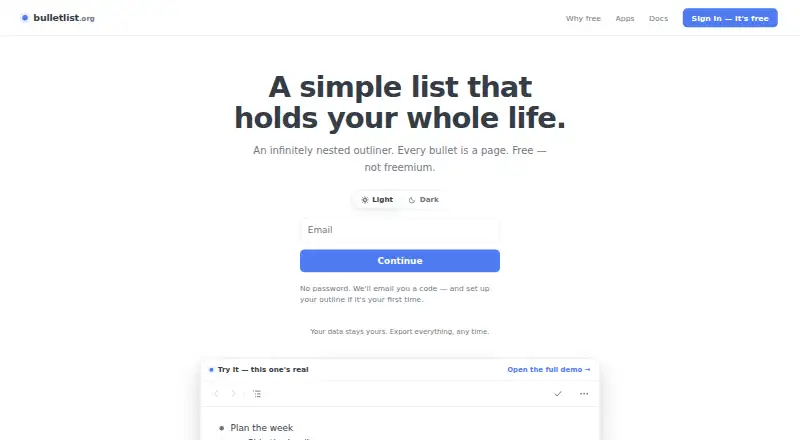
What Bulletlist is
Bulletlist is a free outliner for arranging notes and information in nested bullets, with each bullet able to open as its own page. Bullets can hold multiline comments or full Markdown documents, and the app includes nine note templates, including Zettelkasten, PARA, and Getting Things Done. Users can paste nested lists from Workflowy, Notion, Google Docs, or Markdown, or import OPML files; outlines can be exported as OPML or plain text. It works offline, saves edits on the device first, and merges changes made on separate devices. Keyboard controls include ⌘K for jumping to a bullet by name. The web app can be installed from a browser, and native apps are available for iPhone, iPad, and Android; a Mac desktop app is also listed. All features are free, with no caps or locked tiers. Sign-in uses a code sent by email, rather than a password. The maker says outline content is not used for advertising, sold, or used to train anything; Google Analytics measures usage without access to bullets, notes, or search queries.
Who it suits
Bulletlist suits people who organize notes as nested outlines and want Markdown, offline editing, or imports from other list and document formats. Its free access may appeal to users who do not want tier limits.
What it does well
- Any bullet can open as its own page.
- Works offline and merges changes across devices.
- Imports OPML and several pasted-list formats.
- All features are free with no caps.
What to know first
- Sign-in requires access to an emailed code.
- Google Analytics measures app usage.
- The web app is installed through a browser.
Plans
| Plan | Billed and limits | Price |
|---|---|---|
| Free | Every feature is free for everyone. · No caps · no locked tiers | Free |
As bulletlist.org lists them, read 30 Sept 2026. The maker's own page has the final word.
Getting started
- Open the web app at https://bulletlist.org/ or install the web app from a browser.
- Choose a native app for iPhone, iPad, Android or Mac if preferred.
- Sign in with the code sent to your email.
- Start an outline, use a template, or import OPML or paste a nested list.
Bulletlist suits people who want one outline to hold everything from quick tasks to substantial Markdown notes. Its infinitely nested pages, broad import and export options, and offline-first syncing make it a practical home for structured thinking. The all-free plan is unusually unrestricted, though passwordless email sign-in and a relatively focused platform set may not suit every workflow.
Overview
Bulletlist is an outliner in which any bullet can open as its own page. That design lets a hierarchy accommodate both short entries and deeply developed material without abandoning the surrounding structure. Bullets can carry multiline comments or complete Markdown documents, so the same outline can function as a checklist, knowledge base, or document collection.
Getting started is helped by nine note-taking templates, including Zettelkasten, PARA, and Getting Things Done. Existing material can be pasted from Workflowy, Notion, Google Docs, or Markdown, while OPML files provide a conventional route for importing larger outlines. The complete outline can be exported as OPML or plain text. For a broader category comparison, see Outlining Software.
Key features
Hierarchy with room for detail
Opening any bullet as a page gives a long outline more depth than a conventional list. Multiline comments are useful for context around an item, while full Markdown documents make individual branches suitable for substantial notes. This flexibility is strongest for users who think in trees and want notes to remain attached to their place in a larger system.
Fast navigation and reusable methods
Keyboard shortcuts include ⌘K for jumping to a bullet by name, a valuable shortcut once an outline grows beyond a few screens. The nine templates provide ready-made structures for methods such as Zettelkasten, PARA, and Getting Things Done; they reduce setup work but do not replace choosing a method that fits your habits.
Moving data in and out
Paste-based imports from Workflowy, Notion, Google Docs, and Markdown lower the barrier to switching or consolidating notes. OPML import supports established outliner workflows, and OPML or plain-text export gives the whole outline portable forms. Readers who need a different export ecosystem should check the formats their destination supports before committing.
Offline work and privacy position
Edits are saved to the device first when offline, then changes made on separate devices are merged. That is a sensible arrangement for travel and unreliable connections, although merge-based syncing still rewards a clear personal filing structure. The maker says outline content is not used for advertising, sold, or used to train anything. Google Analytics measures app usage without seeing bullets, notes, or search queries; Google Play states that data is encrypted in transit.
Sign-in uses a code sent by email rather than a password. That removes password management, but access depends on being able to receive email. Support is handled at [email protected].
Pricing
Bulletlist has one plan: Free at free. Every feature is free for everyone, with no caps and no locked tiers. There is no trial because the product is already free, and there are no paid upgrades or seat distinctions to weigh. It is an excellent fit for individuals who want the full feature set without a subscription; teams seeking formal paid controls or differentiated service tiers will find no such option in this plan.
Platforms
Bulletlist runs on the web, Android, iPhone, and iPad, with a Mac desktop app. The web app can be installed from a browser, while native mobile apps cover both major mobile ecosystems. There is no Windows or Linux platform in the published set, so users on those desktops must rely on the browser.
Who it's for
Choose Bulletlist if your work is naturally hierarchical, you want notes and documents inside that hierarchy, or you are migrating from another outliner and need OPML or pasted-list imports. Offline editing and merged multi-device changes also suit people who move between phone, tablet, computer, and browser. It is less compelling for users who require a Windows or Linux desktop application, a non-email authentication method, or a pricing structure with paid collaboration tiers.
Pros and cons
- Pro: Infinitely nested pages let one outline scale from small lists to detailed documents.
- Pro: Markdown comments and full documents keep longer writing in context.
- Pro: Imports from major outliners and OPML, plus OPML and plain-text export, make migration practical.
- Pro: Offline-first saving and cross-device merging support work without a constant connection.
- Pro: The free plan has no caps or locked features.
- Con: Desktop coverage is limited to Mac and the web; Windows and Linux users have no native app.
- Con: Passwordless access depends on receiving an emailed sign-in code.
- Con: There are no paid tiers for organizations that want additional account or service options.
Alternatives
Dynalist is the better pick for users who need Windows or Linux apps, browser extensions, an API, or a paid Pro tier; its free plan includes unlimited items and documents but limits bookmarks to five.
Legend suits readers wanting a Windows or Linux option and plugin synchronization, with a free plan capped at 10 panes despite unlimited documents and items.
Logseq is worth choosing when a free, personal-use product across Windows and Linux matters more than Bulletlist's single unrestricted plan.
Workflowy is the natural alternative for its established outliner ecosystem and broader platform coverage, though its free Basic plan allows 100 nodes per month and 100MB of file uploads.
outl is an option for readers who want a free, MIT-licensed project with self-hosting.
Tana is aimed at users who want a freemium workspace with calendar and AI-query allowances, rather than a no-cap free outliner.
CarbonFin Outliner fits Apple-focused users who prefer a one-time-paid iPhone and iPad app alongside an online companion.
Checkvist is preferable when unlimited hierarchical lists, sharing, collaboration, and adding tasks by email are priorities.
Verdict
Bulletlist is a strong choice for individuals who want a deeply nested, Markdown-capable outline with offline editing, broad migration tools, and no feature caps or subscription cost. Look elsewhere if you need native Windows or Linux software, a different sign-in model, or organizational plans beyond the single free offering.
Verdict
Bulletlist offers a flexible nested outline with offline editing, imports, exports, and Markdown support at no charge. It is available on the web, Mac, iPhone, iPad, and Android, while sign-in depends on email access.
Questions
How much does Bulletlist cost?
The plan is free. Every feature is available, with no caps or locked tiers.
Which platforms does Bulletlist support?
It is available on the web, Android, iOS and macOS. Native mobile apps are available for iPhone, iPad and Android.
Can I import or export outlines?
You can import OPML files or paste nested lists from Workflowy, Notion, Google Docs or Markdown. Export options are OPML and plain text.
Does Bulletlist work offline?
Yes. It saves edits to the device first and merges changes made on separate devices.
Does it support Markdown?
Yes. Bullets can contain full Markdown documents.
How does sign-in work?
Users sign in with a code sent by email and do not need a password.
Facts from Bulletlist's own pages
- Account access
- Users sign in with an emailed code and do not need a password. · bulletlist.org, 30 Sept 2026
- Data use
- The maker says outline content is not used for advertising, sold or used to train anything; Google Analytics measures app usage without seeing bullets, notes or search queries. · bulletlist.org, 30 Sept 2026
- Encryption
- Google Play states that data is encrypted in transit. · play.google.com, 30 Sept 2026
- Export
- Users can export the whole outline as OPML or plain text. · bulletlist.org, 30 Sept 2026
- Headquarters
- Singapore · bulletlist.org, 28 Sept 2026
- Import
- Users can paste nested lists from Workflowy, Notion, Google Docs or Markdown, and import OPML files. · bulletlist.org, 30 Sept 2026
- Keyboard controls
- The app supports keyboard shortcuts, including ⌘K to jump to a bullet by name. · bulletlist.org, 30 Sept 2026
- Notes and documents
- Bullets can include multiline comments or full Markdown documents. · bulletlist.org, 30 Sept 2026
- Offline and sync
- The app works offline, saves edits to the device first, and merges changes made on separate devices. · bulletlist.org, 30 Sept 2026
- Support
- The docs direct users to [email protected]. · bulletlist.org, 30 Sept 2026
- Templates
- The app includes nine note-taking templates, including Zettelkasten, PARA and Getting Things Done. · bulletlist.org, 30 Sept 2026
- Web and mobile
- The web app can be installed from a browser; native apps are available for iPhone, iPad and Android. · bulletlist.org, 30 Sept 2026
- What it does
- Bulletlist is an infinitely nested outliner where any bullet can be opened as its own page. · bulletlist.org, 30 Sept 2026
Where Bulletlist stands on Freedom251
- Outlining Software#2 of 22