Freedom251 › Knowledge base software

Sphinx
by Sphinx
What Sphinx is
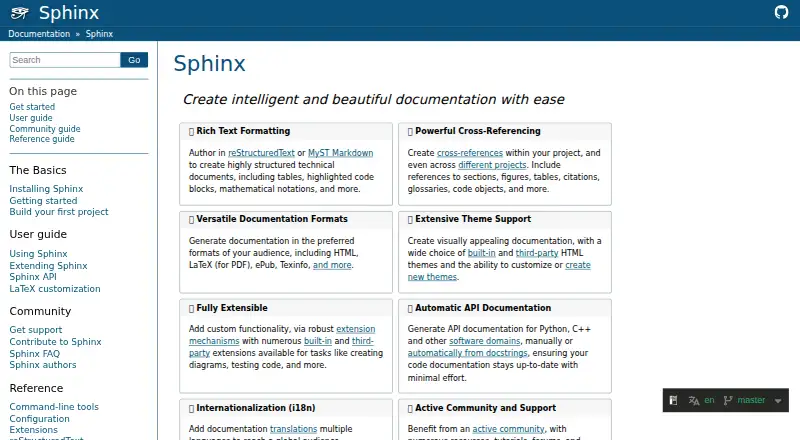
Sphinx generates technical documentation from structured text, with builders for HTML, LaTeX for PDF, ePub, manual pages, Texinfo and plain text. Authors can use reStructuredText or MyST Markdown; Markdown requires the separately installed MyST-Parser. References can connect sections, figures, tables, citations, glossaries and code objects within a project or across projects. The autodoc extension imports documented modules and includes material from their docstrings. Themes and extensions provide options such as diagrams, doctests and API documentation, while built-in integrations include GitHub Pages publishing, Graphviz graphs and intersphinx links. Sphinx also provides gettext-based translation mechanisms and full-text search. It is a Python application, installable through package managers, Docker or from source, and its code is released under the two-clause BSD license. The project is community supported. Its free plan costs nothing.
Who it suits
Sphinx suits people building technical documentation who need structured references, multiple output formats or API documentation from Python modules. It can also suit teams connecting documentation across projects or translating documents.
What it does well
- Builds HTML, LaTeX for PDF, ePub and other formats
- Links references across projects
- Autodoc includes module docstrings
- Supports themes and extensions
- Full-text search is available
What to know first
- MyST Markdown requires a separate parser
- Web Support has limited adoption and development
Plans
| Plan | Billed and limits | Price |
|---|---|---|
| Sphinx open-source software | BSD 2-Clause license · install locally or self-host | Free |
As sphinx-doc.org lists them, read 30 Sept 2026. The maker's own page has the final word.
Getting started
- Visit https://www.sphinx-doc.org/.
- Install Sphinx through PyPI, Conda, a platform package manager, Docker, or from source.
- Install MyST-Parser separately if you plan to author in Markdown.
- Choose a deployment option such as Read the Docs, GitHub Pages, GitLab Pages, Netlify, or a self-hosted server.
Overview
Sphinx is a documentation generator for technical teams who want to build and maintain documentation from structured text. It suits projects that need linked reference material or several output formats. The trade-off is a build-oriented workflow, with an extra parser to install for Markdown.
Key features
Authoring and publishing
Authors can write in reStructuredText or MyST Markdown and generate HTML, LaTeX for PDF, ePub, manual pages, Texinfo, or plain text. That range serves teams publishing both a web reference and formats for print, ebooks, or command-line use. Markdown requires MyST-Parser as a separate installation, so it adds a dependency to the authoring setup.
Built-in and third-party HTML themes, including custom themes, let teams shape the rendered site. Extensions cover tasks such as diagrams and doctests, while built-in integrations include Graphviz graphs and GitHub Pages publishing. Sphinx also lists Read the Docs, GitLab Pages, Netlify, and self-hosted servers as deployment options.
References and API documentation
Cross-references can connect sections, figures, tables, citations, glossaries, and code objects, both within one project and between projects. This is valuable when a documentation set spans related codebases, though it also makes Sphinx a better fit for structured, maintained projects than for a standalone informal knowledge base.
The autodoc extension imports Python modules and incorporates their docstrings, helping teams keep API documentation close to code. Sphinx also provides full-text search and gettext catalogs for document translation. Its Python API can integrate documentation into web applications, but its Web Support feature has had limited adoption and development, so it is a less compelling reason to choose Sphinx.
Pricing
Sphinx open-source software: free, under the BSD 2-Clause license. It can be installed locally or self-hosted, with no paid tier or seat-based plan described. That makes it a fit for teams comfortable managing their own documentation build and deployment; the free price does not remove the work of setting up dependencies, themes, or publishing.
Platforms
Sphinx supports API, Linux, macOS, Windows, web, and self-hosted use. As a Python application, it can be installed through PyPI, Conda, Linux package managers, Homebrew or MacPorts, Chocolatey, Docker, or from source. Official Docker images cover standard builds and LaTeX PDF builds. These options suit teams with different environments, while a self-managed installation is less suited to readers looking for a hosted, turnkey authoring service.
Who it's for
Sphinx is strongest for software teams maintaining structured technical or API documentation, especially when they need cross-project references, multiple output formats, or extensible builds. Its community-supported project welcomes contributions, and users can turn to Stack Overflow, GitHub Discussions, GitHub Issues, or the sphinx-users mailing list. Teams seeking a centrally hosted editor or a dedicated commercial support arrangement may prefer another kind of product.
Pros and cons
- Broad output choice: HTML, PDF-oriented LaTeX, ePub, manual pages, Texinfo, and plain text cover more than web publishing.
- Useful for connected developer references: Cross-project links and Python autodoc help keep related and API documentation connected.
- Flexible build ecosystem: Themes, extensions, deployment options, and several installation routes support varied workflows.
- Markdown takes extra setup: MyST-Parser must be installed separately, unlike a built-in Markdown authoring path.
- Self-management is part of the bargain: The free, locally installable model favors teams able to own their build and deployment rather than those wanting hosted-service convenience.
Alternatives
Mintlify is worth considering for teams that want a web editor, custom domain, authentication, API playground, and MCP server in a free plan capped at five editor seats; Sphinx instead emphasizes locally built documentation and multiple output formats.
DocFX is another free documentation generator if a team prefers an open-source static-site tool and already uses .NET SDK 8.0 or higher. Dokiel is a free open-source publishing chain for teams choosing a desktop or SCENARIchain installation.
Docsie may suit teams seeking a hosted knowledge base with a free plan that includes search, versioning, a custom domain, unlimited viewers, and no expiry. GitBook offers a free option for individuals, with one free user, unlimited page views, and ten GitBook Agent messages per week.
Paligo is a paid alternative for teams considering per-author licensing and a Business plan starting at $15,000 per year. Dr.Explain is an option for Windows users, with a free restricted license capped at 20 topics. Fumadocs is a free, open-source documentation framework for web and self-hosted use.
Browse Technical Documentation Software, Developer Documentation Software, Documentation Generators, or Knowledge base software for more options.
Verdict
Choose Sphinx if your team wants a free, extensible way to build connected technical documentation in several formats, particularly when API references are part of the job. Look elsewhere if you want Markdown support without an extra parser or prefer a hosted authoring workflow over managing the documentation build.
Verdict
Sphinx offers a broad documentation toolset, from multiple output formats and cross-project links to themes and extensions. It is free, but Markdown authors must install MyST-Parser separately.
Questions
How much does Sphinx cost?
The listed Sphinx open-source software plan is free under the BSD 2-Clause license.
Which platforms does Sphinx support?
Its listed platforms are API, Linux, macOS, self-hosted, web, and Windows.
Can I write documentation in Markdown?
Yes. Sphinx supports MyST Markdown, which requires installing MyST-Parser separately.
What output formats can it build?
Its built-in builders include HTML, LaTeX for PDF, ePub, manual pages, Texinfo, and plain text.
Is Sphinx open source?
The project says its code is released under the two-clause BSD license.
Where can I get help?
The project directs users to Stack Overflow, GitHub Discussions, GitHub Issues, or the sphinx-users mailing list.
Facts from Sphinx's own pages
- API documentation
- The autodoc extension imports documented modules and includes documentation from their docstrings. · sphinx-doc.org, 30 Sept 2026
- Authoring
- Documentation can be authored in reStructuredText or MyST Markdown. · sphinx-doc.org, 30 Sept 2026
- Cross-references
- Sphinx supports references within a project and across different projects, including references to sections, figures, tables, citations, glossaries, and code objects. · sphinx-doc.org, 30 Sept 2026
- Deployment integrations
- The documentation lists Read the Docs, GitHub Pages, GitLab Pages, Netlify and self-hosted servers as deployment options. · sphinx-doc.org, 30 Sept 2026
- Docker
- Official Docker images include sphinxdoc/sphinx for standard use and sphinxdoc/sphinx-latexpdf for LaTeX PDF builds. · sphinx-doc.org, 30 Sept 2026
- Extensions
- Sphinx provides extension mechanisms and built-in and third-party extensions for tasks such as diagrams and code testing. · sphinx-doc.org, 30 Sept 2026
- Founded
- 2007 · sphinx-doc.org, 23 Sept 2026
- Free plan
- Yes · sphinx-doc.org, 20 Sept 2026
- Installation
- Sphinx is a Python application installable through PyPI, Conda, Linux package managers, Homebrew or MacPorts, Chocolatey, Docker, or from source. · sphinx-doc.org, 30 Sept 2026
- Integrations
- Built-in extensions include GitHub Pages publishing, Graphviz graphs, and intersphinx links to other projects’ documentation. · sphinx-doc.org, 30 Sept 2026
- Internationalization
- Sphinx supports translating documentation into multiple languages. · sphinx-doc.org, 30 Sept 2026
- License
- The project states that its code is released under the two-clause BSD license. · sphinx-doc.org, 30 Sept 2026
- License and warranty
- Sphinx code is released under the two-clause BSD license, with warranty disclaimers in the license text. · github.com, 30 Sept 2026
- Output formats
- Sphinx generates HTML, LaTeX for PDF, ePub, Texinfo and other documentation formats. · sphinx-doc.org, 30 Sept 2026
- Project audience
- The documentation describes Sphinx as community supported and welcomes contributions from anyone. · sphinx-doc.org, 30 Sept 2026
- Purpose
- Sphinx generates technical documentation from structured text. · sphinx-doc.org, 30 Sept 2026
- Support
- The project directs users to Stack Overflow, GitHub Discussions, GitHub Issues, or the sphinx-users mailing list for questions and problem reports. · sphinx-doc.org, 30 Sept 2026
- Support model
- Sphinx is community supported and welcomes contributions from anybody, with tutorials, forums, examples and contributor resources. · sphinx-doc.org, 30 Sept 2026
- Themes
- Sphinx includes built-in and third-party HTML themes and supports custom themes. · sphinx-doc.org, 30 Sept 2026
- Themes and extensions
- Sphinx supports built-in and third-party themes and extensions, including extensions for diagrams, doctests, API documentation, and links to other projects’ documentation. · sphinx-doc.org, 30 Sept 2026
- Web API
- Sphinx provides a Python API for integrating documentation into web applications, but its Web Support feature has had limited adoption and development. · sphinx-doc.org, 30 Sept 2026
Where Sphinx stands on Freedom251
- Knowledge base software#37 of 138
- Developer Documentation Software#10 of 27
- Documentation Generators#14 of 37
- Technical Documentation Software#15 of 37
- Technical Writing Platforms#13 of 27