Freedom251 › Documentation Generators

DocFX
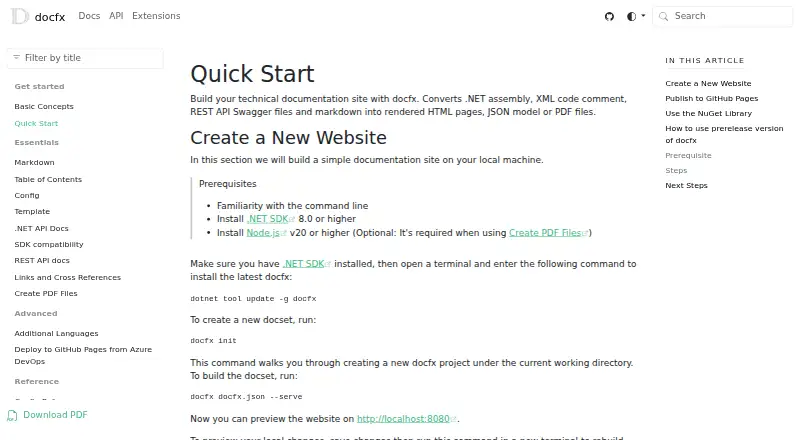
What DocFX is
DocFX is a free static site generator for technical documentation. It builds documentation from .NET assemblies, XML code comments, REST API Swagger files and Markdown, producing rendered HTML pages, JSON models or PDF files. Static HTML is written to the `_site` folder for publishing to services such as GitHub Pages. DocFX can also be used as a NuGet library through the `Docfx.App` package and .NET APIs. It parses CommonMark-compliant Markdown with Markdig and supports additional Markdown extensions. Built-in templates include a modern option with dark mode; customization can use CSS, JavaScript, Mustache templates and metadata settings. DocFX can generate git links for GitHub, GitLab, Azure Pipelines, AppVeyor, TeamCity and Jenkins. Native reference-documentation generation covers .NET and REST APIs; other languages require a custom API docs converter. The project requires .NET SDK 8.0 or higher. Node.js v20 or higher is optional except when creating PDFs, which requires it. PlantUML diagrams render on a remote server by default, with local rendering available as a configuration option. The project is listed as supported by the .NET Foundation.
Who it suits
DocFX suits developers building technical documentation sites from .NET, REST API and Markdown material. It may also suit teams that want static HTML output, PDF generation or integration with listed CI systems.
What it does well
- Free and open-source static site generator.
- Produces HTML, JSON models and PDF files.
- Supports customizable templates and dark mode.
- Can generate git links for several CI systems.
- Can be used as a NuGet library.
What to know first
- Requires .NET SDK 8.0 or higher.
- PDF creation requires Node.js v20 or higher.
- Other language references require a custom API docs converter.
- PlantUML rendering uses a remote server by default.
Limits
The free DocFX plan requires .NET SDK 8.0 or higher. PDF creation additionally requires Node.js v20 or higher, and native reference documentation generation is limited to .NET and REST APIs; other languages need a custom converter.
Plans
| Plan | Billed and limits | Price |
|---|---|---|
| DocFX | Open-source static site generator; requires .NET SDK 8.0 or higher | Free |
As dotnet.github.io lists them, read 2 Oct 2026. The maker's own page has the final word.
Getting started
- Install .NET SDK 8.0 or higher.
- Prepare .NET assemblies, XML code comments, REST API Swagger files or Markdown as documentation inputs.
- Choose a built-in template or customize templates with CSS, JavaScript, Mustache templates or metadata.
- Generate the documentation in HTML, JSON models or PDF format.
- Publish static HTML from the `_site` folder to a static hosting service such as GitHub Pages.
- Install Node.js v20 or higher if creating PDF files.
DocFX is a free, open-source documentation generator for teams building developer documentation into a .NET-based workflow. Its mix of Markdown, .NET and REST API inputs and static output makes it a strong fit for teams that want control over publishing; its native reference coverage is narrower than its broad documentation use.
Overview
DocFX brings authored Markdown together with .NET assemblies, XML code comments and REST API Swagger files. It can produce rendered HTML, JSON models and PDFs, and its static HTML output lands in the _site folder for publishing to services such as GitHub Pages. Teams can also use the Docfx.App NuGet package and .NET APIs to incorporate it into an application.
This makes DocFX useful when documentation generation belongs in a team's own build and publishing process, rather than in a hosted authoring platform. It does require the .NET SDK 8.0 or higher, and other programming languages need a custom API documentation converter.
Key features
DocFX converts XML documentation comments into rendered .NET API pages and can combine reference material with Markdown guides and REST API documentation. The breadth is practical for projects with those inputs, but it should not be mistaken for native reference generation across programming languages.
Markdown parsing uses Markdig for CommonMark-compliant content and supports additional extensions. Built-in templates provide a starting point, including a modern template with dark mode. CSS, JavaScript, Mustache templates and metadata settings allow substantial adaptation; that flexibility is most useful to teams willing to maintain their custom presentation.
For PDF creation, Node.js v20 or higher is required, even though it is otherwise an optional prerequisite. PlantUML diagrams render on a remote server by default, with local rendering as a configurable option. DocFX can generate git links for GitHub, GitLab, Azure Pipelines, AppVeyor, TeamCity and Jenkins, helping connect generated documentation to common project workflows.
Documentation analytics, reader analytics and full-text search are supported. The project is supported by the .NET Foundation.
Pricing
DocFX is free: its DocFX plan costs nothing and is an open-source static site generator. There is no free trial because there is no paid tier to trial. The main cost in practice is the .NET SDK requirement, plus Node.js v20 or higher if PDF creation is needed; PDF is the output that carries the extra prerequisite.
Platforms
DocFX supports API, Linux, macOS, self-hosted and Windows. Static HTML output lets teams publish to static hosting services, while the .NET APIs also support library use within a .NET application.
Who it's for
Choose DocFX if your team works with .NET or REST API reference material, wants to combine it with Markdown, and prefers generating static documentation that it can publish and customize. It is a less direct fit for teams documenting other languages, since they must supply a custom converter, or for teams that want PDF output without adding the required Node.js version.
Pros and cons
- Pros: Combines .NET, REST API and Markdown inputs, so teams can bring reference documentation and authored guides into one generator.
- Pros: Static HTML, JSON and PDF outputs, plus NuGet library use, provide options for publishing or integrating generation.
- Pros: Built-in templates and multiple customization routes let teams shape the documentation site rather than accept a fixed presentation.
- Cons: Native reference generation is limited to .NET and REST APIs; other languages require a custom converter.
- Cons: The .NET SDK 8.0 or higher is required, and PDF creation additionally requires Node.js v20 or higher.
- Cons: PlantUML rendering uses a remote server by default, so teams wanting local rendering must configure that option.
Alternatives
DocPlatform is worth considering for a self-hosted documentation platform with unlimited editors, workspaces and pages on its free Community Edition, rather than a generator centered on .NET and static output.
Fern may fit teams that want a free hosted site with stated limits of 10 team members, 1,000 pages, 250 AI credits per month and 2,000 page generations per month.
Mintlify is another freemium option; its free Starter plan includes five editor seats, a custom domain, web editor, authentication, MCP server and API playground.
Sphinx offers free BSD 2-Clause-licensed software that can be installed locally or self-hosted. VitePress is a free MIT-licensed static site generator that requires Node.js 22 or higher. Writerside has a free plugin for JetBrains IDEs with all standalone-version functionality. 0docs offers a free, MIT-licensed self-hosted documentation platform. GitBook has a free plan for individuals with one free user, unlimited page views and 10 GitBook Agent messages per week.
For broader comparisons, browse Developer Documentation Software, Technical Documentation Software, Documentation Generators and Knowledge base software.
Verdict
DocFX is a solid choice for .NET teams that want to generate and publish customizable static documentation from code, Swagger files and Markdown without paying for the tool. Its strongest reason to choose it is that flexible, build-oriented workflow; look elsewhere if you need native API reference generation for languages beyond .NET and REST APIs, or want a hosted platform rather than a generator.
Verdict
DocFX covers documentation generation from .NET, REST API and Markdown inputs, with static output and template customization. Check its .NET requirement and the additional PDF prerequisite, and plan for a custom converter if documenting other languages.
Questions
How much does DocFX cost?
DocFX is free. Its listed plan costs nothing.
What can DocFX build documentation from?
It accepts .NET assemblies, XML code comments, REST API Swagger files and Markdown.
What output formats does it produce?
DocFX can produce rendered HTML pages, JSON models and PDF files.
What platforms does DocFX support?
Its listed platforms are API, Linux, macOS, self-hosted and Windows.
What does DocFX require?
It requires .NET SDK 8.0 or higher. PDF creation also requires Node.js v20 or higher.
Which languages does DocFX support for reference documentation?
It natively generates reference documentation for .NET and REST APIs. Other languages require a custom API docs converter.
Facts from DocFX's own pages
- API documentation
- DocFX generates .NET API documentation by converting XML documentation comments into rendered HTML documentation. · dotnet.github.io, 2 Oct 2026
- CI integrations
- DocFX can generate git links for GitHub, GitLab, Azure Pipelines, AppVeyor, TeamCity, and Jenkins. · dotnet.github.io, 2 Oct 2026
- Customization
- Users can customize templates with CSS, JavaScript, Mustache templates, and metadata settings. · dotnet.github.io, 2 Oct 2026
- Diagram rendering
- PlantUML diagrams render on a remote server by default, with local rendering available as a configurable option. · dotnet.github.io, 2 Oct 2026
- Free plan
- Yes · dotnet.github.io, 20 Sept 2026
- Language support limit
- DocFX natively generates reference documentation for .NET and REST APIs; other languages require a custom API docs converter. · dotnet.github.io, 2 Oct 2026
- Library use
- DocFX can also be used as a NuGet library through the `Docfx.App` package and its .NET APIs. · dotnet.github.io, 2 Oct 2026
- Markdown
- DocFX parses CommonMark-compliant Markdown with Markdig and supports additional Markdown extensions. · dotnet.github.io, 2 Oct 2026
- Output
- DocFX can produce rendered HTML pages, JSON models, or PDF files. · dotnet.github.io, 2 Oct 2026
- PDF prerequisite
- Node.js v20 or higher is an optional prerequisite, but is required when using the PDF creation feature. · dotnet.github.io, 2 Oct 2026
- Purpose
- DocFX builds technical documentation sites from .NET assemblies, XML code comments, REST API Swagger files, and Markdown. · dotnet.github.io, 2 Oct 2026
- Static hosting
- DocFX outputs static HTML in the `_site` folder for publishing to static site hosting services such as GitHub Pages. · dotnet.github.io, 2 Oct 2026
- Support
- The DocFX project is listed as supported by the .NET Foundation. · dotnet.github.io, 2 Oct 2026
- Templates
- DocFX includes built-in templates, and its modern template supports dark mode and customization options. · dotnet.github.io, 2 Oct 2026
Where DocFX stands on Freedom251
- Documentation Generators#4 of 37
- Technical Documentation Software#5 of 37
- Developer Documentation Software#5 of 27
- Technical Writing Platforms#5 of 27
- Knowledge base software#36 of 138