Freedom251 › Bandwidth Monitoring Software
SoftPerfect Bandwidth Manager
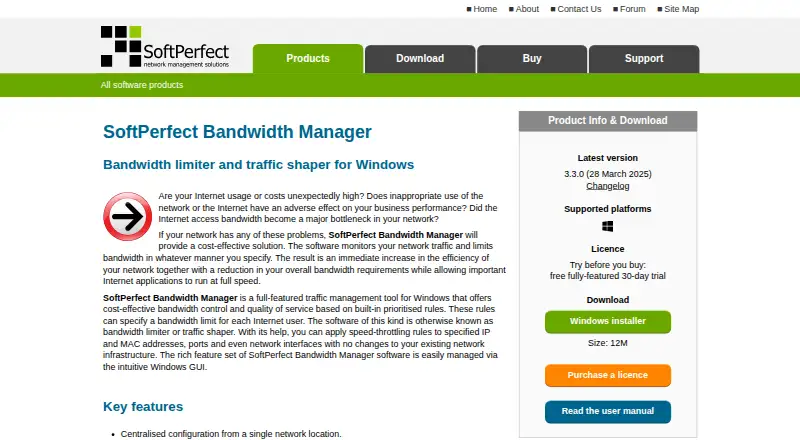
What SoftPerfect Bandwidth Manager is
SoftPerfect Bandwidth Manager is a Windows tool for monitoring network traffic and setting bandwidth limits and quality-of-service rules. Administrators can target rules by IP or MAC address, TCP/IP port, protocol, or network interface, then prioritize bidirectional rate and usage limits. Configuration can be centralized from one network location, and end users usually do not need client software installed. Features include quotas, scheduling, email notifications, usage reports, and a live usage monitor. The Enterprise edition adds deep packet inspection to identify IM, P2P file sharing, gaming, and media streaming. A Windows GUI console manages the service remotely over TCP port 8701; the vendor says there is no web-based management interface. The free Lite plan allows five rules or streams. Paid perpetual licences range from $49, paid once to $4,500, paid once, depending on edition and licence scope, and include one year of free updates. The product is listed for Windows, macOS, and Linux, though its stated traffic-management purpose is Windows-focused.
Who it suits
SoftPerfect Bandwidth Manager suits administrators who need to set and monitor traffic rules across a network. The listed plans range from a free, single-device Lite option to licences covering multiple devices or locations.
What it does well
- Rules can target IPs, ports, protocols, and interfaces.
- Centralized configuration is available.
- Includes quotas, scheduling, reports, and a live monitor.
- Enterprise adds deep packet inspection.
- Paid licences include one year of free updates.
What to know first
- Free Lite allows five rules or streams.
- No web-based management interface is listed.
- Windows 10 is the minimum for version 3.3.0.
- FAQ notes no support for Windows bridged connections.
Limits
The free Lite plan allows five rules or streams. Paid plans begin with 500 rules or streams on the Standard single-device licence at $49, paid once; the site and worldwide Standard licences also allow 500 rules or streams.
Plans
| Plan | Billed and limits | Price |
|---|---|---|
| Lite | 5 rules/streams · usage reports and live usage monitor · penalties for heavy downloads/uploads | Free |
| Professional — site licence | Perpetual licence; includes one year of free updates · Unlimited devices at one organisation site · 2,000 rules/streams | $1,000, paid once |
| Enterprise — single device | Perpetual licence; includes one year of free updates · Unlimited rules/streams · DPI detection for IM, P2P file sharing, gaming and media streaming | $149, paid once |
| Standard — worldwide licence | Perpetual licence; includes one year of free updates · Unlimited devices at unlimited organisation locations · 500 rules/streams | $1,500, paid once |
| Enterprise — site licence | Perpetual licence; includes one year of free updates · Unlimited devices at one organisation site · unlimited rules/streams | $1,500, paid once |
| Professional — worldwide licence | Perpetual licence; includes one year of free updates · Unlimited devices at unlimited organisation locations · 2,000 rules/streams | $3,000, paid once |
| Enterprise — worldwide licence | Perpetual licence; includes one year of free updates · Unlimited devices at unlimited organisation locations · unlimited rules/streams | $4,500, paid once |
| Standard — single device | Perpetual licence; includes one year of free updates · 500 rules/streams · batch rule creation · download/upload quotas · web access to usage reports | $49, paid once |
The first 8 of 10 plans, as softperfect.com lists them, read 30 Sept 2026. The maker's own page has the final word. Every plan
Getting started
- Visit the SoftPerfect Bandwidth Manager website.
- Choose the free Lite plan or a paid licence based on the required rules, devices, and locations.
- Install and configure the service on Windows.
- Use the Windows GUI management console to connect locally or remotely over TCP port 8701.
- Set traffic rules, quotas, schedules, and notifications as needed.
Overview
SoftPerfect Bandwidth Manager applies traffic limits and quality-of-service rules to network use, with quotas, monitoring and reports for administrators. It is best suited to people managing shared bandwidth who want centralized enforcement rather than observation alone. Its perpetual licence options scale from a small rule set to unlimited devices and rules, but management depends on a Windows console.
Key features
Rules can match IP and MAC addresses, ports, protocols or network interfaces, then apply prioritized limits to traffic in both directions. This gives administrators more targeted control than a single network-wide cap. Configuration is centralized, and end users usually do not need client software installed. That is useful for managed networks, though it does not make the product platform-neutral: the management console is a Windows GUI, and there is no web-based interface.
Quotas, scheduling, email notifications, usage reports and a live monitor combine enforcement with oversight. The free Lite plan includes reports and live monitoring, but its five-rule ceiling makes it a narrow fit. Paid tiers raise that ceiling and add controls such as quotas, scheduled rules and notifications. Enterprise adds deep packet inspection to identify IM, P2P file sharing, gaming and media streaming.
The console connects remotely to the service over TCP port 8701. Administrators can set a service logon password and a separate limited-access password. The product is compatible with Microsoft ISA Server and Internet Connection Sharing, but does not support Windows bridged connections; the vendor recommends using its internal bridging instead. An XML-based API and standard SQLite 3 database offer other access routes, although the API has no official documentation.
Pricing
Lite is free and allows five rules or streams, with usage reports, a live monitor and penalties for heavy downloads or uploads. It is a sensible starting point for a small policy set, but not for administrators who need more rules or the paid tiers' specific quota and scheduling controls.
All paid licences are perpetual for the version purchased and include one year of free updates. Single-device plans suit one managed device: Standard costs $49, paid once and includes 500 rules or streams, batch rule creation, download and upload quotas, and web access to usage reports. Professional costs $99, paid once, raises the limit to 2,000, and adds scheduled rules, port mappings, HTTP redirect and email quota notifications. Enterprise costs $149, paid once, removes the rule limit and adds DPI detection.
Site licences cover unlimited devices at one organisation site: Standard costs $499, paid once for 500 rules or streams; Professional costs $1,000, paid once for 2,000; and Enterprise costs $1,500, paid once for unlimited rules or streams and DPI. Worldwide licences cover unlimited devices at unlimited organisation locations: Standard costs $1,500, paid once for 500 rules or streams, Professional costs $3,000, paid once for 2,000, and Enterprise costs $4,500, paid once for unlimited rules or streams and DPI. The licence scope matters as much as the rule allowance: a site plan does not cover multiple locations, while a worldwide licence does.
Platforms
The product is described as a Windows tool. Version 3.3.0 added Windows ARM64 support and set Windows 10 as the minimum. Although Windows, macOS and Linux appear among supported platforms, administration is through a Windows GUI console, so those platform labels do not remove the Windows management requirement.
Who it's for
Choose it when you need to enforce prioritized traffic limits and usage quotas centrally, especially across a shared network where per-user or per-device rules matter. The free tier can suit a modest setup; larger deployments can select a licence by rule capacity and organisation footprint. Look elsewhere if you require browser-based administration or rely on Windows bridged connections.
Pros and cons
- Granular, bidirectional controls: Rules can target addresses, ports, protocols and interfaces, making traffic policy more specific than a blanket cap.
- Centralized enforcement without routine client installs: End users usually need no client software, which reduces per-machine deployment work.
- Licence range for different footprints: Single-device, site and worldwide options pair distinct device scopes with 500, 2,000 or unlimited rules.
- Windows console only: Remote management requires a Windows GUI, with no web interface for administrators who prefer browser access.
- Bridging constraint: Windows bridged connections are unsupported, so affected networks must use the product's internal bridging approach.
- Limited free rule count: Lite's five-rule cap is restrictive once policies need to cover more users, devices or traffic categories.
Alternatives
ntopng is a freemium option with a free Community plan designed for home and network practitioners and a suggested maximum of 256 live local hosts; consider it when that scale and audience fit better than Bandwidth Manager's rule-based enforcement. sFlowTrend is another alternative for readers considering traffic monitoring solutions for high-speed switched networks.
Cacti is free, open-source network monitoring and graphing software, but requires MySQL, PHP, RRDTool, Net-SNMP and a PHP-capable web server; choose it when graphing and an open-source stack matter more than Bandwidth Manager's traffic controls. GlassWire offers a free plan with one day of bandwidth usage, 24 hours of network history and current-day alert logs, making it worth considering for that bounded monitoring need.
ManageEngine NetFlow Analyzer has a free edition limited to two interfaces, a fit for readers whose interface count is within that cap. Sniffnet is a free, open-source option for readers seeking software under the MIT or Apache-2.0 licence. bmon is a free Linux and macOS bandwidth monitoring and rate estimation tool. bwmon is a free, self-hosted option for a single Linux host.
Browse Bandwidth Monitoring Software, Network Performance Monitoring Software, Network Diagnostic Software or Network Monitoring for more options.
Verdict
SoftPerfect Bandwidth Manager is a strong fit for administrators who need centralized, rule-based bandwidth enforcement, quotas and reporting, with licence choices that accommodate single devices through worldwide deployments. Its main reason to choose it is the combination of targeted bidirectional controls and policy enforcement without routine client installs. Look elsewhere if browser-based administration or Windows bridged connections are requirements.
Verdict
SoftPerfect Bandwidth Manager provides traffic limits, monitoring, quotas, and reporting, with Enterprise adding deep packet inspection. Consider the five-rule Lite limit, Windows management console, and licence scope when choosing a plan.
Questions
Is SoftPerfect Bandwidth Manager free?
Yes. Its Lite plan costs nothing and allows five rules or streams. A free trial is also listed.
What do paid licences cost?
Paid perpetual licences range from $49, paid once to $4,500, paid once, depending on edition and licence scope. They include one year of free updates.
Which platforms are listed?
The product lists Windows, macOS, and Linux. Its stated traffic management purpose describes it as a Windows tool.
Does it have a web management interface?
No. The vendor says there is no web-based management interface; a Windows GUI console can connect remotely over TCP port 8701.
What does the Enterprise edition add?
It uses deep packet inspection to detect IM, P2P file sharing, gaming, and media streaming.
Who makes SoftPerfect Bandwidth Manager?
SoftPerfect makes the product. The company was founded in 2000 and is headquartered in Brisbane, Australia.
Facts from SoftPerfect Bandwidth Manager's own pages
- API and database
- The service can be accessed through an XML-based API without official documentation, or through its standard SQLite 3 database. · softperfect.com, 30 Sept 2026
- Deployment
- Centralized configuration is available from one network location, and end users usually need no client software installed. · softperfect.com, 30 Sept 2026
- DPI
- The Enterprise edition detects IM, P2P file sharing, gaming and media streaming using deep packet inspection. · softperfect.com, 30 Sept 2026
- Founded
- 2000 · softperfect.com, 28 Sept 2026
- Headquarters
- Australia · softperfect.com, 28 Sept 2026
- Integrations
- The vendor says the product is compatible with Microsoft ISA Server and Internet Connection Sharing. · softperfect.com, 30 Sept 2026
- Intended users
- SoftPerfect describes its network management software as serving businesses and individuals. · softperfect.com, 30 Sept 2026
- Known limitation
- The product FAQ describes lack of support for Windows bridged connections and recommends using its internal bridging instead. · softperfect.com, 30 Sept 2026
- Licence and updates
- Paid licences are perpetual for the version purchased and include one year of free updates. · softperfect.com, 30 Sept 2026
- Purpose
- The Windows tool monitors network traffic and applies bandwidth limits and quality-of-service rules. · softperfect.com, 30 Sept 2026
- Quotas and reports
- Features include quotas, scheduling, email notifications, comprehensive usage reports and a live usage monitor. · softperfect.com, 30 Sept 2026
- Remote management
- A Windows GUI management console can connect remotely to the service over TCP port 8701; the vendor says there is no web-based management interface. · softperfect.com, 30 Sept 2026
- Security controls
- Settings allow administrators to set a logon password for the Bandwidth Control Service and a separate limited-access password. · softperfect.com, 30 Sept 2026
- Support
- SoftPerfect offers technical support by email, a public forum and a personal contact centre. · softperfect.com, 30 Sept 2026
- Traffic rules
- Rules can target IP and MAC addresses, TCP/IP ports, protocols and network interfaces, with prioritized bidirectional rate and usage limits. · softperfect.com, 30 Sept 2026
- Windows support
- Version 3.3.0 added Windows ARM64 support and made Windows 10 the minimum required version. · softperfect.com, 30 Sept 2026
Where SoftPerfect Bandwidth Manager stands on Freedom251
- Bandwidth Monitoring Software#20 of 33