Freedom251 › Firewall Software
GlassWire
by GlassWire
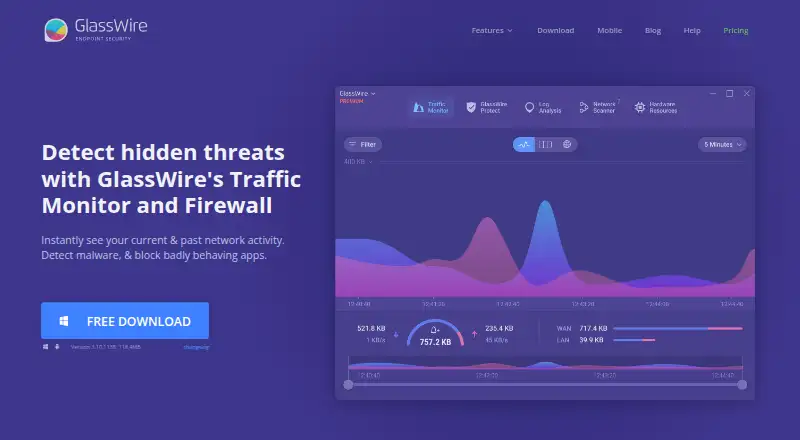
What GlassWire is
GlassWire is a network traffic monitor and personal firewall for viewing current and past activity and blocking suspicious or badly behaving apps. Its desktop analysis can organize usage by IP address or host, app, traffic type, and other categories. Alerts flag unusual network or app changes that could indicate malware, as well as unknown devices joining Wi-Fi. On Android, the app graphs data use by app, reports when apps access the network, and can block connections over mobile or Wi-Fi. GlassWire says Android app and data usage information stays on the phone and that the app itself uses no data. Free includes 24 hours of network history, one day of bandwidth history, and alert logs for the current day. The Personal Plan costs $2.99 a month when billed annually and provides unlimited network and bandwidth history and alert logs. Premium features include bidirectional firewall controls, custom profiles, Ask to Connect, and Lockdown Mode. The desktop download requires Windows 10 or later and supports x64 and ARM64.
Who it suits
GlassWire suits people who want to inspect network activity or manage app connections on Windows and Android. It may also suit users who want alerts about network changes or unfamiliar Wi-Fi devices.
What it does well
- Traffic analysis can break usage down by app and host.
- Alerts identify unusual changes and unknown Wi-Fi devices.
- Android can block app connections over mobile or Wi-Fi.
- Personal Plan includes unlimited network history.
What to know first
- Free network history is limited to 24 hours.
- Free bandwidth history covers one day.
- Desktop requires Windows 10 or later.
Limits
The Free plan includes 24 hours of network history, one day of bandwidth history, and alert logs for the current day. The Personal Plan costs $2.99 a month billed annually and supports up to 20 licenses.
Plans
| Plan | Billed and limits | Price |
|---|---|---|
| Free | Free Forever · Basic network monitoring · 1-day bandwidth history · 24-hour network history · current-day alert logs | Free |
| Personal Plan | Paid annually · Up to 20 licenses available in Premium offering · unlimited history and alerts · Ask to Connect · Lockdown Mode · firewall profiles | $2.99 a month |
| Personal | Per year · All security features · Ask to Connect · Lock Down Mode · Mini Graph · themes · Wi-Fi device view · anomaly detection · live connections map | $35.88 a year |
| Duo | Per year · Contact vendor for more details | $50.16 a year |
| Family | Per year · Contact vendor for more details | $89.76 a year |
As glasswire.com lists them, read 15 Oct 2026. The maker's own page has the final word.
Getting started
- Visit the GlassWire website.
- For desktop use, download GlassWire on Windows 10 or later, with x64 or ARM64 support.
- For Android use, install the Android app.
- Start with the Free plan or choose the Personal Plan, billed annually at $2.99 a month.
Overview
GlassWire is a network traffic monitor and personal firewall that helps people see which apps and devices are active on their network. It suits individuals who want app-level visibility and controls, especially on Windows, with a separate Android app for mobile data use. Its strongest case is pairing detailed traffic views with alerts; the free plan’s short history is a real constraint for anyone who needs to investigate past activity.
Key features
The desktop product sorts network usage by app, IP or host, traffic type, and other categories. That makes it more useful for finding the source of bandwidth use than a simple overall traffic total. Alerts flag unusual network or app changes that could indicate malware and warn when an unknown device joins Wi-Fi. These are useful signals to check, though GlassWire is a monitor and personal firewall rather than a broader security suite.
Premium adds bidirectional firewall control, custom profiles, Ask to Connect, and Lockdown Mode. These options give users more direct ways to manage app connections; the free plan provides monitoring without those premium firewall controls. History is the other dividing line: Free retains 24 hours of network history, one day of bandwidth usage history, and alert logs for the current day. Premium makes all three unlimited, which is a meaningful upgrade for troubleshooting problems that are noticed after the fact.
On Android, GlassWire graphs data use by app, alerts when apps access the network, and can block connections over mobile or Wi-Fi. GlassWire says Android app and data usage information stays on the phone and that the app itself uses no data. That makes the mobile app relevant for people monitoring app-level use, although the desktop traffic breakdowns and premium firewall controls are a different part of the product.
Pricing
GlassWire uses a freemium model. The Free plan costs nothing, billed Free Forever, and includes one day of bandwidth usage, 24 hours of network history, and current-day alert logs. It is a sensible starting point for checking current activity, but the short retention limits its value for reviewing trends or returning to an old alert.
The Personal Plan costs $2.99 a month, billed Paid annually, and includes up to 20 licenses, unlimited bandwidth usage history, unlimited network history, and unlimited alert logs. Premium also includes the bidirectional firewall controls, custom profiles, Ask to Connect, and Lockdown Mode. The annual billing term and 20-license ceiling matter: it is suited to individuals or small groups that need longer records and extra connection controls, not users seeking a month-to-month commitment.
Both Free and Premium include community support; Premium also includes dedicated support. For someone who only needs a short-term view of traffic, the free plan avoids a recurring commitment. For anyone who needs historical context or the additional firewall controls, the paid plan addresses the central limits of Free.
Platforms
GlassWire is available on Android, web, and Windows. The desktop download requires Windows 10 or later and supports x64 and ARM64 architectures. The Android app centers on app data use and connections, while desktop provides the broader traffic breakdowns. GlassWire also publishes recent download hash values on its changelog page so users can verify a downloaded file has not been corrupted or tampered with.
Who it's for
GlassWire is a good fit for individuals who want to identify which apps use bandwidth, receive alerts about unusual network changes, and manage app connections without relying only on router-level totals. Windows users who need detailed desktop monitoring and longer history have the clearest reason to pay. Android users may value the app-specific data graphs and connection blocking, particularly alongside GlassWire’s stated on-device handling of app and data usage information.
It is less suitable for people who need extensive retained records without paying, or who are choosing a network-monitoring platform for broader infrastructure needs. Its focus is personal traffic visibility and firewall control, and the free plan’s history caps can quickly become limiting for retrospective analysis.
Pros and cons
- Pro: Desktop traffic is broken down by app, IP or host, and traffic type, helping users trace bandwidth use to its source.
- Pro: Alerts cover unusual app or network changes and unknown devices joining Wi-Fi, giving users concrete activity to investigate.
- Pro: Premium combines unlimited histories and logs with additional firewall controls, rather than charging only to remove retention limits.
- Con: Free history is limited to 24 hours for network activity, one day for bandwidth usage, and the current day for alert logs, which restricts later troubleshooting.
- Con: The desktop download requires Windows 10 or later, so the desktop product does not serve users on older Windows versions.
- Con: Premium is billed annually, which is less flexible for people who want a short-term paid option.
Alternatives
For a different network-monitoring approach, ntopng has a free Community (Open Source) plan designed for home and network practitioners, with a suggested maximum of 256 live local hosts. sFlowTrend is another option for readers comparing traffic-monitoring software. If rule-based bandwidth management is the priority, SoftPerfect Bandwidth Manager offers a free Lite plan with five rules or streams, usage reports, a live usage monitor, and penalties for heavy downloads or uploads.
Cacti is a free, open-source network monitoring and graphing option that requires MySQL, PHP, RRDTool, Net-SNMP, and a PHP-capable web server. For interface-focused NetFlow analysis, ManageEngine NetFlow Analyzer has a free edition limited to two interfaces. Sniffnet is a fully free, open-source option for Linux, macOS, and Windows, while bmon is a free open-source bandwidth monitoring and rate estimation tool for Linux and macOS. bwmon is a free, self-hosted option for monitoring a single Linux host.
Browse more options in Bandwidth Monitoring Software and Network Monitoring.
Verdict
Choose GlassWire if you want app-level network visibility, useful change alerts, and personal firewall controls, with an Android app for monitoring mobile data use. The free plan is enough for a current snapshot, but anyone who needs lasting history or the extra firewall tools should weigh the Personal Plan’s annual billing and 20-license limit. Look elsewhere if your priority is broad network monitoring rather than personal traffic tracking.
Verdict
GlassWire combines traffic visibility with firewall controls, while its Android app focuses on app data use and connections. The free tier keeps only short histories; the Personal Plan costs $2.99 a month when billed annually.
Questions
Is there a free plan?
Yes. The Free plan is billed as Free Forever and includes limited network history, bandwidth history, and alert-log retention.
How much does the Personal Plan cost?
It costs $2.99 a month when billed annually and supports up to 20 licenses.
Which platforms does GlassWire support?
The listed platforms are Android, web, and Windows. The desktop download requires Windows 10 or later and supports x64 and ARM64.
What does Premium add?
Premium includes bidirectional firewall control, custom profiles, Ask to Connect, Lockdown Mode, and unlimited network history, bandwidth usage history, and alert logs.
Who makes GlassWire?
The maker is GlassWire, based in Draper, Utah, USA. Its website privacy policy describes GlassWire as a brand owned by Domotz Inc.
Facts from GlassWire's own pages
- Android app
- The Android app graphs app data use, alerts when apps access the network, and can block app connections over mobile or Wi-Fi. · glasswire.com, 29 Sept 2026
- Android permissions
- The Android app requires phone and usage permissions to calculate per-app mobile-data usage and states that it has no network connectivity itself. · glasswire.com, 15 Oct 2026
- Android privacy
- GlassWire states that Android app and data usage information never leaves the phone and that the app itself uses no data. · glasswire.com, 29 Sept 2026
- Android privacy claim
- Google Play lists no data shared with third parties and no data collected, while the app description says usage information stays on the phone. · play.google.com, 15 Oct 2026
- Antivirus limitation
- GlassWire says its security layer is not comprehensive malware detection and should be used with a separate primary antivirus. · glasswire.com, 15 Oct 2026
- API and SDKs
- The published documentation describes the VirusTotal API connection but provides no public GlassWire product API or SDK. · glasswire.com, 15 Oct 2026
- Ask to Connect
- Ask to Connect pauses new network connections until the user approves or denies them. · glasswire.com, 15 Oct 2026
- Bandwidth export
- Traffic usage can be exported as CSV from the Usage Table. · glasswire.com, 15 Oct 2026
- Company history
- GlassWire says its team spent over a year building the product before Jon Hundley posted it to Hacker News, after which the team chose to work on it full time. · glasswire.com, 29 Sept 2026
- Company legal provider
- GlassWire services are provided by Domotz Inc., a Delaware company headquartered at 120 East 13065 South, Suite 102, Draper, Utah. · glasswire.com, 15 Oct 2026
- Company ownership
- GlassWire's website privacy policy describes GlassWire as a brand owned by Domotz Inc. · glasswire.com, 29 Sept 2026
- Company profile
- LinkedIn lists GlassWire as privately held, founded in 2014, headquartered in Austin, Texas, with 2–10 employees. · linkedin.com, 15 Oct 2026
- Documentation
- Official documentation includes Windows and Android guides, quick-start instructions, FAQ pages, a forum and a version changelog. · glasswire.com, 15 Oct 2026
- Download verification
- GlassWire says a hash can be used to verify that a downloaded file is not corrupted or tampered with, and publishes recent hash values on its changelog page. · glasswire.com, 29 Sept 2026
- Firewall
- Its bidirectional firewall supports separate inbound and outbound rules for each application. · glasswire.com, 15 Oct 2026
- Firewall controls
- Premium includes bidirectional firewall control, custom profiles, Ask to Connect, and Lockdown Mode. · glasswire.com, 29 Sept 2026
- Firewall profiles
- Users can create and switch among profiles for contexts such as home, work and public Wi-Fi. · glasswire.com, 15 Oct 2026
- Free plan
- Yes · glasswire.com, 21 Sept 2026
- Headquarters
- Draper, Utah, USA · glasswire.com, 28 Sept 2026
- Latest release
- Version 3.11.1164 was listed at 118.4 MB with bulk firewall actions and improved GPU and memory statistics. · glasswire.com, 15 Oct 2026
- License model
- GlassWire software is proprietary, with a temporary, non-transferable subscription license; open-source component terms may apply separately. · glasswire.com, 15 Oct 2026
- Limit: firewall granularity
- A G2 reviewer says GlassWire cannot block programs by specific IP address or subscribe to IP lists and offers limited visibility into packet contents. · g2.com, 15 Oct 2026
- Limit: free-tier history
- Reviewers complain that the free version limits historical connection data to roughly 24 hours. · getapp.com, 15 Oct 2026
- Limit: learning curve
- G2 and Capterra reviewers mention that deeper information can require a learning curve and is not always easy to interpret. · g2.com, 15 Oct 2026
Where GlassWire stands on Freedom251
- Firewall Software#13 of 81
- Network Monitoring#10 of 55
- Computer Security#6 of 30
- Bandwidth Monitoring Software#10 of 33