Freedom251 › Antivirus for Mac
LuLu
What LuLu is
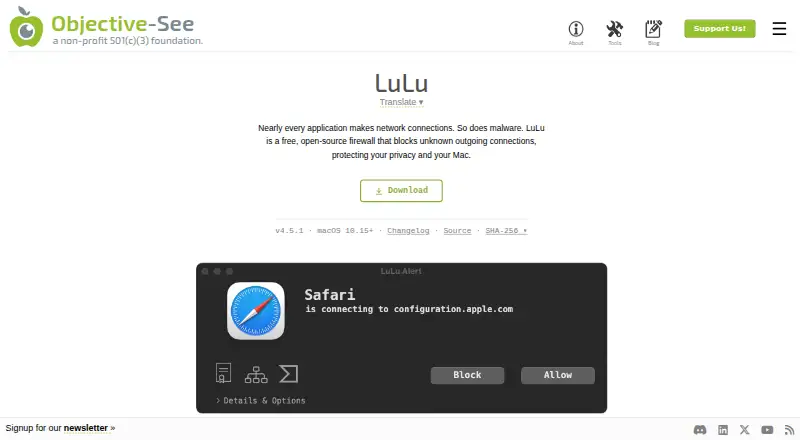
LuLu is a free, open-source firewall for macOS that alerts users to unknown outgoing network connections and lets them block them. Alerts identify the process and destination, and can show code-signing details and process origins. Users can create rules to allow or block connections for a process or a specific remote endpoint, choosing temporary or permanent durations. Allow and block lists can draw on local files or remote URLs; when both are configured, matching block-list entries take priority. Profiles keep separate rules and settings, although only the active profile determines connection decisions. LuLu monitors outgoing traffic, but some traffic may not pass through macOS Network Extensions and therefore may not be visible or blockable. The listed requirement is macOS 10.15 or later. The product includes Objective-See's Netiquette network monitor, accessible from the status-bar menu. A VirusTotal lookup opens only after the user clicks the alert button, and its URL includes the item's hash. The maker says the automatic version check sends no user or product information and can be disabled in settings. LuLu is distributed free, with no free trial listed.
Who it suits
LuLu suits Mac users who want alerts and controls for unknown outgoing connections. Its listed compatibility is macOS 10.15 or later.
What it does well
- Rules can target processes or remote endpoints.
- Rules can be temporary or permanent.
- Profiles keep separate rules and settings.
- Includes the Netiquette network monitor.
- Automatic version checks can be disabled.
What to know first
- Some traffic may not be visible or blockable.
- Only the active profile controls connection decisions.
- The listed platform is macOS only.
Limits
The free plan covers macOS 10.15 or later and outgoing connections. Some traffic may not pass through macOS Network Extensions, so LuLu may not see or block it.
Plans
| Plan | Billed and limits | Price |
|---|---|---|
| LuLu | macOS 10.15+ · outgoing connections | Free |
As objective-see.org lists them, read 11 Oct 2026. The maker's own page has the final word.
Getting started
- Open the LuLu product page at https://objective-see.org/products/lulu.html.
- Use the free LuLu plan for macOS 10.15 or later.
- Set allow or block rules for processes or remote endpoints.
- Choose whether each rule is temporary or permanent.
- Open the status-bar menu to access the included Netiquette network monitor.
LuLu is a free, open-source macOS firewall for controlling unknown outbound connections. It suits Mac users who want process-level prompts and durable allow or block rules rather than a conventional malware scanner. Its narrow, macOS-only focus makes it useful for outbound oversight, but it cannot see every kind of traffic.
Overview
LuLu watches outgoing connections and alerts when an application or process attempts to reach a destination that is not covered by an existing rule. Each alert identifies the process and destination, and can show code-signing information and the process's origin. That context helps you decide whether to permit a legitimate component or stop an unexpected connection without relying on a generic warning.
Rules can apply to an entire process or to one remote endpoint. You can make a decision permanent or temporary, so a one-off exception does not have to become a lasting permission. LuLu also includes ransomware protection and real-time protection, although its stated network scope remains outgoing traffic on macOS.
Key features
Rules, lists and profiles
Allow and block lists can be loaded from local files or remote URLs. When both are configured, a block-list match wins, giving deny rules precedence over broader allowances. Profiles keep separate rules and settings; only the currently active profile influences connection decisions. This is practical for maintaining different policies, but changing profiles is consequential because inactive profiles do nothing until selected.
Investigation and monitoring
A VirusTotal lookup opens only after you click the alert button, using a URL that contains the item's hash. The design leaves the lookup as an explicit decision rather than an automatic submission. LuLu also packages Objective-See's Netiquette network monitor, accessible from the status-bar menu, for a broader view of network activity.
Privacy and scope
The maker says automatic version checks send no user or product information, and you can disable those checks in settings. Some traffic does not pass through macOS Network Extensions, however, so LuLu may neither display nor block every outbound connection. That limitation matters if you require comprehensive traffic enforcement rather than visibility into supported paths.
Pricing
| Plan | Price | Includes |
|---|---|---|
| LuLu | free | macOS 10.15 or later; outgoing-connection controls |
There is no paid tier, trial period, seat quota or renewal charge. The free plan is therefore the complete product, not a curtailed preview. Support is directed through bug reports in LuLu's GitHub repository, which suits users comfortable with an open-source project workflow.
Platforms
LuLu runs on macOS 10.15 or later and is mac-only. It is not a cross-platform policy tool, so households or teams managing Android, iOS or Windows systems need separate products for those devices.
Who it's for
Choose LuLu if you want free, local control over which Mac processes can connect out, with rules that can target endpoints and persist across sessions. Profiles and list imports also fit users who maintain distinct network policies or centrally prepared allow and block data. Look elsewhere if you need inbound-firewall coverage, a Windows or mobile edition, or assurance that traffic outside Network Extensions is handled.
Pros and cons
Pros
- Free without a paid upgrade path: the 0.00 USD plan is the full offering, with no subscription renewal.
- Decisions have useful context: alerts identify process, destination, signing details and origin.
- Flexible enforcement: permanent or temporary rules can target processes or specific endpoints.
- Policy tooling: local or remote lists, block precedence and switchable profiles support structured administration.
- Open-source macOS focus: Objective-See presents LuLu as part of its nonprofit security-tooling mission.
Cons
- Incomplete network visibility: traffic that bypasses Network Extensions may evade both alerts and blocking.
- Mac-only compatibility: it requires macOS 10.15 or later and offers no other platform build.
- Manual interpretation required: outbound prompts ask you to judge each process and destination rather than providing a complete antivirus suite.
- Community-style support: bug reporting goes through GitHub rather than a stated commercial support channel.
Alternatives
For a broader Mac security shortlist, see Antivirus for Mac.
Avira Free Security is the better fit when you need real-time threat protection, privacy tools and performance optimization across Android, iOS, macOS, Windows and a browser extension; its free plan costs nothing.
Pick ClamAV for an open-source GPL antivirus engine that also runs on Linux, Windows, APIs and self-hosted deployments, rather than LuLu's outbound firewall model.
Combo Cleaner suits users wanting cross-platform malware scanning; its free version can scan and show malicious items but cannot remove them, while a 7-day free trial is offered.
ESET Mobile Security for Android is an Android-only alternative with a free lifetime basic tier and a premium tier with custom pricing.
Choose Avira Phantom VPN Free when the priority is Windows VPN access: the free plan is billed monthly with 500 MB per month, while Pro adds unlimited data and a kill switch.
Mac Sai is another free macOS option with a forever-free plan, no subscription and no in-app purchases.
Protectstar Antivirus AI targets Android with manual dual-engine AI scans, anti-ransomware protection and quarantine on its free tier; PRO costs €8.95 a year.
Bitdefender Total Security is the choice for multi-device coverage and a conventional security suite: its individual plan is $59.99 a year for the first year, covering five devices and one account.
Verdict
LuLu is a strong choice for Mac users who want a genuinely free way to question and control outbound connections, with endpoint rules, profiles and list-based policy management. Choose it for focused network oversight and transparent open-source positioning. Look elsewhere for complete traffic coverage, malware-removal workflows, commercial support or protection across multiple operating systems.
Verdict
LuLu offers outgoing-connection alerts and configurable allow or block rules at no cost. Its visibility is not complete for traffic that bypasses macOS Network Extensions.
Questions
How much does LuLu cost?
LuLu is free: its listed plan is free.
Does LuLu have a free plan or trial?
It has a free plan. No free trial is listed.
Which devices does LuLu support?
LuLu is for macOS 10.15 or later.
Is LuLu open source?
Yes. LuLu is described as free and open source.
Who makes LuLu?
Objective-See makes LuLu. The maker describes itself as a nonprofit foundation focused on macOS security and free, open-source tools.
Does LuLu monitor all network traffic?
It monitors outgoing traffic, but some traffic may bypass macOS Network Extensions and may not be visible or blockable.
Facts from LuLu's own pages
- Alerts
- Alerts show the process and destination, and can display code-signing details and process origins. · objective-see.org, 11 Oct 2026
- Compatibility
- The product page lists macOS 10.15 or later as the platform requirement. · objective-see.org, 11 Oct 2026
- Free plan
- Yes · objective-see.org, 22 Sept 2026
- Lists
- Allow and block lists can use local files or remote URLs, and block-list matches take priority when both lists are configured. · objective-see.org, 11 Oct 2026
- Maker
- Objective-See describes itself as a nonprofit foundation focused on macOS security and free, open-source tools. · objective-see.org, 11 Oct 2026
- Network monitor
- LuLu packages Objective-See's Netiquette network monitor, which can be opened from the status-bar menu. · objective-see.org, 11 Oct 2026
- Network scope
- LuLu monitors outgoing traffic, and some traffic may not pass through macOS Network Extensions and therefore may not be visible or blockable by LuLu. · objective-see.org, 11 Oct 2026
- Privacy
- The maker says LuLu's automatic version check sends no user or product information, and the check can be disabled in settings. · objective-see.org, 11 Oct 2026
- Profiles
- Profiles keep separate rules and settings, and only the active profile is used to make connection decisions. · objective-see.org, 11 Oct 2026
- Purpose
- LuLu is a free, open-source firewall that alerts about and blocks unknown outgoing network connections. · objective-see.org, 11 Oct 2026
- Rules
- Rules can allow or block connections for a process or a specific remote endpoint, with permanent or temporary durations. · objective-see.org, 11 Oct 2026
- Support
- The maker directs users to create bug reports through LuLu's GitHub repository. · objective-see.org, 11 Oct 2026
- VirusTotal
- LuLu opens a VirusTotal lookup only when the user clicks the alert button, using a URL that includes the item's hash. · objective-see.org, 11 Oct 2026
Where LuLu stands on Freedom251
- Antivirus for Mac#7 of 43
- Firewall Software#41 of 81