Freedom251 › Antivirus for Mac
Mac Sai
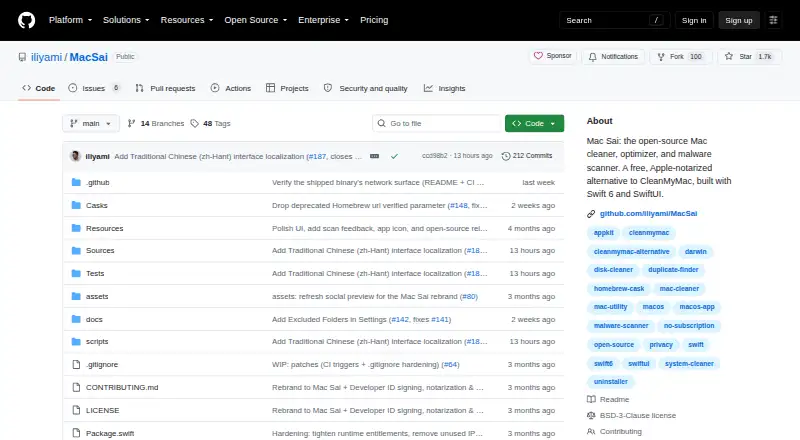
What Mac Sai is
Mac Sai is a free, open-source cleaner, optimizer, and malware scanner for macOS. Its Smart Scan runs cleanup, protection, and performance modules together, while System Junk checks 16 or more categories. The malware scanner uses curated signatures and offers Quick, Balanced, and Deep scan depths; the project says it is not an antivirus. Privacy tools clear history, cookies, and cache in Safari, Chrome, and Firefox while leaving Safari bookmarks untouched. App tools include an uninstaller with leftover detection and reset-to-defaults, an extensions reviewer, and an updater that reads Sparkle appcast version information. Space Lens visualizes disk use, Large & Old Files finds files over 50 MB, and Duplicates can consolidate files with APFS clones. Mail Attachments finds cached files from Apple Mail, Outlook, and Spark. The maker describes deletion safeguards including trash-first handling, protected-path blocks, excluded folders, and dry-run previews. Mac Sai is distributed under the BSD 3-Clause license and is listed for macOS 14 or later.
Who it suits
Mac Sai suits Mac users seeking cleanup, disk-usage, app-management, privacy, and malware-scanning tools in one app. Its modules that scan protected areas require Full Disk Access.
What it does well
- Free forever, with no subscription or in-app purchases.
- Smart Scan combines cleanup, protection, and performance modules.
- Disk tools include visual usage and duplicate-file handling.
- Maker says there is no telemetry server connection.
- Installation options include Homebrew, DMG, or source build.
What to know first
- macOS 14 or later is required.
- Full Disk Access is required by three modules.
- The project says its scanner is not an antivirus.
Limits
The free plan is listed as free forever, with no subscription or in-app purchases. Mail Attachments, Privacy, and Malware scans require Full Disk Access; the project says its malware scanner is not an antivirus.
Plans
| Plan | Billed and limits | Price |
|---|---|---|
| Mac Sai | Free forever · no subscription · no in-app purchases | Free |
As github.com lists them, read 4 Oct 2026. The maker's own page has the final word.
Getting started
- Choose the DMG, Homebrew, or one-line installer route from the project.
- Install Mac Sai on a Mac running macOS 14 or later.
- Grant Full Disk Access if you want Mail Attachments, Privacy, or Malware to scan protected areas.
- Alternatively, build from source with Swift 6 and Xcode 16 or later.
Mac Sai is an open-source macOS utility that combines cleanup, disk analysis, app maintenance, privacy controls, and malware scanning in one interface. It suits Mac users who want a free, local-first toolkit rather than a standalone security product. The main trade-off is scope: it is a broad maintenance suite, not a replacement for antivirus protection or a cross-platform tool.
Overview
Mac Sai brings several maintenance jobs into a single macOS application. Smart Scan runs cleanup, protection, and performance modules together, while System Junk searches more than 16 categories of removable data. The project is distributed under the BSD 3-Clause license, and the maker says it has no analytics, crash reporter, trackers, or telemetry server connection. Optional network activity is limited to update checks.
Deletion is designed to be conservative. Trash-first handling, protected-path blocks, symlink and TOCTOU checks, excluded folders, and a dry-run preview reduce the chance of an irreversible mistake. The maker also says the app is signed with an Apple Developer ID and notarized by Apple.
Key features
Cleanup and privacy
System Junk gives users a wide cleanup sweep, while the Privacy module clears history, cookies, and cache in Safari, Chrome, and Firefox without removing Safari bookmarks. This is useful for routine browser housekeeping, although the browser coverage is limited to those three applications.
Malware scanning
The scanner uses curated signatures and offers Quick, Balanced, and Deep scan depths. That range lets users choose speed or a more thorough pass, but the project explicitly says Mac Sai is not an antivirus. Readers seeking continuous antivirus protection should choose a dedicated security product instead.
App and extension management
The uninstaller detects leftovers and can reset apps to their defaults, addressing files that a basic drag-to-trash removal may leave behind. An extensions reviewer helps inspect installed add-ons. The updater reads Sparkle appcast version information, so its update checks depend on applications exposing those feeds.
Disk and Mail tools
Space Lens visualizes storage use, Large & Old Files targets files over 50 MB, and Duplicates can consolidate files with APFS clones. Mail Attachments locates cached attachments from Apple Mail, Outlook, and Spark. These tools are practical for finding space hogs, but Mail Attachments requires broader system access.
Mail Attachments, Privacy, and Malware modules require Full Disk Access to scan protected areas. Users should expect to grant that permission before those scans can cover their intended locations.
Pricing
| Plan | Price | Includes |
|---|---|---|
| Mac Sai | free | Free forever, no subscription, no in-app purchases |
There is no paid tier, trial period, seat limit, or renewal charge. The single free plan is the natural fit for individual Mac owners who want the complete feature set without recurring costs. Its limitation is not pricing but platform and product scope: coverage is Mac-only, and malware scanning should not be treated as full antivirus service.
Platforms
Mac Sai runs on macOS 14 and later. Source builds require Swift 6 with Xcode 16 or newer. Installation is available through Homebrew, a DMG, a one-line installer, or a source build, while contributions are accepted through GitHub pull requests.
Who it's for
Choose Mac Sai if you want one free, open-source application for junk removal, browser privacy cleanup, storage analysis, app uninstalling, extension review, and signature-based scans. Its local-first telemetry policy and deletion safeguards will appeal to privacy-conscious users who are comfortable granting Full Disk Access when needed.
Look elsewhere if you need Windows, Linux, iOS, or Android coverage, or if your priority is dedicated real-time antivirus protection. Mac Sai is also less suitable for users who prefer a narrowly focused tool instead of a multi-module utility.
Pros and cons
Pros
- Broad maintenance coverage: cleanup, privacy, apps, storage, mail caches, and malware scans share one free utility.
- Careful deletion design: trash-first removal, protected paths, dry-run previews, and link checks address common cleanup risks.
- Privacy-oriented operation: the maker states there are no analytics, trackers, crash reporter, or telemetry server connection.
- Open distribution: BSD 3-Clause licensing, multiple installation methods, and GitHub contributions make the project accessible to technical users.
Cons
- macOS 14+ only: older Macs cannot run the current system requirement.
- Not an antivirus: curated-signature scans provide malware checking, not the broader protection expected from a dedicated security suite.
- Full Disk Access required for key modules: protected-area scans for Mail Attachments, Privacy, and Malware need an additional macOS permission.
- Sparkle-dependent updates: the updater reads appcast feeds, so it cannot use the same update path for every application.
Alternatives
For a wider survey of security products, see Antivirus for Mac.
- Avira Free Security is the better choice when you want free real-time threat protection, privacy tools, and performance optimization across Android, iOS, macOS, Windows, and browser extensions.
- ClamAV fits technical users who want a free, open-source GPL antivirus engine for macOS plus Linux, Windows, APIs, or self-hosted deployments.
- Combo Cleaner offers broader platform coverage and a seven-day trial, but its free version can scan and show malicious items without removing them.
- ESET Mobile Security for Android is for Android phones and tablets, with a free basic tier and a premium tier at custom pricing.
- Avira Phantom VPN Free is a Windows VPN alternative with 500 MB per month on its free plan.
- LuLu is a focused, free, open-source macOS security tool for monitoring outgoing connections on macOS 10.15 and later.
- Protectstar Antivirus AI targets Android users with manual AI scanning, dual-engine checks, and anti-ransomware features on its free tier.
- Bitdefender Total Security is a paid cross-platform suite covering five devices for $59.99 a year in its first year, plus applicable sales tax.
Verdict
Mac Sai is a strong fit for Mac users on macOS 14 or later who want a no-cost, open-source maintenance toolbox with unusually careful deletion controls and minimal telemetry. Choose it for consolidated cleanup and storage management; look elsewhere when you need real-time antivirus protection, older-mac support, or coverage beyond macOS.
Verdict
Mac Sai combines system cleanup, app management, disk tools, and malware scanning for macOS. Note the macOS 14+ requirement and that its project explicitly says it is not an antivirus.
Questions
Is Mac Sai free?
Yes. The plan is free, free forever, with no subscription or in-app purchases.
Which Macs does it support?
The listed system requirement is macOS 14 or later.
Is Mac Sai open source?
Yes. It is distributed under the BSD 3-Clause license.
Does it provide antivirus protection?
The project says its malware scanner is not an antivirus.
How can I install it?
The project offers Homebrew, a DMG, a one-line installer, and a source build.
Does it send telemetry?
The maker says there are no analytics, crash reporter, trackers, or telemetry server connection. Optional network paths are for update checks.
Facts from Mac Sai's own pages
- Apple notarization
- The maker says Mac Sai is signed with an Apple Developer ID and notarized by Apple. · github.com, 4 Oct 2026
- App management
- The app includes an uninstaller with leftover detection and reset-to-defaults, an extensions reviewer, and an updater that reads Sparkle appcast version information. · github.com, 4 Oct 2026
- Cleanup
- Smart Scan runs cleanup, protection, and performance modules together, while System Junk scans 16+ categories. · github.com, 4 Oct 2026
- Deletion safeguards
- The maker describes trash-first deletion, protected-path blocks, symlink and TOCTOU checks, excluded folders, and a dry-run preview. · github.com, 4 Oct 2026
- Disk tools
- Space Lens visualizes disk usage, Large & Old Files finds files over 50 MB, and Duplicates can consolidate files using APFS clones. · github.com, 4 Oct 2026
- Full Disk Access
- Mail Attachments, Privacy, and Malware modules require Full Disk Access to scan protected areas. · github.com, 4 Oct 2026
- Install and support
- The project offers installation through Homebrew, a DMG, a one-line installer, or source build, and invites contributions through GitHub pull requests. · github.com, 4 Oct 2026
- Integrations
- Mail Attachments finds cached attachments from Apple Mail, Outlook, and Spark; the Updater checks apps through their Sparkle feeds. · github.com, 4 Oct 2026
- License
- Mac Sai is distributed under the BSD 3-Clause license. · github.com, 4 Oct 2026
- Privacy tools
- The Privacy module cleans Safari, Chrome, and Firefox history, cookies, and cache, while leaving Safari bookmarks untouched. · github.com, 4 Oct 2026
- Protection
- Its malware scanner uses curated signatures at Quick, Balanced, and Deep scan depths, and the project says it is not an antivirus. · github.com, 4 Oct 2026
- Purpose
- Mac Sai is an open-source Mac cleaner, optimizer, and malware scanner. · github.com, 4 Oct 2026
- System requirement
- The comparison section lists macOS 14+; building from source requires Swift 6 (Xcode 16+). · github.com, 4 Oct 2026
- Telemetry
- The maker states Mac Sai has no analytics, crash reporter, trackers, or server connection for telemetry; its listed network paths are optional update checks. · github.com, 4 Oct 2026
Where Mac Sai stands on Freedom251
- Antivirus for Mac#9 of 43