Freedom251 › Bandwidth Monitoring Software
Sniffnet
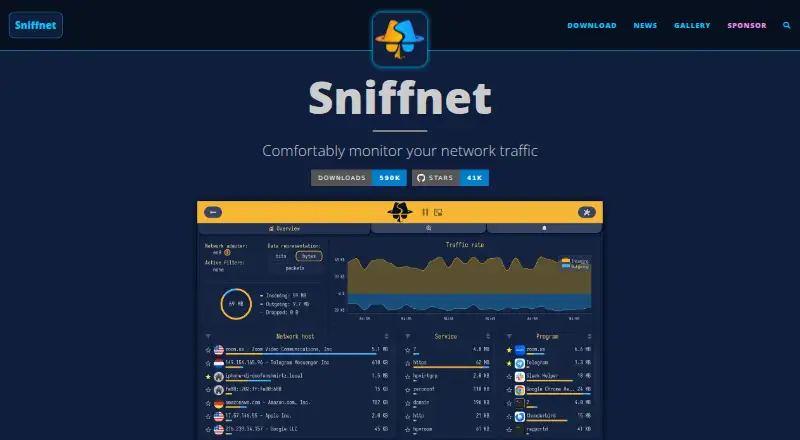
What Sniffnet is
Sniffnet is a free network monitoring app for Windows, macOS, and Linux. It shows overall Internet traffic statistics and real-time charts, and lets you choose a network adapter and filter observed traffic. You can import or export PCAP capture reports, analyze offline traces, and use display filters and protocol dissectors. Sniffnet identifies local connections, shows remote hosts’ locations, and can find their domain names and ASNs. It recognizes more than 6,000 services, protocols, trojans, and worms, and shows which programs use network bandwidth. Users can save favorite programs, set alerts for network events, and import custom IP blacklists to highlight potentially dangerous connections. The app supports custom themes and 26 languages. A 2025 security audit found one low-severity issue, which has been fixed. Most functionality uses offline databases; Sniffnet also makes reverse DNS lookups to provide hostnames. It is free and open source under MIT or Apache-2.0 licenses.
Who it suits
Sniffnet suits people who want to inspect network activity through a graphical app, including those who find other network analyzers difficult to understand. It also supports users who need live monitoring, offline trace analysis, or command-line capture.
What it does well
- Free and open source under MIT or Apache-2.0.
- Available on Windows, macOS, and Linux.
- Recognizes more than 6,000 services and protocols.
- Supports PCAP read/write and PCAPNG and CAP reading.
- Offers alerts, custom IP blacklists, and program tracking.
What to know first
- Does not support traffic decryption.
- Reverse DNS lookups are used to provide hostnames.
- Persistent installation problems or questions are directed to an issue.
Plans
| Plan | Billed and limits | Price |
|---|---|---|
| Sniffnet | Fully free and open-source · MIT or Apache-2.0 | Free |
| Free | Network monitoring · live charts · traffic statistics · PCAP import/export · Windows/macOS/Linux desktop builds | Free |
As sniffnet.app lists them, read 30 Sept 2026. The maker's own page has the final word.
Getting started
- Visit the Sniffnet website.
- Choose the download for Windows, macOS, or Linux.
- Install the app on the selected platform.
- Choose a network adapter to monitor traffic.
- Use filters or capture files to inspect activity.
Sniffnet is a free, open-source network monitor for people who want to understand traffic without starting with a command-line workflow. It is strongest as a visual overview and capture-file companion; it is not suitable when decrypting traffic is essential.
Overview
Sniffnet brings live monitoring, host details, alerts, and offline trace analysis together in a desktop app for Windows, macOS, and Linux. Choose an adapter, filter observed traffic, and follow overall statistics and real-time traffic-intensity charts. That is a useful combination for spotting changes in activity and investigating where bandwidth is going, though the lack of decryption rules it out for inspecting encrypted content.
Most functionality relies on offline databases. Sniffnet processes incoming traffic as needed and uses reverse DNS lookups to provide hostnames for IP addresses. A 2025 security audit covered static and dynamic analysis, dependency checks, fuzzing, and interactive testing; its only relevant finding was low severity and had been fixed.
Key features
- Live traffic and capture files: Select an adapter, apply display filters, and capture traffic. Sniffnet reads PCAP, PCAPNG, and CAP files, and can export reports as PCAP. This makes it useful for moving between a live view and saved traces, with PCAP as the export format.
- Host and service details: The app identifies local connections, shows remote hosts’ geographical locations, and can find domain names and ASNs. It recognizes more than 6,000 upper-layer services, protocols, trojans, and worms, giving a broad set of labels for interpreting observed activity.
- Program monitoring: See which programs use network bandwidth and save favorites. This is especially relevant when the question is which application is responsible for traffic, rather than only how much traffic is moving.
- Alerts and blacklists: Configure notifications for network events and import custom IP blacklists to highlight potentially dangerous connections. These tools add focused attention to monitoring, but do not change the app’s inability to decrypt traffic.
- Customization: Custom themes and 26 languages make the interface adaptable to different preferences and users.
- Command-line support: Sniffnet includes a command-line tool and command-line capture alongside its graphical monitoring features.
Pricing
Sniffnet costs free. The Sniffnet plan is fully free and open-source under MIT or Apache-2.0, with application monitoring, bandwidth alerts, live capture, offline trace analysis, and capture-file support included. There is no paid tier to weigh against the free plan, and no trial is needed to access the software.
This is a strong fit for individuals who want a capable desktop monitor without a license fee. Its principal trade-off is functional rather than commercial: traffic decryption is not included, so users who need that capability should choose another analyzer.
Platforms
Sniffnet runs on Windows, macOS, and Linux. Persistent installation problems or questions can be taken to an issue on the project.
Who it's for
Sniffnet suits people who want a visual way to monitor bandwidth, identify hosts and services, and see which programs are using the network. Its mix of live charts, alerts, and offline trace analysis can serve newcomers as well as users who need a lightweight monitoring view. Choose another tool if decrypting traffic is central to the work.
Pros and cons
- Pro: Live charts, program monitoring, host details, alerts, and offline analysis are combined in a free desktop application, covering several common monitoring tasks without separate paid plans.
- Pro: PCAP export plus PCAP, PCAPNG, and CAP reading make it practical to examine saved traces as well as live activity.
- Pro: The 2025 audit’s only relevant finding was low severity and had been fixed.
- Con: Sniffnet does not decrypt traffic, a decisive limitation for users who need to inspect encrypted content.
- Con: Hostnames rely on reverse DNS lookups, so hostname information is tied to that lookup method.
Alternatives
For more options, browse Network Packet Capture Software, Bandwidth Monitoring Software, or Network Packet Analyzer Software.
- Termshark is another free option across Android, Linux, macOS, and Windows; it requires tshark in PATH, and some tshark features are not exposed.
- Malcolm is a free, self-hosted alternative for readers who want software available across web and API platforms as well as desktop operating systems.
- NetworkMiner is a freemium alternative with a free edition and GPLv2 open-source code.
- tcpdump is a free alternative for readers considering a BSD-licensed tool; capture permission depends on operating system and configuration.
- TShark is a free alternative from the Wireshark project, maintained by the Wireshark Foundation, a nonprofit supported by donations.
- Wireshark is a free full version with no license fee.
- Arkime is free, open source, and self-hosted, with no paid-only features or license fees.
- Colasoft Capsa has a free edition limited to 10 monitored IP addresses, four-hour sessions, and no WiFi connection monitoring; its Professional plan costs $695, paid once.
Verdict
Choose Sniffnet if you want a free, cross-platform visual monitor that combines live traffic, program usage, host details, alerts, and capture-file analysis. Its breadth and open-source pricing make it a practical starting point for network visibility. Look elsewhere if traffic decryption is a requirement.
Verdict
Sniffnet combines live traffic views, host details, capture-file support, and program monitoring at no cost. Note that it does not decrypt traffic, and reverse DNS lookups are used for hostnames.
Questions
How much does Sniffnet cost?
The Sniffnet plan is free, and the app is fully free and open-source under MIT or Apache-2.0.
Which operating systems does it support?
Sniffnet supports Windows, macOS, and Linux.
Which capture file formats can it use?
It reads and writes PCAP files, and reads PCAPNG and CAP files.
Does Sniffnet decrypt traffic?
No. Traffic decryption is listed as unavailable.
Does it require network lookups for hostnames?
Most functionality uses offline databases, but Sniffnet makes reverse DNS lookups to provide hostnames for IP addresses.
Facts from Sniffnet's own pages
- Adapter selection
- Users can choose a network adapter to inspect. · sniffnet.app, 15 Oct 2026
- Alerts and blacklists
- Users can configure notifications for network events and import custom IP blacklists to highlight potentially dangerous connections. · sniffnet.app, 30 Sept 2026
- Capture and reports
- Users can choose a network adapter, filter observed traffic, and import or export capture reports as PCAP files. · sniffnet.app, 30 Sept 2026
- Command-line interface
- Command-line options include selecting an adapter, printing the configuration path, viewing Windows logs, restoring defaults, and showing help or version information. · github.com, 15 Oct 2026
- Company profile
- LinkedIn lists Sniffnet as a self-employed software-development organization with one employee, headquartered in Boissano, Italy, founded in 2022. · it.linkedin.com, 15 Oct 2026
- Documentation
- The project wiki contains installation, capture setup, monitoring, advanced-feature and FAQ sections. · github.com, 15 Oct 2026
- Domain and ASN data
- The app displays domain names and autonomous-system information for hosts. · sniffnet.app, 15 Oct 2026
- Favorites
- Hosts, services and programs can be saved as favorites. · sniffnet.app, 15 Oct 2026
- Flow-level monitoring
- The project emphasizes flow details such as country, organization, domain and upper-layer service instead of presenting full packet payloads. · nlnet.nl, 15 Oct 2026
- Funding
- NLnet records an NGI0 Commons Fund grant for Sniffnet covering June 2024 through July 2025. · nlnet.nl, 15 Oct 2026
- Geolocation
- Remote hosts can be shown with geographical-location information. · sniffnet.app, 15 Oct 2026
- Host details
- Sniffnet can identify local network connections, show remote hosts’ geographical locations, and find host domain names and ASNs. · sniffnet.app, 30 Sept 2026
- Independent description
- Hysen Labs describes Sniffnet as a Rust and Iced cross-platform monitor aimed at visual live-traffic inspection rather than command-line packet analysis. · hysenlabs.com, 15 Oct 2026
- Independent licence listing
- SignPath Foundation lists Sniffnet as free, open-source, cross-platform software under the MIT License. · signpath.org, 15 Oct 2026
- Integrations
- The webhook documentation gives SIGNL4, IFTTT, Svix and Webhook.site as compatible notification receivers. · github.com, 15 Oct 2026
- Intended users
- The maker says Sniffnet is designed to be usable with ease by everyone, including people who find other network analyzers difficult to understand. · sniffnet.app, 30 Sept 2026
- Licence
- Sniffnet is dual-licensed under MIT or Apache-2.0. · sniffnet.app, 15 Oct 2026
- Limit: dependency setup
- An AlternativeTo reviewer reported that Windows 11 initially failed because wpcap.dll was missing until the installation instructions were followed. · alternativeto.net, 15 Oct 2026
- Limit: no traffic control
- ITDeptTools says Sniffnet observes traffic but does not block applications or impose per-application speed limits. · itdepttools.com, 15 Oct 2026
- Limit: PCAP exposure
- The published threat model warns that enabled PCAP export writes captured headers, hostnames, DNS queries and payloads to disk unencrypted. · github.com, 15 Oct 2026
- Limit: shallow packet analysis
- Hysen Labs says Sniffnet is not a replacement for Wireshark or tcpdump when deep protocol dissection or headless automation is required. · hysenlabs.com, 15 Oct 2026
- Linux requirements
- Linux builds may require libpcap, ALSA, Fontconfig and GTK development/runtime packages, and non-root users need network-capture capabilities. · github.com, 15 Oct 2026
- Live charts
- Real-time charts show traffic intensity. · sniffnet.app, 15 Oct 2026
- Local network view
- Sniffnet identifies connections in the local network. · sniffnet.app, 15 Oct 2026
Where Sniffnet stands on Freedom251
- Bandwidth Monitoring Software#2 of 33
- Network Packet Capture Software#3 of 22
- Network Packet Analyzer Software#6 of 32