Freedom251 › Network Packet Capture Software
TShark
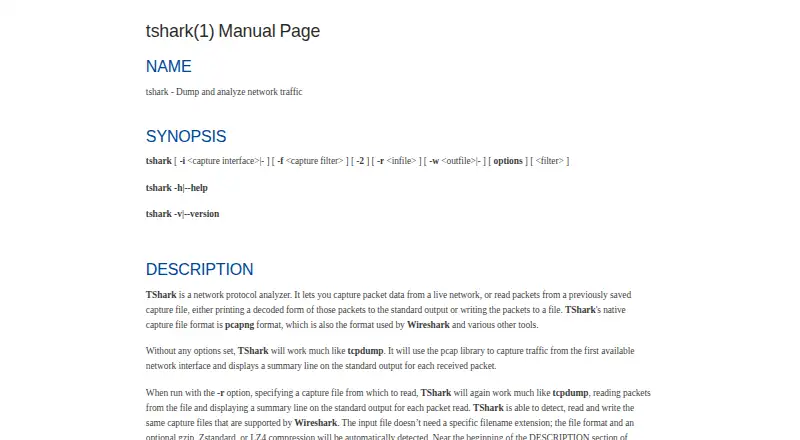
What TShark is
TShark is the Wireshark project's terminal-mode utility for network protocol analysis. It can capture live network traffic or read saved captures, decode packets for output, and write captures to a file. Its native capture format is pcapng, and it can read and write capture files supported by Wireshark. Display filters use Wireshark's syntax to select packets and protocol fields. Output options include fields, JSON, PDML, and text; capture settings include interface selection, capture filters, packet limits, and ring-buffer files. TShark can also produce ElasticSearch mapping data or pipe packet output to another program or script. Display filters are not supported when capturing and saving packets with the -w option. The manual sets a 2 TB maximum capture-file size and notes possible issues above 2^32 packets. TShark is free under GNU GPL version 2 and is listed for Linux, macOS, and Windows.
Who it suits
TShark suits users who need a terminal-mode tool to capture or inspect network packets and select protocol fields with display filters. Its output and piping options may suit workflows that send packet data to other tools.
What it does well
- Captures live traffic or reads saved captures.
- Supports Wireshark display-filter syntax.
- Outputs fields, JSON, PDML, and text.
- Can pipe output to another program or script.
- Free under GNU GPL version 2.
What to know first
- Display filters are unavailable with capture saving via -w.
- Capture files have a 2 TB maximum.
- Manual notes possible issues above 2^32 packets.
Limits
There is no paid plan listed. The manual sets a maximum capture-file size of 2 TB and notes potential issues above 2^32 packets; display filters are not supported while capturing and saving with -w.
Plans
| Plan | Billed and limits | Price |
|---|---|---|
| Free | GNU GPL v2 · network protocol analyzer | Free |
As wireshark.org lists them, read 30 Sept 2026. The maker's own page has the final word.
Getting started
- Open the TShark manual on the Wireshark website.
- Use TShark on Linux, macOS, or Windows.
- Select a capture interface and configure capture filters or packet limits.
- Capture live traffic or open a saved capture file.
- Choose an output format or pipe packet output to another program.
TShark is a command-line utility for capturing live network traffic and decoding saved packet captures. It is best suited to network engineers, security analysts, and automation-heavy teams comfortable working in a terminal. The free, scriptable tool is a strong fit when Wireshark-compatible analysis and structured output matter more than a graphical interface.
Overview
TShark covers both sides of packet work: it collects traffic from a chosen interface and reads existing capture files for offline investigation. It decodes protocols and can print results directly or write them for later processing, making it practical for shell pipelines, scheduled jobs, and incident-response scripts.
pcapng is its native capture format, while files supported by Wireshark can also be read and written. Because its display-filter syntax matches Wireshark's, analysts can transfer filtering knowledge between the terminal and desktop tools rather than learn a separate query language.
The project sits within the Wireshark Foundation, a nonprofit supported by donations. Wireshark software is released under the GNU General Public License version 2, with no license fee.
Key features
- Live and offline capture: Select an interface for real-time collection or open a saved capture for analysis. That combination suits both troubleshooting in progress and post-incident review.
- Collection controls: Interface selection, capture filters, packet limits, and ring-buffer files help constrain traffic and manage rolling captures. These controls are useful on busy links where unrestricted collection would be impractical.
- Protocol inspection and filtering: TShark decodes packet contents and applies Wireshark-style display filters to packets and protocol fields. The important limitation is operational: display filters do not work while a live capture is being saved with -w, so that workflow must rely on capture filters or later analysis.
- Structured output: Fields, JSON, PDML, and text formats support both human inspection and downstream parsing. Output can be piped to another program or script, and TShark can write ElasticSearch mapping data for integration work.
- Traffic decryption and analysis: Traffic decryption, flow analysis, remote capture, and PCAP support extend it beyond basic packet dumping for teams that need protocol-level investigation across capture sources.
- Large-capture handling: Capture files have a stated maximum of 2 TB, with possible issues above 2^32 packets. That is ample for ordinary investigations but a material constraint for very long, high-volume collection.
Pricing
TShark has one plan: Free at no cost. It is free software under GNU GPL v2, with no trial or paid tier to budget for. That makes it suitable for individual analysts, classrooms, open-source projects, and organizations that can operate a command-line tool without commercial support or licensing arrangements.
Platforms
Official packages target Linux, macOS, and Windows. Wireshark also lists FreeBSD, NetBSD, and other supported systems, so deployments outside the three primary desktop platforms may be possible where the project provides support. TShark supports both local and remote capture workflows, and can be deployed directly or integrated into scripts and services.
Who it's for
Choose TShark if you need repeatable packet capture, Wireshark-compatible filters, and machine-readable output in a terminal. It is particularly well matched to network operations, security investigation, CI or scheduled diagnostics, and developers building packet-processing pipelines.
It is less suitable for readers who want a visual packet browser, guided dashboards, or an interface that hides command syntax. The -w display-filter restriction also makes it a poor fit when you require filtering during simultaneous live capture and file writing rather than filtering before capture or afterward.
Pros and cons
Pros
- Free GPLv2 software: No license fee makes broad deployment and experimentation possible.
- Wireshark-compatible filters: Shared syntax helps teams move between terminal and graphical analysis.
- Automation-ready output: JSON, fields, PDML, text, pipes, and ElasticSearch mapping support scripted workflows.
- Strong capture controls: Ring buffers, limits, interface choice, and capture filters give operators control over collection.
- Broad capability: Live capture, offline decoding, decryption, flow analysis, PCAP handling, and remote capture cover serious investigation tasks.
Cons
- No display filters with -w: Live captures saved directly to file cannot use display filters at that stage.
- Terminal-first operation: Users seeking visual exploration must choose another interface or pair TShark with a separate tool.
- Very large-file caveats: The 2 TB limit and warning above 2^32 packets matter for sustained high-volume collection.
Alternatives
Termshark is a free terminal interface that requires TShark in the PATH; choose it when you want a more guided terminal presentation, accepting that some TShark features are not exposed.
Wireshark is the natural choice when the same analysis requires a full graphical application rather than command-line output.
tcpdump suits users who want a free, BSD-licensed capture utility and can handle operating-system-dependent capture permissions.
Sniffnet offers a fully free, open-source alternative for readers who prefer a different monitoring experience.
NetworkMiner is a freemium, GPLv2 option for those interested in its managed-C# approach to network analysis.
Malcolm is a free, self-hosted platform for teams wanting a broader web and API deployment model.
Arkime is a free, open-source, self-hosted option when large-scale web-oriented deployment is the priority.
Colasoft Capsa is worth considering on Windows if a freemium product with a free monitored-address cap and paid professional tier fits your requirements.
Browse Network Packet Capture Software, Network Packet Analyzer Software, and Network Protocol Analyzers for broader category choices.
Verdict
TShark is an excellent choice for technically confident users who need free, repeatable packet capture and Wireshark-level protocol filtering in scripts or terminal sessions. Its main reason to choose it is the combination of deep decoding and automation-friendly formats; its main reason to look elsewhere is the command-line-only workflow, compounded by the inability to apply display filters while saving with -w.
Verdict
TShark provides terminal-based capture and analysis with multiple output formats and Wireshark-compatible display filters. Note the filter restriction when saving captures with -w, as well as the stated file-size limit.
Questions
How much does TShark cost?
TShark is free under GNU GPL version 2, with no license fee for downloading.
Which platforms are listed?
Wireshark lists Linux, macOS, and Windows among its supported systems.
What capture formats does it support?
Its native format is pcapng, and it can read and write capture formats supported by Wireshark.
Can TShark filter packets?
Yes. It uses Wireshark display-filter syntax to select packets and protocol fields. Display filters are not supported while capturing and saving with -w.
Who maintains TShark?
The Wireshark Foundation, a nonprofit supported by donations, maintains the Wireshark project.
Facts from TShark's own pages
- Analysis limit
- Display filters are not supported when TShark captures and saves packets with the -w option. · wireshark.org, 30 Sept 2026
- Capture controls
- Capture options include interface selection, capture filters, packet limits, and ring-buffer files. · wireshark.org, 30 Sept 2026
- File size limit
- The manual states that capture file size is limited to a maximum of 2 TB, and notes potential issues above 2^32 packets. · wireshark.org, 30 Sept 2026
- Integration
- TShark can write ElasticSearch mapping data and supports piping packet output to another program or script. · wireshark.org, 30 Sept 2026
- License
- Wireshark is freely available under the GNU General Public License version 2, with no license fee for downloading. · wireshark.org, 30 Sept 2026
- Maker
- The Wireshark project is maintained by the Wireshark Foundation, described as a nonprofit supported by donations. · wireshark.org, 30 Sept 2026
- Output
- TShark can output packet data in formats including fields, JSON, PDML, and text. · wireshark.org, 30 Sept 2026
- Packet formats
- TShark uses pcapng as its native capture format and can read and write capture files supported by Wireshark. · wireshark.org, 30 Sept 2026
- Project features
- The Wireshark project describes TShark as its terminal-mode utility and lists live capture, offline analysis, protocol inspection, and display filters among its features. · wireshark.org, 30 Sept 2026
- Protocol analysis
- TShark provides display filters for selecting packets and protocol fields, using the same syntax as Wireshark. · wireshark.org, 30 Sept 2026
- Purpose
- TShark captures live network traffic or reads saved captures, then decodes packets for output or writes them to a file. · wireshark.org, 30 Sept 2026
- Security information
- The documentation page links to security advisories covering past vulnerabilities and how to report a vulnerability. · wireshark.org, 30 Sept 2026
- Support and learning
- The project offers documentation, mailing lists, community forums, and educational resources including SharkFest. · wireshark.org, 30 Sept 2026
- Supported systems
- The project lists Windows, Linux, macOS, FreeBSD, NetBSD, and other platforms as supported by Wireshark. · wireshark.org, 30 Sept 2026
Where TShark stands on Freedom251
- Network Packet Capture Software#11 of 22
- Network Protocol Analyzers#17 of 30
- Network Packet Analyzer Software#19 of 32