Freedom251 › Network Monitoring
NetLimiter
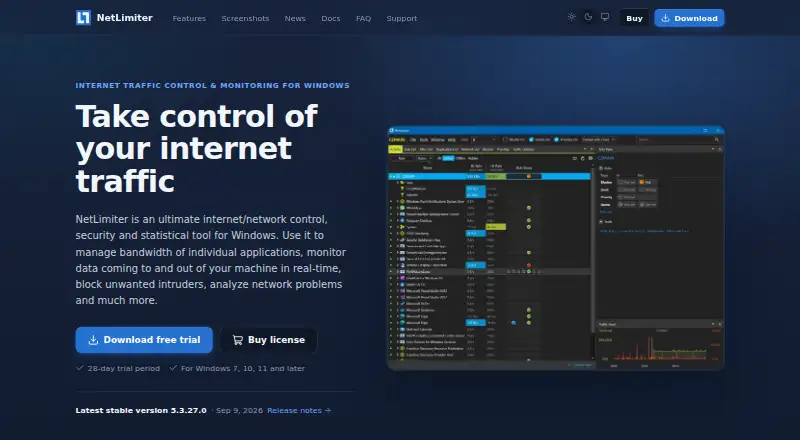
What NetLimiter is
NetLimiter is Windows software for monitoring internet traffic and controlling bandwidth on PCs. It can set maximum transfer speeds for an entire machine, applications, users, or individual connections, and adjust bandwidth priority. Real-time monitoring shows application traffic moving to and from the internet or other networks with traffic charts. Connection Blocker rules can stop selected applications from connecting, with an interactive prompt for creating rules as connections occur. Filters can use application paths, domain names, IP ranges, or users; quotas can trigger speed limits or blocker rules. Detailed traffic statistics are stored locally for retrospective analysis, with unlimited historical retention. NetLimiter can remotely control other machines where it is installed, supports VirusTotal checks, and offers an API for third parties. The maker says data is not sent to or stored outside the installed machine, although the software connects online for updates, license registration, and VirusTotal checks. It is listed for Windows 7, 10, 11, and later, and includes a 28-day trial.
Who it suits
It suits Windows users who need per-application bandwidth controls, connection blocking, traffic charts, and long-term local statistics. Administrators can also manage other installed machines remotely.
What it does well
- Per-application and per-user bandwidth limits
- Real-time traffic charts
- Connection blocking with rule prompts
- Unlimited locally stored historical statistics
- Remote control of other installed machines
What to know first
- Windows-only software
- Standard license supports one device at a time
- New rules unavailable after trial or subscription expiry
- Statistics stop working in Restricted Mode
Limits
After the trial or subscription expires, Restricted Mode keeps real-time monitoring and existing rules working, but it prevents creating new rules and disables statistics. A standard license can be registered on one device at a time, including virtual machines.
Plans
| Plan | Billed and limits | Price |
|---|---|---|
| Standard license — two years | One-time payment with manual renewal, or automatic renewal; price is not displayed on the opened page. · 24 months of full functionality · one device at a time, including virtual machines · one license per computer | On request |
| Standard license — one year | One-time payment with manual renewal, or automatic renewal; price is not displayed on the opened page. · 12 months of full functionality · one device at a time, including virtual machines · one license per computer | On request |
As netlimiter.com lists them, read 2 Oct 2026. The maker's own page has the final word.
Getting started
- Open the NetLimiter website
- Download the Windows version
- Install it on Windows 7, 10, 11, or later
- Use the included 28-day trial
- Create bandwidth, blocker, filter, or quota rules
- Register a standard license on one device if continuing
Verdict
NetLimiter combines detailed Windows traffic monitoring with speed controls, quotas, filters, and blocking rules. Its local data storage and remote administration broaden its use, while licensing and post-expiration restrictions should be considered.
Questions
Is NetLimiter free?
A free plan is listed, and the download includes a 28-day trial. The pricing model is paid, with standard one-year and two-year license terms.
Which systems does it support?
NetLimiter is listed for Windows 7, Windows 10, Windows 11, and later.
How many devices does a standard license cover?
The currently available standard license can be registered on one device at a time, including virtual machines, and transferred between devices.
Does NetLimiter store data online?
The maker says user data stays on the installed machine and is not stored in cloud or other online storage. The software connects online for updates, license registration, and VirusTotal checks when used.
What happens when the trial ends?
Restricted Mode allows real-time monitoring and existing rules to continue, but new rules cannot be created and statistics do not work.
Facts from NetLimiter's own pages
- Bandwidth controls
- It can set maximum transfer speeds for a machine, applications, users, or individual connections, and adjust bandwidth priority. · netlimiter.com, 2 Oct 2026
- Connection rules
- Connection Blocker rules can prevent selected applications from connecting to the internet, with an interactive prompt to create rules in real time. · netlimiter.com, 2 Oct 2026
- Free plan
- No · netlimiter.com, 21 Sept 2026
- Integrations and API
- The feature list states that NetLimiter supports VirusTotal checks and provides an API for third parties. · netlimiter.com, 2 Oct 2026
- Internet connections
- The privacy notice says NetLimiter connects to the internet for updates, license registration, or VirusTotal file checks when used. · netlimiter.com, 2 Oct 2026
- License limit
- The currently available standard license can be registered on one device at a time, including virtual machines, and transferred between devices. · netlimiter.com, 2 Oct 2026
- Privacy
- The maker says NetLimiter does not send or store user data outside the installed machine and does not use cloud or other online storage. · netlimiter.com, 2 Oct 2026
- Purpose
- NetLimiter controls and monitors internet traffic on Windows PCs, including per-application bandwidth management and connection blocking. · netlimiter.com, 2 Oct 2026
- Quotas and filters
- Users can create filters using application paths, domain names, IP ranges, or users, and set quotas that can trigger limits or blocker rules. · netlimiter.com, 2 Oct 2026
- Remote administration
- NetLimiter can remotely control other machines that have NetLimiter installed. · netlimiter.com, 2 Oct 2026
- Statistics
- Detailed long-term traffic statistics are stored locally for retrospective analysis. · netlimiter.com, 2 Oct 2026
- Support
- The maker offers email support, user documentation, FAQs, and help with lost registration or license management. · netlimiter.com, 2 Oct 2026
- Traffic monitoring
- It monitors application traffic to and from the internet or other networks in real time and provides traffic charts. · netlimiter.com, 2 Oct 2026
- Trial and platform
- The download includes a 28-day trial and is listed for Windows 7, 10, 11, and later. · netlimiter.com, 2 Oct 2026
- Trial expiration
- After the trial or subscription expires, Restricted Mode allows real-time monitoring and existing rules to keep functioning, but users cannot create new rules and statistics do not work. · netlimiter.com, 2 Oct 2026
Where NetLimiter stands on Freedom251
- Network Monitoring#26 of 55
- Firewall Software#43 of 81
- Bandwidth Monitoring Software#19 of 33