Freedom251 › Duplicate File Finders
rdfind
What rdfind is
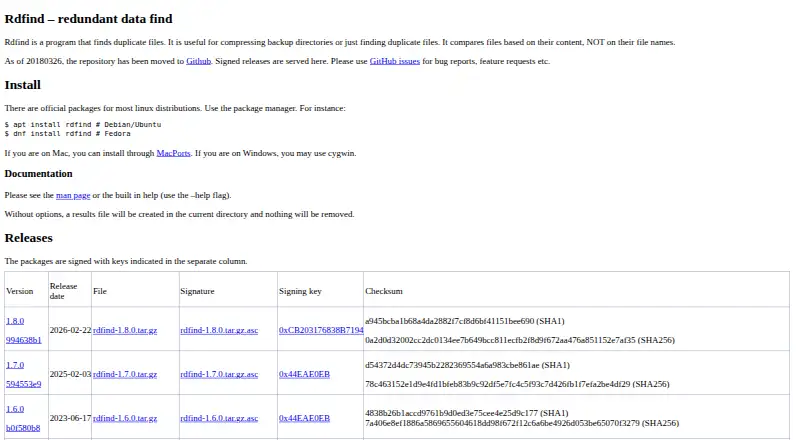
rdfind is a command-line utility for finding duplicate files by comparing their contents, rather than relying on filenames. It searches directories recursively and can compare files within or across directories, or scan individual files supplied as arguments. Matching can consider file size, the first and last bytes, checksums, and inode and device identity. Supported checksums are MD5, SHA-1, SHA-256, SHA-512, and xxh128; SHA-1 is the default. By default, rdfind writes a results file and leaves files alone. Options can delete duplicates or replace them with symbolic or hard links, while a dry run previews an enabled action without carrying it out. File-size limits and ignoring empty files are also available. rdfind is free under GPLv2 or later and runs on Linux, macOS, and Windows. Linux packages are available for most distributions; the project also describes MacPorts and Cygwin installation routes. Its manual warns about symlink attacks when deleting or linking and says it does not handle file ownership or permissions.
Who it suits
rdfind suits people who want to locate duplicate files from the command line, including those scanning directories recursively or across locations. Its ownership and permissions limitation makes it a poor fit for directories with several owners.
What it does well
- Recursively scans within or across directories.
- Supports five checksum options.
- Dry-run previews enabled actions.
- Can filter empty files and file sizes.
- Free under GPLv2 or later.
What to know first
- Command-line tool; no graphical interface is listed.
- Does not handle file ownership or permissions.
- Deleting or linking can expose it to symlink attacks.
- No Recycle Bin or Trash option is listed.
Plans
| Plan | Billed and limits | Price |
|---|---|---|
| rdfind | GPLv2 or later | Free |
As rdfind.pauldreik.se lists them, read 9 Oct 2026. The maker's own page has the final word.
Getting started
- Visit the rdfind website.
- Choose the installation route for your platform: a Linux distribution package, MacPorts, or Cygwin on Windows.
- Supply directories or individual files as command-line arguments.
- Run the default mode to write a results file, or use a dry run to preview an enabled action.
rdfind is a command-line duplicate finder for people who care about content-accurate results and controlled cleanup across folders. It suits Linux, macOS, and Windows users comfortable supplying paths and reviewing a results file. Its strongest case is flexible, recursive matching with conservative defaults; its weakest is the need to understand symlinks, ownership, and command-line actions before automating changes.
Overview
rdfind compares file contents rather than relying on filenames, so it can find duplicates even when files have been renamed. It searches directories recursively and can also accept individual files as command-line arguments, making it useful for checking one backup tree, several directories, or a mixed set of paths. The project dates to 2006 and is authored by Paul Dreik.
The program can also help reduce backup-directory duplication, but it is not a graphical organizer or a recycle-bin workflow. Its default run writes a results file without modifying files, a sensible starting point when the scan covers valuable data. Users must decide what to do next.
Key features
Content-based matching
rdfind narrows candidates by file size, then compares first and last bytes and calculates a checksum. It supports MD5, SHA-1, SHA-256, SHA-512, and xxh128, with SHA-1 as the default. It also accounts for inode and device identity, helping distinguish filesystem references that should not be treated as separate content copies. Automatic selection chooses among duplicate files according to the program's rules, rather than requiring a manual choice for every match.
Controlled actions
A dry run prints what an enabled action would do, which is valuable before deletion or link creation. rdfind can delete duplicates or replace them with symbolic links or hard links, but those options change the risk profile substantially. The results file and dry-run output make review possible; they do not remove the need to verify which copy is retained.
Filtering and scope
Options can ignore empty files and impose minimum or maximum file sizes. These filters are practical for excluding noise or focusing a scan on large backup data. Recursive searches work within one directory or across several supplied locations.
Operational cautions
The manual warns that changing directories while a run is in progress can make rdfind brittle. It also cautions that deletion and linking can expose the process to symlink attacks. rdfind does not handle file ownership or permissions and is not recommended across directories with several owners. Those constraints make it a better fit for an administrator controlling a consistent environment than for shared, multi-owner storage.
Pricing
rdfind is free: the rdfind plan costs nothing and is licensed under GPLv2 or later. There is no free trial because the software is already free, and no paid tier, seat charge, quota, or renewal term is given. This suits anyone wanting a no-cost command-line utility, while the trade-off is that convenience features such as a trash workflow are not part of the offering.
Platforms
rdfind is cross-platform on Linux, macOS, and Windows. The official site says most Linux distributions provide packages and gives apt and dnf installation examples. macOS users can install through MacPorts, while Windows users may use Cygwin. That breadth is useful for mixed-device households and servers, though each platform's installation path assumes some command-line familiarity.
Who it's for
Choose rdfind if you need recursive, content-based duplicate detection across directories and want checksum choices, size filters, and a preview before taking action. It is particularly suitable for backup maintenance and technically confident users who can inspect results and manage filesystem permissions.
Look elsewhere if you want a graphical interface, built-in Trash or Recycle Bin handling, or workflows designed around multiple owners and permission boundaries. rdfind's linking and deletion modes demand careful path control and security awareness.
Pros and cons
Pros
- Conservative default: a scan writes results without changing files, allowing review before cleanup.
- Flexible matching: recursive searches, multiple checksum algorithms, and size filters cover varied backup and archive jobs.
- Broad platform reach: Linux, macOS, and Windows support makes the same utility viable across systems.
- Previewable actions: dry-run output shows the consequences of deletion or linking before execution.
Cons
- Command-line focused: supplying paths and interpreting output will not suit users seeking a visual browser.
- Filesystem risk: symlink attacks and brittleness when directories change make destructive or linking modes unsuitable for casual automation.
- No ownership handling: shared trees with several owners are outside its recommended use.
- No Trash support: deleted duplicates do not have a built-in recycle-bin safety net.
Alternatives
For a broader shortlist, see Duplicate File Finders.
- Czkawka is a free, no-ads option for Android as well as Linux, macOS, and Windows.
- dupeGuru is another free choice across Linux, macOS, and Windows for finding duplicate files.
- Anti-Twin is freeware for private use and supports Linux, macOS, and Windows.
- Duplicate Files Fixer offers Android, macOS, and Windows coverage; its free version scans unlimited files but removes up to 15 duplicates at once, while the paid plan is €35.95 a year.
- fclones is a free, MIT-licensed command-line utility for Linux, macOS, and Windows.
- jdupes is free, MIT-licensed software for exact duplicate matching on Linux, macOS, and Windows.
- Space Wizard has a free tier with up to 100 GB per scan and a paid Pro tier.
- AllDup is free for private users and companies, but Windows-only.
Verdict
rdfind is a strong choice for technically capable users managing duplicate-heavy backups across Linux, macOS, or Windows. Its content comparison, configurable checksums, filters, and non-destructive default provide disciplined control at no cost. Choose another tool if you need a graphical cleanup experience, Trash recovery, or safer handling of shared directories and ownership boundaries.
Verdict
rdfind offers several ways to identify duplicates and leaves files unchanged by default. Review its symlink and ownership cautions before enabling deletion or linking.
Questions
How much does rdfind cost?
The rdfind plan is free and is licensed under GPLv2 or later.
Is there a free plan or trial?
rdfind is free. There is no free trial.
Which platforms does rdfind support?
It runs on Linux, macOS, and Windows. Linux users can use distribution packages, Mac users can install through MacPorts, and Windows users may use Cygwin.
How does rdfind identify duplicates?
It uses file size, first and last bytes, checksums, and inode and device identity. Supported checksums are MD5, SHA-1, SHA-256, SHA-512, and xxh128.
Does rdfind change files automatically?
By default, rdfind writes a results file and takes no action. Options can delete duplicates or replace them with symbolic or hard links; a dry run previews an enabled action.
Who makes rdfind?
The author is Paul Dreik. The project was founded in 2006.
Facts from rdfind's own pages
- Checksum options
- It supports MD5, SHA-1, SHA-256, SHA-512, and xxh128 checksums; SHA-1 is the default. · rdfind.pauldreik.se, 9 Oct 2026
- Duplicate handling
- By default, rdfind writes a results file and takes no action; options can delete duplicates or replace them with symbolic or hard links. · rdfind.pauldreik.se, 9 Oct 2026
- File filtering
- Options can ignore empty files and set minimum and maximum file sizes. · rdfind.pauldreik.se, 9 Oct 2026
- Founded
- 2006 · rdfind.pauldreik.se, 28 Sept 2026
- Linux installation
- The official site says most Linux distributions have packages and gives apt and dnf installation examples. · rdfind.pauldreik.se, 9 Oct 2026
- Maintainer
- The site identifies Paul Dreik as rdfind's author. · rdfind.pauldreik.se, 9 Oct 2026
- Other platforms
- The official site says Mac users can install through MacPorts and Windows users may use Cygwin. · rdfind.pauldreik.se, 9 Oct 2026
- Ownership limitation
- The manual says rdfind does not handle file ownership and permissions and is not recommended across directories with several owners. · rdfind.pauldreik.se, 9 Oct 2026
- Purpose
- rdfind finds duplicate files by comparing their contents rather than their names, and can help compress backup directories. · rdfind.pauldreik.se, 9 Oct 2026
- Recursive search
- It finds duplicates within or across directories and searches directories recursively. · rdfind.pauldreik.se, 9 Oct 2026
- Safe preview
- Its dry-run option prints what an enabled action would do instead of carrying it out. · rdfind.pauldreik.se, 9 Oct 2026
- Security guidance
- The manual warns that changing directories during a run can make rdfind brittle and that deleting or linking can expose it to symlink attacks. · rdfind.pauldreik.se, 9 Oct 2026
- Support
- The site directs users to GitHub issues for bug reports and feature requests and invites suggestions and comments. · rdfind.pauldreik.se, 9 Oct 2026
Where rdfind stands on Freedom251
- Duplicate File Finders#17 of 38