Freedom251 › Duplicate File Finders

Duplicate Cleaner
What Duplicate Cleaner is
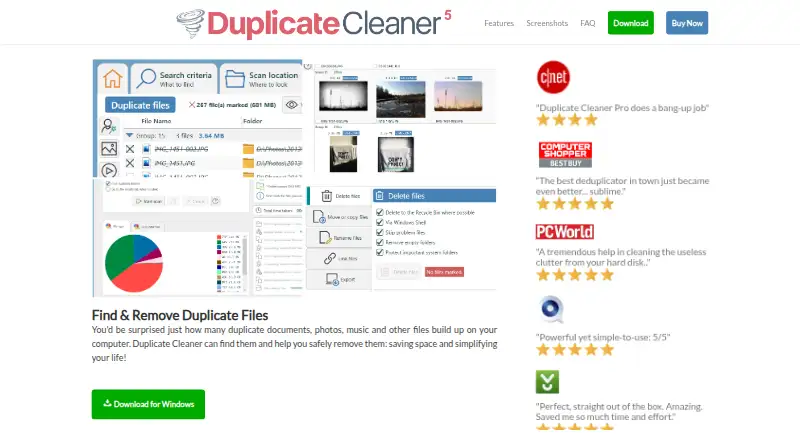
Duplicate Cleaner is a Windows application for finding and removing duplicate files on computers and network drives. Its Regular, Image, Audio, and Video modes provide different ways to locate matches across documents and media. Image Mode can identify exact or similar pictures, including rotated or flipped versions, and use image tags. Audio Mode can compare similar-sounding or exact audio and tags, while Video Mode checks frames, thumbnails, soundtracks, data, and metadata. Scans can cover local drives and folders, network paths, and portable devices such as smartphones and MP3 players. The Pro edition can scan ZIP files and other archives. After reviewing results, you can delete, move, copy, rename, or link selected files. Folder protections, exclusions, and checks on duplicate selections are included to help prevent unwanted removals. The free edition is for personal and home use, not commercial use. The Pro download includes a seven-day trial. The current download supports Windows 11, 10, 8, or 7 and requires Microsoft .NET Framework 4.7.2 or later.
Who it suits
Duplicate Cleaner suits Windows users who want to locate duplicate documents, photos, audio, or video on local or network storage. The free edition is limited to personal and home use.
What it does well
- Includes Regular, Image, Audio, and Video scan modes
- Can scan network paths and portable devices
- Pro scans ZIP and other archive formats
- Offers file preview and automatic selection
- Includes folder protections and exclusions
What to know first
- Windows only
- Free edition is not for commercial use
- Current download requires .NET Framework 4.7.2 or later
Limits
Duplicate Cleaner Free provides basic functionality for personal and home use only and cannot be used commercially. The Pro 5 download includes a seven-day free trial; archive scanning is a Pro feature.
Plans
| Plan | Billed and limits | Price |
|---|---|---|
| Duplicate Cleaner Free | basic functionality · personal/home use only · not for commercial use | Free |
| Duplicate Cleaner Pro 5 Site License | single site · unlimited installations · includes version 5 updates | On request |
| Duplicate Cleaner Pro 5 | perpetual version 5 license · Windows 10 or 11 · technical support by ticket and forum | On request |
As duplicatecleaner.com lists them, read 30 Sept 2026. The maker's own page has the final word.
Getting started
- Open the Duplicate Cleaner website.
- Choose the free plan for personal or home use, or download Duplicate Cleaner Pro 5 for its seven-day trial.
- Use a supported Windows version: 11, 10, 8 or 7.
- Ensure Microsoft .NET Framework 4.7.2 or greater is available.
- Choose a scan mode and locations, then review the matching files.
Verdict
Duplicate Cleaner offers several matching modes and file actions for people sorting duplicate files on Windows. Check the edition limits: free use is personal and home only, and archive scanning is a Pro feature.
Questions
Is Duplicate Cleaner free?
Yes. Duplicate Cleaner Free costs nothing and provides basic functionality for personal and home use only.
What does the Pro trial include?
The Duplicate Cleaner Pro 5 download includes a 7-day free trial.
Which operating systems does it support?
The current download supports Microsoft Windows 11, 10, 8 or 7, and requires Microsoft .NET Framework 4.7.2 or greater.
Can it scan ZIP and other archive files?
Pro can scan inside ZIP files and formats including RAR, GZ, TAR, BZ2, TGZ, 7Z and JAR.
What can I do with selected duplicates?
You can delete, move, copy, rename, create a shortcut, or make a symbolic or hard link.
Who provides support?
DigitalVolcano provides technical support through Freshdesk tickets, an online manual and a discussion forum.
Facts from Duplicate Cleaner's own pages
- Archive scanning
- Pro can scan inside ZIP files and other archive formats including RAR, GZ, TAR, BZ2, TGZ, 7Z and JAR. · digitalvolcano.co.uk, 30 Sept 2026
- Audio matching
- Audio Mode can match similar sounding audio, exact audio data and audio tags across popular audio formats. · digitalvolcano.co.uk, 30 Sept 2026
- File actions
- Duplicate Cleaner can delete, move, copy, rename, shortcut, symbolically link or hard-link selected files. · digitalvolcano.co.uk, 30 Sept 2026
- Founded
- 2006 · duplicatecleaner.com, 23 Sept 2026
- Headquarters
- United Kingdom · duplicatecleaner.com, 23 Sept 2026
- Image matching
- Image Mode can match similar, exact, rotated or flipped images and can use image tags. · digitalvolcano.co.uk, 30 Sept 2026
- Portable devices
- The application can scan portable media devices such as smartphones and MP3 players. · digitalvolcano.co.uk, 30 Sept 2026
- Privacy
- The application does not collect or transmit users' personally identifiable information. · digitalvolcano.co.uk, 30 Sept 2026
- Purpose
- Duplicate Cleaner finds and removes duplicate files from computers or network drives, including documents, photos, music and video. · duplicatecleaner.com, 30 Sept 2026
- Requirements
- The current download is for Microsoft Windows 11, 10, 8 or 7 and requires Microsoft .NET Framework 4.7.2 or greater. · digitalvolcano.co.uk, 30 Sept 2026
- Safety
- Safety features include protecting folders, avoiding system files and folders, and checking whether all duplicates in a group are marked for removal. · digitalvolcano.co.uk, 30 Sept 2026
- Scan modes
- The product provides Regular, Image, Audio and Video scan modes for finding duplicate files. · digitalvolcano.co.uk, 30 Sept 2026
- Support
- DigitalVolcano provides technical support through Freshdesk tickets, an online manual and a discussion forum. · digitalvolcano.co.uk, 30 Sept 2026
- Trial
- The Duplicate Cleaner Pro 5 download includes a 7-day free trial. · digitalvolcano.co.uk, 30 Sept 2026
- Video matching
- Video Mode can match similar video frames, thumbnails, soundtracks, exact data and video metadata tags. · digitalvolcano.co.uk, 30 Sept 2026
Where Duplicate Cleaner stands on Freedom251
- Duplicate File Finders#15 of 38