Freedom251 › Pixel Art Software

Piskel
What Piskel is
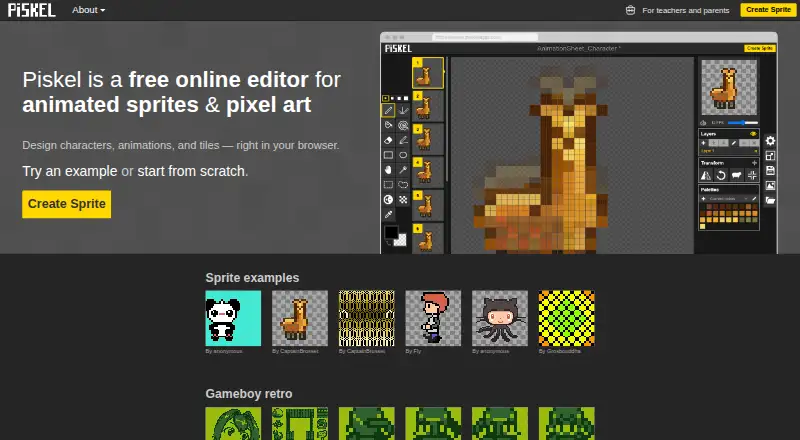
Piskel is a free editor for creating pixel art and animated sprites in a web browser. It is suited to drawing characters, animation frames, and tiles, with a live preview that shows the animation as you work. You can adjust the frame delay while drawing, then export finished work as an animated GIF or as a spritesheet in PNG or ZIP format.
Piskel’s code is open source and available on GitHub. Free offline applications are available for Windows, Mac OS X, and Linux. The maker describes these desktop releases as best effort, with limited quality assurance and no set timing for updates, and recommends the web version for current fixes and features. The project lists the latest Chrome, Firefox, and Edge as supported browsers; Brave requires canvas fingerprinting to be disabled. Mobile and tablet use is unsupported.
No account is required. Artwork is kept in browser storage rather than sent to a server, so users need to export and save their work themselves. Piskel does not provide autosave or cloud storage, and unsaved artwork may be lost.
Who it suits
Piskel suits pixel artists and sprite animators who want a free browser editor with a live animation preview and GIF or spritesheet export. Its child friendly Piskel for Kids version is intended for children and educators, and also requires no account.
What it does well
- Free browser editor and offline desktop applications
- Real-time animation preview with adjustable frame delay
- Exports animated GIFs and PNG or ZIP spritesheets
- Open source code available on GitHub
- Artwork stays in local browser storage; no account required
What to know first
- Mobile and tablet use is unsupported
- No autosave or cloud storage; users must save exports
- Offline releases receive limited QA and have no release schedule
Limits
Piskel is free, with no trial. It has no autosave or cloud storage, so unsaved artwork may be lost; offline releases have limited QA and no set release schedule.
Plans
| Plan | Billed and limits | Price |
|---|---|---|
| Piskel | Free browser based pixel art editor · Free offline desktop applications | Free |
As piskelapp.com lists them, read 9 Oct 2026. The maker's own page has the final word.
Getting started
- Open the Piskel website in the latest Chrome, Firefox, or Edge.
- Create pixel art, characters, animation frames, or tiles in the editor.
- Adjust frame delay and view the animation preview while drawing.
- Export your work as an animated GIF or a PNG or ZIP spritesheet.
- For offline use, download an application for Windows, Mac OS X, or Linux; the maker recommends the web version for current fixes and features.
Piskel is a free editor for pixel art and animated sprites, aimed at creators who want to draw and check animation timing in a browser. Its live preview and GIF or spritesheet exports make it a focused choice for sprite work, but saving and backing up artwork are your responsibility.
Overview
Piskel concentrates on pixel art, characters, tiles, and sprite animation rather than broad image editing. The live preview and frame-delay control keep timing decisions alongside the drawing, which is useful when refining a short animation. GIF and spritesheet exports provide practical ways to share work or move it into another tool, though Piskel does not state integrations with other products.
The editor is free and open source, with code available on GitHub. Piskel for Kids is a separate free, child-friendly editor for children and educators that does not require an account.
Key features
- Live animation preview: See the animation as you work and adjust frame delay while drawing. This is a real advantage for sprite timing, without needing a separate preview step.
- GIF and spritesheet exports: Export animated GIFs or spritesheets as PNG or ZIP files. These cover common sharing and asset handoff needs, but the stated route to other workflows is export rather than a direct integration.
- Local artwork storage: Piskel stores artwork in the browser using localStorage and IndexedDB, not on a server. With no accounts, that keeps the workflow local; it also means there is no cloud copy to rely on.
- Desktop applications: Free offline apps are available for Windows, Mac OS X, and Linux. The maker calls these releases best effort, with limited quality assurance and no promised release timing, and recommends the web version for current fixes and features.
Pricing
Piskel has one plan: free. It includes the browser-based pixel-art editor and free offline desktop applications, so there is no paid tier to unlock the stated core workflow. There is no free trial because the product is free.
The important cost is operational rather than financial: the terms put responsibility for exporting and saving artwork on users. Piskel does not provide autosave or cloud storage, and unsaved work may be lost. Export work you want to keep rather than treating the browser as a backup.
Platforms
Piskel supports the web, Windows, macOS, and Linux. The project supports current Chrome, Firefox, and Edge; Brave works only with canvas fingerprinting disabled. Mobile phones and tablets are unsupported, so Piskel is not a suitable choice for drawing on those devices.
The desktop apps allow offline use, but their best-effort release approach makes the web version the stronger option for users who want current fixes and features. The privacy policy says the service collects aggregate anonymous usage statistics; its Ezoic advertising partner may collect data for interest-based advertising.
Who it's for
Piskel suits pixel artists, sprite animators, and game creators who want a free, focused editor with animation timing feedback and straightforward exports. Its no-account, local-storage model may appeal to people who prefer artwork not to be sent to a server, provided they are comfortable managing their own backups. The separate Piskel for Kids edition is aimed at children and educators.
Look elsewhere if you need mobile or tablet support, cloud storage, or autosave. Piskel is also a narrower fit for workflows that depend on direct integrations rather than exported files.
Pros and cons
- Pro: Animation feedback while drawing. The live preview and adjustable frame delay make it easier to assess sprite timing in the editor.
- Pro: Useful export choices. Animated GIF and spritesheet PNG or ZIP exports give users portable ways to share or reuse their work.
- Pro: Free browser and desktop options. The plan includes the browser editor and offline applications for three desktop operating systems.
- Con: No cloud backup or autosave. Users must export and save their own work, and unsaved artwork can be lost.
- Con: No mobile or tablet support. Piskel is limited to web and desktop use.
- Con: Desktop releases are best effort. Limited QA and no release schedule make the web version preferable for up-to-date fixes and features.
Alternatives
Pixelorama is worth considering if Android support matters: its free, open-source offering spans Android, desktop platforms, and the web, while Piskel does not support mobile or tablet use.
LibreSprite is another free, open-source option if you want a GNU General Public License Version 2 project. Piskel is also free and open source, with the added stated convenience of browser editing and a live animation preview.
Rive may suit users seeking a collaborative editor: its free plan includes three collaborative files and one project, while Piskel's stated strengths are pixel-art editing and sprite exports.
Cascadeur, Pro Motion NG, SkelForm, TexturePacker, and akeytsu are other options to compare.
Browse Pixel Art Software, Game Animation Software, GIF Maker Software, and Animation Software for more choices by category.
Verdict
Choose Piskel if you want a free, focused way to create pixel art and animated sprites, especially when live timing feedback and GIF or spritesheet export matter. Its local, no-account workflow and desktop apps are useful, but the lack of autosave, cloud storage, and mobile support is decisive for anyone who needs backup or drawing on a phone or tablet.
Verdict
Choose Piskel for free browser based pixel art and sprite animation, especially if you want a live preview and direct GIF or spritesheet export. Look elsewhere if you need mobile or tablet support, or automatic cloud saving.
Questions
How much does Piskel cost?
The Piskel plan is free. The free plan is available, and there is no free trial.
Which platforms does Piskel support?
Piskel is available on the web and as free offline applications for Windows, Mac OS X, and Linux. Mobile and tablet use is unsupported.
Which browsers are supported?
The project lists the latest Chrome, Firefox, and Edge. Brave is supported when canvas fingerprinting is disabled.
Is Piskel open source?
Yes. Piskel says its code is open source and available on GitHub.
Does Piskel require an account or save artwork online?
No account is required. Artwork is stored locally in the browser, and users need to export and save it themselves.
What can I export from Piskel?
You can export animated GIFs and spritesheets in PNG or ZIP formats.
Facts from Piskel's own pages
- Advertising and data
- The privacy policy says Piskel collects aggregate anonymous usage statistics and that its Ezoic advertising partner may collect data for interest based advertising. · piskelapp.com, 9 Oct 2026
- Audience
- Piskel for Kids is described as a free child friendly editor designed for children and educators, with no account required. · piskelapp.com, 9 Oct 2026
- Browser support
- The project README lists latest Chrome, Firefox, and Edge as supported; Brave is supported only when canvas fingerprinting is disabled. · github.com, 9 Oct 2026
- Export
- Export options include animated GIFs and spritesheet PNG or ZIP files. · piskelapp.com, 9 Oct 2026
- Free plan
- Yes · piskelapp.com, 23 Sept 2026
- Integrations
- The maker pages opened describe export to GIF, PNG, and ZIP and link to the source repository; they do not state integrations with other products. · piskelapp.com, 9 Oct 2026
- Live preview
- The editor previews animations in real time and lets users adjust frame delay while drawing. · piskelapp.com, 9 Oct 2026
- Local storage
- The privacy policy says there are no accounts and artwork is stored locally in the browser using localStorage and IndexedDB, not sent to a server. · piskelapp.com, 9 Oct 2026
- Mobile limitation
- The project README says mobile and tablet use is unsupported. · github.com, 9 Oct 2026
- Offline apps
- Free offline applications are available for Windows, Mac OS X, and Linux. · piskelapp.com, 9 Oct 2026
- Offline release status
- The maker describes offline releases as best effort, with limited QA and no ETA for new releases, and recommends the web version for current fixes and features. · piskelapp.com, 9 Oct 2026
- Open source
- Piskel says all its code is open source and available on GitHub. · piskelapp.com, 9 Oct 2026
- Supported platforms
- Web,Windows,macOS,Linux · piskelapp.com, 23 Sept 2026
- Purpose
- Piskel is a free online editor for animated sprites and pixel art, for designing characters, animations, and tiles in a browser. · piskelapp.com, 9 Oct 2026
- Save responsibility
- The terms say users are responsible for exporting and saving artwork; unsaved work may be lost, and the service does not provide autosave or cloud storage. · piskelapp.com, 9 Oct 2026
- Support
- The FAQ directs general questions and support requests to email and recommends GitHub issues for bug reports or feature proposals. · piskelapp.com, 9 Oct 2026
Where Piskel stands on Freedom251
- Pixel Art Software#10 of 70
- Game Animation Software#6 of 32
- Animation Software#41 of 106
- GIF Maker Software#14 of 33
- GIF makers#25 of 54