Freedom251 › Pixel Art Software

csprite
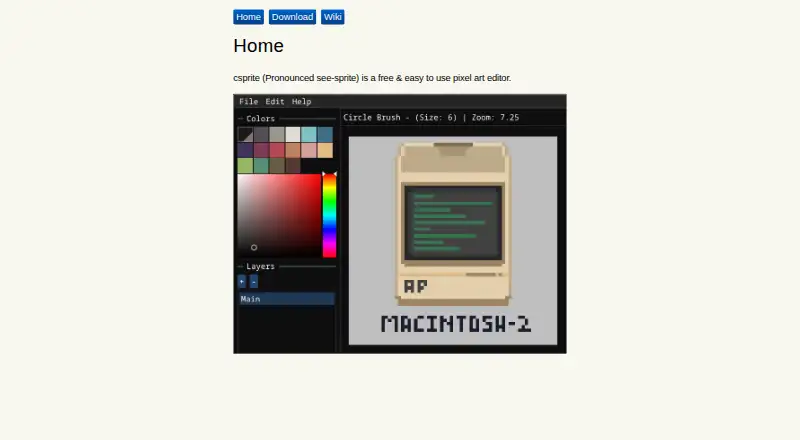
What csprite is
csprite is a free pixel art editor for Linux, macOS, and Windows. It opens with a blank 60×40 canvas, and users can create new canvases or open existing pixel art. Drawing tools include square and circle brushes, with corresponding eraser variants. The editor supplies the 16-color Pico-8 palette by default and includes an eyedropper for selecting colors. A fill tool colors an area until it reaches a border it cannot cross. Save and Save As options are available, including keyboard shortcuts, and the project’s release changelog lists a custom .csprite file format. The editor includes indexed color tools and is licensed under BSD-3-Clause. The repository README gives minimum requirements of a 64-bit processor, OpenGL 3.0 or later, and at least 512 MB of usable RAM; it names Linux and Windows 7 or later as minimum system requirement platforms. Binaries can be downloaded from GitHub Releases if JavaScript is unavailable on the maker’s download page. The repository also provides separate compilation requirements for Windows and Linux. These tools make csprite suitable for creating and saving pixel art using basic brush, eraser, palette, and fill functions.
Who it suits
csprite suits people looking for a free editor for creating pixel art with straightforward brush, eraser, palette, and fill tools. It is also relevant to users who want indexed color tools and are comfortable with its listed system requirements.
What it does well
- Free to use on Linux, macOS, and Windows.
- Starts with a blank 60×40 canvas and can open existing pixel art.
- Offers square and circle brushes and erasers.
- Includes the 16-color Pico-8 palette and an eyedropper.
- Provides fill, Save, and Save As tools.
- Licensed under BSD-3-Clause.
What to know first
- Minimum requirements include a 64-bit processor and OpenGL 3.0 or later.
- The README lists Linux and Windows 7 or later as minimum system requirement platforms.
- The listed export format is .csprite.
Limits
The listed minimum requirements are a 64-bit processor, OpenGL 3.0 or later, and at least 512 MB of usable RAM. The README names Linux and Windows 7 or later as minimum system requirement platforms.
Plans
| Plan | Billed and limits | Price |
|---|---|---|
| csprite | Free pixel art editor | Free |
As csprite.github.io lists them, read 11 Oct 2026. The maker's own page has the final word.
Getting started
- Visit the csprite website.
- Download a binary from GitHub Releases if JavaScript is unavailable on the download page.
- Check that your system meets the listed requirements.
- Open csprite to start with a blank 60×40 canvas, or open existing pixel art.
- Use Save or Save As to save your work.
Verdict
Pick csprite if you want a free pixel art editor with basic drawing, color selection, filling, and saving tools. Check the listed processor, graphics, and memory requirements against your system before getting started.
Questions
Is csprite free?
Yes. The listed plan is free.
Which platforms does csprite support?
The listed platforms are Linux, macOS, and Windows. The README names Linux and Windows 7 or later as minimum system requirement platforms.
What does csprite save its files as?
The release changelog lists a custom .csprite file format.
What tools does the editor include?
It describes square and circle brushes and erasers, the Pico-8 palette, an eyedropper, and a fill tool.
What are the minimum system requirements?
The README lists a 64-bit processor, OpenGL 3.0 or later, and at least 512 MB of usable RAM.
What is csprite's license?
The GitHub repository identifies the license as BSD-3-Clause.
Facts from csprite's own pages
- Brush and eraser
- The v0.1.x guide describes square and circle brush and eraser variants. · csprite.github.io, 11 Oct 2026
- Build from source
- The repository README provides separate compilation requirements for Windows and Linux. · github.com, 11 Oct 2026
- Canvas
- The v0.1.x guide says csprite starts with a blank 60×40 canvas and lets users create new canvases or open existing pixel art. · csprite.github.io, 11 Oct 2026
- Downloads
- The maker's download page says binaries can be downloaded from GitHub Releases if JavaScript is unavailable. · csprite.github.io, 11 Oct 2026
- File format
- A GitHub release changelog lists a custom .csprite file format among the changes. · github.com, 11 Oct 2026
- Fill tool
- The fill tool paints an area until it reaches a border it cannot cross. · csprite.github.io, 11 Oct 2026
- License
- The GitHub repository identifies its license as BSD-3-Clause. · github.com, 11 Oct 2026
- Operating systems
- The repository README lists Linux and Windows 7 or later as minimum system requirement platforms. · github.com, 11 Oct 2026
- Palette
- The v0.1.x guide says csprite provides the 16-color Pico-8 palette by default and includes an eyedropper tool. · csprite.github.io, 11 Oct 2026
- Saving
- The v0.1.x guide describes Save and Save As options, including keyboard shortcuts. · csprite.github.io, 11 Oct 2026
- System requirements
- The repository README lists at least 512 MB of usable RAM, a 64-bit processor, and OpenGL 3.0 or later as minimum requirements. · github.com, 11 Oct 2026
- What it does
- csprite is a free pixel art editor. · csprite.github.io, 11 Oct 2026
Where csprite stands on Freedom251
- Pixel Art Software#6 of 70