Freedom251 › Pixel Art Software
LibreSprite
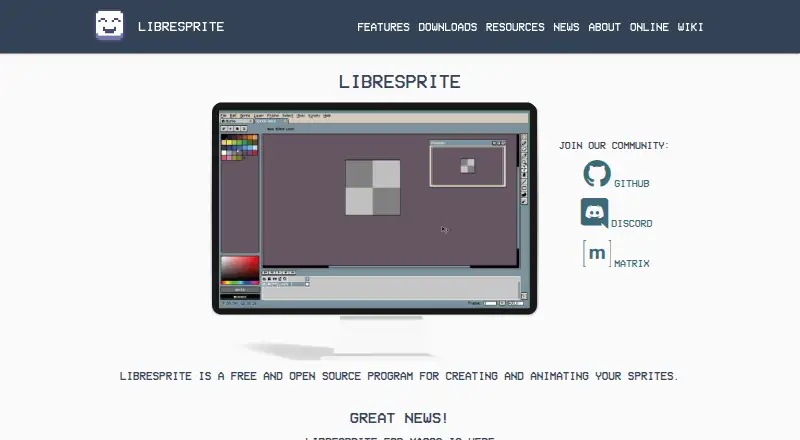
What LibreSprite is
LibreSprite is a free, open-source program for creating and animating sprites, available for Windows, macOS, Linux and Android. Its 2D animation tools include a timeline, real-time previews and onion skinning, while sprites use layers and frames. Users can work on multiple sprites at once, draw in tiled mode and use pixel-precise tools such as filled contour, polygon and shading. The program includes ready-made palettes and supports custom palettes, indexed color tools and sprite-sheet export. Listed file formats include PNG, GIF, JPEG, BMP, PCX, TGA, ICO, FLI/FLC, WebP and ASE. Scripting documentation describes loading palettes, cropping and resizing sprites, and saving them. LibreSprite is licensed under GNU General Public License Version 2. The project began as a fork of an Aseprite commit and is now developed independently. Version 1.0 is listed as supported; the security page reports no published advisories and directs vulnerability reports to GitHub Issues. Contributors can connect through Discord or Matrix.
Who it suits
LibreSprite suits sprite artists and animators looking for a free tool with pixel-focused drawing, animation and multiple platform support. Its scripting documentation may also be useful to users working with palette and sprite operations.
What it does well
- Free and open source under GNU General Public License Version 2.
- Available for Windows, macOS, Linux and Android.
- Includes timeline, real-time previews and onion skinning.
- Supports multiple sprites, layers and frames.
- Exports common image and animation formats.
What to know first
- Version 1.0 is the version listed as supported.
- Vulnerability reports are directed to GitHub Issues.
Plans
| Plan | Billed and limits | Price |
|---|---|---|
| LibreSprite | Free and open source · GNU General Public License Version 2 | Free |
| Free | free and open source program | Free |
As libresprite.github.io lists them, read 4 Oct 2026. The maker's own page has the final word.
Getting started
- Visit the LibreSprite website.
- Choose a download for Windows, macOS, Linux, or Android.
- Install or open the program on your platform.
- Create or open sprites and work with layers, frames, and palettes.
- Use the animation timeline and export a sprite sheet in a supported format.
Overview
LibreSprite is a free, open-source editor for creating and animating 2D sprites. It is a strong fit for pixel artists and game creators who want frame-based animation and precise drawing tools without an editor fee. Choose it for its focused sprite workflow; look elsewhere if you specifically want an Aseprite product, since LibreSprite is developed independently.
Key features
The animation timeline, real-time previews and onion skinning make it practical to inspect movement frame by frame. Layers and simultaneous editing of multiple sprites also help when a project involves more than one asset. These tools suit sprite animation, though the documented emphasis is on sprite work rather than a broader animation pipeline.
Tiled drawing mode and pixel-precise tools—including filled contour, polygon and shading modes—serve artists who need control over sprite shapes and tile patterns. Indexed-color tools, ready-made palettes and the ability to create custom palettes support deliberate color-limited work. Sprite-sheet export and support for PNG, GIF, JPEG, BMP, PCX, TGA, ICO, FLI/FLC, WebP and ASE give users multiple formats for moving sprites and animations between tools.
The scripting documentation describes loading palettes, cropping and resizing sprites, and saving them. That makes it a useful option for users with those particular repetitive tasks, without implying a general-purpose scripting environment. LibreSprite began as a fork of an Aseprite commit covered by GPL version 2, but the project is independent of Aseprite.
Pricing
LibreSprite costs nothing under its free and open-source GNU General Public License Version 2 plan. There is no paid tier in the stated pricing model, so it suits users who want the listed sprite tools without an editor subscription.
Platforms
LibreSprite supports Windows, macOS, Linux and Android. That range makes it an option across desktop and Android devices, while the available platform facts do not establish identical capabilities across versions.
Who it's for
Pixel artists, sprite animators and game creators who need a timeline, onion skinning, indexed-color tools and sprite-sheet export should find the feature set relevant. It is less compelling for anyone who requires a product maintained as part of Aseprite, or whose needs center on a different animation approach.
Pros and cons
- Pros: Free and open-source, with no paid plan in the stated model.
- Pros: Timeline, real-time preview and onion skinning support frame-by-frame sprite animation.
- Pros: Tiled drawing, indexed-color tools and a wide range of export formats serve focused pixel-art workflows.
- Cons: It is an independent project, not Aseprite; users seeking that product should choose accordingly.
- Cons: The security policy lists version 1.0 as supported, a consideration for users who need a clearly supported release target.
Alternatives
For other options, browse 2D Game Animation Software, Game Animation Software and Pixel Art Software.
- Effekseer is another free, open-source program, with support for Android, iOS, Linux, macOS, web and Windows; consider it if that platform range better fits your needs.
- Rive has a free plan with three collaborative files and one project, and supports web and mobile as well as desktop; choose it if those collaboration and platform details suit your work.
- SkelForm is a free, open-source 2D skeletal animator for Linux, macOS, web and Windows; consider it for skeletal animation rather than LibreSprite's sprite-focused workflow.
- Pixelpart offers a free demo on Linux and Windows; consider it if a demo-based option fits your decision process.
- SpineBones is free for macOS and Windows, with a 300-frame timeline, playback up to 120 FPS, and WebM, PNG-sequence and sprite-sheet exports; choose it if those specific timeline and export limits fit.
- Spriter has a free version with PNG and spritesheet animation and basic animation features on Linux and Windows; its Pro plan is $59.99 a month for one user license. Consider it if that free feature set or paid license matches your needs.
- Keyframe.it is a free browser option with four tools, no account and no ads; consider it if you prefer browser-based tools.
- SpriteBrew is a free web app whose source is available under AGPL-3.0; choose it if a web-based option fits your workflow.
Verdict
Choose LibreSprite if you want a no-cost, open-source workspace for pixel-precise sprite creation and frame-based 2D animation across desktop or Android platforms. Its focused animation and export tools are the main reason to pick it; look elsewhere if you require Aseprite itself or a different animation workflow.
Verdict
LibreSprite offers a broad sprite-creation and animation toolset at no cost across desktop and Android platforms. Its documented support centers on version 1.0, and the project is developed independently of Aseprite.
Questions
How much does LibreSprite cost?
The free plan costs nothing.
Is LibreSprite open source?
Yes. The plan identifies it as free and open source under the GNU General Public License Version 2.
Which platforms does LibreSprite support?
It is available for Windows, macOS, Linux, and Android.
What formats can LibreSprite export?
Listed export formats are PNG, GIF, JPEG, BMP, PCX, TGA, ICO, FLI/FLC, WebP, and ASE.
Who develops LibreSprite?
The project originated as a fork of an Aseprite commit covered by GPL version 2 and is developed independently of Aseprite.
Facts from LibreSprite's own pages
- Android build
- Android compilation requires first making a native build and then placing ls-android-deps in the repository before opening the Android project in Android Studio. · github.com, 15 Oct 2026
- Animation
- It includes real-time animation previews and onion skinning. · github.com, 4 Oct 2026
- Browser version
- The release notes state that LibreSprite can be used in a web browser through LibreSprite Online. · github.com, 15 Oct 2026
- Build requirements
- Source builds require CMake 3.4 or newer, Ninja and MSYS2 on Windows. · github.com, 15 Oct 2026
- Community support
- The project directs contributors and users to Discord, Matrix and GitHub resources. · github.com, 15 Oct 2026
- Drawing tools
- It provides tiled drawing mode and pixel-precise tools such as filled contour, polygon, and shading mode. · github.com, 4 Oct 2026
- File support
- The software supports several file types for sprites and animations. · github.com, 15 Oct 2026
- Headless mode
- The documented application API exposes an isHeadless flag for batch or shell execution. · github.com, 15 Oct 2026
- Independent description
- SourceForge describes LibreSprite as an animated sprite editor and pixel-art tool and identifies its GitHub repository as the exact mirrored project. · sourceforge.net, 15 Oct 2026
- Independent installation format
- AppImage distributes LibreSprite as a single executable file that does not require a package manager or alter system libraries and preferences. · appimage.github.io, 15 Oct 2026
- Independent Linux limitation
- The AppImage page warns that AppImages are usually not independently verified and recommends using them only when the developer is trusted. · appimage.github.io, 15 Oct 2026
- Independent project metadata
- SourceForge lists Linux and Windows operating systems and C++ as the programming language. · sourceforge.net, 15 Oct 2026
- Independent review availability
- SourceForge shows no user reviews for the mirrored LibreSprite project. · sourceforge.net, 15 Oct 2026
- Latest release
- The v1.3 release is dated 2 October and includes fixes for zip-slip, shell injection, codec memory safety and script sandbox escapes. · github.com, 15 Oct 2026
- Layers and frames
- Sprites are organized using layers and animation frames. · github.com, 15 Oct 2026
- Licence
- LibreSprite is distributed under the GNU General Public License version 2. · github.com, 15 Oct 2026
- Limit: Android distribution
- A project discussion says Android builds were available as release previews rather than through a conventional app-store port. · github.com, 15 Oct 2026
- Limit: batch processing
- The hands-on review questions whether LibreSprite can process multiple images in bulk and lists this as a limitation. · note.com, 15 Oct 2026
- Limit: canvas settings
- The hands-on review reports that LibreSprite lacks Aseprite's advanced canvas settings. · note.com, 15 Oct 2026
- Limit: import and export
- The hands-on review reports an inability to import images and limitations when exporting tagged frames. · note.com, 15 Oct 2026
- Limit: Japanese support
- The hands-on review reports that Japanese is not supported. · note.com, 15 Oct 2026
- Limit: scripting documentation
- A project issue records a maintainer saying the scripting API was experimental, very limited and undocumented at the time, with examples in the data/scripts folder. · github.com, 15 Oct 2026
- Limit: timeline layout
- The hands-on review reports that users cannot change the timeline bar position. · note.com, 15 Oct 2026
- Multiple-sprite editing
- Users can edit multiple sprites at the same time. · github.com, 15 Oct 2026
Where LibreSprite stands on Freedom251
- Pixel Art Software#2 of 70
- Game Animation Software#1 of 32
- 2D Game Animation Software#1 of 25