Freedom251 › 2D Game Animation Software
Effekseer
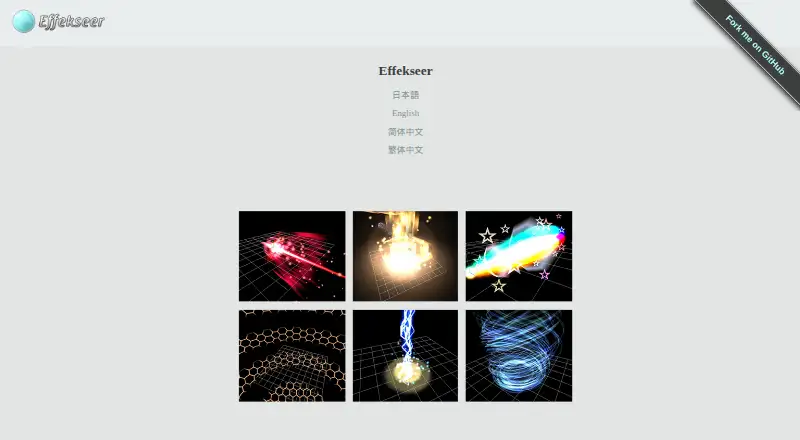
What Effekseer is
Effekseer is a free, open-source tool for creating particle effects for games and movies. Effects can be exported as 2D animations or 3D effects. Included runtimes support DirectX, OpenGL, Unity, UnrealEngine4 and Cocos2d-x, with effects available on Windows, Mac OS X, Linux, iOS, Android and Emscripten. Downloads also include plugins or libraries for Unity, UnrealEngine, GodotEngine, RPGMakerMZ, WebGL, DXLibrary and Cocos2d-x. Programmer libraries support DirectX 9/11/12, OpenGL, Metal and Vulkan. The site lists version 1.80.7 as available. Version 1.80 adds collision settings, track and ribbon UV repetition, movement-aligned rotation, continuous and trigger spawning, external-model emission sources and directional billboarding; it also supports direct loading of gltf, glb, obj, geo and bgeo models. GPU particle simulation and CPU/GPU profiling are preview features that may not work in all environments. The tool and runtime use the MIT license, while texture and effect data use CC-0. To play effects in a game, users need separate runtime or library packages.
Who it suits
Effekseer suits game and movie creators who need to author particle effects and export them for supported runtimes. Developers should check whether the separate runtime or library package they need is available for their target.
What it does well
- Exports effects as 2D animations or 3D effects.
- Supports a range of graphics APIs and engine integrations.
- Tool and runtime use the MIT license.
- Texture and effect data use CC-0.
What to know first
- Playing effects in a game requires separate runtime or library packages.
- GPU simulation and profiling are preview features.
- Preview features may not be available in all environments.
Plans
| Plan | Billed and limits | Price |
|---|---|---|
| Effekseer | free and open-source | Free |
As effekseer.github.io lists them, read 1 Oct 2026. The maker's own page has the final word.
Getting started
- Visit https://effekseer.github.io/.
- Download the editing tool for your platform.
- On Windows, run the editing tool from its Tool directory.
- Create effects and export them as 2D animations or 3D effects.
- Download the separate runtime or integration package needed to play effects in a game.
Effekseer is a free, open-source tool for making particle effects for games and movies. It is best suited to creators who need effects they can carry across multiple engines and graphics APIs. Its broad runtime reach is compelling, but using effects in a game means downloading a separate runtime package.
Overview
Effects can be exported as 2D animations or 3D effects, so Effekseer can serve projects with different output needs. The tool and runtime use the MIT license, while texture and effect data are CC-0. User-contributed sample effects are free to use and edit in games or movies, and almost all are distributed under CC-0.
On Windows, the editor runs from its Tool directory without changing the registry or other system settings. That makes it easy to keep the editor self-contained, but it does not bundle the runtime needed to play effects in a game.
Key features
Version 1.80 adds collision settings, repeated UVs for tracks and ribbons, movement-aligned rotation, continuous and trigger-based spawning, external-model emission sources, and directional billboarding. These controls give effect authors more ways to shape particle motion, emission, and trails, making the tool a stronger fit for effects that need more than simple bursts.
Direct loading of gltf, glb, obj, geo, and bgeo models supports model-based sources without requiring a separate conversion step in the stated workflow. Version 1.80 also introduces GPU-based particle simulation and a CPU/GPU profiler, but both are preview features that may not work in every environment. They are promising additions, not capabilities to rely on for every production setup.
Pricing
Effekseer costs nothing and is free and open-source. The free plan includes particle effects and runtime export, with no paid tier or seat limit stated. The main practical cost is setup rather than subscription: game playback requires separate runtime, Unity, or DX library packages.
Platforms
The editor is available for Android, iOS, Linux, macOS, web, and Windows. Included runtimes support DirectX, OpenGL, Unity, UnrealEngine4, and Cocos2d-x, with effects available on Windows, Mac OS X, Linux, iOS, Android, and Emscripten. Programmer libraries support DirectX 9/11/12, OpenGL, Metal, and Vulkan; official downloads also include plugins or libraries for Unity, UnrealEngine, GodotEngine, RPGMakerMZ, WebGL, DXLibrary, and Cocos2d-x. This is an unusually broad set of integration paths, though users should expect to select and download the package that matches their target.
Who it's for
Effekseer suits game and movie creators who need to author particle effects and want the option to target multiple engines or graphics APIs. Its open licensing and reusable sample effects also suit projects that value freely usable assets. It is a less direct fit for someone seeking an all-in-one editor-and-runtime installation or a tool focused on character animation rather than particles.
Pros and cons
- Pros: Free and open-source, with MIT-licensed tool and runtime and CC-0 texture and effect data, making reuse and integration flexible.
- Pros: Broad runtime, API, and plugin support gives developers several routes to bring effects into game projects.
- Pros: Version 1.80's model loading and particle controls support more varied effect workflows.
- Cons: Separate runtime packages add a setup step before effects can play in a game.
- Cons: GPU simulation and profiling are preview features and may not be available in all environments.
Alternatives
For a broader set of animation tools, browse 2D Game Animation Software. Choose Rive instead if you want a freemium editor with a free plan for 3 collaborative files and 1 project. LibreSprite is another free, open-source option for readers comparing animation software.
SkelForm is a free, open-source 2D skeletal animator, so consider it when skeletal animation is the priority. SpineBones offers a free plan with a 300-frame timeline, playback up to 120 FPS, and WebM, PNG sequence, and sprite sheet exports. Spriter has a free version for PNG and spritesheet animation with basic animation features.
Live2D Cubism is another option with a free plan and trial. Keyframe.it is a free web-based alternative, while Phluxel is a freemium option for Windows.
Verdict
Choose Effekseer if you need a free, open-source particle-effect tool with broad runtime and graphics API support. Its main advantage is the range of ways to take effects into projects; look elsewhere if you need a bundled playback runtime or a dedicated skeletal-animation workflow.
Verdict
Effekseer supports authoring and exporting effects across a broad set of listed runtimes and graphics APIs. Plan for separate runtime packages, and treat GPU simulation and profiling as preview capabilities.
Questions
Is Effekseer free?
Yes. Effekseer is described as a free, open-source program, and its listed plan is free.
Which platforms can run Effekseer effects?
Listed runtime platforms include Windows, Mac OS X, Linux, iOS, Android, and Emscripten. Supported runtimes include DirectX, OpenGL, Unity, UnrealEngine4, and Cocos2d-x.
Which integrations are available?
Official downloads include plugins or libraries for Unity, UnrealEngine, GodotEngine, RPGMakerMZ, WebGL, DXLibrary, and Cocos2d-x.
Is Effekseer open source?
Yes. The tool and runtime use the MIT license. Texture and effect data use CC-0.
Do I need a separate runtime to use effects in a game?
Yes. Playing effects in a game requires separate runtime, Unity, or DX library packages.
What are the preview features in version 1.80?
GPU-based particle simulation and the CPU/GPU profiler are preview features. They may not be available in every environment.
Facts from Effekseer's own pages
- Exports
- Effects can be exported as 2D animations or 3D effects. · effekseer.github.io, 1 Oct 2026
- GPU and profiling
- Version 1.80 adds GPU-based particle simulation and a CPU/GPU profiler, both marked preview features that may not be available in all environments. · effekseer.github.io, 1 Oct 2026
- Graphics APIs
- Programmer libraries support DirectX 9/11/12, OpenGL, Metal and Vulkan. · effekseer.github.io, 1 Oct 2026
- Installation
- On Windows the editing tool runs from its Tool directory and does not modify the registry or anything else. · effekseer.github.io, 1 Oct 2026
- Integrations
- Official downloads include plugins or libraries for Unity, UnrealEngine, GodotEngine, RPGMakerMZ, WebGL, DXLibrary and Cocos2d-x. · effekseer.github.io, 1 Oct 2026
- Latest version
- The site lists version 1.80.7 as available. · effekseer.github.io, 1 Oct 2026
- Licensing
- The documentation states that the runtime and tool use the MIT license and that texture and effect data is CC-0. · effekseer.github.io, 1 Oct 2026
- Model formats
- Version 1.80 supports directly loading gltf, glb, obj, geo and bgeo models. · effekseer.github.io, 1 Oct 2026
- Open source
- The official site describes Effekseer as a free, open-source program. · effekseer.github.io, 1 Oct 2026
- Particle features
- Version 1.80 adds collision settings, track and ribbon UV repetition, movement-aligned rotation, continuous and trigger spawning, external-model emission sources and directional billboarding. · effekseer.github.io, 1 Oct 2026
- Purpose
- Effekseer is a tool for creating particle effects for games and movies. · effekseer.github.io, 1 Oct 2026
- Rendering platforms
- Included runtimes support DirectX, OpenGL, Unity, UnrealEngine4 and Cocos2d-x, with effects available on Windows, Mac OS X, Linux, iOS, Android and Emscripten. · effekseer.github.io, 1 Oct 2026
- Sample assets
- User-contributed sample effects are free to use and edit in games or movies, with almost all distributed under CC-0. · effekseer.github.io, 1 Oct 2026
- Separate runtimes
- To play effects in a game, users must download separate runtime, Unity or DX library packages. · effekseer.github.io, 1 Oct 2026
- Support
- User support is provided through Twitter, GitHub, Slack, Discord and email for bug reports, requests and questions. · effekseer.github.io, 1 Oct 2026
Where Effekseer stands on Freedom251
- 2D Game Animation Software#2 of 25