Freedom251 › 2D Character Animation Software

SpineBones
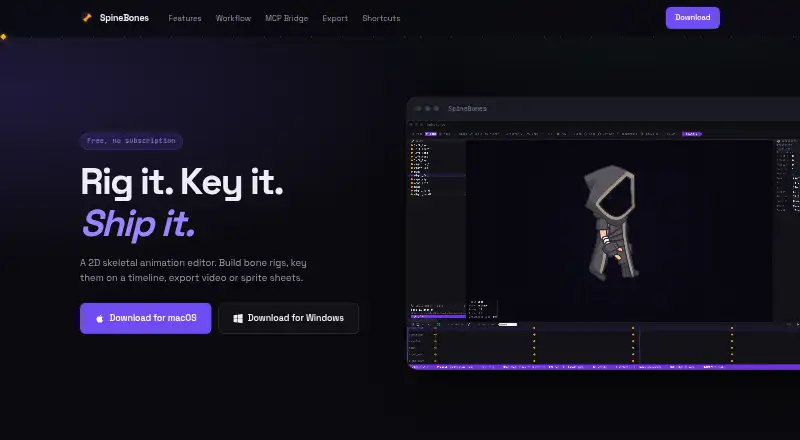
What SpineBones is
SpineBones is a free 2D skeletal animation editor for creating bone rigs, animating them on a timeline, and exporting finished work. Rigging tools include bone hierarchies, re-parenting, grouping, and inverse kinematics. Its timeline supports keyframe editing and looping, with easing per key and audio tracks. Slots can hold PNG, JPG, SVG, or WebP artwork, including several attachments that can be swapped frame by frame. Mesh deformation with keyed vertices and onion skin views are also available. SETUP mode holds a base pose; ANIMATE mode uses keyframes for position, rotation, and scale. Export options include WebM, transparent PNG sequences, and sprite sheets with atlas data, as well as portable .sbn project packages; legacy .json projects can be opened. An MCP bridge can work with Claude and other MCP clients to create rig elements and keyframes, change frame rates, and start exports. SpineBones runs on macOS 12 or newer and Windows 10 or newer. The free plan has a 300-frame timeline and playback up to 120 FPS.
Who it suits
SpineBones suits artists making skeletal animations for game engines or 2D frameworks, as well as users preparing PNG sequences for compositing tools. Its portable project packages can support work across machines without a cloud round trip.
What it does well
- Free plan with no subscription.
- Supports inverse kinematics and mesh deformation.
- Exports WebM, PNG sequences, and sprite sheets.
- Opens legacy .json projects.
- Works with Claude and other MCP clients.
What to know first
- Limited to macOS and Windows.
- Free timeline is limited to 300 frames.
- Playback is limited to 120 FPS.
Limits
The free plan allows a 300-frame timeline and playback up to 120 FPS. It includes WebM, PNG sequence, and sprite sheet exports.
Plans
| Plan | Billed and limits | Price |
|---|---|---|
| Free | 300-frame timeline · playback up to 120 FPS · WebM, PNG sequence, and sprite-sheet exports | Free |
As spinebones.agara.id lists them, read 15 Oct 2026. The maker's own page has the final word.
Getting started
- Open the SpineBones website.
- Download the app for macOS or Windows.
- Install it on macOS 12 or newer or Windows 10 or newer.
- Create a project and build a bone rig.
- Animate with timeline keyframes and export a video, PNG sequence, or sprite sheet.
SpineBones is a free desktop editor for 2D skeletal rigs, timeline animation, and game-oriented exports. It is best suited to artists and developers making compact character or sprite animations who want an offline workflow without account friction. The 300-frame and 120-FPS limits make timeline scope an important suitability check.
Overview
SpineBones combines bone-rig construction, keyframed motion, artwork attachment, mesh deformation, and export in one application. Bone hierarchies, inverse kinematics, and re-parenting support both initial rig creation and later structural changes. Its SETUP mode preserves a base pose while ANIMATE mode contains keyed position, rotation, and scale, giving a clear separation between rig preparation and motion work.
The application is free to download without an account, licence key, or trial timer. Projects can be saved as portable .sbn packages, which suits teams or individuals moving files between machines without a cloud round trip. The main constraint is duration: the Free plan provides a 300-frame timeline and playback up to 120 FPS, so longer-form animation work may require a different tool or a segmented workflow.
Key features
Rigging and skeletal motion
Hierarchies, grouping, re-parenting, and inverse kinematics give SpineBones practical controls for building articulated characters and revising their structure. Skeletal animation reduces the need to redraw every pose, making it a sensible choice for reusable game characters and other assets driven by bones rather than purely frame-by-frame drawing.
Timeline and posing
The timeline handles inserting, moving, selecting, copying, and looping keyframes. Easing can be set per key, and audio tracks help synchronize motion. These controls support repeatable game cycles and timed actions, although the 300-frame ceiling limits how much can be kept in one sequence.
Artwork, meshes, and onion skin
Slots accept PNG, JPG, SVG, and WebP artwork, with multiple attachments per slot and frame-by-frame swapping. That combination supports alternate hands, expressions, equipment, or other sprite changes alongside bone motion. Attachment meshes can be deformed through keyed vertices, while onion skin shows neighboring poses; together they are useful when skeletal movement needs localized shape changes or closer visual alignment.
Exports and integration
Exports include WebM video, transparent PNG frame sequences, sprite sheets with atlas data, and portable .sbn project packages. Legacy .json projects can be opened. Sprite sheets target game engines and 2D frameworks, while PNG sequences fit compositing workflows. An MCP bridge can create rig elements and keyframes, rescale animation frame rates, and trigger exports from Claude and other MCP clients, adding automation for users who already work with MCP tools.
Pricing
| Plan | Price | Includes |
|---|---|---|
| Free | free | 300-frame timeline; playback up to 120 FPS; WebM, PNG sequence, and sprite sheet exports; no subscription |
There is no paid tier, free trial, renewal, or seat charge. The zero-cost plan fits independent creators, students, and teams evaluating a compact skeletal-animation workflow. Its fixed frame and playback limits are the meaningful concessions rather than missing access to core rigging tools.
Platforms
SpineBones supports macOS 12 or newer and Windows 10 or newer. It is a desktop application, so it suits users who can install software on those systems rather than browser-only workflows. Portable project packages help when work must move between compatible machines.
Who it's for
Choose SpineBones for game artists and developers creating character rigs, looping actions, sprite sheets, or compositing-ready frame sequences. It is particularly suitable when offline operation, common image formats, mesh deformation, and direct export matter more than long timelines. Look elsewhere for projects whose individual scenes exceed 300 frames or whose target platform is outside macOS and Windows.
Pros and cons
- Pros: Bone hierarchies, inverse kinematics, re-parenting, and grouping support adaptable rigs.
- Pros: Mesh vertex keys, onion skin, attachment swapping, and easing extend skeletal animation beyond simple rigid-bone movement.
- Pros: WebM, transparent PNG sequences, sprite sheets with atlas data, and portable packages cover common production handoffs.
- Pros: Free access requires no account, licence key, or trial timer, and the MCP bridge enables automation through compatible clients.
- Cons: The 300-frame timeline can constrain longer scenes or extended edits.
- Cons: Playback is capped at 120 FPS, and the desktop platform list excludes other operating systems.
Alternatives
Effekseer is a free, open-source option with broader platform coverage, including Android, iOS, Linux, macOS, web, and Windows; pick it when those targets or open-source licensing are priorities.
Rive offers a free plan across desktop, mobile, and web platforms with three collaborative files and one project; choose it when browser access or collaboration matters more than SpineBones' offline package workflow.
LibreSprite is free and open source under the GNU General Public License, making it the alternative for users focused on pixel-art editing.
SkelForm is a free, open-source 2D skeletal animator for Linux, macOS, web, and Windows.
Pixelpart provides a free demo for simple effects on Linux and Windows; choose it when effects work is the priority.
Spriter has a free version for PNG and spritesheet animation, with paid Pro licensing; consider it when its basic animation path or Pro option fits your budget.
Keyframe.it supplies four browser tools with no account and no ads.
Phluxel has a forever-free Windows plan but adds watermarks, a 128×128 limit, 300-frame limit, and personal non-commercial terms; choose it for small constrained projects.
Verdict
SpineBones is a strong choice for cost-conscious game artists who need skeletal rigs, mesh-aware deformation, and sprite-sheet or PNG exports in a no-account desktop workflow. Choose it for compact, reusable animations and portable project files; look elsewhere when 300 frames, 120 FPS, or Windows/macOS-only support cannot accommodate the production.
Verdict
SpineBones brings rigging, keyframed animation, mesh deformation, and several export formats into a free desktop editor. Its 300-frame timeline and listed operating-system requirements are worth checking against your workflow.
Questions
How much does SpineBones cost?
The Free plan costs nothing, with no subscription.
Is there a free trial?
No. The app is free to download without a trial timer.
Which platforms does SpineBones support?
It runs on macOS 12 or newer and Windows 10 or newer.
What can it export?
It exports WebM video, transparent PNG frame sequences, sprite sheets with atlas data, and portable .sbn project packages. It can also open legacy .json projects.
Can MCP clients work with SpineBones?
Yes. Its MCP bridge works with Claude and other MCP clients to create rig elements and keyframes, rescale animation frame rates, and trigger exports.
Does SpineBones need an account?
No account or licence key is required to download it.
Facts from SpineBones's own pages
- Access and trial
- The app is free to download with no account, licence key, or trial timer. · spinebones.agara.id, 2 Oct 2026
- Agent integration
- Its MCP bridge works with Claude and other MCP clients to create rig elements and keyframes, rescale animation frame rates, and trigger exports. · spinebones.agara.id, 2 Oct 2026
- Animation modes
- SETUP holds the base pose and ANIMATE holds keyframes; the editor supports keying position, rotation, and scale. · spinebones.agara.id, 2 Oct 2026
- Artwork
- Slots can bind PNG, JPG, SVG, or WebP artwork, with multiple attachments per slot and frame-by-frame swapping. · spinebones.agara.id, 2 Oct 2026
- Artwork attachments
- Slots can use PNG, JPG, SVG, or WebP artwork, with multiple attachments and frame-by-frame swaps. · spinebones.agara.id, 15 Oct 2026
- Bone rigging
- The editor supports canvas bone-chain creation, re-parenting, grouping, and inverse-kinematics chains. · spinebones.agara.id, 15 Oct 2026
- Company fact
- An Agara Teknologi proposal names I Gst. Ngr. Ag. Pt. Kresna Putra as CEO/software developer and Ketut Pradipta Westika as CTO/software developer. · hadir.agara.id, 15 Oct 2026
- Download formats
- The itch.io download page lists a 3.2 MB Apple-silicon DMG and a 12 MB Windows executable. · gevanni.itch.io, 15 Oct 2026
- Exports
- Exports include WebM video, transparent PNG frame sequences, and sprite sheets with atlas data. · spinebones.agara.id, 15 Oct 2026
- Founded
- 2020 · spinebones.agara.id, 28 Sept 2026
- Headquarters
- Jembrana, Bali, Indonesia · spinebones.agara.id, 28 Sept 2026
- Independent description
- The itch.io listing describes SpineBones as a lightweight desktop tool aimed at practical skeletal-animation work without unnecessary complexity. · gevanni.itch.io, 15 Oct 2026
- Independent export confirmation
- The itch.io listing states that projects can be exported as JSON, sprite sheets, or WebM video. · gevanni.itch.io, 15 Oct 2026
- Independent feature list
- The itch.io listing confirms bone hierarchies, parent-child rigs, slots, skins, setup and animate modes, keyframes, IK, groups, audio preview, and background references. · gevanni.itch.io, 15 Oct 2026
- Independent listing status
- The itch.io catalog marks SpineBones as released, authored by gevanni, and available for Windows and macOS. · gevanni.itch.io, 15 Oct 2026
- Installation documentation
- The itch.io page gives Windows installer steps and macOS DMG drag-to-Applications steps, including first-run security prompts. · gevanni.itch.io, 15 Oct 2026
- Intended use
- The maker describes sprite-sheet exports as sized for game engines and 2D frameworks, and PNG sequences as suitable for compositing tools. · spinebones.agara.id, 2 Oct 2026
- Keyboard controls
- Dedicated shortcuts cover posing, bones, transforms, setup and animate modes, playback, keyframes, saving, opening, and undo. · spinebones.agara.id, 15 Oct 2026
- Licence and account
- The official site says the app has no per-seat licence, account requirement, licence key, or trial timer. · spinebones.agara.id, 15 Oct 2026
- Limit: MCP packaging complaint
- A user reported that an older Windows build lacked the MCP server bundle required for the MCP server to start. · gevanni.itch.io, 15 Oct 2026
- Limit: platform coverage
- The published downloads and platform metadata cover only Windows and macOS. · gevanni.itch.io, 15 Oct 2026
- Local operation
- The itch.io notes say normal use needs no extra libraries and that exported files and projects are written locally. · gevanni.itch.io, 15 Oct 2026
- MCP actions
- MCP commands can create rig elements and keyframes, change animation frame rate, and start exports. · spinebones.agara.id, 15 Oct 2026
- MCP editing depth
- The itch.io documentation says MCP can add, rename, delete, reorder, re-parent, mirror, and transform bones and can batch keyframe operations. · gevanni.itch.io, 15 Oct 2026
Where SpineBones stands on Freedom251
- 2D Character Animation Software#14 of 48
- 2D Game Animation Software#11 of 25
- Game Animation Software#17 of 32