Freedom251 › AI Video Repurposing Tools

OpusClip
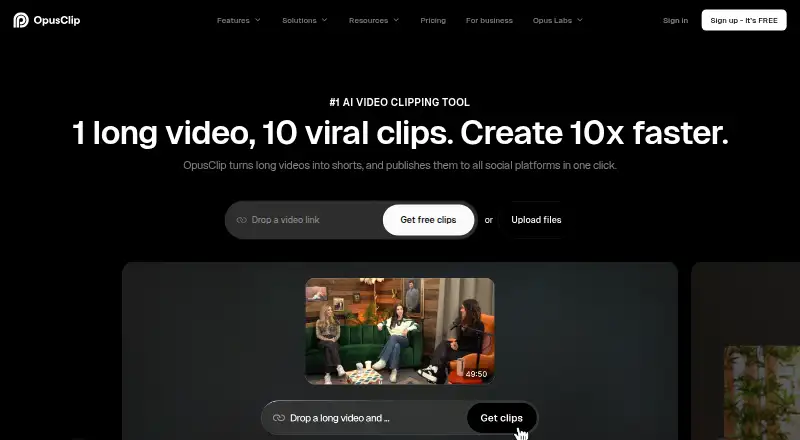
What OpusClip is
OpusClip turns long videos into short clips and can publish them to social platforms in one click. Its AI tools include clipping, captions, reframing, B-Roll, audio enhancement and voice-over. AI Producer is designed to turn raw talking-head footage into publish-ready video; the editor also supports text-based editing, timeline editing and brand tools. The service lists support for English, German, Spanish, French, Portuguese and more than 20 additional languages. Its free plan includes 60 credits refreshed monthly and clips rendered up to 1080p, but adds a watermark, has no editing and makes clips unexportable after three days. Starter costs $15 a month. Pro costs $29 a month or 174.00 USD billed annually, and a 7-day trial is listed. OpusClip supports API, iOS and web. Its iOS app can upload videos, generate clips with AI, edit captions and share with one tap; it runs on iPhone with iOS 16 or newer.
Who it suits
OpusClip suits individual creators, professional creators, marketers and teams making short clips from longer videos. Its Business plan is positioned for organizations seeking tailored solutions and API access.
What it does well
- AI clipping, captions, reframing and audio enhancement
- Supports more than 25 listed languages
- iOS app can generate clips and edit captions
- API workflow integration, Zapier and MCP connector
What to know first
- Free clips have a watermark
- Free plan does not include editing
- Free clips cannot be exported after three days
- iOS app requires iPhone with iOS 16 or newer
Limits
The free plan includes 60 credits refreshed monthly and clips up to 1080p, with a watermark and no editing. Clips are no longer exportable after three days. Starter includes 150 credits per month; Pro includes 300 credits per month, and Business has customized credits.
Plans
| Plan | Billed and limits | Price |
|---|---|---|
| Free | Free forever · 60 credits/month · up to 1080p · watermark · no editing · exports expire after 3 days | Free |
| Starter | $15 billed monthly · 150 credits/month · AI clipping · animated captions in 20+ languages · one brand template · watermark removal | $15 a month |
| Pro | $29 monthly or $174 billed annually ($14.5/mo) · 300 credits/month · credits roll over 2 months · 2 seats · 6 social connections · AI B-roll · scheduler · limited API · dubbing | $29 a month |
| Business | Contact us · custom credits/seats/connections · dedicated storage · API and custom integrations · enterprise security · priority Slack support | On request |
As opus.pro lists them, read 21 Oct 2026. The maker's own page has the final word.
Getting started
- Visit the OpusClip website and choose the free plan or a paid plan.
- Start the listed 7-day trial if you want to try a trial.
- Import a video from a supported source on Pro, or upload one through the iOS app.
- Use AI clipping and captioning to generate clips, then edit captions or use the available editor on a plan that includes editing.
- Connect social accounts or integrations to publish and automate workflows.
OpusClip is built for turning long recordings into short social videos, with AI assistance from clipping through publishing. It is a strong fit for creators and teams repurposing video regularly; occasional users may find the credit limits and the free plan’s export restrictions more trouble than they are worth.
Overview
The appeal is a connected workflow: identify moments in longer footage, refine them, and prepare clips for social channels. That breadth makes OpusClip more useful than a clipping-only tool for ongoing publishing, though the free tier stops short of a usable editing and export routine.
Key features
AI clipping and highlight detection identify moments to turn into short videos. AI captions, automatic reframing and social platform presets help adapt each clip for its destination. AI B-Roll, audio enhancement and voice-over offer further production options, while transcript-to-post output can carry the workflow beyond video. OpusClip supports English, German, Spanish, French, Portuguese and more than 20 additional languages.
The AI Producer is designed to turn talking-head footage into publish-ready video. Text-based and timeline editing and brand tools let users refine the output rather than rely on the initial cut. That distinction matters: Free includes no editing, so creators need a paid plan to make OpusClip a fuller production workflow.
Pro supports imports from YouTube, Google Drive, Vimeo, Zoom, Rumble, Twitch, Facebook, LinkedIn, Twitter, Loom, Riverside and StreamYard. API workflow integration, Zapier and an MCP connector give teams ways to connect OpusClip with other tools. The iOS app supports video uploads, AI clip generation, caption editing and one-tap sharing on iPhones running iOS 16 or newer.
Pricing
OpusClip uses a freemium model and offers a 7-day trial. Free costs nothing forever and provides 60 credits per month and clips rendered at up to 1080p. The watermark, lack of editing and three-day export window make it better for trying the service than producing finished clips to keep and publish later.
Starter costs $15 a month, billed $15 monthly. It raises the allowance to 150 credits per month, adds one brand template and removes the watermark. This is the entry point for individual creators who need clean exports, but it provides less capacity and fewer team tools than Pro.
Pro costs $29 a month, billed $29 USD monthly or $174 billed annually ($14.5 USD/mo). It includes 300 credits per month, two seats, two brand templates and six social account connections; unused credits roll over for two months. The annual option lowers the monthly equivalent, while the two-seat allowance and account connections make Pro the more practical plan for professional creators, marketers and small teams.
Business has custom pricing. It adds priority processing, customized credits, seats and social connections, dedicated storage, API and custom integrations, and enterprise-level security. It is aimed at organizations needing tailored capacity and API access rather than a fixed self-serve package.
Platforms
OpusClip is available on web and iOS, and offers an API. Its iPhone app requires iOS 16 or newer. The company directs users to Discord and [email protected] for help; Pro includes Intercom chat support, while Business adds priority support through a dedicated Slack channel. Its security portal lists SOC 2 Type 2 and GDPR compliance, with continuous monitoring by Secureframe.
Who it's for
Choose OpusClip if you regularly repurpose long video and want AI clipping, editing options and publishing tools in one service. Starter suits an individual seeking watermark-free clips, while Pro is the stronger choice for professional or collaborative workflows. Free is a constrained way to try the service, not a dependable home for finished exports. Organizations needing tailored seats, storage or API integrations should consider Business; users who only clip occasionally may be better served by a simpler or free alternative.
Pros and cons
- Broad production workflow: clipping, captions, reframing, editing and publishing tools serve creators who want to handle several steps together.
- Useful paid-plan capacity: Pro’s 300 monthly credits, two seats, six social account connections and two-month rollover support recurring team work.
- Free is sharply limited: a watermark, no editing and exports that expire after three days restrict its usefulness for completed projects.
- Plan capacity is credit-based: creators with heavier output needs may need to move beyond Starter’s 150 monthly credits or seek a tailored Business plan.
Alternatives
AI Video Repurposing Tools is a useful category to compare if OpusClip’s credit-based plans do not suit your workflow. AI Video Editing Software and Social Media Video Makers are broader categories for readers weighing editing or publishing needs. Podcast-focused creators can also compare the Podcast Clip Makers category.
CapsAI is another freemium option across Android, iOS and web; its free plan shows 0 minutes left, so its listed one-time Starter plan may be more relevant to someone weighing a paid alternative. Headliner is worth considering for users who want unlimited video clips and captioned clips on a free plan, though its free audiogram allowance is one unwatermarked per month.
ScreenApp AI Meeting Notes is a meeting-notes alternative rather than a direct choice for video repurposing. Flowjin offers a free 60-minute one-time credit at 720p, but its free export limit is described inconsistently across the plan information, making it a less straightforward free-tier comparison. Kinocut is for readers prioritizing local processing and an Apache-2.0 free core over a hosted workflow.
reap offers one hour of monthly clipping and captions on its free plan, with watermarked 720p exports and projects expiring after seven days. Splicora is another freemium option, with a free allowance of 25 monthly credits, 1 GB storage and one brand voice. Vizard offers 60 monthly free credits and one social account, but its free exports are limited to 720p and 10 minutes, with three-day storage.
Verdict
OpusClip is a good choice for creators and teams that regularly turn long video into social clips and want editing, publishing and integration options in the same workflow. Its central advantage is that breadth; its main drawback is that the free plan cannot edit and stops exports after three days, while ongoing use depends on monthly credits. Choose Starter for watermark-free individual work, Pro for recurring collaborative output, and look elsewhere if you need a less restricted free production workflow.
Verdict
OpusClip combines automated clip creation with editing and publishing tools across web and iOS. The free plan has export and editing limits, while paid plans start at $15 a month.
Questions
Is OpusClip free?
Yes. Its free plan costs nothing, is billed free forever and includes 60 credits per month.
How much do the paid plans cost?
Starter costs $15 a month. Pro costs $29 a month or 174.00 USD billed annually, equivalent to 14.5 USD per month. Business pricing is available by contacting the company.
Which platforms does OpusClip support?
It lists API, iOS and web. The iPhone app requires iOS 16 or newer.
What can the iOS app do?
It supports uploading videos, AI clip generation, caption editing and one-tap sharing.
Does OpusClip integrate with other tools?
It offers API workflow integration with CMS and other tools, plus Zapier integration and an MCP connector.
What are the free-plan restrictions?
The free plan has 60 monthly credits and supports clips rendered up to 1080p, but includes a watermark, no editing, and clips become unexportable after three days.
Facts from OpusClip's own pages
- AI B-roll
- Paid tiers can add contextually relevant AI image, stock, or AI video B-roll to clips. · opus.pro, 21 Oct 2026
- AI clipping
- The service supports clipping by spoken words, visual objects, sound, emotion, and genre-specific curation models. · opus.pro, 21 Oct 2026
- AI editor
- Its editor provides text and timeline editing, trimming, scene reordering, transitions, layouts, and keyboard shortcuts. · opus.pro, 21 Oct 2026
- AI features
- The product lists AI clipping, AI captioning, AI reframe, AI B-Roll, AI audio enhancement and AI voice-over. · opus.pro, 2 Oct 2026
- API
- OpusClip exposes a REST video-clipping API using bearer API keys and a clip-projects endpoint. · opus.pro, 21 Oct 2026
- Audience
- The pricing page positions Starter for individual creators, Pro for professional creators, marketers and teams, and Business for organizations needing tailored solutions and API access. · opus.pro, 2 Oct 2026
- Audio tools
- Features include AI voice-over, speech enhancement, filler and pause removal, dubbing, and sound-effects generation. · opus.pro, 21 Oct 2026
- Captions
- OpusClip automatically generates captions, supports animated styles, emoji and keyword highlighting, and transcription in more than 20 languages. · opus.pro, 21 Oct 2026
- Company founded
- G2 lists OpusClip as serving customers since 2022 and identifies the company headquarters as Redwood City, California. · g2.com, 21 Oct 2026
- Core function
- OpusClip turns long videos into short clips and publishes them to social platforms in one click. · opus.pro, 2 Oct 2026
- Documentation and support
- Documentation is provided through API examples, MCP instructions, a help center, Discord, AI chat, Intercom for paid tiers, and dedicated Slack for business customers. · opus.pro, 21 Oct 2026
- Editor
- OpusClip AI Producer turns raw talking-head footage into publish-ready video, while the editor supports text-based editing, timeline editing and brand tools. · opus.pro, 2 Oct 2026
- Free-plan limits
- The free plan includes 60 credits refreshed monthly, up to 1080p rendered clips, auto reframe and AI captions, but adds a watermark, has no editing, and makes clips unexportable after three days. · opus.pro, 2 Oct 2026
- Free trial
- New users receive a 7-day Pro trial with 90 minutes of video processing time, approximately 30 downloadable clips. · opus.pro, 2 Oct 2026
- Funding news
- The company about page links coverage of a SoftBank Vision Fund 2 investment valuing OpusClip at $215 million and an earlier $30 million funding announcement. · opus.pro, 21 Oct 2026
- Headquarters
- Mountain View, California, United States · opus.pro, 23 Sept 2026
- Input integrations
- Supported sources listed by OpusClip include YouTube, Google Drive, Vimeo, Zoom, Rumble, Twitch, Facebook, LinkedIn, X, Loom, Riverside, and StreamYard. · opus.pro, 21 Oct 2026
- Integrations
- OpusClip offers API workflow integration with CMS and other tools, plus Zapier integration and an MCP connector. · opus.pro, 2 Oct 2026
- Legal company and investors
- Crunchbase identifies the company as Opus AI Inc., headquartered in Mountain View, with 101–250 employees and 13 listed investors including Millennium New Horizons and AI Grant. · crunchbase.com, 21 Oct 2026
- Limit: AI accuracy
- Reviewers report clips can be out of context, generic, or require manual cleanup and creative editing. · capterra.com, 21 Oct 2026
- Limit: exports and workflows
- Independent review analysis reports unreliable posting or exports, downloaded clips differing from edits, and limited scheduling integrations. · reviews.vc, 21 Oct 2026
- Limit: pricing and credits
- Review complaints include watermarks on free output, credit limits or extra-credit upsells, and pricing that feels high for heavy use. · trustpilot.com, 21 Oct 2026
- Limit: support and billing
- Trustpilot complaints include slow or failed cancellation, refund disputes, expired unused credits, and unresponsive support threads. · trustpilot.com, 21 Oct 2026
- MCP extensibility
- Its MCP server works with Claude, Cursor, ChatGPT, VS Code, and other compatible clients through OAuth; it exposes 27 tools. · opus.pro, 21 Oct 2026
Where OpusClip stands on Freedom251
- AI Video Repurposing Tools#10 of 50
- Podcast Clip Makers#7 of 30
- AI Video Editing Software#10 of 32
- Social Media Video Makers#10 of 29