Freedom251 › AI Script Writing Software
ngram
by ngram
What ngram is
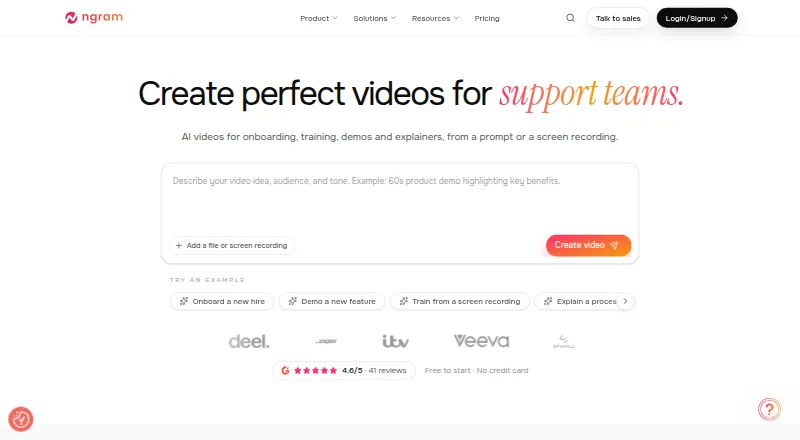
ngram turns prompts and source material into editable business videos. You can start with documents, URLs, screenshots, presentations, or recordings, then review the script, storyboard, scene plan, visual direction, timing, and call to action before rendering. Afterward, drafts can be revised through chat, a script editor, canvas controls, or a timeline. Projects can include generated visuals, voiceover, captions, motion graphics, translation, and video editing. The Free plan provides 600 one-time credits, requires no credit card, and includes up to 60 seconds of premium AI-generated footage, 720p exports, and a watermark; it is an evaluation option rather than a time-limited trial. Annual-billed paid plans start at $23.20/mo and include unlimited manual editing and exports, with quality ranging from 720p to 4K by plan. Available on the web and as an extension, ngram also lists workflow integrations and beta publishing to LinkedIn, X, and YouTube. Its maker was founded in 2020 and is based in San Francisco, California.
Who it suits
It suits teams in product marketing, product management, customer success, sales, education, HR, and founders who need to create business videos from prompts or source materials. The review and editing controls may suit teams that want to refine a draft before rendering.
What it does well
- Accepts documents, URLs, screenshots, presentations, and recordings.
- Review script and scene plan before rendering.
- Revise drafts through chat, editor, canvas, or timeline.
- Free plan requires no credit card.
- Paid plans include unlimited manual editing and exports.
What to know first
- Free plan exports include a watermark.
- Free plan provides 600 one-time credits.
- Social publishing is in Beta.
- No free trial is offered.
Limits
The Free plan includes 600 one-time credits, up to 60 seconds of premium AI-generated footage, 720p exports, and a watermark. Basic costs $23.20 a month when billed annually and includes 3,000 credits per month equivalent, up to 300 seconds of premium AI video generation per month at the base rate, and 720p exports.
Plans
| Plan | Billed and limits | Price |
|---|---|---|
| Free | one-time allocation · 600 credits · up to 60 seconds premium AI footage · 720p · watermark · no card | Free |
| Basic | $29 monthly or $278.40 billed annually ($23.20/mo) · 3,000 credits/month · up to 300 seconds premium footage · 720p · standard models · unlimited manual edits and AI text | $29 a month |
| Premium | $59 monthly or $566.40 billed annually ($47.20/mo) · 10,000 credits/month · up to 1,000 seconds premium footage · 1080p · advanced models · 1 BrandKit · 1 custom voice · 1 custom avatar · one-cycle credit rollover | $59 a month |
| Ultimate | $299 monthly or $2,870.40 billed annually ($239.20/mo) · 50,000 credits/month · up to 5,000 seconds premium footage · 4K · unlimited BrandKits, voices and avatars · unlimited teammates · hosting and interactive viewer features in limited rollout | $299 a month |
| Enterprise | custom agreement · custom capacity and export quality · organization security controls · dedicated onboarding and support | On request |
As ngram.com lists them, read 15 Oct 2026. The maker's own page has the final word.
Getting started
- Open ngram’s website or use its browser extension.
- Start with a prompt or source material such as a document, URL, screenshot, deck, or recording.
- Review the script, storyboard, scene plan, visual direction, timing, and call to action.
- Revise the draft using chat, the script editor, canvas controls, or the timeline.
- Choose the Free plan or a paid plan; the Free plan requires no credit card.
- Render and export the video, with quality depending on the plan.
ngram is a web app and browser extension for turning prompts and source material into structured business videos. It is best for teams that need stakeholders to approve wording, scenes, and timing before a render. Choose it when controlled iteration matters more than instant, one-click output.
Overview
Documents, URLs, screenshots, slide decks, and recordings can all become starting points for a project. ngram lays out the script, storyboard, scene plan, visual direction, timing, and call to action for review before rendering. That approval stage suits product marketing, product management, customer success, founders, sales, educators, and HR teams producing explainers or internal communications. It is less compelling for a user who only wants an unreviewed social clip.
The maker, founded in 2020 and headquartered in San Francisco, presents ngram as a freemium service. The Free plan is an evaluation route rather than a timed trial: it supplies one-time credits without requiring a card, but the resulting footage and exports are tightly capped.
Key features
Drafts can be changed in several ways: chat for conversational direction, a script editor for wording, canvas controls for visual arrangement, or a timeline for timing adjustments. Keeping these options in one project lets a marketer, editor, and approver work at the level each needs instead of restarting generation.
Projects can include generated visuals, voiceover, captions, motion graphics, translation, and editing. Auto clip detection and video reframing help adapt material for different uses. Paid subscriptions include unlimited manual editing and exports, but AI generation remains governed by monthly credits and premium-footage allowances. The quality ceiling rises with the plan, from 720p to 4K.
Workflow connections include the Chrome Extension, viaSocket, Zapier, n8n, and an MCP Server. LinkedIn, X, and YouTube publishing is in Beta, with immediate posting or calendar scheduling through Studio. Documentation, a Help Center, community forum, and live chat provide several support channels.
Pricing
Free
Free costs $0.00 per free and provides 600 one-time credits, up to 60 seconds of premium AI-generated footage, 720p exports, and a watermark. It is useful for validating the planning workflow or making a short proof of concept, not for an ongoing publishing operation.
Basic
Basic costs $23.20 per month when billed annually ($278.40 annually, with 20% off). It includes the equivalent of 3,000 credits per month, up to 300 seconds of premium AI video generation at the base rate, 720p exports, and standard AI models. This is the entry point for small teams that can accept HD-ready output and a narrower model selection.
Premium
Premium is $47.20 per month billed annually ($566.40 annually, 20% off). The 10,000-credit equivalent and allowance of up to 1,000 seconds of premium footage support regular production, while 1080p exports, all advanced AI models, and one BrandKit make it a better fit for branded customer or product work.
Ultimate and Enterprise
Ultimate costs $239.20 per month billed annually ($2,870.40 annually, 20% off). It raises the allowance to 50,000 credits and up to 5,000 seconds of premium footage, adds 4K exports, and includes unlimited BrandKits, custom voices, and custom avatars. It targets high-volume teams with demanding delivery standards. Enterprise uses custom pricing and adds custom credits, custom export quality, organization-wide security and controls, plus dedicated onboarding and support.
Platforms
ngram runs on the web and as a browser extension. Its listed integrations extend creation into connected automation workflows, while Studio handles Beta publishing to LinkedIn, X, and YouTube.
Who it's for
Choose ngram if your team needs a reviewable production process for business video, especially when scripts, visual plans, calls to action, and brand treatment require approval. Premium is the practical middle tier for teams needing 1080p and advanced models. Basic suits lighter, standard-model production; Ultimate is for 4K and extensive brand or voice customization. Look elsewhere if your priority is broad device coverage, a permanent free allowance, or sales-prospecting features rather than structured source-to-video creation.
Pros and cons
- Pro: Script, storyboard, scene, visual, timing, and call-to-action reviews provide meaningful control before rendering.
- Pro: Chat, script, canvas, and timeline revisions accommodate different editing responsibilities.
- Pro: Source inputs, generated media, captions, translation, and reframing share one project workflow.
- Con: The Free plan is limited to one-time credits, 60 seconds of premium footage, 720p, and a watermark.
- Con: Paid plans cap AI generation monthly even though manual editing and exports are unlimited.
- Con: LinkedIn, X, and YouTube publishing remains in Beta.
Alternatives
For prospecting-focused workflows, compare Dubb, which offers Android, iOS, desktop, web, extension, and API access plus an annual Pro plan with unlimited videos and HD quality. Hippo Video is a broader multi-platform option with a free tier that includes two video flows and ten minutes of closed captions. Bonjoro suits simple personalized outreach, with a free-forever allowance of up to 50 videos. Vidyard is oriented to recording, sharing, integrations, and limited AI videos. BHuman is the more focused choice for template-based personalized videos through web and API. Castify offers extension and web access with up to ten free videos and five members. RepliQ is a paid, API/web alternative with a 30-video free allowance. Vimotion is positioned around a managed hero-video service rather than ngram's review-first workspace.
You can also browse Video Prospecting Software, AI Explainer Video Makers, AI Script Writing Software, Podcast Clip Makers, AI Video Repurposing Tools, and AI Video Caption Generators by use case.
Verdict
ngram is a strong choice for teams that need business videos to pass through script and scene review before publication, with several revision modes and integrated production tools. Its main reason to look elsewhere is the combination of plan-based AI quotas, watermark and 720p limits on Free, and Beta social publishing; high-volume or prospecting-first users may find a more specialized service a better fit.
Verdict
ngram combines source-based video creation with review and revision controls. The free plan provides a no-card way to evaluate it, while paid plans start at $23.20/mo billed annually and offer higher export quality by tier.
Questions
Is ngram free?
Yes. The Free plan provides 600 one-time credits and requires no credit card. It includes up to 60 seconds of premium AI-generated footage, 720p exports, and a watermark.
How much do paid plans cost?
Annual-billed plans start at $23.20 a month for Basic. Premium is $47.20 a month and Ultimate is $239.20 a month, each billed annually.
Which platforms does ngram support?
ngram is available on the web and as an extension.
What can I use to make a video?
You can start with prompts or materials such as documents, URLs, screenshots, decks, and recordings. Projects can include generated visuals, voiceover, captions, motion graphics, translation, and editing.
Which workflow integrations are listed?
The integrations page lists Chrome Extension, viaSocket, Zapier, n8n, and an MCP Server.
Who makes ngram?
The maker is ngram, founded in 2020 and based in San Francisco, California.
Facts from ngram's own pages
- AI video generation
- AI video generation accepts PDFs, Markdown, webpages, screenshots, decks, screen recordings and raw video, then produces scenes with narration, captions, motion graphics and brand direction. · ngram.com, 15 Oct 2026
- API key management
- Every signed-in user can self-serve API keys beginning with ngs_, then rotate or revoke them in Settings. · help.ngram.com, 15 Oct 2026
- API limits
- The API permits at most three processing jobs per account at once and returns 429 for excess jobs and 402 when credits are insufficient. · help.ngram.com, 15 Oct 2026
- Coming integrations
- Make.com and a Custom GPT connector are marked coming soon. · ngram.com, 15 Oct 2026
- Company founders
- The company identifies Devadutta Ghat as co-founder and CTO and Anish Muppalaneni as co-founder and CEO. · ngram.com, 15 Oct 2026
- Company founding
- The media kit states that ngram was founded in 2020 in San Francisco, California, with a 10–50-person team. · ngram.com, 15 Oct 2026
- Company legal name
- The terms identify the contracting entity as Ngram, a California corporation. · ngram.com, 15 Oct 2026
- Creation workflow
- The workflow lets users describe a video, approve a scene plan, watch generation, preview, revise in chat or an editor, and download or share it. · ngram.com, 15 Oct 2026
- Crunchbase company facts
- Crunchbase lists ngram Inc as a private, for-profit San Francisco company with 11–50 employees and one pre-seed round involving K5 Global. · crunchbase.com, 15 Oct 2026
- Documentation
- Documentation covers creation, editing, sharing, billing, troubleshooting, API, MCP, Zapier and n8n workflows. · ngram.com, 15 Oct 2026
- Editing
- Finished drafts can be revised through chat, a script editor, canvas controls, or a timeline. · ngram.com, 29 Sept 2026
- Exports
- Paid plans include unlimited manual editing and exports, with export quality varying by plan from 720p to 4K. · ngram.com, 29 Sept 2026
- Formats
- The product supports 16:9, 9:16 and 1:1 outputs and can export MP4 or GIF, share links and provide embeds. · ngram.com, 15 Oct 2026
- Founded
- 2020 · ngram.com, 28 Sept 2026
- Free access
- The Free plan provides 600 one-time credits, requires no credit card, and is described as the evaluation path rather than a time-limited trial. · ngram.com, 29 Sept 2026
- Free plan
- Yes · ngram.com, 20 Sept 2026
- Free-tier data use
- Terms say paid-plan content is not used to train models, while free-tier content may be used for training unless the user opts out prospectively. · ngram.com, 15 Oct 2026
- Free-tier output rights
- Free-tier outputs remain owned by ngram and are licensed only for personal, non-commercial viewing, downloading and sharing. · ngram.com, 15 Oct 2026
- Headquarters
- San Francisco, CA · ngram.com, 28 Sept 2026
- Image Lab
- Image Lab generates and edits branded stills, thumbnails and product cards from prompts or reference images. · ngram.com, 15 Oct 2026
- Integrations
- Official integrations include Chrome, viaSocket, Zapier, n8n and MCP for creation, plus LinkedIn, X and YouTube publishing in beta. · ngram.com, 15 Oct 2026
- Intended users
- The product is presented for teams including product marketing, product management, customer success, founders, sales, educators, and HR. · ngram.com, 29 Sept 2026
- Limit: factual verification
- The maker advises checking research claims, numbers and visuals against original sources before publishing. · producthunt.com, 15 Oct 2026
- Limit: graphics quality
- A G2 reviewer reported that default graphics can look cheap and are difficult for non-designers to improve. · g2.com, 15 Oct 2026
Where ngram stands on Freedom251
- AI Script Writing Software#4 of 27
- AI Video Caption Generators#16 of 99
- AI Video Repurposing Tools#12 of 50
- Video Prospecting Software#7 of 26
- AI Explainer Video Makers#8 of 27
- Podcast Clip Makers#10 of 30
- AI video generators#134 of 242