Freedom251 › AI Script Writing Software
Lastslate
What Lastslate is
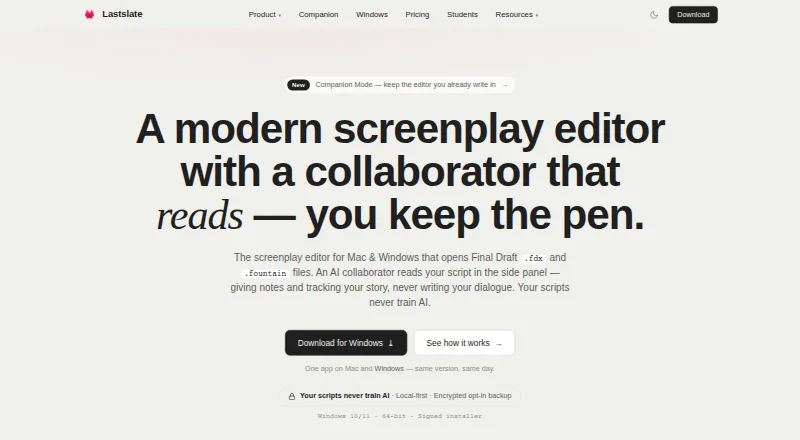
Lastslate is a screenplay editor for Mac and Windows with an AI collaborator that reads scripts but does not write dialogue. As a writer types, it detects elements such as sluglines, character cues, and dialogue, and saves automatically. It supports Final Draft FDX, Fountain, plain text, and PDF; PDF screenplays can be reconstructed as editable scenes. The Beat Board connects story beats to script scenes and is included on every plan. Built-in tools can derive cast lists, location and prop breakdowns, loglines, and one-sheets from a script. Browser review links let recipients comment on specific lines without an account, while Pro supports live co-writing with up to 10 writers in one script. Scripts are stored locally by default; cloud backup is optional and encrypted in transit and at rest. An AI action sends the relevant script excerpt, prompt, and session context to the AI provider for that request. The Free plan includes the full editor, Beat Board, PDF and FDX export, 10 cloud projects, 30-day version history, and limited AI collaboration. Pro costs $15 a month; Pro+ costs $45 a month.
Who it suits
Lastslate suits screenwriters who want screenplay formatting, script-derived planning tools, and optional AI assistance. Its review links and Pro co-writing features may suit writers sharing drafts with others.
What it does well
- Automatically detects screenplay elements while typing.
- Supports FDX, Fountain, plain text, and PDF.
- Beat Board is included on every plan.
- Scripts are stored locally by default.
What to know first
- AI collaborator does not write dialogue.
- AI actions send script excerpts and context to the AI provider.
- Pro costs $15 a month.
Limits
The Free plan includes 10 cloud projects, 30-day version history, and limited AI collaboration. Companion Mode questions require Pro or a user-provided model key.
Plans
| Plan | Billed and limits | Price |
|---|---|---|
| Free | full editor · PDF and Final Draft export · Beat Board · 10 cloud projects · 30-day version history · limited AI questions | Free |
| Pro | Month-to-month · $15 AI usage included each billing cycle · Unlimited cloud projects · Unlimited version history · Up to 10 writers in one script | $15 a month |
| Pro+ | $450 USD/year annual option · three times Pro AI allowance · unlimited cloud projects and version history · live co-writing | $45 a month |
| Student Pro | $100 USD/year; US and Canada students with school email · Pro plan access · school email required | $10 a month |
| Individual (Pro) | Billed monthly; $150 USD/year annual option; 7-day free trial · more AI questions · strongest AI models · logline-to-outline · review links · unlimited cloud projects and version history · live co-writing · usage-based AI beyond allowance | $15 a month |
| Individual (Pro), annual | $150 USD / year · Extended AI collaborator limits · Advanced models · AI scaffolding · Review links · Unlimited cloud projects and version history · Real-time co-writing · Usage-based pricing available | $150 a year |
As lastslate.com lists them, read 14 Oct 2026. The maker's own page has the final word.
Getting started
- Visit https://www.lastslate.com/ to get started.
- Choose the Free plan or a paid plan; the listed offer includes a 14-day trial.
- Install the macOS app on macOS 12 or later, or the Windows app on Windows 10 or 11 (64-bit).
- Import a screenplay in FDX, Fountain, plain text, or PDF, or start writing in the editor.
- Use the Beat Board to link story beats to scenes.
Lastslate is a screenplay editor for Mac and Windows, best suited to writers who want script planning, review, and AI assistance alongside drafting. Its free tier covers core solo work; paid plans make the most sense when you need more cloud capacity, history, or live co-writing.
Overview
Lastslate recognizes screenplay elements such as scene headings, character cues, and dialogue as you type, and saves automatically. Its Beat Board links story beats to script scenes, while built-in tools derive cast lists, location and prop breakdowns, loglines, and one-sheets from a script. That combination keeps planning and practical production documents close to the draft, rather than requiring separate tools.
It supports Final Draft FDX, Fountain, plain text, and PDF, including reconstruction of editable scenes from PDF screenplays. This is useful when bringing older or shared scripts into an editable workflow. Lastslate is specifically a screenplay editor, however, and its AI is not a dialogue generator or rewriting tool.
Key features
AI collaboration and privacy
The AI collaborator reads scripts and responds to them, but does not write dialogue. For writers who want assistance without delegating authorship, that is a meaningful boundary; writers seeking generated dialogue or scene rewrites should look elsewhere. Paid users can connect their own Claude, OpenAI, or Gemini account, or a model running on their computer, with the key kept in the computer's keychain.
When an AI action is invoked, the relevant script excerpt, prompt, and session conversation context go to the AI provider for that request. Scripts are stored locally by default; optional cloud backup is encrypted in transit and at rest. The company says scripts, prompts, and completions are not used to train AI models. Writers should still consider the per-request sharing before sending sensitive material to an AI provider.
Planning, review, and co-writing
The Beat Board is included on every plan and connects beats to scenes; Pro adds reference images to beats. Review links let recipients comment on specific script lines in a browser without an account, with threaded replies attached to a particular draft. Pro also supports live co-writing with up to 10 writers in one script, a stronger fit for collaborative rooms than for writers working alone.
Companion Mode watches a script file created in another editor and rereads it after saves, but works read-only. Asking it questions requires Pro or a user-provided model key, so it can extend an existing workflow without replacing the other editor, but it cannot edit that file.
Pricing
Lastslate has a free plan and paid plans billed month-to-month, plus annual terms for select options. The free plan costs nothing and includes the full editor, PDF and FDX export, Beat Board, 10 cloud projects, 30-day version history, and a limited AI collaborator. It is a capable starting point for solo writers, with cloud-project and history caps as the main constraints.
Pro costs $15 a month, billed month-to-month, and includes $15 AI usage each billing cycle, unlimited cloud projects and version history, and co-writing for up to 10 writers. Pro+ costs $45 a month on the same billing cadence and provides three times Pro's included AI, alongside the same stated project, history, and writer limits. Pro+ is for heavier AI use; the listed plan terms do not describe additional collaboration capacity.
Student Pro costs $10 a month, or $100 USD per year, with a school email, and is available to students in the US and Canada. It includes the Pro plan, making it the lower-cost route for eligible students. Individual (Pro) costs $15 a month or $150 a year and includes a 7-day free trial, extended AI collaborator limits, advanced models, AI scaffolding, review links, unlimited cloud projects and version history, real-time co-writing, and usage-based pricing. The annual Individual (Pro) option is $150 a year with those same stated features. The 14-day trial described for the product differs from the 7-day trial attached to Individual (Pro); check the applicable offer before starting.
Platforms
Lastslate runs on macOS 12 or later, on Apple Silicon and Intel, and its Mac app is notarized by Apple. The Windows app supports 64-bit Windows 10 and 11, uses a code-signed installer, and updates automatically.
Who it's for
Lastslate is a strong fit for screenwriters who want automatic formatting, linked story planning, and script-derived production tools in one desktop app. It is especially appealing to writers who value local-first storage, browser-based line comments, or a path to live co-writing. It is less suited to people who need AI-generated dialogue, rewriting, or a fully web-based editor.
Pros and cons
- Pros: Broad script import and export support, including editable-scene reconstruction from PDF, helps bring scripts from different workflows into one editor.
- Pros: The Beat Board is available on every plan, and review links allow account-free commenting tied to a draft.
- Pros: Local storage by default and optional encrypted cloud backup give writers a clear choice about cloud use.
- Cons: The AI does not write dialogue or rewrite scenes, excluding a common use for generative writing tools.
- Cons: Free users face a 10-project cloud cap, 30-day version history, and limited AI collaborator.
- Cons: Companion Mode is read-only, and questions require Pro or a user-provided model key.
Alternatives
Choose ScreenWeaver if you want a screenplay option with a forever-free plan offering unlimited projects and pages, plus PDF and Final Draft export. Screenplay Assistant may suit writers who want a free plan centered on AI formatting, character images, storyboards, and Atticus answers.
FiveDraft is worth considering for mobile-first drafting across Android, iOS, and web; its free plan allows unlimited local drafts but saves only one script to cloud and watermarks PDF exports. For an iOS or Mac editor with offline use, unlimited scripts, and no account requirement on its free plan, consider Inkwell.
ScriptDraft is an Android and iOS option with a free Fountain editor, PDF, Fountain, and FDX export, and support for more than 100 languages. Scriptuber is another alternative. For a web-based script tool, consider FluvAI, which offers a free tier of three scripts per month and one source per script. ngram is another alternative.
For broader discovery, browse AI Script Writing Software and Writing Apps.
Verdict
Choose Lastslate if you want a desktop screenplay editor that combines beat-to-scene planning, script review, and collaboration with local-first storage. Its strongest reason to choose it is how much of the writing workflow sits beside the draft, including review links and live co-writing on paid plans. Look elsewhere if your priority is AI-generated dialogue or rewriting, or if you need a web-based editor.
Verdict
Lastslate combines screenplay editing with script planning, review links, and an AI collaborator. Before using an AI action, note that the relevant excerpt, prompt, and session context are sent to the provider for that request.
Questions
Which platforms does Lastslate support?
It has macOS and Windows apps. The Mac app requires macOS 12 or later; Windows support covers Windows 10 and 11 (64-bit).
Is there a free plan or trial?
Yes. The Free plan costs nothing. The listed pricing note also includes a 14-day trial.
What does the Free plan include?
It includes the full editor, PDF and FDX export, the Beat Board, 10 cloud projects, 30-day version history, and limited AI collaboration.
What file formats does Lastslate support?
It supports Final Draft FDX, Fountain, plain text, and PDF, and can reconstruct editable scenes from PDF screenplays.
How does Lastslate handle scripts and AI requests?
Scripts are stored locally by default, and optional cloud backup is encrypted in transit and at rest. An AI action sends the relevant script excerpt, prompt, and session conversation context to the AI provider for that request.
Who publishes Lastslate?
The privacy policy identifies Uniqlabs LLC as the publisher of the Lastslate application.
Facts from Lastslate's own pages
- AI account options
- Paid plan users can connect their own Claude, OpenAI, or Gemini account or a model running on their computer, with the key stored in the computer's keychain. · lastslate.com, 29 Sept 2026
- AI collaborator
- The collaborator can read as a First Reader, Showrunner, Script Editor or Staff Writer, identify story issues and map arcs, but does not draft screenplay text. · lastslate.com, 14 Oct 2026
- AI data sharing
- When a user invokes an AI action, the relevant script excerpt, prompt, and session conversation context are sent to the AI provider for that request. · lastslate.com, 29 Sept 2026
- AI design rationale
- A June 2, 2026 company article says the product intentionally restricts AI to reading and analysis rather than generating screenplay pages. · lastslate.com, 14 Oct 2026
- AI integrations
- Paid users can connect Claude, OpenAI, Gemini or a model running on their own computer; provider billing applies to those external accounts. · lastslate.com, 14 Oct 2026
- AI limitation
- The terms warn that AI output may be wrong, misleading or unsuitable and must be reviewed by the user. · lastslate.com, 14 Oct 2026
- AI training policy
- Uniqlabs says it does not use scripts, prompts or completions to train models and contracts providers that prohibit such training. · lastslate.com, 14 Oct 2026
- Analytics controls
- Anonymous usage events and crash diagnostics exclude screenplay text and can be disabled in the app settings. · lastslate.com, 14 Oct 2026
- Backup limitation
- The terms make users responsible for their own backups and say cloud backup is only a convenience, not a replacement for backup strategy. · lastslate.com, 14 Oct 2026
- Beat Board
- The Beat Board stores story beats, links them to scenes and is available on every plan; Pro adds reference images. · lastslate.com, 14 Oct 2026
- Cloud security
- Opt-in cloud backups are encrypted in transit with TLS 1.2 or higher and encrypted at rest. · lastslate.com, 14 Oct 2026
- Real-time collaboration
- Yes · lastslate.com, 21 Sept 2026
- Companion Mode
- Companion Mode watches files created in Final Draft, Fade In, Highland, Fountain, plain text or PDF editors and answers questions without modifying those files. · lastslate.com, 14 Oct 2026
- Company legal name
- The application and privacy policy identify Uniqlabs LLC as the publisher and company. · lastslate.com, 14 Oct 2026
- Co-writing
- Pro supports live editing by up to 10 writers in one screenplay with visible cursors and keystrokes. · lastslate.com, 14 Oct 2026
- Drafts
- Named parallel drafts let writers create alternate versions and return to earlier versions without overwriting the main draft. · lastslate.com, 14 Oct 2026
- File formats
- The app imports and exports Final Draft FDX, reads and writes Fountain and plain text, and imports PDF screenplays into editable scenes. · lastslate.com, 14 Oct 2026
- Final Draft compatibility
- Lastslate says title pages, dual dialogue and revision colours survive FDX round trips and pagination matches Final Draft using Courier Prime 12-point and 54 lines per page. · lastslate.com, 14 Oct 2026
- Format as you type
- The editor detects sluglines, character cues and dialogue as you type and saves automatically. · lastslate.com, 14 Oct 2026
- Formatting
- The editor detects screenplay elements such as sluglines, character cues, and dialogue as the writer types and saves automatically. · lastslate.com, 29 Sept 2026
- Free plan
- Yes · lastslate.com, 21 Sept 2026
- Installer security
- The Windows installer is code-signed through Microsoft Trusted Signing and updates itself automatically; the Mac app is notarized by Apple. · lastslate.com, 14 Oct 2026
- License terms
- Uniqlabs grants a personal, non-exclusive, non-transferable, revocable license and prohibits redistribution, reverse engineering and competing use. · lastslate.com, 14 Oct 2026
- Local-first storage
- Scripts, drafts, version history and preferences remain on local disk unless the user enables cloud backup. · lastslate.com, 14 Oct 2026
Where Lastslate stands on Freedom251
- AI Script Writing Software#6 of 27
- Writing Apps#38 of 135