Freedom251 › AI Video Repurposing Tools
NovaClip
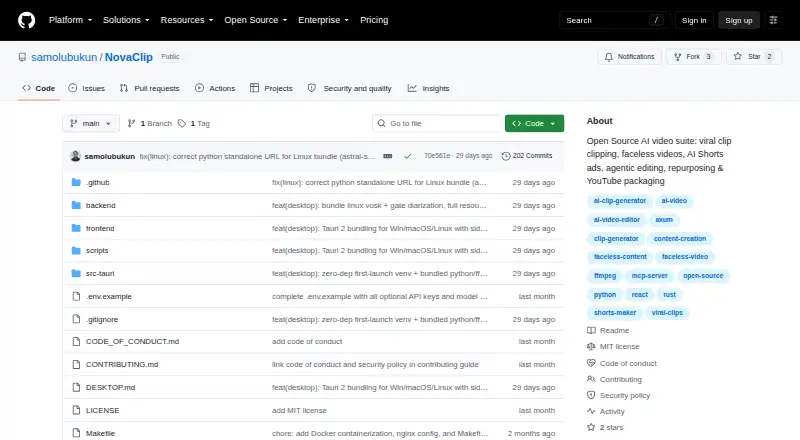
What NovaClip is
NovaClip is a free, open-source toolkit for creating, editing, repurposing, and packaging video, with web, desktop, API, and self-hosted options. Nova Clipper transcribes footage, scores candidate clips, crops and captions them, and exports clips individually or as a ZIP. Nova Studio creates faceless videos from topics or scripts and UGC-style AI Shorts ads from product URLs. Nova Edit proposes edits for human approval, renders the cut, and scores it; its listed targets are short-form videos of 20–90 seconds and long-form videos of 2–60 minutes. Nova Repurpose makes versions for TikTok, Instagram, YouTube, LinkedIn, and X, plus newsletter or blog copy and campaign PDFs. Generated videos can be published to YouTube, TikTok, or Instagram through Upload-Post. The pipeline is also available through an MCP endpoint for clients such as Claude Desktop and Cursor. Speech-to-text choices include Deepgram Nova-3, Vosk, and Whisper; text-to-speech options include Edge-TTS, ElevenLabs, and Deepgram Aura. The project says it is young and prototype-heavy, and that some pipelines or integrations can break. FFmpeg is required at runtime; Nova Edit is not yet a full NLE.
Who it suits
NovaClip may suit creators who want tools to generate, edit, package, or adapt video for multiple platforms. It may also interest users who want local speech options or access to the pipeline through an MCP client.
What it does well
- Exports clips individually or as a ZIP.
- Repurposes videos for five named social platforms.
- Offers cloud and offline speech-to-text options.
- Generated videos can publish through Upload-Post.
- Provider keys are stored only in the browser.
What to know first
- FFmpeg is required at runtime.
- The project says some pipelines and integrations can break.
- Nova Edit is not yet a full NLE.
- Provider keys must be supplied by the user.
Limits
The open-source plan is BYOK, so provider keys are needed where applicable. FFmpeg is required at runtime for desktop use; Nova Edit does not yet include transitions, color grading, keyframed motion graphics, or detailed audio mixing.
Plans
| Plan | Billed and limits | Price |
|---|---|---|
| Open source (MIT License) | Bring your own provider keys; no hosted plan or usage quota is stated | Free |
As github.com lists them, read 9 Oct 2026. The maker's own page has the final word.
Getting started
- Choose web, API, desktop, or self-hosted use.
- For desktop, use the Windows installer, macOS DMG, or Linux AppImage, deb, or rpm package.
- Install FFmpeg for desktop runtime use.
- For Docker Compose, start the documented frontend at localhost:3000 and backend at localhost:8000.
- Configure the provider keys needed for the providers you use; configured keys are stored in the browser.
- Connect an MCP client to the HTTP endpoint at POST /mcp if you want pipeline access through Claude Desktop, Cursor, or another MCP client.
NovaClip is a free, open-source toolkit for creators who want clipping, AI video creation, editing assistance, and repurposing in one project. It is strongest for technically comfortable users willing to bring provider keys and manage a local setup. Its range is impressive, but its prototype-heavy state and basic editing make it a cautious pick for production work.
Overview
NovaClip spans the path from source footage to social assets: it can find and prepare clips, create videos from a topic or script, propose edits, and produce channel-specific variants. That breadth may help independent creators consolidate several workflows. The MIT license and local or self-hosted deployment options offer flexibility, while the project’s stated maturity limits make reliability a real consideration.
Users can run it with Docker Compose or a native local setup. Desktop packages cover Windows, macOS, and Linux. FFmpeg is required at runtime; Python-based reframe is optional, and the backend can operate with reduced capability without it. This setup suits people comfortable managing a local stack better than users looking for a ready-to-use hosted editor.
Key features
Clipping and creation
Nova Clipper transcribes footage, scores possible highlights, reframes and captions clips, then exports them individually or as a ZIP. Automatic highlight detection, reframing, and social presets make the workflow relevant to creators turning longer videos into short-form posts. Nova Studio can build faceless videos from a topic or script and create UGC-style Shorts ads from a product URL, extending the tool beyond repackaging existing footage.
Editing and repurposing
Nova Edit analyzes footage, proposes a cut for human approval, renders it, and scores the result. Its targets range from 20–90 second short-form videos to 2–60 minute long-form videos. That approval step gives creators a chance to guide the result, but Nova Edit is not a full nonlinear editor: transitions, color grading, keyframed motion graphics, and detailed audio mixing remain roadmap items. It is better suited to assisted assembly than finishing work that depends on detailed creative control.
Nova Repurpose prepares variants for TikTok, Instagram, YouTube, LinkedIn, and X, alongside newsletter or blog copy and a campaign PDF. Generated videos can be published to YouTube, TikTok, or Instagram through Upload-Post. That combination may save steps for creators preparing a campaign across channels, though publishing depends on the integration.
Providers and automation
NovaClip connects with Gemini, OpenRouter, Deepgram, ElevenLabs, Pexels, Pixabay, WaveSpeed, and Upload-Post, with user keys required where applicable. The project follows a bring-your-own-key model and says configured keys are stored only in the browser. Transcription can use cloud Deepgram Nova-3 or offline Vosk and Whisper; speech generation options include Edge-TTS, ElevenLabs, and Deepgram Aura. The choice of local and cloud speech tools is useful for different workflows, but users must configure the providers they need.
An HTTP Model Context Protocol endpoint exposes the pipeline to Claude Desktop, Cursor, and other MCP clients. This opens automation and assistant-driven workflows for developers, while adding little for someone who simply wants a conventional video editor.
Pricing
Open source (MIT License): free. The plan includes the open-source toolkit and requires users to bring their own provider keys. No hosted plan or usage quota is stated. The lack of a subscription makes it an option for users who can run it themselves, but provider services may require configured accounts and keys.
There is no cheaper paid tier to compare: the trade-off is between a free, self-managed project and the setup and provider configuration it requires. Users seeking a hosted service or a stated included usage allowance should consider a different tool.
Platforms
NovaClip lists API, Linux, macOS, self-hosted, web, and Windows support. Windows installers, a universal macOS DMG, and Linux AppImage, deb, and rpm packages are described for desktop use. Docker Compose provides a local web frontend and backend. FFmpeg is required at runtime, which adds a dependency for desktop and local deployments.
Who it's for
NovaClip fits creators and developers who want one project for clip generation, prompt-based video creation, assisted editing, and cross-channel repurposing—and who are comfortable supplying provider keys and operating local software. Its MCP endpoint may also suit users building assistant-led workflows. It is a weaker fit for teams that need a mature editor with detailed finishing controls or dependable publishing pipelines.
Pros and cons
- Pros: Brings clipping, video creation, assisted editing, and repurposing together, which may reduce handoffs between separate tools.
- Pros: Supports local speech options and multiple cloud providers, giving users choices for transcription and text-to-speech.
- Pros: MIT licensing, desktop packages, and local or self-hosted deployment make it adaptable for users comfortable managing their own setup.
- Cons: The project describes itself as young and prototype-heavy, and warns that AI Shorts, YouTube Studio, Nova Edit, and integrations can break.
- Cons: Nova Edit lacks several finishing controls, including color grading and detailed audio mixing, limiting its role in polished post-production.
- Cons: FFmpeg is required at runtime, and provider keys are needed where applicable, adding setup and account configuration.
Alternatives
For a different balance of price, access, or workflow, consider these options:
- CapsAI is a freemium option with Android, iOS, and web support; its Starter plan is a one-time 49.00 INR and includes a 20-minute upload and 1080p export, which may suit someone seeking a defined paid entry point.
- Headliner has a Forever Free plan with unlimited video clips and captioned clips, plus one unwatermarked audiogram a month and unlimited watermarked audiograms; choose it when those clip and audiogram limits match the job.
- ScreenApp AI Meeting Notes is a freemium meeting-notes option with web, desktop, and mobile platforms, which may fit readers prioritizing that category.
- Flowjin offers a free plan with a one-time 60-minute credit, 720p output, and projects that expire after five days; it may suit a short trial of a paid service.
- Kinocut is a free, local-processing option with an Apache-2.0 license and no credit meter, for readers who prioritize local processing.
- OpusClip has a free plan with 60 credits per month and clips up to 1080p, but includes a watermark, no editing, and clips that stop being exportable after three days; it may suit users who want a defined monthly clipping allowance.
- reap offers one hour a month of free clipping and captions, with watermarked 720p exports and projects that expire after seven days; consider it when a capped monthly workflow is sufficient.
- Splicora has a free monthly plan with 25 credits, 1 GB storage, one brand voice, and seven-day history; it may suit readers looking for those defined limits in a freemium tool.
Browse more options in AI Video Repurposing Tools.
Verdict
NovaClip is a promising fit for technically confident creators who value a broad, free, open-source video pipeline and can handle provider setup and local requirements. Its combination of clipping, creation, repurposing, and MCP access is the strongest reason to choose it. Look elsewhere if your work depends on a dependable production environment, a hosted service, or fine-grained editing controls.
Verdict
NovaClip covers several video workflows, from clip generation to repurposing and publishing. Its prototype-heavy status, provider-key requirement, and FFmpeg dependency are worth weighing first.
Questions
How much does NovaClip cost?
The Open source (MIT License) plan is free.
Is NovaClip open source?
Yes. The project is distributed under the MIT License.
Which platforms does NovaClip support?
Its listed platforms are API, Linux, macOS, self-hosted, web, and Windows. Desktop packages are listed for Windows, macOS, and Linux.
Do I need my own provider keys?
NovaClip describes itself as BYOK and says provider keys are needed where applicable. Configured keys are stored only in the browser.
Can NovaClip publish videos to social platforms?
Generated videos can be published to YouTube, TikTok, or Instagram through Upload-Post.
What are Nova Edit's current editing limits?
Nova Edit proposes edits for human approval, renders them, and scores the result, but is not yet a full NLE. Transitions, color grading, keyframed motion graphics, and detailed audio mixing are listed as roadmap items.
Facts from NovaClip's own pages
- Agentic editing
- Nova Edit analyzes footage, proposes an edit plan for human approval, renders the cut, and scores it; the README says transitions, color grading, keyframed motion graphics, and detailed audio mixing are roadmap items. · github.com, 9 Oct 2026
- AI assistant access
- NovaClip exposes its pipeline through an HTTP Model Context Protocol endpoint and documents connecting Claude Desktop, Cursor, or another MCP client. · github.com, 9 Oct 2026
- AI video creation
- Nova Studio creates faceless videos from a topic or script and can make UGC-style AI Shorts ads from a product URL. · github.com, 9 Oct 2026
- Automation API
- NovaClip exposes its pipeline through a Model Context Protocol endpoint at POST /mcp and documents connections for Claude Desktop, Cursor, or any MCP client. · github.com, 9 Oct 2026
- Clip generation
- Nova Clipper transcribes video, scores candidate clips for virality, crops and captions them, and exports clips individually or as a ZIP. · github.com, 9 Oct 2026
- Credentials
- The project describes itself as BYOK and says configured keys are stored only in the browser. · github.com, 9 Oct 2026
- Deployment
- The project documents Docker Compose and native local setup, with a frontend at localhost:3000 and backend at localhost:8000 for the Docker option. · github.com, 9 Oct 2026
- Desktop platforms
- The README lists Windows NSIS/MSI installers, a universal macOS DMG, and Linux deb, AppImage, and rpm packages. · github.com, 9 Oct 2026
- Editing
- Nova Edit proposes edits for human approval, renders them, and scores the result; its listed targets are short-form videos of 20–90 seconds and long-form videos of 2–60 minutes. · github.com, 9 Oct 2026
- Integrations
- The project lists Gemini, OpenRouter, Deepgram, ElevenLabs, Pexels, Pixabay, WaveSpeed, and Upload-Post as providers or integrations. · github.com, 9 Oct 2026
- Key handling
- The README says provider keys are stored only in the user's browser. · github.com, 9 Oct 2026
- License and maker
- The repository states that NovaClip is distributed under the MIT License, copyright Samuel Olubukun. · github.com, 9 Oct 2026
- License and maturity
- The repository is distributed under the MIT License and describes the project as young and prototype-heavy, noting that some pipelines and integrations can break. · github.com, 9 Oct 2026
- Limitations
- The README says Nova Edit is not yet a full NLE and lists transitions, color grading, keyframed motion graphics, and detailed audio mixing as roadmap items. · github.com, 9 Oct 2026
- Local speech options
- Speech transcription can use cloud Deepgram Nova-3 or offline Vosk and Whisper; text-to-speech options include Edge-TTS, ElevenLabs, and Deepgram Aura. · github.com, 9 Oct 2026
- Other integrations
- The README lists Gemini, OpenRouter, Deepgram, ElevenLabs, Pexels, Pixabay, WaveSpeed, and Upload-Post as provider integrations requiring user keys where applicable. · github.com, 9 Oct 2026
- Product
- NovaClip is an open-source toolkit for clipping, creating, editing, repurposing, and packaging videos. · github.com, 9 Oct 2026
- Project maturity
- The README describes NovaClip as a young, prototype-heavy project and says AI Shorts, YouTube Studio, Nova Edit, and integrations can break. · github.com, 9 Oct 2026
- Publishing
- Generated videos can be published to YouTube, TikTok, or Instagram through Upload-Post. · github.com, 9 Oct 2026
- Publishing integration
- Generated videos can be published to YouTube, TikTok, and Instagram through Upload-Post. · github.com, 9 Oct 2026
- Repurposing
- Nova Repurpose creates video variants for TikTok, Instagram, YouTube, LinkedIn, and X, plus newsletter or blog copy and a campaign PDF. · github.com, 9 Oct 2026
- Requirements
- The desktop guide says FFmpeg is required at runtime, while Python-based reframe is optional and the backend degrades gracefully without it. · github.com, 9 Oct 2026
- Speech options
- Speech-to-text options include cloud Deepgram Nova-3 and local Vosk or Whisper, while text-to-speech options include Edge-TTS, ElevenLabs, and Deepgram Aura. · github.com, 9 Oct 2026
Where NovaClip stands on Freedom251
- AI Video Repurposing Tools#9 of 50