Freedom251 › AI Video Repurposing Tools

Kinocut
What Kinocut is
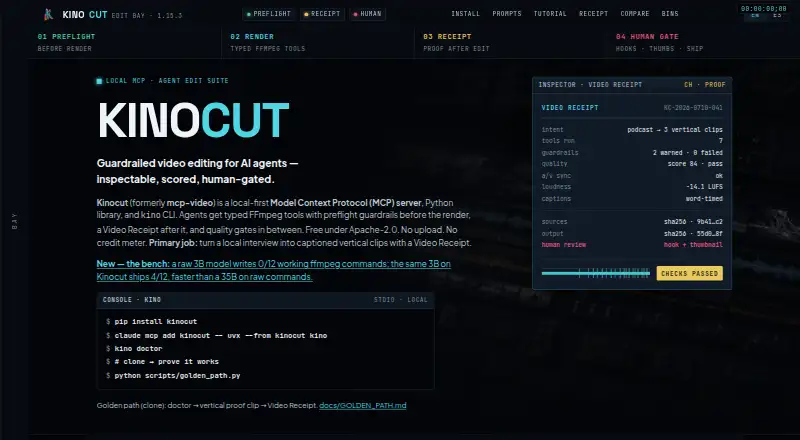
Kinocut is a local-first MCP server, Python library, and CLI for AI-agent video editing. Its workflow is designed to turn local interviews into captioned vertical clips, with a JSON Video Receipt that records the request, operations, changes, guardrails, and points for human review. The published version offers 203 structured MCP tools for tasks such as trimming, merging, subtitling, reframing, and audio normalization. Server-side checks validate parameters before FFmpeg renders, while quality gates can check VMAF, loudness, black frames, and audio/video sync and hold output below a configured bar. The maker says media stays on the user's machine, with FFmpeg and Whisper running locally. The core requires no account or API key and has no analytics or phone-home telemetry. Documented integrations include Claude Code, Cursor, generic stdio MCP clients, Python automation, and CI. The free core is Apache-2.0, with local processing and no Kinocut credit meter. FFmpeg must be installed separately; optional Hyperframes support requires Node.js 22 or later.
Who it suits
Kinocut is aimed at AI agents, automation, and agency teams that need local video editing with review before client delivery. It may suit users who want editing workflows with quality gates and a record of operations.
What it does well
- Provides 203 structured MCP tools.
- Quality gates check VMAF, loudness, black frames, and sync.
- Media processing stays local, according to the maker.
- Core requires no account or API key.
- Free core is Apache-2.0 with no credit meter.
What to know first
- FFmpeg must be installed separately and available on PATH.
- Optional Hyperframes support requires Node.js 22 or later.
- No hosted multi-tenant SaaS editor is provided.
- No paid SLA is claimed.
Plans
| Plan | Billed and limits | Price |
|---|---|---|
| Free core | Apache-2.0 · no Kinocut credit meter · local processing | Free |
As kinocut.dev lists them, read 7 Oct 2026. The maker's own page has the final word.
Getting started
- Open the Kinocut website.
- Install Kinocut on macOS, Ubuntu/Debian, or Windows using the install instructions.
- Install FFmpeg separately and make it available on PATH.
- Connect it to Claude Code, Cursor, a generic stdio MCP client, Python automation, or CI.
- For optional Hyperframes support, install Node.js 22 or later.
Kinocut is a local-first MCP server, Python library, and command-line tool for AI-agent video editing. It is aimed at automation and agency teams turning interviews into captioned vertical clips with a review trail. Choose it for local control and production checks; choose another product if you need hosted editing, formal compliance packages, or a hands-off publishing pipeline.
Overview
Kinocut’s workflow takes local interview media through editing, captioning, reframing, and quality review, then can produce a JSON Video Receipt. The receipt records the request, tools run, resulting changes, guardrails, and items that still require human review. That makes the system more accountable for client work than an opaque one-click clip generator, but it does not remove editorial responsibility or guarantee brand-safe publishing without a person involved.
The published version exposes 203 structured MCP tools, including trimming, merging, subtitling, reframing, and audio normalization. Server-side preflight validation rejects risky or invalid parameters before FFmpeg renders, reducing avoidable failed jobs. Quality gates can check VMAF, loudness, black frames, and audio/video sync, and hold output that falls below configured thresholds.
Key features
Local processing and privacy
FFmpeg and Whisper run on the user’s machine, and the maker says media stays there. The core needs no account or API key and has no analytics or phone-home telemetry. This is a strong fit for teams that want tighter control of interview footage or predictable local automation. It also means the team owns the operational setup rather than handing processing to a hosted service.
Agent and automation workflow
Kinocut integrates with Claude Code, Cursor, generic stdio MCP clients, Python automation, and CI. AI highlight detection, automatic reframing, and social-platform presets support a repeatable short-form pipeline. Receipts and quality gates are particularly useful when multiple edits must be checked before delivery, although the system still expects human review where editorial or brand decisions matter.
Dependencies and boundaries
FFmpeg must be installed separately and available on PATH. Optional Hyperframes support requires Node.js 22 or later. Kinocut is not a hosted multi-tenant SaaS editor, does not include a SOC 2 or ISO certificate package, and does not promise fully automatic brand-safe publishing. Community support is through Forgejo or GitHub issues, with no paid SLA claimed.
Pricing
| Plan | Price | What you get |
|---|---|---|
| Free core | free | Apache-2.0 license, local processing, no Kinocut credit meter, AI highlight detection, automatic reframing, and social-platform presets |
There is no free trial because the core is free, and no paid tier or usage quota is stated. That makes it easy to adopt for experiments, internal tooling, and agency workflows without a subscription commitment. The trade-off is that infrastructure, installation, and support remain the team’s responsibility; organizations needing contractual service levels or a hosted workspace will need a different model.
Platforms
Kinocut supports API, Linux, macOS, and Windows. Installation guidance covers macOS, Ubuntu/Debian, and Windows. Its local architecture is well suited to development machines, servers, and CI environments where FFmpeg can be managed directly.
Who it's for
Kinocut fits AI-agent builders, automation engineers, and agencies that process interview footage locally and want validation, measurable quality gates, and a receipt for client review. It is also a sensible option for teams that prefer open-source distribution and do not want account-based telemetry. It is less suitable for casual creators seeking an all-in-one browser editor, organizations requiring a paid SLA or formal certification package, and publishers expecting entirely automatic approval and release.
Pros and cons
Pros
- Local-by-default processing: FFmpeg and Whisper run on the user’s machine, with no account, API key, analytics, or phone-home telemetry claimed.
- Broad structured toolset: 203 MCP tools cover core edit, caption, reframing, and audio operations for agent-driven workflows.
- Useful safeguards: Preflight validation and gates for VMAF, loudness, black frames, and sync catch technical problems before delivery.
- Reviewable audit trail: JSON Video Receipts document actions and unresolved human-review items.
Cons
- More setup than a hosted editor: FFmpeg is a separate required dependency, and optional Hyperframes support adds Node.js 22 or later.
- Human review remains necessary: Kinocut does not provide fully automatic brand-safe publishing.
- No paid service commitment: Support is community-based and no paid SLA or formal SOC 2/ISO package is claimed.
Alternatives
For a broader shortlist, see AI Video Repurposing Tools.
- CapsAI is the better choice for Android, iOS, or web use and offers a one-time Starter plan at 49.00 INR, while Kinocut is local and automation-focused.
- Headliner suits users wanting web or mobile access, unlimited video clips on its Forever Free plan, and a hosted workflow.
- NovaClip is a close open-source alternative across API, desktop, web, and self-hosted deployments, with no hosted plan or usage quota stated.
- ScreenApp AI Meeting Notes is preferable when meeting transcription and AI notes matter more than local video-editing controls.
- Flowjin fits hosted social clipping with a one-time 60-minute free credit and 720p output, rather than Kinocut’s local pipeline.
- OpusClip is a hosted option with 60 monthly free credits and up to 1080p clips, but its free exports are watermarked and time-limited.
- reap is suited to mobile and web users who want a free hour per month for clipping and captions, with watermarked 720p exports.
- Splicora offers a hosted credit-and-storage model for teams that prefer managed projects to local infrastructure.
Verdict
Kinocut is a strong choice for AI-agent and agency workflows that need local media handling, technical quality gates, and a receipt that supports human approval. Its free core and broad integrations lower the barrier to building repeatable pipelines. Look elsewhere if you want a polished hosted editor, formal service commitments, or publishing that can proceed without human review and local dependency management.
Verdict
Kinocut combines local video editing tools with validation, quality checks, and workflow receipts for review. It is not a hosted multi-tenant editor, and FFmpeg must be installed separately.
Questions
How much does Kinocut cost?
The Free core plan costs nothing. It is Apache-2.0, uses local processing, and has no Kinocut credit meter.
Is there a free plan or trial?
The Free core plan is free. There is no free trial.
Which platforms does Kinocut support?
The listed platforms are API, Linux, macOS, and Windows. Setup instructions cover macOS, Ubuntu/Debian, and Windows.
Does Kinocut process video locally?
The maker says media stays on the user's machine and FFmpeg and Whisper run locally.
Which integrations are documented?
Kinocut documents integrations with Claude Code, Cursor, generic stdio MCP clients, Python automation, and CI.
Does Kinocut require an account or API key?
The maker says the core requires neither an account nor an API key.
Facts from Kinocut's own pages
- Core workflow
- It is designed to turn local interviews into captioned vertical clips with a Video Receipt. · kinocut.dev, 7 Oct 2026
- Dependencies
- FFmpeg must be installed separately and available on PATH; optional Hyperframes support requires Node.js 22 or later. · kinocut.dev, 7 Oct 2026
- Editing tools
- The published version provides 203 structured MCP tools for operations including trimming, merging, subtitling, reframing, and audio normalization. · kinocut.dev, 7 Oct 2026
- Integrations
- The maker documents integrations with Claude Code, Cursor, generic stdio MCP clients, Python automation, and CI. · kinocut.dev, 7 Oct 2026
- Intended users
- The maker describes it for AI agents, automation, and agency teams that need local video editing with review before client delivery. · kinocut.dev, 7 Oct 2026
- Limitations
- The maker says it does not provide a hosted multi-tenant SaaS editor, a SOC 2 or ISO certificate package, or fully automatic brand-safe publishing without human review. · kinocut.dev, 7 Oct 2026
- Local processing
- The maker says media stays on the user's machine and FFmpeg and Whisper run locally. · kinocut.dev, 7 Oct 2026
- Platform support
- The install page gives setup instructions for macOS, Ubuntu/Debian, and Windows. · kinocut.dev, 7 Oct 2026
- Preflight
- Server-side parameter validation catches risky or invalid editing inputs before FFmpeg renders. · kinocut.dev, 7 Oct 2026
- Privacy claims
- The maker states that the core requires no account or API key and has no analytics or phone-home telemetry. · kinocut.dev, 7 Oct 2026
- Purpose
- Kinocut is a local-first MCP server, Python library, and CLI for AI-agent video editing. · kinocut.dev, 7 Oct 2026
- Quality checks
- Quality gates can check VMAF, loudness, black frames, and audio/video sync, and hold outputs below the configured bar. · kinocut.dev, 7 Oct 2026
- Receipts
- Each workflow can produce a JSON Video Receipt recording the request, tools run, changes, guardrails, and items needing human review. · kinocut.dev, 7 Oct 2026
- Support
- The maker identifies community support through Forgejo or GitHub issues and says no paid SLA is claimed. · kinocut.dev, 7 Oct 2026
Where Kinocut stands on Freedom251
- AI Video Repurposing Tools#5 of 50