Freedom251 › AI Video Repurposing Tools

Choppity
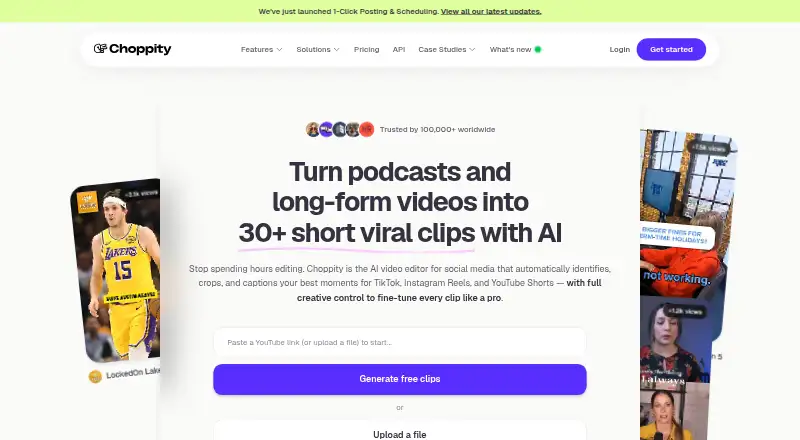
What Choppity is
Choppity turns podcasts and long-form videos into short social clips using AI. You can provide a YouTube link or upload MP4 or MOV files; the service says it can ingest hour-long content in minutes. Its AI looks through transcripts for clip-worthy moments, and a built-in editor lets you refine the results. Editing the transcript can trim or remove spoken sections, and you can add images or b-roll. Other tools include animated captions described as 97%+ accurate, automatic vertical reframing, active-speaker detection, keyword search, and automatic profanity censoring. The scheduler currently supports direct publishing to YouTube; other platform integrations are rolling out. Choppity is available on the web and through a versioned API for clip generation and social workflows, with uploads up to 5 GB and webhooks. The free plan includes one seat, one hour of AI video analysis, 2 GB of storage, and three-day project storage. Paid plans start at $14/mo (annual); Starter is $20 a month billed monthly.
Who it suits
Choppity suits creators and content-driven businesses, including podcasters, agencies, churches, ecommerce businesses, course creators, marketers, and coaches. Its API and clip editing tools may also suit teams building social video workflows.
What it does well
- Accepts YouTube links and MP4 or MOV uploads
- Transcript-based editing can trim spoken sections
- Includes automatic vertical reframing and animated captions
- API supports uploads up to 5 GB and webhooks
What to know first
- Direct publishing currently supports YouTube
- Free plan includes one hour of AI video analysis
- Free projects are stored for three days
Limits
The Free plan has one seat, one hour of AI video analysis, 2 GB of cloud storage and three-day project storage. Starter provides three hours of analysis, 40 GB of storage and 30-day project storage; its listed monthly price is $20 a month, or $14 a month billed yearly.
Plans
| Plan | Billed and limits | Price |
|---|---|---|
| Free | free forever · 1 AI Analysis Hour/month · 2 GB storage · 1 seat · 1 transcript/month · 1 YouTube clipping/month · no downloads · no social posting/scheduling | Free |
| Starter | annual billing (30% off); $19/month billed monthly · 3 AI Analysis Hours/month · 40 GB storage · 1 seat · 1 brand template · 5 transcripts/month · 5 YouTube clippings/month · unlimited downloads · social posting/scheduling | $13.30 a month |
| Pro | from, annual billing (30% off); from $29/month billed monthly · 5–100 AI Analysis Hours/month · 100 GB storage · up to 2 seats · 4 brand templates · unlimited transcripts and YouTube clippings · unlimited downloads · social posting/scheduling | $20.30 a month |
| Creator | $32 /m monthly; $22.4 /m yearly · 1 seat · 5 hours AI video analysis · 100GB cloud storage · forever project storage · 3 social accounts · 1 brand template · API access | $32 a month |
| Team | $48 /m monthly; $33.6 /m yearly · Unlimited seats · 5 hours AI video analysis · 200GB cloud storage · forever project storage · 10 social accounts · 5 brand templates · shared workspace | $48 a month |
| Enterprise | custom pricing · unlimited AI, uploads, storage, seats and sub-teams · API/iframe/custom integrations · white-labeling · SSO · priority Slack support | On request |
As choppity.com lists them, read 15 Oct 2026. The maker's own page has the final word.
Getting started
- Visit Choppity on the web.
- Choose the Free plan or a paid plan; the free plan has one seat.
- Paste a YouTube link or upload an MP4 or MOV file.
- Use AI transcript analysis to generate clips, then adjust them in the built-in editor.
- Use the scheduler for direct YouTube publishing, or use the API for clip-generation and social workflows.
Choppity is a web-based and API service for turning podcasts and long videos into short social clips. It suits creators and content-led businesses that want transcript-driven editing as well as automated clip suggestions. Its strongest case is speeding up selection and repurposing; publishing integrations and plan quotas are worth checking against your workflow.
Overview
Start with a YouTube link or upload an MP4 or MOV, and Choppity analyzes the transcript to find potential clips. The service says it can ingest hour-long content in minutes, then provides an editor to refine selections. That pairing is useful for recurring repurposing work, but the analysis-hour limits make the plan choice consequential for anyone processing longer recordings regularly.
Key features
Transcript-based editing lets users trim or remove sections by changing spoken text, and add images or b-roll. This is a practical fit for dialogue-led video, where finding and adjusting a passage through its words can be more direct than navigating a timeline. AI highlight detection, keyword search, and active-speaker detection help locate candidate moments; automatic profanity censoring can reduce a routine cleanup step.
Animated captions are described as 97%+ accurate, and automatic reframing adapts clips to vertical formats. That combination addresses two common jobs in social-video preparation, though captions still merit review. Social presets and brand templates help standardize output, with template allowances varying by tier.
The scheduler currently supports direct publishing to YouTube, with other integrations rolling out progressively. That makes Choppity more useful for YouTube-focused workflows than for teams expecting a single scheduler to publish across their full social mix today. Its scheduler uses OAuth-style authorization where supported and says connected platform passwords are not stored as plain passwords. Uploaded content is processed privately and is not published unless the user directs publication or distribution.
The versioned API supports clip generation and social workflows, with uploads up to 5 GB and webhooks. That may suit teams incorporating clipping into a larger workflow; the Creator tier is the first plan that includes API access.
Pricing
Choppity is freemium. The Free plan costs nothing and includes one seat, one hour of AI video analysis, 2GB of cloud storage, three-day project storage, and chat support. It is a limited way to try the workflow, but short retention and a single analysis hour constrain ongoing use.
Starter costs $20 a month, billed $20 /m monthly or $14 /m yearly. It keeps one seat and raises analysis to three hours, storage to 40GB, and project retention to 30 days; it also includes 1080p HD exports and one social account. This is the entry paid tier for an individual who needs better exports and more room than Free, but it does not include forever project storage or API access.
Creator costs $32 a month, billed $32 /m monthly or $22.4 /m yearly. It provides one seat, five analysis hours, 100GB storage, forever project storage, three social accounts, one brand template, and API access. It fits a solo creator or operator who needs retention, integrations, or a small number of publishing accounts, though the five-hour allowance remains a firm ceiling.
Team costs $48 a month, billed $48 /m monthly or $33.6 /m yearly. It includes unlimited seats, five analysis hours, 200GB storage, forever project storage, ten social accounts, five brand templates, and a shared workspace. Its seat and collaboration provisions suit a team, but analysis remains at five hours, the same quota as Creator.
Enterprise has custom pricing and offers custom usage, unlimited social accounts and brand templates, advanced or custom user roles and usage reporting, and a contract/MSA. It is the tier to consider when standard quotas and roles do not fit. Refund requests must be made within 14 days of payment for evaluation.
Platforms
Choppity is available on the web and through an API. The API's 5 GB upload limit and webhooks are relevant for integrations, while direct publishing currently supports YouTube.
Who it's for
Choppity is aimed at creators and content-driven businesses, including podcasters, agencies, churches, ecommerce businesses, course creators, marketers, and coaches. It is a stronger fit for people who regularly turn spoken, long-form material into vertical clips than for users seeking broad direct publishing across social networks from one scheduler.
Pros and cons
- Transcript-led editing: Spoken text can be used to trim or remove footage, a useful approach for dialogue-heavy recordings.
- Several repurposing tasks in one service: Clip suggestions, captions, vertical reframing, and profanity censoring address distinct steps in preparing short-form video.
- API on Creator and above: Webhooks and uploads up to 5 GB give workflow builders a path beyond manual use.
- Modest analysis quotas on paid plans: Starter includes three hours and Creator and Team include five, which can limit volume even when storage and seats increase.
- Publishing is currently narrow: Direct publishing is supported for YouTube, so other platform workflows may still need separate handling.
Alternatives
Podcli is a better fit for users who want a free, open-source option with no watermark, no minute cap, and no subscription; its Podcli Cloud pricing has not been announced. For captioned clips and audiograms, Headliner offers a Forever Free plan with unlimited video clips and captioned clips, unlimited watermarked audiograms, and one unwatermarked audiogram per month. Video To Reel is a mobile alternative on Android and iOS, with a free plan capped at one video per month of up to 15 minutes and three watermarked clips kept for seven days.
Atlabs AI UGC Avatar Video is an alternative for users considering avatar video, with a free video of up to 25 seconds and a paid Lite plan. ClipEmber is another web and API option, with a free tier of five videos each month, file-upload ingest, a full editor, and manual download. Cliperoni offers 250 minutes of source content per month and 5 GB storage on its free plan, with a short outro on free clips. ClipForge has an iOS and web free plan limited to one lifetime clip set from a source video up to five minutes, with a watermark and outro. Clipkiln is another web-based option.
For category browsing, see Podcast Clip Makers, AI Video Repurposing Tools, or AI Video Editing Software.
Verdict
Choose Choppity if you routinely turn long, spoken recordings into short clips and value transcript-led editing, captions, and reframing in the same workflow. The API and higher-tier collaboration features broaden its use beyond a solo editor. Look elsewhere if your priority is broad direct publishing today or if your recording volume outstrips the five-hour analysis allowance on Creator and Team.
Verdict
Choppity combines transcript-led clip generation with editing, captions, and reframing in a web service with an API. Check the plan limits and current publishing integrations against your workflow before choosing a paid tier.
Questions
Does Choppity have a free plan?
Yes. Free includes one seat, one hour of AI video analysis, 2 GB of cloud storage, three-day project storage and chat support.
How much does Choppity cost?
Starter is $20 a month on monthly billing or $14 a month billed yearly. Creator is $32 a month monthly or $22.40 a month billed yearly; Team is $48 a month monthly or $33.60 a month billed yearly. Enterprise has custom pricing.
What platforms does it support?
Choppity is available on the web and through an API. Its scheduler currently supports direct publishing to YouTube.
Can Choppity publish to other social platforms?
The scheduler’s direct publishing is currently supported for YouTube. Additional platform integrations are rolling out progressively.
What does the API include?
Choppity offers a versioned API for clip generation and social workflows. The API page specifies uploads up to 5 GB and webhooks.
Who is Choppity for?
The company describes it as built for creators and content-driven businesses. Listed audiences include podcasters, agencies, churches, ecommerce, course creators, marketers and coaches.
Facts from Choppity's own pages
- Account security
- The scheduler says it uses OAuth-style authorization where supported and does not store connected platform passwords as plain passwords. · choppity.com, 3 Oct 2026
- AI clip generation
- Its AI transcribes uploads, detects high-impact moments and produces dozens of clips with captions, framing and platform formatting. · choppity.com, 15 Oct 2026
- Animated captions
- The editor generates animated subtitles, supports custom styles and allows manual text and timing corrections. · help.choppity.com, 15 Oct 2026
- API
- Choppity offers a versioned API for clip generation and social workflows; its API page specifies uploads up to 5 GB and webhooks. · choppity.com, 3 Oct 2026
- API authentication
- API calls support team API keys and Firebase bearer JWTs, with JWT required for some credential-management operations. · help.choppity.com, 15 Oct 2026
- API capabilities
- The public v1 API can generate clips from URLs or uploads, render full-quality MP4s, create posts and publish them. · docs.choppity.com, 15 Oct 2026
- API rate limit
- The v1 API allows 60 requests per minute per root team and returns HTTP 429 after the fixed window is exceeded. · docs.choppity.com, 15 Oct 2026
- Auto reframing
- Landscape footage can be reframed to 9:16, 1:1 or 16:9 outputs. · help.choppity.com, 15 Oct 2026
- Bootstrapping
- Choppity says it is 100% bootstrapped and has taken no venture capital. · choppity.com, 15 Oct 2026
- B-roll and effects
- Editors can add B-roll, images, music, sound effects and overlays inside the workflow. · help.choppity.com, 15 Oct 2026
- Captions and framing
- The site describes animated captions it says are 97%+ accurate and automatic reframing into vertical formats. · choppity.com, 3 Oct 2026
- Clip generation
- Its AI analyzes transcripts to find moments and generate clips, with a built-in editor for adjustments. · choppity.com, 3 Oct 2026
- Company facts
- LinkedIn lists Choppity as privately held, founded in 2022, headquartered in Sydney, NSW, with 2–10 employees. · linkedin.com, 15 Oct 2026
- Company legal identity
- The site footer identifies the maker as Mizko Media Pty Ltd trading as Choppity. · choppity.com, 15 Oct 2026
- Documentation depth
- Official documentation includes quickstarts, endpoint references, authentication, uploads, posts, webhooks, errors and integrations with Zapier, n8n and MCP. · help.choppity.com, 15 Oct 2026
- Editing
- Transcript-based editing lets users trim or remove video sections by editing spoken text, and add images or b-roll. · choppity.com, 3 Oct 2026
- Input
- Users can paste a YouTube link or upload MP4/MOV files, and the site says its clipper ingests hour-long content in minutes. · choppity.com, 3 Oct 2026
- Keyword search
- Moment Search accepts natural-language queries over processed videos and creates clips from matching sections. · help.choppity.com, 15 Oct 2026
- Licence
- The service is presented as a proprietary hosted product from Mizko Media Pty Ltd, with no open-source licence published. · choppity.com, 15 Oct 2026
- Limit: free tier and editing depth
- MakerStack says the free allowance is thin and that Choppity lacks deep multi-track timeline control for complex manual edits. · makerstack.co, 15 Oct 2026
- Limit: reliability and support
- Trustpilot complaints describe failed clip generation, audio/video sync problems, consumed analysis time for failed jobs and unanswered support tickets. · trustpilot.com, 15 Oct 2026
- MCP integration
- Choppity exposes a remote MCP server at api2.choppity.com/mcp for assistants such as Claude and ChatGPT. · docs.choppity.com, 15 Oct 2026
- New social integrations
- The September 2026 changelog lists native Facebook and Threads publishing and scheduling. · help.choppity.com, 15 Oct 2026
- Notable news
- The changelog records Facebook and Threads integrations on September 14, 2026, plus a brand-template wizard on September 18, 2026. · help.choppity.com, 15 Oct 2026
Where Choppity stands on Freedom251
- AI Video Repurposing Tools#1 of 50
- Podcast Clip Makers#1 of 30
- AI Video Editing Software#3 of 32