Freedom251 › Podcast Clip Makers

ClipEmber
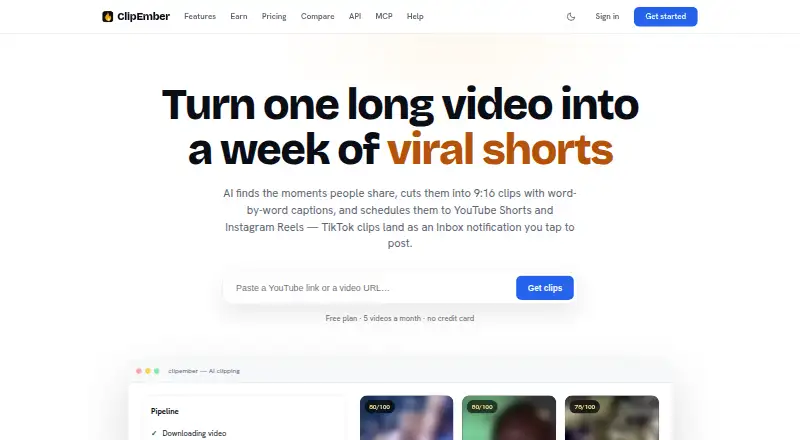
What ClipEmber is
ClipEmber turns long videos into short vertical clips that users can edit, download, schedule, and publish to connected social accounts. It is aimed at podcasters, coaches, and agencies reusing their content libraries, with web and API access. Its model scores candidate moments from 0–100 and explains each clip’s hook. In the editor, users can cut words from transcripts, restyle captions, and use undo, redo, and version history. Transcription supports 90+ languages with word-level timing, while captions can be rendered in nine styles. Face detection keeps speakers centered in vertical crops, with fill, fit, and square layouts. Connections to TikTok, YouTube Shorts, and Instagram Reels use official APIs; TikTok posting requires users to finish from an Inbox notification while Direct Post remains under audit. The REST API handles clip requests, status checks, rendered downloads, and completion webhooks. ClipEmber also offers an MCP server for compatible clients. Plans include a free option and paid plans from $9/mo.
Who it suits
ClipEmber suits podcasters, coaches, and agencies repurposing video libraries. Its web editor, API, and social publishing features also fit teams handling clips across connected accounts.
What it does well
- Scores candidate moments and explains each clip’s hook.
- Transcript editing includes undo, redo, and version history.
- Transcription supports 90+ languages with word-level timing.
- Face detection centers speakers in vertical crops.
- API supports clip requests and completion webhooks.
What to know first
- TikTok posts must be completed from an Inbox notification.
- Free plan allows five videos each month.
- Creator plan’s listed $6/mo rate is billed yearly.
Limits
Free allows five free videos every month and provides file upload ingest, the full editor, and manual download. Creator is listed at 30 videos per month, Pro at 100, and Agency at 300; those paid plans are billed yearly.
Plans
| Plan | Billed and limits | Price |
|---|---|---|
| Free | $0/mo · 5 free videos every month · file upload ingest · full editor · manual download | Free |
| Pro | $20/mo, billed yearly — you save $104/yr (shown with $29) · 100 videos per month · 10 connected accounts · channel automation · priority rendering queue | $20 a month |
| Agency | $55/mo, billed yearly — you save $284/yr (shown with $79) · 300 videos per month · unlimited accounts · 5 workspaces · white-label deliverables · API included | $55 a month |
| Creator | $6/mo, billed yearly — you save $32/yr (shown with $9) · 30 videos per month · YouTube link ingest · autoposting to 3 accounts · priority support | $6 a month |
As clipember.com lists them, read 3 Oct 2026. The maker's own page has the final word.
Getting started
- Open the ClipEmber website.
- Choose the Free plan or a paid plan.
- Upload a video or, on Creator and above, use YouTube link ingest.
- Select candidate moments and edit captions or framing.
- Download, schedule, or publish clips to connected social accounts.
Overview
ClipEmber turns long videos into short vertical clips, combining clip discovery, editing, captions and social publishing. It is best suited to podcasters, coaches and agencies with a library of videos to repurpose. The integrated workflow is its main appeal, though monthly video quotas and a manual TikTok posting step matter for high-volume or hands-off publishing.
Key features
ClipEmber scores candidate moments from 0 to 100 and explains each clip’s hook. That gives users a useful way to prioritize promising segments, while leaving the final choice to the creator. In the editor, users can cut words from the transcript, restyle captions, undo and redo changes, and revisit version history—a practical set of controls for refining clips without losing earlier work.
Transcription supports more than 90 languages with word-level timing, and captions can be rendered in nine styles. Face detection keeps speakers centered in vertical crops, with fill, fit and square layouts. Together, these options suit creators adapting different source footage for short-form formats; they do not remove the need to review framing and captions for each clip.
ClipEmber connects to TikTok, YouTube Shorts and Instagram Reels through their official APIs. TikTok Direct Post is still under audit, so users upload clips and finish publishing from an Inbox notification. That is a useful handoff, but not a fully automated TikTok workflow.
The REST API supports clip requests, status checks, rendered downloads and completion webhooks. An MCP server works with Claude, ChatGPT, Claude Code, Claude Desktop and other compatible clients, giving developers and AI-assisted workflows another way to interact with the service. ClipEmber says API key secrets are shown once and only a hash is stored. Its terms say submitted content and generated clips remain the user’s and are not used to train models.
Pricing
The free plan costs nothing, billed $0/mo, and allows five videos every month. It includes file upload, the full editor and manual downloads. That is enough to try the core workflow or handle occasional clips, but it does not include the paid plans’ YouTube link ingest or autoposting.
Creator costs $6 a month, billed $6/mo yearly, with $32/year in savings (shown with $9). It raises the allowance to 30 videos per month, adds YouTube link ingest, autoposting to three accounts and priority support. This fits an individual or small creator publishing regularly, but the video and account caps leave less room for growing output.
Pro costs $20 a month, billed $20/mo yearly, with $104/year in savings (shown with $29). Its 100-video monthly allowance, 10 connected accounts, channel automation and priority rendering queue suit heavier publishing across several channels. Agency costs $55 a month, billed $55/mo yearly, with $284/year in savings (shown with $79). It includes 300 videos per month, unlimited accounts, five workspaces, white-label deliverables and the API, making it the plan aimed at agencies handling multiple client workflows. Both higher tiers still have monthly video caps; Agency is the only plan with listed API access.
Platforms
ClipEmber is available on the web and through an API. The MCP server extends access to compatible clients including Claude and ChatGPT. The listed social publishing integrations are TikTok, YouTube Shorts and Instagram Reels.
Who it's for
ClipEmber is a good fit for podcasters, coaches and agencies that want to turn existing long videos into short clips without stitching together separate tools for selection, captions, reframing and publishing. Its language support and editing controls also suit creators refining clips for varied audiences. It is a weaker fit for anyone who needs TikTok to publish automatically without a final user action, or whose video volume exceeds the relevant plan quota.
Pros and cons
- Pros: Clip scores include an explanation of the hook, helping users compare candidate moments rather than sorting clips blindly.
- Pros: Transcript editing, timed captions in 90+ languages and nine caption styles bring substantial clip refinement into the same workflow.
- Pros: The plans scale from five monthly videos to 300, with account, workspace and automation features for larger publishing operations.
- Cons: TikTok posting still requires users to complete the process from an Inbox notification.
- Cons: Every plan has a monthly video cap, which may constrain frequent publishers.
- Cons: The free plan is limited to file uploads and manual downloads, so it does not provide the paid plans’ YouTube link ingest or autoposting.
Alternatives
Podcast Clip Makers is a broader category to browse if you want to compare tools for turning podcast recordings into clips.
Choose Podcli if you want a free option with no watermark, no minute cap and no subscription; its free plan is available across desktop platforms as well as the web and API. Headliner is worth considering for unlimited free video and captioned clips, including 1080p output, though its free plan limits unwatermarked audiograms to one per month.
Video To Reel may suit mobile users who only need one video per month, up to 15 minutes, and can work within three watermarked clips kept for seven days on its free plan. For teams seeking AI video analysis and cloud storage, Choppity has a free plan with one seat, one hour of analysis, 2GB of storage and three-day project storage.
Atlabs AI UGC Avatar Video is an alternative for users looking for avatar video creation, with a free plan covering one video up to 25 seconds. Cliperoni offers a free plan with 250 minutes of source content per month and 5GB storage, but adds a short outro to free clips. ClipForge offers one free clip set from a source video up to five minutes, with a watermark and outro. Clipkiln is another freemium web option.
Verdict
Choose ClipEmber if you regularly repurpose long videos and want clip selection, editing, captions and multi-platform publishing in one service. Its breadth is the strongest reason to pick it; monthly quotas and the unfinished TikTok Direct Post flow are the clearest reasons to look elsewhere.
Verdict
ClipEmber combines clip selection, editing, captioning, and social publishing in one workflow. Check the TikTok posting handoff and plan limits against your publishing needs.
Questions
Is ClipEmber free?
Yes. The Free plan costs nothing and includes five videos each month.
How much do paid plans cost?
Creator is $6 a month, Pro is $20 a month, and Agency is $55 a month; each is billed yearly. The pricing note says paid plans start at $9/mo.
Which social platforms does ClipEmber connect to?
It connects to TikTok, YouTube Shorts, and Instagram Reels through their official APIs. TikTok Direct Post is still under audit, so users complete posting from an Inbox notification after upload.
Does ClipEmber have an API?
Yes. Its REST API supports clip requests, status checks, rendered clip downloads, and completion webhooks.
Are submitted videos used to train models?
ClipEmber's terms say submitted content and generated clips remain the user's and are not used to train models.
Facts from ClipEmber's own pages
- API
- The REST API supports clip requests, status checks, rendered clip downloads, and completion webhooks. · clipember.com, 3 Oct 2026
- Assistant integrations
- An MCP server works with Claude, ChatGPT, Claude Code, Claude Desktop, and other MCP-compatible clients. · clipember.com, 3 Oct 2026
- Captions
- Transcription supports 90+ languages with word-level timing, and captions can be rendered in nine styles. · clipember.com, 3 Oct 2026
- Clip selection
- Its model scores candidate moments from 0–100 and explains each clip’s hook. · clipember.com, 3 Oct 2026
- Content and model training
- The terms say submitted content and generated clips remain the user's and are not used to train models. · clipember.com, 3 Oct 2026
- Editing
- The editor lets users cut words from the transcript, restyle captions, and use undo, redo, and version history. · clipember.com, 3 Oct 2026
- Headquarters
- Ukraine · clipember.com, 28 Sept 2026
- Intended users
- The product page describes ClipEmber as built for podcasters, coaches, and agencies repurposing their content libraries. · clipember.com, 3 Oct 2026
- Product
- ClipEmber turns long videos into short vertical clips with captions and lets users edit, download, schedule, and publish them to connected social accounts. · clipember.com, 3 Oct 2026
- Publishing integrations
- ClipEmber connects to TikTok, YouTube Shorts, and Instagram Reels through their official APIs. · clipember.com, 3 Oct 2026
- Reframing
- Face detection keeps speakers centered in vertical crops, with fill, fit, and square layouts. · clipember.com, 3 Oct 2026
- Security
- ClipEmber says API key secrets are shown once and only a hash is stored. · clipember.com, 3 Oct 2026
- Support
- The help center directs users to [email protected] and says a human reads the email. · clipember.com, 3 Oct 2026
- TikTok limitation
- TikTok Direct Post is still under audit, so clips are uploaded to TikTok and users complete posting from an Inbox notification. · clipember.com, 3 Oct 2026
Where ClipEmber stands on Freedom251
- Podcast Clip Makers#3 of 30