Freedom251 › Podcast Clip Makers
Video To Reel
What Video To Reel is
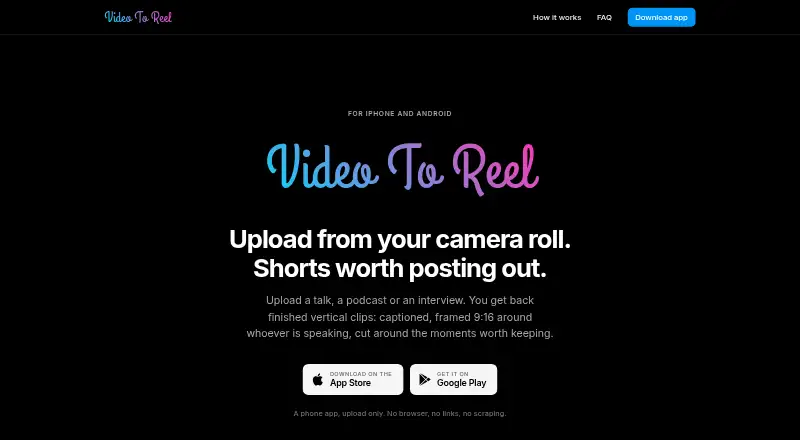
Video To Reel is a mobile app for turning talks, podcasts, and interviews into short vertical clips. It accepts MP4, MOV, or MKV files from a device, transcribes videos, selects moments, reframes them, adds word-timed captions, and renders clips at 1080p. SpeakerLock tracks the speaking face within a 9:16 frame and smooths its movement to reduce jitter. Captions have three styles and nine positions, and users can remake an individual clip after changing its settings. Finished clips can be saved to the camera roll or shared to TikTok, Reels, or Shorts; the app does not publish directly to social platforms. The free plan costs nothing and permits one video per month, up to 15 minutes, with three watermarked clips kept for seven days. Paid plans increase monthly source minutes and upload-length limits. Uploaded source video and intermediate files are deleted when rendering finishes. The maker says transfers use TLS, uploads are separated by account, and clips are delivered through expiring private links.
Who it suits
Video To Reel suits people who want to turn talks, podcasts, or interviews into shareable short clips on Android or iOS. It is aimed at workflows where users upload a video and then save or share the resulting clips.
What it does well
- Accepts MP4, MOV, and MKV device files
- Renders clips at 1080p
- SpeakerLock follows the speaking face
- Offers three caption styles and nine positions
- Source video and intermediate files are deleted after rendering
What to know first
- Free plan allows one video monthly
- Free clips have a watermark
- Free clips are kept for seven days
- YouTube live or restricted videos are unsupported
Limits
The free plan includes one video per month, uploads up to 15 minutes, three watermarked clips, and seven-day clip retention. Paid plans raise monthly source-minute and upload-length limits; Starter includes 150 source minutes per month, uploads up to 45 minutes, up to 10 clips per video, no watermark, and 30-day clip retention.
Plans
| Plan | Billed and limits | Price |
|---|---|---|
| Free | 1 video/month · up to 15 min · 3 watermarked clips · clips kept 7 days | Free |
| Creator | €19/month on Google Play or $19.99/month on the App Store; annual plans cost ten months · 500 source minutes/month · uploads up to 2 hours · up to 10 clips/video · no watermark · clips kept 30 days | €19 a month |
| Studio | €49/month on Google Play or $49.99/month on the App Store; annual plans cost ten months · 1,500 source minutes/month · uploads up to 3 hours · up to 10 clips/video · no watermark · clips kept 30 days | €49 a month |
| Starter | €9/month on Google Play or $9.99/month on the App Store; annual plans cost ten months · 150 source minutes/month · uploads up to 45 min · up to 10 clips/video · no watermark · clips kept 30 days | €9 a month |
As videotoreel.com lists them, read 5 Oct 2026. The maker's own page has the final word.
Getting started
- Visit the Video To Reel website or get the app for Android or iOS.
- Choose the free plan or a paid plan.
- Upload an MP4, MOV, or MKV file from your device.
- Review the selected clips and adjust caption style or position if needed.
- Save finished clips to your camera roll or share them to TikTok, Reels, or Shorts.
Overview
Video To Reel turns talks, podcasts, and interviews into short vertical clips on Android and iOS. It is best for creators who want an automated route from a video file to captioned, speaker-focused clips. Its focused workflow is appealing, though the free plan is tightly capped and regular use calls for a paid subscription.
Key features
Upload an MP4, MOV, or MKV from your device and the app transcribes it, selects moments, reframes them to 9:16, adds word-timed captions, and renders at 1080p. That combination handles several production steps in one mobile workflow. Automated moment selection can speed up a first pass, but creators who need precise editorial control over every selected segment may prefer a different approach.
SpeakerLock tracks the speaking face as the frame moves, with smoothing to reduce jitter. Captions come in three styles and nine positions, and individual clips can be remade after changing their settings. Those options make it possible to adjust a clip without repeating the whole video workflow.
Finished clips can be saved to the camera roll or shared to TikTok, Reels, or Shorts. The app does not publish directly to social platforms. It also cannot use private, restricted, or live YouTube videos, or TikTok and Instagram links, so the workflow depends on having a supported video file on the device.
The source video and intermediate files are deleted when rendering finishes. The privacy policy says transfers use TLS, uploads are isolated by account, and clips are delivered through expiring private links. The maker says it does not sell data, run ads, use third-party analytics or tracking SDKs, or train models on uploaded content. Its subprocessors include Hetzner, Cloudflare, OpenRouter, Google, and Sentry.
Pricing
The free plan costs nothing and allows one video per month, up to 15 minutes, producing up to three watermarked clips. Clips are kept for seven days. That is enough to try the workflow or make an occasional batch, but the monthly video cap and short retention are restrictive for ongoing publishing.
Starter costs $9 a month, billed at €9/month on Google Play or $9.99/month on the App Store. Annual plans cost ten months. It includes 150 source minutes per month, uploads up to 45 minutes, up to 10 clips per video, no watermark, and 30-day clip retention. It suits lighter regular use, though its source-minute allowance may be limiting for long recordings.
Creator costs $19 a month, billed at €19/month on Google Play or $19.99/month on the App Store. Annual plans cost ten months. Its 500 source minutes per month and two-hour upload limit suit creators working with longer or more frequent recordings; it keeps the 10-clip-per-video limit, watermark-free output, and 30-day retention.
Studio costs $49 a month, billed at €49/month on Google Play or $49.99/month on the App Store. Annual plans cost ten months. With 1,500 source minutes per month and uploads up to three hours, it is the plan for heavier production. It retains the same maximum of 10 clips per video and 30-day clip retention. No seat allowance is stated for these plans.
Platforms
Video To Reel is available on Android and iOS. Its workflow is built around video files uploaded from a device; supported inputs are MP4, MOV, and MKV.
Who it's for
Choose it if you regularly turn recorded talks, podcasts, or interviews into vertical social clips and value automatic transcription, moment selection, speaker framing, and captions in one mobile app. It is less suitable if you need direct publishing, link-based imports from TikTok or Instagram, or access to private, restricted, or live YouTube videos.
Pros and cons
- Automates the core clip workflow: Transcription, moment selection, 9:16 reframing, word-timed captions, and 1080p rendering are part of the same process.
- Speaker-focused framing: SpeakerLock follows the speaking face, with smoothing to reduce jitter.
- Useful caption adjustments: Three styles and nine positions are available, and individual clips can be remade after changing settings.
- Free use is limited: One video a month, three watermarked clips, and seven-day retention make the free plan better for occasional use than ongoing work.
- No direct social publishing: Clips can be saved or shared to social destinations, but the app does not publish them to accounts.
- File-based input has gaps: The app rejects private, restricted, and live YouTube videos and does not accept TikTok or Instagram links.
Alternatives
Podcast Clip Makers is a useful place to compare tools for turning podcast recordings into short clips.
Pick Podcli if you want a free, no-watermark option with no minute cap and no subscription, and can work with its API, Linux, macOS, web, or Windows platforms. Its cloud offering has custom pricing.
Headliner is worth considering for its Forever Free plan, which includes unlimited video and captioned clips, 1080p video, and one unwatermarked audiogram per month.
Consider Atlabs AI UGC Avatar Video if you want a web-based avatar-video tool: its free plan includes one video up to 25 seconds, and it also offers a free trial.
Choppity may suit web or API users who want a free plan with one seat, an hour of AI video analysis, 2GB of cloud storage, and three-day project storage.
Choose ClipEmber if five free videos each month, file-upload ingest, a full editor, and manual downloads fit your workflow better.
Cliperoni offers a free plan with 250 source minutes per month, 5GB cloud storage, and one member; free clips include a Short Cliperoni outro.
ClipForge is an iOS and web option whose free plan gives one lifetime clip set for a source video up to five minutes, with a watermark and outro.
Clipkiln is another web-based alternative.
Verdict
Video To Reel is a strong fit for mobile creators who want to turn recorded conversations into captioned, speaker-framed clips without assembling a multi-step workflow. Its paid plans scale source minutes and upload length, while the free tier works mainly as a limited trial of the process.
Verdict
Video To Reel handles transcription, moment selection, speaker framing, and captions in a mobile workflow. Finished clips can be saved or shared, but the app does not publish them directly to social platforms.
Questions
How much does Video To Reel cost?
The free plan costs nothing. Starter is $9 a month, billed at €9/month on Google Play or $9.99/month on the App Store. Annual plans cost ten months.
What does the free plan include?
It allows one video per month, up to 15 minutes, and three watermarked clips kept for seven days.
Which devices can run Video To Reel?
The app is available on Android and iOS.
Can it publish clips directly to social platforms?
No. Finished clips can be saved to the camera roll or shared to TikTok, Reels, or Shorts, but social publishing is not available.
What file formats does it accept?
It accepts MP4, MOV, and MKV files from a device.
Who makes Video To Reel?
The facts list the website as videotoreel.com and the headquarters as Delaware, United States; they do not name a maker.
Facts from Video To Reel's own pages
- Caption options
- Captions have three styles and nine positions, and an individual clip can be remade after changing its settings. · videotoreel.com, 5 Oct 2026
- Data use
- The maker says it does not sell data, run advertising, use third-party analytics or tracking SDKs, or train models on uploaded content. · videotoreel.com, 5 Oct 2026
- Headquarters
- Delaware, United States · videotoreel.com, 28 Sept 2026
- Input formats
- The app accepts MP4, MOV, or MKV files from a device. · videotoreel.com, 5 Oct 2026
- Intended users
- The maker describes the app for people turning talks, podcasts, or interviews into shareable short clips. · videotoreel.com, 5 Oct 2026
- Notable limits
- Private, restricted, and live YouTube videos are unsupported, and TikTok and Instagram links are not supported. · videotoreel.com, 5 Oct 2026
- Rendering
- It transcribes videos, selects moments, reframes clips, burns in word-timed captions, and renders at 1080p. · videotoreel.com, 5 Oct 2026
- Security
- The privacy policy says transfers use TLS, uploads are isolated per account, and clips are delivered through expiring private links. · videotoreel.com, 5 Oct 2026
- Service providers
- The listed subprocessors include Hetzner for hosting, Cloudflare for storage and delivery, OpenRouter for moment selection, Google for push notifications, and Sentry for error reporting. · videotoreel.com, 5 Oct 2026
- Sharing
- Finished clips can be saved to the camera roll or shared to TikTok, Reels, or Shorts. · videotoreel.com, 5 Oct 2026
- Source deletion
- The uploaded source video and intermediate files are deleted when rendering finishes. · videotoreel.com, 5 Oct 2026
- Speaker framing
- SpeakerLock finds the speaking face and moves the 9:16 frame with it, with smoothing to reduce jitter. · videotoreel.com, 5 Oct 2026
- Support
- The maker lists [email protected] for questions and support requests. · videotoreel.com, 5 Oct 2026
- What it does
- The mobile app turns uploaded talks, podcasts, and interviews into vertical clips with captions, speaker-focused 9:16 framing, and selected moments. · videotoreel.com, 5 Oct 2026
Where Video To Reel stands on Freedom251
- Podcast Clip Makers#21 of 30