Freedom251 › Podcast Clip Makers

Cliperoni
What Cliperoni is
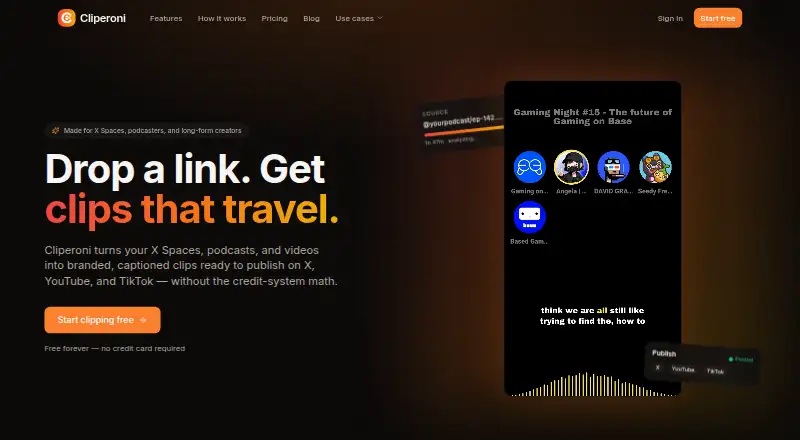
Cliperoni turns recordings and online media into captioned video clips for publishing to X, YouTube, and TikTok. You can start with an X Space or YouTube link, a podcast RSS feed, or an uploaded recording. You can also follow podcasts, YouTube channels, or X Space hosts to bring in new episodes automatically; podcast episodes can be found through Podcast Index. Cliperoni transcribes and processes sources, detects promising moments, and can draft clips based on a topic request. Captions identify speakers and time words, while templates support 9:16, 1:1, and 16:9 video. Clips can be sent to connected social accounts, with suggested post text available for X and YouTube. Teams can publish through shared accounts. Plans are based on source-content minutes, not the length of finished clips, and purchased minute top-ups do not expire. The free plan is $0.00 per free and includes 250 source minutes per month, 5 GB storage, and one member. Clipper costs $19 a month, billed $228 yearly; Creator costs $28 a month, billed $336 yearly.
Who it suits
Cliperoni suits podcasters, video creators, and agencies that want to turn source recordings into social clips. Teams can use shared publishing accounts, and the Creator tier supports unlimited members.
What it does well
- Imports new episodes from followed sources automatically
- Captions label speakers and time individual words
- Templates cover three video aspect ratios
- Minute top-ups do not expire
- Shared publishing accounts support team workflows
What to know first
- Free clips include a short Cliperoni outro
- Free plan is limited to 250 source minutes monthly
- AI B-roll generation costs extra
- Free plan supports one member
Limits
The Free plan includes 250 source minutes per month, 5 GB of storage, one member, and a short outro on free clips. Clipper includes 600 minutes per month, 100 GB of storage, and three members. Creator includes 1,800 minutes per month and 1 TB of storage; AI B-roll cutaway generation costs extra through prepaid balance or a fal.ai account.
Plans
| Plan | Billed and limits | Price |
|---|---|---|
| Free | $0 forever · 250 min/month source content · 5 GB cloud storage · 1 member · Short Cliperoni outro on free clips | Free |
| Clipper | $228 yearly; page shows $19/month and $24 · 600 min/month source content · 100 GB cloud storage · 3 members · No outro | $19 a month |
| Medium top-up pack | One-time · +500 minutes · Never expire | $20, paid once |
| Creator | $336 yearly; page shows $28/month and $35 · 1,800 min/month source content · 1 TB cloud storage · Unlimited members · Public API + docs · Priority processing | $28 a month |
| Small top-up pack | One-time · +100 minutes · Never expire | $5, paid once |
| Large top-up pack | One-time · +1,500 minutes · Never expire | $50, paid once |
As cliperoni.com lists them, read 3 Oct 2026. The maker's own page has the final word.
Getting started
- Open https://cliperoni.com/
- Choose a plan; the Free plan is $0.00 per free, and Clipper and Creator have monthly prices billed yearly.
- Paste an X Space or YouTube link, provide a podcast RSS feed, select an episode through Podcast Index, or upload a recording.
- Follow podcasts, YouTube channels, or X Space hosts to import new episodes automatically.
- Connect X, YouTube, or TikTok accounts to publish clips.
Cliperoni is a source-to-social clipping service for podcasts, X Spaces, and video. It suits creators, publishers, and agencies with recurring shows and multiple social accounts. Its strongest advantage is combining automatic imports, AI clip selection, captions, and direct publishing; source-minute quotas and paid B-roll generation are the key constraints.
Overview
Cliperoni accepts an X Space or YouTube link, a podcast RSS feed, or an uploaded recording, then transcribes and processes the material. You can follow a podcast, YouTube channel, or X Space host so new episodes import automatically, a practical feature for regular publishing schedules rather than occasional one-off edits.
Usage is based on minutes in the source content, not the length of exported clips. A long episode therefore uses the same allowance whether you make one clip or several. Top-up minutes never expire, which makes occasional overages easier to manage without immediately moving to a larger recurring plan.
Key features
AI clipping and captions
Highlight detection scores moments for hook strength and drafts captioned clips. Topic requests provide a more directed way to find material when a general highlight pass is not enough. Speaker-tagged, word-timed captions improve readability for dialogue-heavy recordings, while templates cover vertical 9:16, square 1:1, and widescreen 16:9 formats. These features reduce repetitive selection and formatting work, although the quality and usefulness of an automatically chosen hook will still depend on the source conversation.
Publishing and team workflow
Clips can be published to connected X, YouTube, and TikTok accounts, with AI-suggested post text for X and YouTube. Shared publishing accounts let several people publish under a client or company handle, avoiding the need to hand files between editors and account managers. Cliperoni describes its agency workflow around client rosters, unlimited Creator-tier team seats, shared handles, and per-team minute counters, making the Creator plan the natural fit for multi-client operations.
B-roll and imports
AI B-roll suggestions cost nothing, but generating the cutaways requires extra spending through a prepaid balance or your own fal.ai account. B-roll generation is included as a feature on the Clipper and Creator plans, yet the generated assets are not covered by the monthly minute allowance. Podcast users can search Podcast Index, choose an episode, follow a show for automatic imports, or combine that workflow with direct uploads and live X Spaces.
Pricing
| Plan | Price | Includes |
|---|---|---|
| Free | 0.00 USD forever | 250 source minutes/month, 5 GB storage, 1 member, short Cliperoni outro |
| Clipper | $19 a month, billed $228 yearly | 600 source minutes/month, 100 GB storage, 3 members, no outro |
| Creator | $28 a month, billed $336 yearly | 1,800 source minutes/month, 1 TB storage, unlimited members, public API and docs, priority processing |
The page also shows $24 for Clipper and $35 for Creator, while the plans above show $19/month and $28/month with annual billing amounts. Check the displayed term before subscribing. There is no free trial. The Free plan is suitable for testing a light workflow, but 250 source minutes, one member, 5 GB, and the outro make it a poor fit for frequent long episodes or client work. Clipper removes the outro, adds two members, and expands storage and minutes for a small publishing team. Creator adds three times Clipper's source allowance, unlimited members, API access, and priority processing; agencies and high-volume publishers have the clearest reason to pay for it.
One-time top-ups cost $5 for 100 minutes, $20 for 500 minutes, or $50 for 1,500 minutes. Because they do not expire, they are better suited to seasonal spikes than permanently upgrading a monthly plan.
Platforms
Cliperoni is offered through the web and an API. The API and public documentation are included with Creator, while the web workflow covers importing, editing, and publishing for other users.
Who it's for
Choose Cliperoni if you routinely turn podcasts, X Spaces, or videos into social clips and want imports, captions, formatting, and publishing connected. It is particularly well matched to agencies managing several client handles and to teams that need shared publishing access. It is less suitable for infrequent editing, very small source allowances, or workflows that depend heavily on generated B-roll without budgeting for fal.ai or prepaid generation.
Pros and cons
Pros
- Recurring imports: Following shows and channels reduces manual collection for ongoing series.
- End-to-end workflow: Selection, captions, aspect-ratio templates, and social publishing sit in one service.
- Team publishing: Shared accounts and Creator's unlimited members support client or company handles.
- Non-expiring top-ups: Extra minutes remain useful for occasional heavy months.
Cons
- Source-minute billing: Long recordings consume quota even when you export only short clips.
- Limited free tier: 250 minutes, one member, 5 GB, and an outro restrict serious recurring use.
- B-roll costs extra: Suggestions are free, but generating cutaways requires separate prepaid or fal.ai spending.
- No trial: Prospective paid users cannot trial a time-limited subscription before committing.
Alternatives
For a broader shortlist, see Podcast Clip Makers.
- Podcli is the better choice if you want a free, no-minute-cap, no-subscription tool with no watermark and AGPL-3.0 licensing across desktop, Linux, web, and API; its cloud plan has no announced price.
- Headliner suits users prioritizing a permanent free plan with unlimited video and captioned clips, including one unwatermarked audiogram monthly.
- Video To Reel is aimed at mobile users who need a simple allowance of one video per month, up to 15 minutes, with three watermarked clips on its free plan.
- Atlabs AI UGC Avatar Video is an alternative for avatar-video creation rather than podcast and Space repurposing.
- Choppity is another API and web clipping option with a free tier offering one seat, one hour of AI analysis, and 2 GB storage.
- ClipEmber fits users seeking a low-cost editor with five free videos per month and file-upload ingest.
- ClipForge is a mobile and web option centered on a lifetime free clip set from a source video up to five minutes.
- Clipkiln is a web alternative with a free trial and free allowance of 30 minutes per month.
Verdict
Cliperoni is a strong choice for creators, publishers, and agencies repurposing recurring long-form content across X, YouTube, and TikTok. Choose it for automatic source imports, shared publishing handles, and a unified clipping-to-posting workflow. Look elsewhere if your recordings are infrequent, your budget cannot absorb separate B-roll generation, or a 250-minute free allowance and no trial do not provide enough room to evaluate the service.
Verdict
Cliperoni brings source imports, clip selection, captions, and social publishing into one workflow. Check the source-minute allowance and B-roll generation costs against your needs.
Questions
Is there a free plan?
Yes. Free is $0.00 per free and includes 250 source minutes per month, 5 GB of storage, and one member.
How much do the paid plans cost?
Clipper is $19.00 per month billed yearly, and Creator is $28.00 per month billed yearly. The listed paid-from amount is $24/mo.
Which platforms does Cliperoni support?
Cliperoni is available on the web and as an API. Clips can be published to connected X, YouTube, and TikTok accounts.
Can teams share publishing accounts?
Yes. Multiple team members can publish through shared client or company accounts. The agency workflow includes unlimited Creator-tier team seats.
How are usage minutes counted?
Plans charge by source-content minutes rather than output clip length. Purchased top-up minutes do not expire.
Does generating AI B-roll cost extra?
AI B-roll suggestions are free. Generating cutaways costs extra through a prepaid balance or the user's fal.ai account.
Facts from Cliperoni's own pages
- Agency audience
- Cliperoni describes its agency workflow as supporting client rosters, unlimited Creator-tier team seats, shared publishing handles, and per-team minute counters. · cliperoni.com, 3 Oct 2026
- AI B-roll
- AI B-roll suggestions are free, while generating cutaways costs extra through a prepaid balance or the user's fal.ai account; the feature is included on Clipper and Creator plans. · cliperoni.com, 3 Oct 2026
- AI clipping
- Highlight detection scores moments for hook strength and drafts captioned clips; users can also request clips by topic. · cliperoni.com, 3 Oct 2026
- Automatic imports
- Users can follow podcasts, YouTube channels, or X Space hosts so new episodes auto-import. · cliperoni.com, 3 Oct 2026
- Captions and formats
- Cliperoni provides speaker-tagged, word-timed captions and templates for 9:16, 1:1, and 16:9 video. · cliperoni.com, 3 Oct 2026
- Inputs
- Users can paste an X Space or YouTube link, provide a podcast RSS feed, or upload a recording; the service transcribes and processes it. · cliperoni.com, 3 Oct 2026
- Limits
- The free plan includes 250 source minutes per month, 5 GB storage, and one member; the Clipper plan includes 600 minutes and three members. · cliperoni.com, 3 Oct 2026
- Podcast workflow
- Podcasters can search Podcast Index for a show, select an episode, or follow a show for automatic imports; direct uploads and live X Spaces are also supported. · cliperoni.com, 3 Oct 2026
- Publishing integrations
- Clips can be published directly to connected X, YouTube, and TikTok accounts; AI-suggested post text is available for X and YouTube. · cliperoni.com, 3 Oct 2026
- Support
- The site provides a contact link and lists an email address for questions. · cliperoni.com, 3 Oct 2026
- Team features
- Shared publishing accounts let multiple team members publish under a connected client or company handle. · cliperoni.com, 3 Oct 2026
- Usage model
- Plans charge by source-content minutes rather than output clip length, and top-up minutes do not expire. · cliperoni.com, 3 Oct 2026
- What it does
- Cliperoni turns X Spaces, podcasts, and videos into branded, captioned clips for publishing on X, YouTube, and TikTok. · cliperoni.com, 3 Oct 2026
Where Cliperoni stands on Freedom251
- Podcast Clip Makers#4 of 30