Freedom251 › AI Video Repurposing Tools

CrabCut
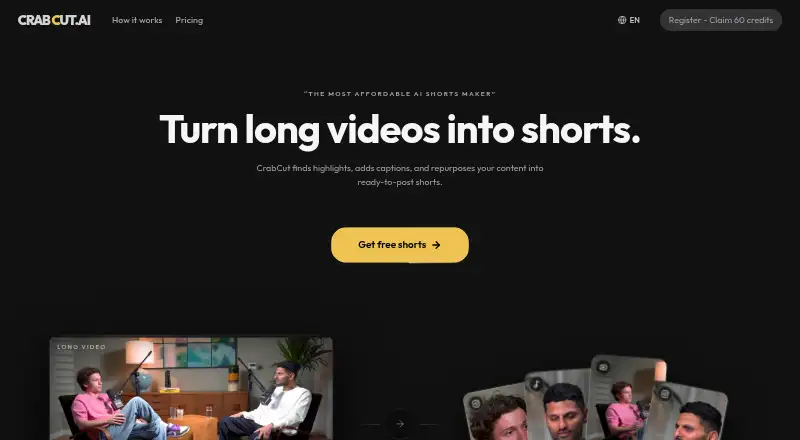
What CrabCut is
CrabCut turns long-form videos into vertical 9:16 clips for TikTok, YouTube Shorts, and Instagram Reels. Its AI reviews video and transcripts to identify highlights, transcribes in 16+ languages, and reframes selected moments with face tracking. Animated captions and hooks are added to the clips, and users can change caption fonts, colors, placement, and animation style. Uploads can be MP4, MOV, WebM, or MKV; importing from YouTube links is available on paid plans. Connected YouTube and TikTok accounts support direct publishing, while Pexels may supply B-roll stock media. CrabCut is available on the web and through a developer API. The maker says most videos process in under five minutes, with longer videos taking up to 15 minutes. Credits are based on processing time: one credit per video minute, resetting monthly without rollover. The free plan starts with 60 credits and exports at 720p with a CrabCut watermark. Paid plans begin at $6.99 a month and include 1080p exports without a watermark. The maker says uploads and generated clips are not used to train AI models.
Who it suits
CrabCut suits creators who want AI to find highlights and format long videos for short-form social channels. Light is described for occasional edits, Standard for regular creators, and Heavy for high-volume editing and frequent publishing.
What it does well
- Finds highlight moments from video and transcripts automatically.
- Transcribes videos in 16+ languages.
- Reframes clips vertically with face tracking.
- Customize caption fonts, colors, positions, and animation styles.
- Publish directly to connected YouTube and TikTok accounts.
- Offers a developer API for programmatic access.
What to know first
- Free exports are limited to 720p and include a CrabCut watermark.
- Credits reset monthly and do not roll over.
- YouTube-link imports are limited to paid plans.
- API access has no uptime guarantee or SLA unless agreed separately.
Limits
The Free plan provides 60 credits at sign-up, 720p exports with a CrabCut watermark, and uploads up to 1 hour. Paid plans provide monthly credits that reset without rollover: Light has 90, Standard 180, and Heavy 540; paid uploads can be up to 4 hours and exports are 1080p without a watermark.
Plans
| Plan | Billed and limits | Price |
|---|---|---|
| Free | 60 credits on sign-up · 720p exports with CrabCut watermark · uploads up to 1 hour · no card required | Free |
| Standard | monthly · 180 credits / month · priority queue · 2 brand templates · uploads up to 4 hours · 1080p exports, no watermark | $12.99 a month |
| Heavy | monthly · 540 credits / month · highest priority queue · 10 brand templates · uploads up to 4 hours · 1080p exports, no watermark | $29.99 a month |
| Light | monthly · 90 credits / month · 2 brand templates · uploads up to 4 hours · 1080p exports, no watermark | $6.99 a month |
As crabcut.ai lists them, read 7 Oct 2026. The maker's own page has the final word.
Getting started
- Open CrabCut on the web or use its developer API.
- Choose the Free plan, which requires no card, or select a paid plan.
- Upload an MP4, MOV, WebM, or MKV video; paid plans also support YouTube links.
- Review the highlighted clips and customize captions as needed.
- Connect YouTube or TikTok to publish directly.
Verdict
Choose CrabCut if you need automated highlight selection and vertical clips with captions for short-form channels. The free plan is a way to begin, while paid plans remove the watermark and provide 1080p exports. Look elsewhere if you need API uptime guarantees as a standard commitment.
Questions
Is CrabCut free?
Yes. The Free plan costs nothing and includes 60 credits on sign-up, 720p exports with a CrabCut watermark, and uploads up to 1 hour. No card is required.
How much do paid plans cost?
Light costs $6.99 a month, Standard costs $12.99 a month, and Heavy costs $29.99 a month; each is billed monthly.
What platforms does CrabCut support?
CrabCut is available on the web and through an API.
What does one credit cover?
One credit equals one minute of video processing. Credits reset monthly and do not roll over.
Can CrabCut publish directly to social accounts?
Connected YouTube and TikTok accounts can be used for direct publishing.
Does CrabCut use uploads to train AI models?
The maker says uploaded videos, audio, transcripts, and generated shorts are not used to train AI models.
Facts from CrabCut's own pages
- AI providers
- CrabCut says Deepgram processes audio for transcription and OpenAI analyzes transcripts and metadata for highlights and suggestions. · crabcut.ai, 7 Oct 2026
- Content and training
- CrabCut says it does not use uploaded videos, audio, transcripts, or generated shorts to train AI models. · crabcut.ai, 7 Oct 2026
- Credit limits
- Credits reset monthly and do not roll over; one credit equals one minute of video processing. · crabcut.ai, 7 Oct 2026
- Data deletion
- After account deletion, user content is removed from active systems within 30 days, while backup copies may persist for up to 90 days. · crabcut.ai, 7 Oct 2026
- Developer access
- The terms describe a developer API for programmatic access, with no uptime guarantees or SLA unless separately agreed in writing. · crabcut.ai, 7 Oct 2026
- Editing options
- Users can customize caption fonts, colors, positions, and animation styles. · crabcut.ai, 7 Oct 2026
- Headquarters
- The Netherlands · crabcut.ai, 28 Sept 2026
- Highlight detection
- Its AI scans transcripts and video content to surface highlight moments automatically. · crabcut.ai, 7 Oct 2026
- Integrations
- Connected YouTube and TikTok accounts can be used for direct publishing, and Pexels may provide stock media for B-roll. · crabcut.ai, 7 Oct 2026
- Processing
- The maker says most videos finish processing in under 5 minutes, while longer videos can take up to 15 minutes. · crabcut.ai, 7 Oct 2026
- Purpose
- CrabCut turns long-form videos into ready-to-post 9:16 shorts for TikTok, YouTube Shorts, and Instagram Reels. · crabcut.ai, 7 Oct 2026
- Reframing and captions
- It reframes highlights vertically with face tracking and adds animated captions and hooks. · crabcut.ai, 7 Oct 2026
- Security
- The privacy policy lists TLS/HTTPS encryption in transit, encryption at rest, hashed credentials and API keys, OAuth 2.0, and need-to-know access controls. · crabcut.ai, 7 Oct 2026
- Supported inputs
- The site lists MP4, MOV, WebM, and MKV uploads, plus YouTube links on paid plans. · crabcut.ai, 7 Oct 2026
- Transcription
- CrabCut says it transcribes videos in 16+ languages. · crabcut.ai, 7 Oct 2026
- Who it is for
- The maker describes Light as for occasional edits, Standard for regular creators, and Heavy for high-volume editing and frequent publishing. · crabcut.ai, 7 Oct 2026
Where CrabCut stands on Freedom251
- AI Video Repurposing Tools#11 of 50