Freedom251 › Cleaning Service Software
Opsycle
What Opsycle is
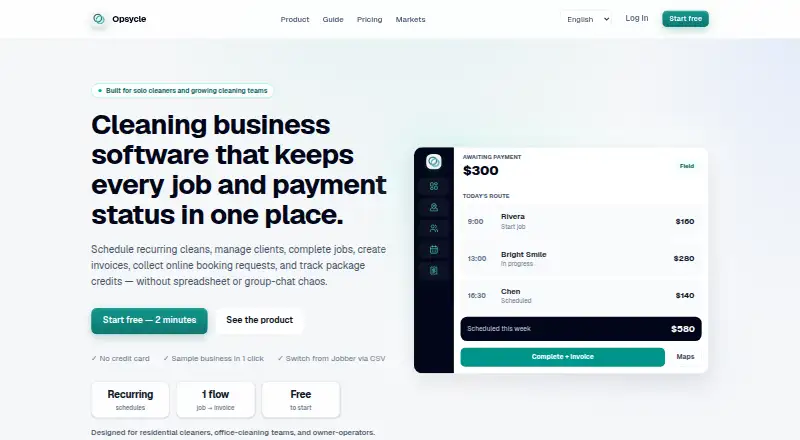
Opsycle is a web-based tool for cleaning businesses to book, schedule, complete, and invoice jobs while organizing recurring clients. It is built for solo cleaners, owner-operators, and small residential or office-cleaning teams. Scheduling covers one-time, weekly, and biweekly jobs, and a phone-friendly field view lets cleaners review the day and mark work complete. Client and property records can hold addresses, access instructions, pet information, service notes, and contact details. Users can prepare quotes, link invoices to jobs, and track paid or outstanding status. A public booking path and client portal let returning clients review history and request another service. Businesses can also record packages sold outside Opsycle and track remaining cleaning credits as jobs are completed. The free plan allows five clients and 15 jobs per month. Starter costs $29 a month for up to 50 clients and 200 jobs; higher plans expand client and job limits and add team tools or activity history.
Who it suits
Opsycle suits solo cleaners and small residential or office-cleaning teams that need scheduling, client records, job completion tracking, and invoicing. It can also accommodate teams that manage recurring work and client self-service requests.
What it does well
- Schedules one-time, weekly, and biweekly cleaning jobs
- Client records hold property access and service details
- Invoices link to jobs and track payment status
- Client portal supports history review and repeat service requests
What to know first
- Free plan allows five clients and 15 jobs monthly
- Online card collection for clients is not included
- Not certified accounting, payroll, or tax-filing software
Limits
The free plan covers five clients and 15 jobs per month. Starter costs $29 a month and covers 50 clients and 200 jobs per month. Online card collection is not included in the current release.
Plans
| Plan | Billed and limits | Price |
|---|---|---|
| Free | $0/mo · 5 clients · 15 jobs/month · public booking page · invoices + payment tracking | Free |
| Scale | $149/mo · 5,000 clients · 50,000 jobs/month · team roster up to 49 members · activity history · business-branded booking page | $149 a month |
| Starter | $29/mo · 50 clients · 200 jobs/month · client portals · auto-invoice on complete | $29 a month |
| Growth | $79/mo · 300 clients · 2,000 jobs/month · team roster and job assignment · client CSV import · activity history | $79 a month |
As opsycle.com lists them, read 30 Sept 2026. The maker's own page has the final word.
Getting started
- Open the Opsycle website.
- Choose the Free plan or a paid plan based on the client and monthly job limits.
- Add client and property records, including relevant access instructions and service notes.
- Schedule one-time, weekly, or biweekly jobs.
- Use the phone-friendly field view to review the day and mark completed work.
Opsycle brings scheduling, job completion, customer records, and invoice tracking into a web-based tool for cleaning businesses. It is best suited to solo cleaners and small residential or office teams managing repeat work. Its free plan offers a practical starting point, while client and job caps and the lack of online card collection put a ceiling on its fit.
Overview
One-time, weekly, and biweekly scheduling covers the common patterns of occasional and recurring cleaning work. Client and property records can keep addresses, access instructions, pet details, service notes, and contact information together, giving cleaners useful context for each visit.
A public booking path can bring in service requests, and returning clients can use a portal to view their history and request another cleaning. Quotes and job-linked invoices support billing workflows, with paid and outstanding status tracking. Businesses can also record packages sold outside Opsycle and track remaining cleaning credits as jobs are completed.
Key features
- Scheduling and field work: Create one-time or recurring jobs, then use the phone-friendly field view to check the day’s work and mark jobs complete. Cleaning checklists are supported, but the stated platform is web; the cleaner mobile app capability should not be mistaken for a separately listed iOS or Android platform.
- Client booking and records: The public booking path and returning-client portal support booking and repeat requests, while detailed client and property records keep job instructions close to the schedule.
- Quotes and invoices: Job-linked invoices and payment-status tracking help connect completed work to billing. Starter adds automatic invoicing on job completion.
- Package credits: Track credits from packages sold outside the product as jobs consume them, without treating Opsycle as the place where those packages are sold.
- Data migration: A CSV switching center supports client-data imports, including for businesses moving from Jobber or Housecall Pro.
- Security and scope: Opsycle says it uses encryption in transit, access controls, and hashed passwords, and does not sell personal data. It is not certified accounting, payroll, tax-filing, e-invoicing-compliance, or fiscal-reporting software.
Pricing
The free plan costs $0/mo and allows 5 clients and 15 jobs per month, with a public booking page, invoices, and payment tracking. That is a useful way for a solo cleaner to begin, but the client cap is small and the monthly job allowance can become restrictive as recurring work grows.
Starter costs $29/mo and raises the limits to 50 clients and 200 jobs per month. Client portals and automatic invoicing on completion make it the clearest step up for a small operation that wants customers to manage repeat requests and less manual billing. It still may not suit a busy team that needs much larger capacity.
Growth costs $79/mo and includes 300 clients, 2,000 jobs per month, a team roster and job assignment, client CSV import, and activity history. Its higher limits and team tools suit a growing company coordinating more work and staff. Scale costs $149/mo and expands capacity to 5,000 clients and 50,000 jobs per month, with a roster for up to 49 members, activity history, and a business-branded booking page. That is the option for larger volumes and teams; the listed roster cap is worth checking against staffing needs.
All listed paid plans are billed monthly. Support is available at [email protected].
Platforms
Opsycle is listed for web.
Who it's for
Opsycle fits solo cleaners, owner-operators, and small residential or office-cleaning teams that need recurring schedules, client records, booking, and invoice tracking in one workflow. Its commercial-cleaning support broadens its use, but companies requiring online client card collection need another payment workflow. Businesses needing certified accounting, payroll, tax, e-invoicing compliance, or fiscal reporting should use software built and certified for those responsibilities.
Pros and cons
- Pro: The free plan includes booking and invoice tracking, giving a small cleaner a way to organize early work without a subscription.
- Pro: Job instructions, recurring schedules, field completion, and invoice status fit together around the cleaning visit.
- Pro: Client imports and recorded package credits help with switching and tracking work sold through other channels.
- Con: Free is capped at 5 clients and 15 jobs per month, so even modest growth may require a paid tier.
- Con: Clients cannot pay by card online through the current release, leaving a gap for businesses seeking an integrated collection flow.
- Con: Web is the only listed platform, which may not fit teams that require a dedicated iOS or Android app.
- Con: Opsycle does not replace certified accounting, payroll, tax-filing, e-invoicing-compliance, or fiscal-reporting software.
Alternatives
For a broader set of options, see Cleaning Service Software.
Consider CleanGuru if iOS or Android access matters alongside a free plan; SweepOS is another free-plan option on iOS and Android. Allclean offers a free plan on web and iOS, while JobFlowly offers a free plan on web.
Choose Clean Scheduler if a paid product with a free trial and Android, iOS, and web coverage better suits your team: its Starter plan is $39 a month, billed monthly, for 2 office seats, 5 field seats, up to 500 active customers, and 3 recurring visit rules.
Clean Smarts, Cleaners App, and Janitorial Manager are also alternatives to compare.
Verdict
Opsycle is a sensible choice for solo cleaners and small teams that want recurring job scheduling, customer context, and invoice tracking, with a free tier to start and paid plans that scale substantially. Choose it when those workflows matter more than built-in online card collection or a native mobile platform; look elsewhere if either is essential, or if your business needs certified financial or compliance software.
Verdict
Opsycle covers core cleaning-job workflows, from booking and scheduling to invoice tracking. Check its plan limits and the absence of online card collection against the way your business takes payment.
Questions
Is Opsycle free?
Yes. Its Free plan costs nothing and allows five clients and 15 jobs per month.
How much do the paid plans cost?
Starter is $29 a month, Growth is $79 a month, and Scale is $149 a month.
What platforms does Opsycle support?
Opsycle is available on the web.
Can clients book or review their service history?
There is a public booking path, and the client portal lets returning clients review history and request another service.
Can Opsycle collect card payments online?
Online card collection for clients is not included in the current release.
Does Opsycle replace accounting or payroll software?
Opsycle says it is not certified accounting, payroll, tax-filing, e-invoicing-compliance, or fiscal-reporting software.
Facts from Opsycle's own pages
- Booking and portals
- The product offers a public booking path and a client portal for returning clients to review history and request another service. · opsycle.com, 30 Sept 2026
- Client records
- Client and property records can hold addresses, access instructions, pets, service notes, and contact details. · opsycle.com, 30 Sept 2026
- Field workflow
- A phone-friendly field view lets cleaners review the day and mark jobs complete. · opsycle.com, 30 Sept 2026
- Integrations and imports
- The site describes a CSV switching center for importing client data, including when switching from Jobber or Housecall Pro. · opsycle.com, 30 Sept 2026
- Limits
- Online card collection for clients is not included in the current release. · opsycle.com, 30 Sept 2026
- Package credits
- Businesses can record packages sold outside Opsycle and track remaining cleaning credits as jobs are completed. · opsycle.com, 30 Sept 2026
- Product boundaries
- Opsycle says it is not certified accounting, payroll, tax-filing, e-invoicing-compliance, or fiscal-reporting software. · opsycle.com, 30 Sept 2026
- Quotes and invoicing
- Opsycle supports quotes, job-linked invoices, and tracking outstanding and paid invoice status. · opsycle.com, 30 Sept 2026
- Scheduling
- Users can schedule one-time, weekly, or biweekly cleaning jobs. · opsycle.com, 30 Sept 2026
- Security and privacy
- The privacy policy says Opsycle uses encryption in transit, access controls, and hashed passwords, and does not sell personal data. · opsycle.com, 30 Sept 2026
- Support
- The about page lists [email protected] for support. · opsycle.com, 30 Sept 2026
- What it does
- Opsycle helps cleaning companies book, schedule, complete jobs, invoice, and organize recurring clients. · opsycle.com, 30 Sept 2026
- Who it serves
- It is built for solo cleaners, owner-operators, and small residential or office-cleaning teams. · opsycle.com, 30 Sept 2026
Where Opsycle stands on Freedom251
- Cleaning Service Software#4 of 34