Freedom251 › Janitorial Software

Clean Scheduler
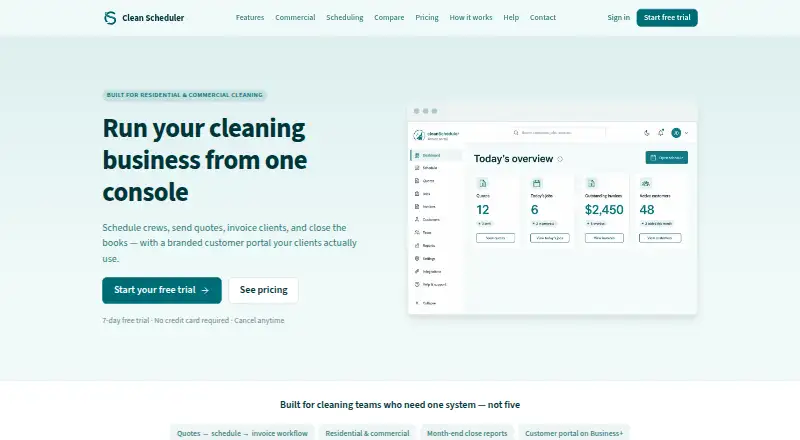
What Clean Scheduler is
Clean Scheduler brings scheduling, quoting, invoicing, and reporting tools together for residential and commercial cleaning businesses. Its calendar includes day, week, and month views, recurring visits, employee filters, and customer reschedule requests. Businesses can send branded estimates with line items and photos, then schedule the first visit after acceptance. Invoices can take card and ACH payments through Stripe Connect; cash and checks can be recorded manually. Crews use a mobile-friendly field view to check in, complete visits, and record payments, without a separate App Store download. Business and Pro add a branded customer portal for viewing visits, paying invoices, and requesting reschedules. Those plans also include payroll export reports with CSV layouts for ADP, Gusto, and QuickBooks, but the service does not sync live with accounting software. Clean Scheduler is available on Android, iOS, and web. There is no free plan; the Starter plan costs $39 a month, and a 7-day trial is available. Clean Scheduler is based in Casper, Wyoming.
Who it suits
Clean Scheduler suits residential and commercial cleaning companies that need scheduling, quoting, invoicing, and reporting tools for office staff and field crews.
What it does well
- Calendar supports recurring visits and reschedule requests.
- Branded estimates can include line items and photos.
- Stripe Connect supports card and ACH invoice payments.
- Mobile-friendly field view needs no separate app download.
What to know first
- There is no free plan.
- Accounting software does not sync live.
- Zelle is not directly connected.
Limits
Starter is limited to 2 office seats, 5 field seats, 500 active customers and 3 recurring visit rules. There is no free plan; the available trial lasts 7 days.
Plans
| Plan | Billed and limits | Price |
|---|---|---|
| Business | Billed monthly · 2 office seats · 10 field seats · Up to 5,000 active customers · 20 recurring visit rules | $129 a month |
| Pro | Billed monthly · 10 office seats · Unlimited field seats · Up to 25,000 active customers · 100 recurring visit rules | $299 a month |
| Starter | Billed monthly · 2 office seats · 5 field seats · Up to 500 active customers · 3 recurring visit rules | $39 a month |
As cleanscheduler.com lists them, read 3 Oct 2026. The maker's own page has the final word.
Getting started
- Visit the Clean Scheduler website.
- Choose a plan or begin the 7-day trial.
- Access the service on Android, iOS or web.
- Use the mobile-friendly field view for crew check-ins and visit completion.
Clean Scheduler is a purpose-built operations system for residential and commercial cleaning companies. It suits owners who need quoting, recurring scheduling, invoicing, payments, and crew access in one workflow, rather than a generic field-service tool. The main trade-off is a paid-only structure with seat, customer, and recurring-rule caps on the lower tiers.
Overview
Clean Scheduler combines the administrative work of a cleaning company with a field view for crews. Its calendar offers day, week, and month views, recurring visits, employee filters, and customer-initiated reschedule requests. That combination is useful when recurring domestic rounds and commercial contracts must be coordinated without maintaining separate scheduling and billing systems.
Quotes can carry branding, line items, and photos. When a customer accepts an estimate, the first visit can be scheduled immediately, reducing the handoff between sales and operations. Reporting is also included for businesses that need a view of activity beyond the calendar.
Key features
Scheduling and field work
Recurring visit rules support repeat work, while employee filters help dispatchers focus on the right crews. The mobile-friendly field view lets cleaners check in, complete visits, and record payments without a separate App Store download. That is practical for teams that want browser-based access on phones rather than managing another installation.
Quotes, invoices, and payments
Stripe Connect handles card and ACH payments on invoices. Cash and checks can be recorded manually, which keeps offline payment records in the same system. Clean Scheduler does not connect directly to Zelle; Business+ bank reconciliation can match Zelle and ACH deposits to invoices, so companies relying heavily on Zelle need the higher tier for that workflow.
Customer and payroll workflows
Business and Pro add a branded customer portal for viewing visits, paying invoices, and requesting reschedules. Those plans also provide payroll export reports in CSV layouts for ADP, Gusto, and QuickBooks. The exports are useful for handoff, but they are not live accounting integrations, so bookkeeping still requires an import or manual process.
Pro includes 25,000 SMS segments per month and dedicated onboarding support. Web traffic uses HTTPS, workspaces are isolated with Postgres row-level security, and Stripe Connect handles payment data; Clean Scheduler says it does not store full card numbers. Never-activated trial workspaces are hard-deleted 30 days after the trial ends.
Pricing
| Plan | Price and limits | Best fit |
|---|---|---|
| Starter | $39 a month, billed monthly; 2 office seats, 5 field seats, up to 500 active customers, and 3 recurring visit rules. | Small operators with a modest customer book and straightforward repeat schedules. |
| Business | $129 a month, billed monthly; 2 office seats, 10 field seats, up to 5,000 active customers, and 20 recurring visit rules. Includes the customer portal, payroll export reports, and Business+ reconciliation for Zelle and ACH deposits. | Growing companies that need client self-service, more crews, and broader recurring work. |
| Pro | $299 a month, billed monthly; 10 office seats, unlimited field seats, up to 25,000 active customers, and 100 recurring visit rules. Adds 25,000 SMS segments per month and dedicated onboarding support. | Larger operations with many dispatchers, cleaners, customers, and frequent messaging. |
There is no free plan, but a 7-day trial is available. Starter's low price comes with the tightest seat, customer, and recurring-rule allowances; moving up is necessary for the portal and payroll exports, not merely for extra capacity. The unlimited field-seat allowance makes Pro easier to scale for large cleaner rosters, although its 299.00 USD monthly commitment is substantial for a small business.
Platforms
Clean Scheduler runs on web, Android, and iOS. Crews can use the mobile-friendly field view without a separate App Store download, while office staff can work from the web interface.
Who it's for
This is a strong fit for residential and commercial cleaning companies that want one system for estimates, recurring dispatch, invoicing, online payments, and field updates. Starter suits a small office with up to five field workers. Business is the practical middle ground for teams needing a branded client portal and exportable payroll workflows. Pro is aimed at larger organizations that need unlimited field seats, more office users, high customer limits, extensive recurring rules, SMS volume, and onboarding help.
Pros and cons
Pros
- Cleaning-specific workflow: Quotes can become scheduled first visits, while recurring jobs, field completion, invoices, and payments stay connected.
- Flexible payment recording: Stripe card and ACH processing is paired with manual cash and check entries.
- Useful higher-tier collaboration: Business and Pro provide a branded portal and payroll CSV layouts for three major payroll or accounting destinations.
- Scalable field access: Pro removes the field-seat ceiling and adds substantial SMS capacity.
Cons
- No free tier: Every customer pays after the 7-day trial.
- Lower-tier ceilings: Starter is limited to 2 office seats, 5 field seats, 500 customers, and 3 recurring rules.
- No live accounting sync: Payroll and bookkeeping exports require an additional import step.
- Zelle is indirect: Direct connection is unavailable; reconciliation requires Business+.
Alternatives
Allclean is the better starting point for a small team that wants a free plan with all features for up to three users, accepting 6.9% plus 30¢ processing fees and $40.00 per additional user each month.
JobFlowly suits buyers seeking a free plan with scheduling, basic invoicing, and a cleaner mobile portal across Android, iOS, and web.
SweepOS is an option for teams that need a free mobile plan covering one admin, three workers, unlimited sites, checklists, photo documentation, and basic time tracking.
Opsycle fits a very small operation that can work within a free allowance of five clients and 15 jobs per month, with a public booking page and invoice payment tracking.
CleanCloud is another paid, trial-based product with broad platform coverage, including Android, iOS, macOS, Windows, web, and API access.
Clean Smarts is a paid alternative with its own payroll and annual-plan structure.
Cleaners App offers paid Solo, Crew, and Team tiers for companies organizing users by team size.
CleanManager is a paid option with a client-login plan billed quarterly in EUR, with VAT excluded.
For a wider comparison, see Cleaning Service Software.
Verdict
Choose Clean Scheduler if you run a cleaning company and want estimates, recurring scheduling, customer self-service, payments, and crew updates in one cleaning-focused platform. Its strongest case is the connected workflow from quote acceptance through field completion and invoicing. Look elsewhere if you need a free entry tier, live accounting synchronization, or direct Zelle connectivity without upgrading to Business+.
Verdict
Clean Scheduler is built specifically for cleaning businesses, with scheduling, payments, and field access in one service. Its plans start at $39 a month, and a 7-day trial is available.
Questions
How much does Clean Scheduler cost?
Starter is $39 a month, billed monthly. Business is $129 a month, billed monthly, and Pro is $299 a month, billed monthly.
Is there a free plan or trial?
There is no free plan. A 7-day trial is available.
Which platforms can I use?
Clean Scheduler is available on Android, iOS and web. Crews can use its mobile-friendly field view without a separate App Store download.
Does it connect to accounting software?
Business and Pro include payroll export reports with CSV layouts for ADP, Gusto and QuickBooks. Clean Scheduler says it does not sync live with accounting software.
How are customer card and bank payments handled?
Stripe Connect handles card and ACH payment data. Clean Scheduler says it does not store full card numbers.
What are the Starter plan limits?
Starter includes 2 office seats, 5 field seats, up to 500 active customers and 3 recurring visit rules.
Facts from Clean Scheduler's own pages
- Customer portal
- Business and Pro include a branded customer portal for viewing visits, paying invoices, and requesting reschedules. · cleanscheduler.com, 3 Oct 2026
- Data retention
- The security page says never-activated trial workspaces are hard-deleted 30 days after the trial ends. · cleanscheduler.com, 3 Oct 2026
- Headquarters
- Casper, Wyoming, United States · cleanscheduler.com, 28 Sept 2026
- Integrations
- Business and Pro include payroll export reports with CSV layouts for ADP, Gusto, and QuickBooks, but the product says it does not sync live with accounting software. · cleanscheduler.com, 3 Oct 2026
- Mobile access
- Crews can use a mobile-friendly field view to check in, complete visits, and record payments, with no separate App Store download required. · cleanscheduler.com, 3 Oct 2026
- Payment data
- Stripe Connect handles customer card and bank payment data, and Clean Scheduler says it does not store full card numbers. · cleanscheduler.com, 3 Oct 2026
- Payments
- Stripe Connect supports card and ACH payments on invoices, while cash and checks can be recorded manually. · cleanscheduler.com, 3 Oct 2026
- Purpose
- Clean Scheduler provides scheduling, quoting, invoicing, and reporting tools for residential and commercial cleaning businesses. · cleanscheduler.com, 3 Oct 2026
- Quotes
- Businesses can send branded estimates with line items and photos, then schedule the first visit when a quote is accepted. · cleanscheduler.com, 3 Oct 2026
- Scheduling
- The calendar supports day, week, and month views, recurring visits, employee filters, and customer reschedule requests. · cleanscheduler.com, 3 Oct 2026
- Security
- The service says web traffic uses HTTPS and tenant workspaces are isolated with Postgres row-level security. · cleanscheduler.com, 3 Oct 2026
- SMS
- Pro includes 25,000 SMS segments per month for customer communication. · cleanscheduler.com, 3 Oct 2026
- Support
- The Pro plan includes dedicated onboarding support. · cleanscheduler.com, 3 Oct 2026
- Who it serves
- The company says the product is built specifically for residential and commercial cleaning companies, rather than generic field service. · cleanscheduler.com, 3 Oct 2026
- Zelle limitation
- Clean Scheduler does not connect directly to Zelle; Business+ bank reconciliation can match Zelle and ACH deposits to invoices. · cleanscheduler.com, 3 Oct 2026
Where Clean Scheduler stands on Freedom251
- Janitorial Software#3 of 15
- Maid Service#4 of 17
- Cleaning Service Software#14 of 34