Freedom251 › Cleaning Service Software
JobFlowly
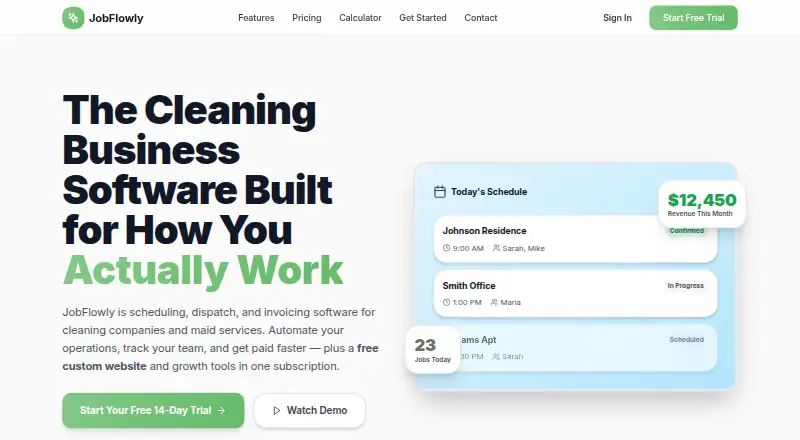
What JobFlowly is
JobFlowly is cleaning business management software for maid services, house cleaners and commercial cleaning operations. It supports one-time and recurring jobs, Airbnb turnovers and drag-and-drop scheduling, alongside real-time crew dispatch, route optimization and GPS tracking. Completed jobs can generate branded invoices, and regular clients can be billed in batches. Payroll data can be exported in CSV formats for Gusto, QuickBooks Payroll or Homebase. Cleaners can use a mobile web portal on iPhone or Android to view schedules and job details, clock in and out, and upload photos without installing an app. Clients submit booking requests on a branded page, but the business must approve them before they become scheduled jobs. Other tools include timestamped completion photos, photo-attached maintenance tickets and short-term rental supply checklists. The free plan includes scheduling, basic invoicing and the cleaner portal, with no credit card required. Pro costs $49 a month and paid plans include a 14-day free trial. Business offers custom pricing, dedicated support and custom onboarding for larger teams, multiple locations or commercial contracts.
Who it suits
JobFlowly is aimed at solo cleaners and cleaning businesses, from maid services and house cleaners to commercial and Airbnb turnover operators. It may suit teams that need scheduling, dispatch, billing and cleaner-facing job details in one system.
What it does well
- Free plan includes scheduling and basic invoicing
- Supports recurring jobs and Airbnb turnovers
- Route optimization and GPS tracking
- Cleaner portal works without an app install
- Branded invoices and batch billing
What to know first
- Booking requests require business approval
- Pro costs $49 a month
- Business plan uses custom pricing
Limits
The free plan includes scheduling, basic invoicing, and the cleaner mobile portal. Automated invoicing, payroll tracking, route optimization, recurring schedules, online booking, photo evidence, and team dispatch are listed with Pro at $49 a month.
Plans
| Plan | Billed and limits | Price |
|---|---|---|
| Free Plan | Scheduling · basic invoicing · cleaner mobile portal · no credit card | Free |
| Small Team | monthly · Up to 6 cleaner seats · Owner-Operator features · payroll and timesheets · dispatch board · route optimization · photo evidence · recurring jobs · team reports | $129 a month |
| Growing Business | monthly · Up to 15 cleaner seats · Small Team features · multiple locations · priority support · white-glove onboarding · advanced analytics | $199 a month |
| Pro | monthly · Unlimited jobs · unlimited clients · automated invoicing · payroll tracking · route optimization · recurring schedules · online booking · photo evidence · team dispatch | $49 a month |
| Owner-Operator | monthly · 1 cleaner seat · unlimited jobs and clients · scheduling and invoicing · mobile portal · GPS tracking and routes · proof-of-work reports · website and marketing tools | $69 a month |
| Business | custom pricing · Large teams · multiple locations · commercial contracts · dedicated support · custom onboarding | On request |
As jobflowly.com lists them, read 15 Oct 2026. The maker's own page has the final word.
Getting started
- Open the JobFlowly website.
- Start with the Free Plan, which requires no credit card, or choose Pro at $49 a month.
- Use the web service on a supported platform: web, Android, or iOS.
- Set up cleaning jobs as one-time or recurring appointments, including turnover work if needed.
- Give cleaners access to the mobile web portal for schedules, job details, time clocking, and photo uploads.
- If selecting a paid plan, use its 14-day free trial.
JobFlowly is software for managing cleaning jobs from scheduling through billing and crew coordination. It is best suited to cleaning businesses with field teams or short-term rental turnovers; solo cleaners may find the free plan sufficient, while growing teams will need Pro for dispatch and routing.
The breadth is useful, but online bookings remain requests until the business approves them, and the strongest operational tools sit behind a paid plan.
Overview
JobFlowly brings job scheduling, crew workflows, invoicing, and cleaner updates into one system for residential and commercial cleaning operations. Its turnover-specific checklists and scheduling around checkout and check-in gaps give Airbnb-focused businesses a more tailored workflow than a basic job calendar. The free plan offers a way to start without a credit card, but it does not include the unlimited jobs, dispatch, or route optimization that make Pro more suitable for a busy team.
Key features
Scheduling and crew coordination
Drag-and-drop scheduling covers one-time and recurring cleans as well as Airbnb turnovers. Pro adds unlimited jobs and clients, recurring schedules, team dispatch, route optimization, and GPS tracking. These capabilities matter most when a manager needs to coordinate several cleaners across a changing schedule; solo operators may not benefit enough to justify upgrading.
Cleaner workflows and quality records
Cleaners can view schedules and job details, clock in and out, and upload photos through a mobile web portal that works on iPhone and Android without requiring an app installation. Timestamped completion photos and photo-attached maintenance tickets give managers a record of completed work and site issues. Short-term rental operators also get property-specific supply checklists and turnover photos, with scheduling designed around guest changeover gaps.
Billing, payroll, and bookings
Completed jobs can produce branded invoices, and batch billing supports regular clients. Payroll CSV exports are formatted for Gusto, QuickBooks Payroll, or Homebase, which offers a route to payroll processing without claiming to replace those systems. Clients can submit requests through a branded booking page, but the business must approve each request before it becomes a scheduled job. That approval step preserves control over the calendar, though it is not fully automatic booking.
Pricing
JobFlowly uses a freemium model, with no per-job charges or long-term contracts. Paid plans include a 14-day free trial.
| Plan | Price | What it includes | Best fit |
|---|---|---|---|
| Free Plan | free | Scheduling, basic invoicing, and cleaner mobile portal; no credit card required. | Solo cleaners or small operations that need core scheduling and invoicing. |
| Pro | $49 a month, billed $49/month | Unlimited jobs and clients, automated invoicing, payroll tracking, route optimization, recurring schedules, online booking, photo evidence, and team dispatch. | Growing teams that need field coordination and broader billing workflows. |
| Business | Custom pricing | For large teams, multiple locations, or commercial contracts; includes dedicated support and custom onboarding. | Larger or multi-location operations that need tailored onboarding and support. |
The free tier keeps the entry cost at zero, but its published scope is narrower than Pro: it provides basic rather than automated invoicing and does not include the paid plan's stated dispatch, routing, and online-booking features. Business is the option for larger operations, but its cost depends on a custom quote.
Platforms
JobFlowly is available on Android, iOS, and the web. Cleaners can use the mobile web portal on iPhone or Android without installing an app.
Who it's for
JobFlowly is a strong fit for growing cleaning companies, maid services, commercial cleaners, and Airbnb turnover businesses that need schedules tied to field execution, billing, and photo records. Solo cleaners can start with the free plan, but teams that do not need dispatch, routing, or recurring schedules may be paying for operational reach they will not use on Pro.
Pros and cons
- Pros: A free plan includes scheduling, basic invoicing, and a cleaner portal without a credit card.
- Pros: Pro combines unlimited jobs and clients with dispatch, route optimization, recurring schedules, and automated invoicing for $49 a month.
- Pros: Cleaner access through a mobile web portal avoids requiring an app installation, while timestamped photos and maintenance tickets support accountability.
- Cons: Client booking requests need business approval before they enter the schedule, so booking is not automatic.
- Cons: Dispatch, routing, and other advanced workflows are tied to Pro rather than the free plan.
- Cons: Business has custom pricing, so larger teams cannot compare its cost against a fixed monthly rate.
Alternatives
Cleaning Service Software is the broader category to compare when JobFlowly's workflow or plan structure is not the right fit.
- Allclean may suit teams that want all features on a free plan for up to three users and can account for 6.9% + 30¢ processing fees and $40/mo for each additional user.
- SweepOS is worth considering for a small crew whose free plan covers one admin, up to three workers, unlimited sites, checklists, photo documentation, and basic time tracking.
- Opsycle may fit a smaller operation that can work within the free plan's 5 clients and 15 jobs/month, or wants its Starter plan at $29 a month.
- CleanCloud is a paid alternative with Android, iOS, MacOS, web, and Windows support; its Lite plan supports 500 orders per month.
- Clean Scheduler may suit a business that wants a fixed monthly entry plan: Starter is $39 a month and includes 2 office seats, 5 field seats, up to 500 active customers, and 3 recurring visit rules.
- Clean Smarts is another paid option for readers comparing cleaning-management software and payroll add-ons.
- Cleaners App may be a fit for teams comparing user-based plans, including Solo at $29.99 a month for 1–2 users and Crew at $79 a month for 3–5 users, billed annually.
- CleanManager is an alternative for readers considering a client login priced at €1.50 a month, billed quarterly and exclusive of VAT.
Verdict
Choose JobFlowly if your cleaning business needs one workflow for recurring jobs, field crews, invoices, and turnover records, with a free starting tier and a clear Pro price. Look elsewhere if you require bookings to enter the calendar without approval, need advanced coordination without upgrading, or prefer a fixed price for a large-team plan.
Verdict
JobFlowly covers scheduling, crew coordination, billing and cleaner updates, with a free entry plan and paid features from Pro. Businesses should account for the approval step between client booking requests and scheduled jobs.
Questions
Is JobFlowly free?
Yes. Its Free Plan costs nothing and includes scheduling, basic invoicing, and the cleaner mobile portal; no credit card is required.
How much does Pro cost?
Pro costs $49 a month. It includes unlimited jobs and clients, automated invoicing, payroll tracking, route optimization, recurring schedules, online booking, photo evidence, and team dispatch.
Is there a free trial?
Paid plans include a 14-day free trial.
Which platforms does JobFlowly support?
The listed platforms are Android, iOS, and web. Cleaners can also use the mobile web portal on iPhone and Android without installing an app.
Does JobFlowly integrate with payroll services?
It exports payroll CSVs formatted for Gusto, QuickBooks Payroll, or Homebase.
What does the Business plan include?
Business has custom pricing for large teams, multiple locations, or commercial contracts, and includes dedicated support and custom onboarding.
Facts from JobFlowly's own pages
- API and SDKs
- The opened official pages describe CSV exports and third-party payroll formats but do not publish API, SDK or developer documentation. · jobflowly.com, 15 Oct 2026
- Capterra audience
- Capterra describes the intended market as small and midsize cleaning, janitorial, residential and Airbnb/short-term-rental businesses. · capterra.com, 15 Oct 2026
- Capterra buyer priorities
- Capterra reports scheduling, mobile access and customer databases as leading priorities among service-dispatch buyers. · capterra.com, 15 Oct 2026
- Capterra deployment
- Capterra records web, Android and iPhone/iPad deployment options. · capterra.com, 15 Oct 2026
- Capterra feature count
- Capterra lists 23 supported features, including scheduling, routing, time tracking, invoicing, CRM and customer records. · capterra.com, 15 Oct 2026
- Capterra support
- Capterra lists email/help desk, FAQ/forum, knowledge base, phone and chat support options. · capterra.com, 15 Oct 2026
- Capterra training
- Capterra lists live online sessions, documentation and videos as training formats. · capterra.com, 15 Oct 2026
- Cleaner portal
- Cleaners use a smartphone browser portal for schedules, job details, clocking, photos, supply alerts and issue reporting. · jobflowly.com, 15 Oct 2026
- Company disclosure
- The official site identifies JobFlowly as built by cleaning-business operators but gives no legal entity, headquarters or founding year. · jobflowly.com, 15 Oct 2026
- Dispatch
- Managers can assign crews in real time and use route optimization with GPS tracking. · jobflowly.com, 15 Oct 2026
- Dispatch and routing
- It offers real-time crew dispatch, route optimization, and GPS tracking. · jobflowly.com, 7 Oct 2026
- Independent user adoption
- Three North Clean states that it moved its schedules, crews and billing onto JobFlowly and continues using it as its primary operations platform. · threenorthclean.com, 15 Oct 2026
- Industries
- The product targets maid services, residential cleaners, commercial cleaning companies and short-term-rental turnover operators. · jobflowly.com, 15 Oct 2026
- Invoicing
- Completed jobs can automatically generate branded invoices, with paid, overdue and outstanding tracking. · jobflowly.com, 15 Oct 2026
- Licence and hosting
- The opened pages present JobFlowly as a hosted commercial service and do not state an open-source licence or self-hosting option. · jobflowly.com, 15 Oct 2026
- Limit: product scope
- Three North Clean says the platform does not replace hiring, training or communication practices, even though it reduces administrative friction. · threenorthclean.com, 15 Oct 2026
- Limit: solo operators
- Three North Clean considers JobFlowly potentially excessive for solo operators handling fewer than ten jobs weekly. · threenorthclean.com, 15 Oct 2026
- Maintenance tracking
- Workers can create photo-backed maintenance tickets that remain tracked from opening through resolution. · jobflowly.com, 15 Oct 2026
- Mobile delivery
- The official FAQ says no app download is required because cleaners use a mobile web portal that works on iPhone and Android. · jobflowly.com, 15 Oct 2026
- Online booking
- Customers submit requests through a branded booking page that staff approve before calendar creation. · jobflowly.com, 15 Oct 2026
- Payroll
- Clock data is converted into hourly or per-job pay calculations and CSV exports for Gusto, QuickBooks Payroll and Homebase. · jobflowly.com, 15 Oct 2026
- Payroll integrations
- It exports payroll CSVs formatted for Gusto, QuickBooks Payroll, or Homebase. · jobflowly.com, 7 Oct 2026
- Photo evidence
- Administrators can require timestamped before-and-after photos before a job is marked complete. · jobflowly.com, 15 Oct 2026
- Praise: onboarding
- Three North Clean describes crew onboarding as straightforward, with screens that use understandable cleaner-oriented terminology. · threenorthclean.com, 15 Oct 2026
Where JobFlowly stands on Freedom251
- Cleaning Service Software#2 of 34
- Maid Service#1 of 17