Freedom251 › Janitorial Software

Clean Smarts
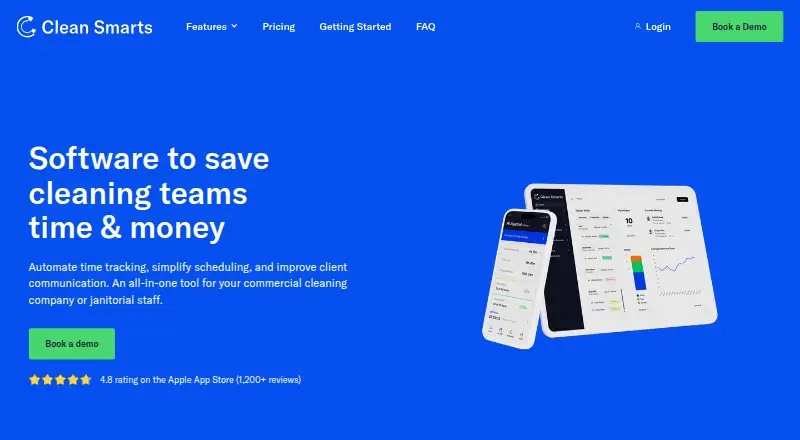
What Clean Smarts is
Clean Smarts brings time tracking, scheduling, issue reporting, supply updates, inspections, and client communication into a tool for commercial cleaning companies and janitorial staff. Employees can clock in or out through the mobile app, NFC sensors, text message, phone call, or barcode. Managers can schedule teams from a drag-and-drop desktop calendar or mobile app, send notifications, and track live status. Teams and customers can submit and follow issues on mobile, desktop, or by QR code, with real-time notifications and photo or video attachments. Inspection tools support customized checklists, weighted tasks, due dates, and issue logging. Cleaners can update supply levels, with configurable minimum thresholds triggering reorder notices. Messaging supports text, photos, or videos without sharing personal phone numbers. QuickBooks Online can sync billing customers, account mappings, services, supplies, and invoices; that feature may need to be enabled. The service runs on Android, iOS, and web. Annual pricing starts at 100 USD per month, and a fully featured 14-day free trial is offered. Foundation plans are limited to 100 users; payroll is currently offered to U.S.-based companies.
Who it suits
It suits commercial cleaning businesses that need scheduling, time tracking, inspections, and client or team communication across mobile and desktop. U.S.-based companies may also consider its payroll offering.
What it does well
- Clock-ins support five methods, including NFC and barcode.
- Issue reports can include photos or videos.
- Customizable inspection checklists include weighted tasks.
- QuickBooks Online can sync invoices and account data.
- Fully featured 14-day free trial.
What to know first
- No free plan is listed.
- Foundation is capped at 100 users.
- Payroll is currently limited to U.S.-based companies.
- Expert customers over 300 users must request a quote.
Limits
There is no free plan. Foundation is capped at 100 users, and Expert customers with more than 300 users must contact the company for a quote. Payroll is currently offered only to U.S.-based companies.
Plans
| Plan | Billed and limits | Price |
|---|---|---|
| Foundation (annual) | billed annually · +$6 per additional user per month · Maximum 100 users | $10,010 a year |
| Foundation (monthly) | billed monthly · +$6 per additional user per month · Maximum 100 users | $12,510 a month |
| Expert (annual) | billed annually · +$8 per additional user per month · More than 300 users? Contact us for a quote. | $16,010 a year |
| Expert (monthly) | billed monthly · +$8 per additional user per month · More than 300 users? Contact us for a quote. | $20,010 a month |
| Payroll add-on | One-time, $200 fee for mid-year transfer from old payroll system | $606 a month |
As cleansmarts.com lists them, read 3 Oct 2026. The maker's own page has the final word.
Getting started
- Visit the Clean Smarts website.
- Start the fully featured 14-day free trial.
- Use the web platform or Android or iOS app.
- Choose a Foundation or Expert plan; contact the company for an Expert quote above 300 users.
- Ask about enabling the QuickBooks Online accounting feature if needed.
Clean Smarts is an operations platform for commercial cleaning companies managing recurring work, field staff, and client requests. It fits organizations that need payroll-ready attendance, inspections, supply controls, and customer communication together. The trade-off is a substantial paid commitment and payroll restricted to U.S.-based companies.
Overview
Clean Smarts brings scheduling, time capture, issue handling, inspections, supplies, messaging, and accounting connectivity into one system. Managers can coordinate crews and locations from a drag-and-drop desktop calendar or mobile app, send notifications, and follow live status updates. Employees and customers can raise issues from mobile, desktop, or QR codes, with real-time alerts and photo or video evidence.
This breadth suits multi-crew janitorial operations more than very small businesses seeking only a calendar and invoices. The 14-day fully featured trial is long enough to test workflows before committing, and cancellation requests are processed within one business day.
Key features
Time tracking and scheduling
Cleaners can clock in and out through the mobile app, NFC sensors, text message, phone call, or barcode. Multiple capture methods accommodate varied sites and devices, but managers should establish a consistent policy so records remain comparable. Recurring scheduling, mobile notifications, and live status updates help supervisors manage work as it changes.
Issues, inspections, and supplies
Teams and customers can submit and follow issues through mobile, desktop, or QR codes. Attachments and immediate notifications give managers evidence and a faster route to resolution. Inspection checklists support weighted tasks, due dates, and issue logging, with examples aligned to ISSA and APPA standards; that structure is useful when quality scores must be documented across locations.
Cleaners update supply levels in the app, while customizable minimums can trigger reorder notices. This is more practical than relying on periodic stock checks, especially for distributed sites, although it depends on staff keeping quantities current.
Messaging and accounting
In-app messaging covers employees, teams, and customers with text, photos, and video without exposing personal phone numbers. QuickBooks Online integration can synchronize billing customers, account mappings, services, supplies, and invoices. The accounting capability may need to be enabled for an account, so confirm that requirement before planning an automated finance workflow.
Security and reliability
Network traffic uses TLS, files and backups are encrypted at rest, and administrator permissions can be limited by module and service location. Clean Smarts states a 99.9% uptime guarantee in its service-level agreement, backs up data daily, and supports restoration to any point in the previous seven days. Account owners retain platform-data rights, can export after cancellation, and can request permanent deletion, while data may be retained for seven years for legal compliance.
Pricing
There is no free plan. A 14-day free trial includes the full feature set. Foundation costs $10,010 a year when billed annually, or $12,510 a month when billed monthly; both add $6 per additional user per month and cap usage at 100 users. These tiers suit smaller commercial operators that need the complete operations set, with annual billing offering the lower recurring rate.
Expert is $16,010 a year billed annually or $20,010 a month billed monthly, plus $8 per additional user per month. Customers above 300 users must contact the company for a quote, making this the route for larger organizations but with less predictable budgeting at enterprise scale.
The Payroll add-on is $606 a month, with a one-time $200 fee for a mid-year transfer from an old payroll system. Payroll is currently offered only to U.S.-based companies, so international operators cannot use that part of the service.
Platforms
Clean Smarts provides Android and iOS mobile apps alongside a web platform. Desktop scheduling and browser-based issue handling complement field workflows, allowing office managers and cleaners to use different interfaces without splitting systems.
Who it's for
Choose Clean Smarts if you run commercial cleaning teams across recurring jobs and need attendance capture, documented inspections, stock thresholds, client messaging, and QuickBooks connectivity in one subscription. It is less suitable for a solo cleaner or a small crew that cannot use the 100-user Foundation capacity or justify a paid plan from $100 per month annually.
Pros and cons
- Pros: many clock-in methods support varied job sites; QR, photo, and video issue reporting creates accountable service records; weighted inspection checklists fit standards-driven contracts; supply thresholds can prompt reorders; scoped permissions, encryption, backups, and a stated 99.9% uptime SLA address operational risk; free management training and U.S.-business-hours phone and email support reduce rollout friction.
- Cons: there is no free tier; Foundation stops at 100 users; Expert pricing becomes quote-based above 300 users; payroll is U.S.-only; the monthly plans cost more than annual billing; accounting integration may require activation.
Alternatives
Cleaning Service Software is the broader category guide for comparing options. Pick Allclean if you want a freemium starting point, including a free plan for up to three users, rather than Clean Smarts' paid entry. JobFlowly is a better fit when a free plan with scheduling, basic invoicing, and a cleaner portal covers your needs. Choose SweepOS for a free mobile-first setup supporting one admin and up to three workers with checklists and basic time tracking.
Opsycle suits small operations that can work within a free allowance of five clients and 15 jobs per month. Consider CleanCloud when you need broader platform coverage, including Windows, macOS, and an API. Clean Scheduler is an alternative for teams starting with defined office and field-seat limits. Cleaners App targets solo users and small crews with plans organized by user count. CleanManager is worth comparing if a client-login portal priced in euros matches your market.
Verdict
Clean Smarts is a strong choice for established commercial cleaning companies that need one system for crews, clients, inspections, supplies, and payroll-oriented time records. Its main reason to choose is operational coverage across mobile, web, and desktop workflows. Look elsewhere if you need a free or low-cost starter plan, serve more than 100 users on Foundation, or require payroll outside the United States.
Verdict
Clean Smarts covers operational tasks from staff clock-ins to supply updates and inspections, with mobile, web, and desktop workflows. Review the user caps, payroll availability, and plan terms to see whether they fit your operation.
Questions
Is there a free plan or trial?
There is no free plan. Clean Smarts offers a fully featured 14-day free trial.
How much does Clean Smarts cost?
Pricing is listed from $100/mo (annual). The Foundation (annual) plan is $10,010 a year, and Foundation (monthly) is $12,510 a month.
Which platforms does it support?
Clean Smarts is available on Android, iOS, and web.
Does it integrate with QuickBooks?
QuickBooks Online can sync billing customers, account mappings, services, supplies, and invoices. The accounting feature may need to be enabled for an account.
What are the user limits?
Foundation allows a maximum of 100 users. Expert customers with more than 300 users must contact the company for a quote.
Can I cancel?
The company says customers can cancel at any time, with one business day to process the request.
Facts from Clean Smarts's own pages
- Headquarters
- Texas, USA · cleansmarts.com, 28 Sept 2026
- Inspections
- Inspections support customized checklists, weighted tasks, due dates, and issue logging, with examples of industry standards including ISSA and APPA. · cleansmarts.com, 3 Oct 2026
- Issue reporting
- Teams and customers can submit and track issues on mobile, desktop, or through QR codes, with real-time notifications and photo or video attachments. · cleansmarts.com, 3 Oct 2026
- Messaging
- Users can message employees, teams, or customers with text, photos, or videos without sharing personal phone numbers. · cleansmarts.com, 3 Oct 2026
- Notable limits
- Foundation is capped at 100 users, Expert customers with more than 300 users must contact the company for a quote, and payroll is currently offered to U.S.-based companies. · cleansmarts.com, 3 Oct 2026
- Privacy and retention
- Account owners retain rights to platform data, can export it after cancellation, and can request permanent deletion; the page also says data may be retained for seven years for legal compliance. · cleansmarts.com, 3 Oct 2026
- Purpose
- Clean Smarts is an all-in-one tool for commercial cleaning companies and janitorial staff that automates time tracking, simplifies scheduling, and improves client communication. · cleansmarts.com, 3 Oct 2026
- QuickBooks integration
- The QuickBooks Online accounting integration can sync billing customers, account mappings, services, supplies, and invoices; the accounting feature may need to be enabled for an account. · support.cleansmarts.com, 3 Oct 2026
- Reliability
- Clean Smarts states a 99.9% uptime guarantee for its Service Level Agreement and says data is backed up daily with restoration available to any point within the last seven days. · cleansmarts.com, 3 Oct 2026
- Scheduling
- Managers can use a drag-and-drop desktop calendar and mobile app to schedule teams, send notifications, and track live status updates. · cleansmarts.com, 3 Oct 2026
- Security
- Network requests use TLS encryption, files and backups are encrypted at rest, and administrator access can be scoped by module and service location. · cleansmarts.com, 3 Oct 2026
- Supplies
- Cleaners can update supply levels in the mobile app, and customizable minimum thresholds can trigger reorder notices. · cleansmarts.com, 3 Oct 2026
- Support
- Customers receive free live web training for their management team and can reach support by email or phone during U.S. business hours. · cleansmarts.com, 3 Oct 2026
- Time tracking
- Employees can clock in and out using the mobile app, NFC sensors, text message, phone call, or barcode. · cleansmarts.com, 3 Oct 2026
- Trial and cancellation
- The company offers a fully featured 14-day free trial and says customers can cancel at any time with one business day to process the request. · cleansmarts.com, 3 Oct 2026
Where Clean Smarts stands on Freedom251
- Janitorial Software#4 of 15
- Cleaning Service Software#15 of 34