Freedom251 › Digital Communications Governance Software
OpenText Retain Unified Archiving
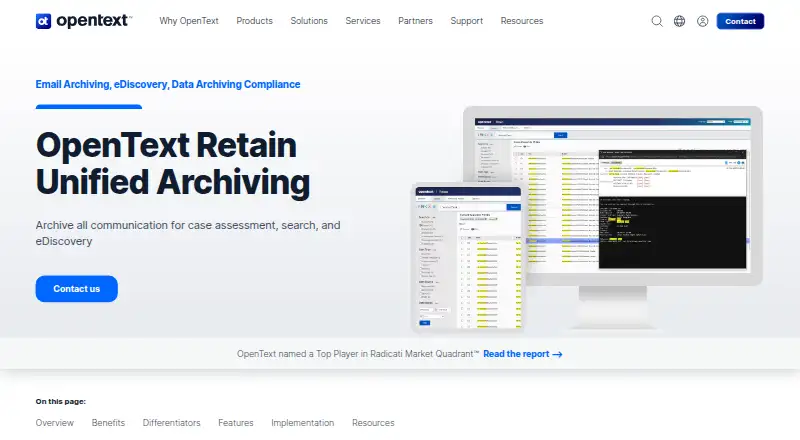
What OpenText Retain Unified Archiving is
OpenText Retain Unified Archiving stores business communications for centralized case assessment, search, and eDiscovery. Organizations can deploy it on-premises or in the cloud, with supported sources including Exchange, Office 365, Gmail, Bloomberg Professional, OpenText GroupWise, and mobile communications. Administrators can set archive policies using mailbox type, message source, item type, status, age, attachments, folder, and attachment type. Built-in eDiscovery tools cover litigation holds, search, redaction, and export. Archives are accessible through a browser-based Web Access Archive Viewer; other listed options include email clients, a mobile app, and an Offline Archive Viewer. Data can be exported to PST, PDF, or standalone archive viewer formats. The product describes encrypted mobile archiving for iOS, Android, and BlackBerry, alongside AES encryption, secure storage options, audit trails, role-based access, and permissions for confidential messages. Single-instance storage keeps one copy of each message and attachment. Pricing is available on request.
Who it suits
It suits organizations that need to manage communication records and meet data archiving mandates. It may also fit teams handling litigation holds, archive searches, redaction, and exports.
What it does well
- Deploys on-premises or in the cloud
- Supports multiple email and mobile message sources
- Includes litigation holds and redaction
- Exports to PST, PDF, or viewer formats
- Single-instance storage retains one copy of messages
What to know first
- Pricing is available on request
- No listed free plan or trial
Limits
Pricing is available on request; no free plan or entry plan limits are listed in these facts.
Getting started
- Visit the OpenText Retain Unified Archiving website.
- Choose an on-premises or cloud deployment.
- Contact OpenText for pricing.
- Select message sources and define archive policies.
- Set up archive access and eDiscovery workflows.
OpenText Retain Unified Archiving is a business communications archive with retention controls and built-in eDiscovery. It is best suited to organizations that need to preserve records across multiple messaging sources and support legal review. Its range of policy controls and deployment options is compelling, but the named source coverage makes fit checks important.
Overview
Retain brings business communications together for search, case assessment, and eDiscovery. Organizations can deploy it on-premises or in the cloud, which gives IT teams a choice about where the archive runs. That flexibility matters for organizations with different infrastructure requirements, though it does not remove the need to verify that each source they rely on is supported.
Supported sources include Exchange, Office 365, Gmail, Bloomberg Professional, OpenText GroupWise, and mobile communications. This mix can serve organizations preserving records across email and other business messaging, but those using sources outside this group should confirm compatibility before committing.
Key features
Administrators can set archive policies by mailbox type, message source, item type, status, age, attachments, folder, and attachment type. That level of granularity can help teams apply different retention rules to distinct record types instead of treating every message alike.
Built-in eDiscovery includes litigation holds, search, redaction, and export of archived messages. Exports are available in PST, PDF, and standalone archive viewer formats, giving legal and compliance teams several ways to review or hand off collected material. Single-instance storage retains one copy of each message and attachment, which avoids keeping duplicate copies in the archive.
Users and administrators can access archives through a browser-based Web Access Archive Viewer; email clients, a mobile app, and an Offline Archive Viewer are also identified as access methods. Encrypted mobile message archiving is described for iOS, Android, and BlackBerry devices. Security controls include AES encryption, secure storage options, audit trails, role-based access, and permissions for confidential messages. A third-party API can ingest information while maintaining data fidelity, which may help organizations bring additional information into the archive.
Pricing
Retain is paid software with custom pricing. There are no published plan tiers or seat, storage, trial, or renewal terms to compare, so buyers should request a quote based on their deployment and requirements. This makes it difficult to assess cost before a sales conversation, particularly for organizations comparing it with products that publish free or fixed-price options.
Platforms
Retain supports Android, iOS, Linux, Windows, web, API, and self-hosted environments. The on-premises and cloud deployment choices add flexibility, while the mobile support is relevant to organizations archiving messages from mobile devices. Buyers should check that the specific clients and communication sources in their environment align with the access and archiving methods they need.
Who it's for
Retain is aimed at organizations that need to manage communication records and meet data archiving mandates. It is a particularly strong fit when legal and compliance teams need litigation holds, searchable archives, redaction, and export alongside administrative control over retention policies. It is less suitable for buyers seeking transparent, self-serve pricing or for teams whose key message sources are not among the supported systems.
Pros and cons
- Pros: Policy rules can target multiple message attributes, giving administrators more precise control over what is archived.
- Pros: Litigation holds, search, redaction, and several export formats support legal review and downstream use of archived records.
- Pros: On-premises and cloud deployment provide a choice of operating model, with mobile and offline archive access also supported.
- Cons: Pricing is custom, so buyers cannot compare costs from published tiers before engaging with the vendor.
- Cons: The named message sources define a clear compatibility boundary; organizations using other systems need to verify coverage.
Alternatives
For a broader comparison, see Email Archiving Software. Choose Google Drive instead when the priority is general cloud file storage with a free plan that includes up to 15 GB per Google Account, rather than a communications archive with legal holds and eDiscovery. VM Backup is a better fit for virtual-machine backup, with a free edition covering two VMs per host and a 30-day fully featured trial, not message retention.
Open Archiver Enterprise is worth considering for buyers who want a self-hosted open-source edition with community support or an enterprise edition priced at €14 per seat as a one-time payment. MessageSolution Enterprise Email Archive is another paid archive option, with quote-based editions and a stated $600 per year maintenance minimum.
Jatheon Cloud may suit organizations seeking per-user monthly pricing billed annually, unlimited storage, and no egress fees at exit. MailArchiva offers an alternative on-premise perpetual license per mailbox, with mandatory first-year support and annual support thereafter. Mimecast Data Leak Prevention is aimed at SaaS and cloud exfiltration detection rather than unified message archiving. Proofpoint Enterprise Archive is another paid archive option.
Verdict
Choose Retain if your organization needs policy-driven preservation across its supported communication sources, with litigation holds and practical search, redaction, and export tools for eDiscovery. Its flexible deployment and detailed controls are its strongest reasons to buy. Look elsewhere if published pricing is essential to your shortlist or if your core message sources fall outside its supported set.
Verdict
OpenText Retain Unified Archiving combines communications retention with search and eDiscovery tools. Organizations can choose on-premises or cloud deployment, with pricing available on request.
Questions
How much does OpenText Retain Unified Archiving cost?
Pricing is available on request.
Can it be deployed in the cloud?
Yes. The archive can be deployed in the cloud or on-premises.
Does it support litigation holds and eDiscovery?
Yes. Built-in eDiscovery includes litigation holds, search, redaction, and export of archived messages.
How can users access archived messages?
Access options include a browser-based Web Access Archive Viewer, email clients, a mobile app, and an Offline Archive Viewer.
What formats can archived data be exported to?
Archived data can be exported to PST, PDF, or standalone archive viewer formats.
What integrations are identified?
The product page identifies OpenText Enterprise Messaging and OpenText GroupWise among related integrations and solutions. A third-party API can also ingest information into the archive while maintaining data fidelity.
Facts from OpenText Retain Unified Archiving's own pages
- Archive access
- Users and administrators can access archives through a browser-based Web Access Archive Viewer, and the data sheet also lists email clients, a mobile app, and an Offline Archive Viewer. · opentext.com, 4 Oct 2026
- Deployment
- The archive can be deployed on-premises or in the cloud. · opentext.com, 4 Oct 2026
- Discovery tools
- Built-in eDiscovery supports litigation holds, search, redaction, and export of archived messages. · opentext.com, 4 Oct 2026
- Export formats
- Archived data can be exported to PST, PDF, or standalone archive viewer formats. · opentext.com, 4 Oct 2026
- Integrations
- The product page identifies OpenText Enterprise Messaging and OpenText GroupWise among related integrations and solutions. · opentext.com, 4 Oct 2026
- Intended users
- The product page describes archiving and eDiscovery for organizations that need to manage communication records and meet data archiving mandates. · opentext.com, 4 Oct 2026
- Message sources
- The data sheet lists Exchange, Office 365, Gmail, Bloomberg Professional, OpenText GroupWise, and mobile communications as supported sources. · opentext.com, 4 Oct 2026
- Mobile archiving
- The data sheet describes encrypted mobile message archiving for iOS, Android, and BlackBerry devices. · opentext.com, 4 Oct 2026
- Policy controls
- Administrators can define archive policies by mailbox type, message source, item type, status, age, attachments, folder, and attachment type. · opentext.com, 4 Oct 2026
- Purpose
- Archives business communications for centralized case assessment, search, and eDiscovery. · opentext.com, 4 Oct 2026
- Security and access
- The data sheet describes AES encryption, secure storage options, audit trails, role-based access controls, and permissions for confidential messages. · opentext.com, 4 Oct 2026
- Storage efficiency
- Single-instance storage keeps one copy of each message and attachment in the archive. · opentext.com, 4 Oct 2026
- Support
- The product page links to OpenText Support Services, Professional Services, Customer Success Services, and Managed Services. · opentext.com, 4 Oct 2026
- Third-party integration
- The data sheet says a third-party API can ingest information into the archive while maintaining data fidelity. · opentext.com, 4 Oct 2026
Where OpenText Retain Unified Archiving stands on Freedom251
- Digital Communications Governance Software#9 of 19
- Email Archiving Software#15 of 27