Freedom251 › Email Archiving Software

Open Archiver Enterprise
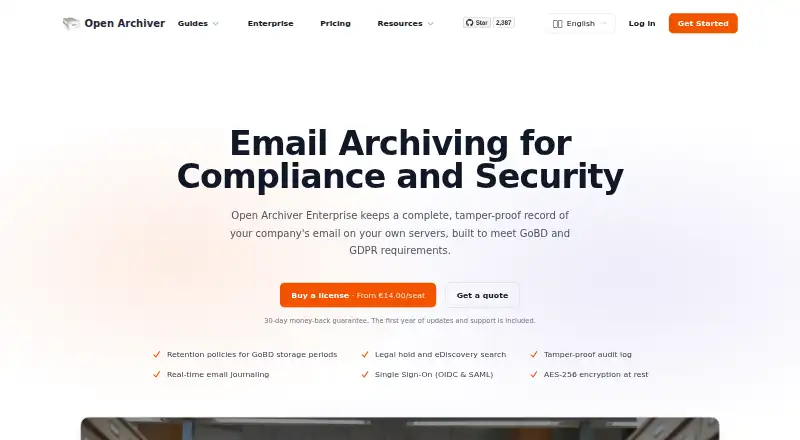
What Open Archiver Enterprise is
Open Archiver Enterprise keeps company email searchable on infrastructure controlled by the organization. It connects to Google Workspace, Microsoft 365, and IMAP, and supports bulk imports from PST, EML, and MBOX files. Enterprise journaling captures unmodified messages for each recipient, including BCC recipients, alongside mailbox synchronization. Full-text search covers email and attachments, and archived messages can be exported as EML files.
Enterprise features include retention policies, legal holds, a hash-chained audit log, and integrity reports for GoBD and GDPR-related workflows. Archived files can be encrypted with AES-256; identity controls include OIDC and SAML single sign-on, identity-provider group role mapping, and organization-wide two-factor authentication policies. The vendor says email, the index, and encryption keys remain on customer-controlled servers, and messages are stored as plain .eml files. The open-source self-hosted edition is free. Enterprise is a perpetual license purchased once per archived mailbox at €14, paid once, with the first year of updates and support included. Enterprise features are enabled individually by license key, so a license may not include every feature.
Who it suits
Open Archiver Enterprise suits organizations that need a searchable email archive on infrastructure they control. Its journaling and compliance features may suit teams managing retention, legal holds, and audit records.
What it does well
- Connects to Google Workspace, Microsoft 365, and IMAP.
- Supports bulk PST, EML, and MBOX imports.
- Journaling captures messages per recipient, including BCC.
- Includes full-text search across email and attachments.
- Enterprise license is perpetual.
What to know first
- Enterprise features are entitled individually by license key.
- Updates and support stop if support lapses.
- Enterprise costs €14 per archived mailbox, paid once.
Limits
The free self-hosted edition is open source and includes community support. Enterprise includes the first year of updates and support; when support lapses, the license and Enterprise features continue working, but updates and technical support stop.
Plans
Open Archiver Enterprise's published prices are being re-checked against the maker's own page.
| Plan | Billed and limits | Price |
|---|---|---|
| Self-hosted | free self-hosting · open-source edition · self-hosted containers · community support · IMAP, PST, EML, Mbox, Microsoft 365 and Google Workspace ingestion | Price being re-checked |
| Enterprise Edition | per seat; 1 year of updates and support included · 500+ seats: €14.00/seat · 300–499: €17.00/seat · 100–299: €21.00/seat · 50–99: €26.50/seat · 25–49: €29.00/seat · 10–24: €38.00/seat · 5–9: €57.00/seat · 1–4: €65.00/seat · license never expires | Price being re-checked |
As openarchiver.com lists them, read 15 Oct 2026. The maker's own page has the final word.
Getting started
- Visit https://openarchiver.com/enterprise.
- Choose the free self-hosted edition or an Enterprise license.
- Deploy the web interface with Docker Compose on a server or local machine.
- Connect Google Workspace, Microsoft 365, or IMAP, or bulk import PST, EML, or MBOX files.
- For Enterprise, check which features are entitled by the license key.
Open Archiver Enterprise is a self-hosted archive for organizations that need to preserve and search company email. It is best for teams that want control over archived data and need compliance-oriented capture. Its strongest advantage is pairing recipient-level journaling with a perpetual per-mailbox license; buyers should confirm which Enterprise features their license key includes.
Overview
The archive connects to Google Workspace, Microsoft 365 and IMAP, and supports bulk imports from PST, EML and MBOX files. Full-text search spans email and attachments, and messages can be exported as EML. Archived messages are stored as plain .eml files, giving teams a portable format. Because the archive, index and encryption keys stay on customer-controlled servers, the product suits organizations that prioritize data control. The trade-off is that they must deploy and operate the hosting themselves.
The installation guide describes using Docker Compose to deploy the web interface on a server or local machine. This supports self-managed deployments, but does not remove the operational work of maintaining the environment.
Key features
Enterprise journaling captures unmodified messages per recipient, including BCC recipients, alongside mailbox synchronization. That makes it more suitable than mailbox sync alone for organizations that need recipient-level message records.
Retention policies, legal holds, a hash-chained audit log and integrity reports support GoBD and GDPR-related workflows. AES-256 encryption protects archived files. OIDC and SAML single sign-on, identity-provider group role mapping and organization-wide two-factor authentication policies provide additional access controls. Together these features make Enterprise relevant to compliance-focused teams, but entitlements are assigned individually by license key, so buyers should confirm which controls are included.
Search and export are practical strengths: teams can find messages and attachments with full-text search and export mail in EML format. Bulk import of PST, EML and MBOX files also gives organizations a route to bring existing archives into the system.
Pricing
The self-hosted Open-source edition costs nothing and includes community support. It is the no-cost option for teams that can work without Enterprise features and do not require the included first-year commercial updates and support.
Enterprise Edition costs €14, paid once, billed as a one-time payment per seat, with each seat representing an archived mailbox. The license is perpetual, the first year of updates and support is included, and larger seat counts receive a lower per-seat rate. After support lapses, the license and Enterprise features continue working, but updates and technical support stop. This structure may suit buyers who prefer a one-time license, though future maintenance and support require attention.
Enterprise features are entitled individually by license key, so the Enterprise price does not by itself establish that every feature is included. Check the key’s entitlements before purchasing, especially if journaling, legal holds or particular access controls are essential.
Platforms
Open Archiver Enterprise supports API, Linux, self-hosted and web use. Docker Compose deployment on a server or local machine fits teams able to manage their own hosting rather than those seeking a purely managed archive.
Who it's for
It is a strong fit for organizations that need searchable email retention, recipient-level journaling and compliance controls while keeping the archive and keys on infrastructure they control. The plain EML storage, EML export and bulk-import support also help teams that value portability. It is less suitable for buyers who want a hosted service or who cannot take responsibility for self-hosting and ongoing operations.
Pros and cons
Pros
- Customer-controlled hosting keeps emails, the index and encryption keys on infrastructure the organization controls.
- Recipient-level journaling includes BCC recipients, adding capture beyond mailbox synchronization.
- Perpetual, one-time per-mailbox licensing avoids a recurring license charge, and larger seat counts receive lower per-seat rates.
- Plain EML storage, EML export and imports from PST, EML and MBOX support portability and migration.
Cons
- Self-hosting makes deployment and operation the customer's responsibility.
- Enterprise capabilities depend on individual license-key entitlements, so the edition name alone does not guarantee every feature.
- Updates and technical support stop when support lapses, despite the perpetual license remaining active.
Alternatives
Email Archiving Software is a useful starting point for comparing options across the category.
- Google Drive is a better fit for general cloud file storage, with up to 15 GB included free for each Google account; it is not positioned here as an email archive.
- VM Backup is the more relevant choice for protecting virtual machines, with a free edition capped at two VMs per host and a 30-day fully featured trial.
- MessageSolution Enterprise Email Archive is another enterprise archiving option, with quote-based pricing tied to organization size and a $600 annual maintenance minimum.
- OpenText Retain Unified Archiving is an alternative for organizations evaluating a paid archiving product with broader listed platform support, including Android, iOS, Windows and web.
- Jatheon Cloud may suit teams preferring cloud delivery, with annual billing per user, unlimited storage and no egress fees at exit.
- MailArchiva is worth considering for teams comparing freemium, self-hosted archives; its on-premise license is a one-time per-mailbox fee, with first-year support mandatory and annual support thereafter.
- Mimecast Data Leak Prevention is the more relevant option when the need is SaaS or cloud exfiltration detection rather than email archiving; its Professional plan includes one detector and 30 days of historical activity.
- Proofpoint Enterprise Archive is another paid enterprise archiving option to compare.
Verdict
Choose Open Archiver Enterprise if your organization needs searchable, portable email records, recipient-level journaling and compliance controls while retaining control of the hosting environment. The perpetual per-mailbox license and customer-controlled data are compelling for self-hosting teams. Look elsewhere if you need a managed service, or if the operating burden and feature-by-feature license entitlements do not fit your requirements.
Verdict
Open Archiver combines controlled self-hosting with email ingestion, search, and Enterprise compliance features. Check which features are included in a license key and note that ongoing updates and technical support stop if support lapses.
Questions
Is Open Archiver Enterprise open source?
The Self-hosted edition is described as open source and free. The Enterprise Edition is a separately licensed option.
How much does Enterprise cost?
The Enterprise Edition is listed at €14, paid once, as a one-time payment per archived mailbox. Larger seat counts receive a lower per-seat rate.
What does the free edition include?
The Self-hosted plan is free, open source, and self-hosted, with community support.
Which email sources can it connect to?
It connects to Google Workspace, Microsoft 365, and IMAP. Bulk import supports PST, EML, and MBOX files.
Does the product support legal holds and eDiscovery?
Yes. Legal holds and eDiscovery tools are listed, alongside retention policies, audit logs, and integrity reports.
Where are archived messages and keys stored?
The product is self-hosted. The vendor says emails, the index, and encryption keys stay on servers controlled by the customer.
Facts from Open Archiver Enterprise's own pages
- API authentication
- API clients can authenticate with short-lived login JWTs or long-lived API keys passed in the X-API-KEY header. · docs.openarchiver.com, 15 Oct 2026
- API rate limiting
- The API defaults to 100 requests per minute per IP and returns HTTP 429 when the limit is exceeded; environment variables can change the limits. · docs.openarchiver.com, 15 Oct 2026
- Audit log
- Enterprise adds a tamper-evident audit log and auditor-oriented integrity reports. · openarchiver.com, 15 Oct 2026
- Company founded
- The company record states that LogicLabs OÜ was established on 14 October 2022. · corpinfo.ee, 15 Oct 2026
- Company headquarters
- The company record lists Tartu mnt 67/1-13b, Tallinn, Estonia as the registered address. · corpinfo.ee, 15 Oct 2026
- Company legal name
- Estonian business data identifies the maker as LogicLabs OÜ, registry code 16593924. · corpinfo.ee, 15 Oct 2026
- Compliance
- Enterprise includes retention policies, legal holds, a hash-chained audit log and integrity reports for GoBD and GDPR-related workflows. · openarchiver.com, 4 Oct 2026
- Data control
- The product is self-hosted; the vendor says emails, index and encryption keys stay on servers the customer controls. · openarchiver.com, 4 Oct 2026
- Deduplication
- Message-level deduplication is included in both the open-source and Enterprise editions. · openarchiver.com, 15 Oct 2026
- Deployment
- The installation guide describes deploying the web interface with Docker Compose on a server or local machine. · docs.openarchiver.com, 4 Oct 2026
- Deployment portability
- Both editions use the same database schema, so an open-source deployment can be switched to Enterprise by changing the Docker image and license key without reimporting or reindexing. · openarchiver.com, 15 Oct 2026
- Documentation depth
- The documentation site includes installation, provider setup, search, indexing, upgrades, troubleshooting, enterprise features and a detailed API reference. · docs.openarchiver.com, 15 Oct 2026
- Edition limit
- Enterprise features are entitled individually by the license key, so a plan can include some Enterprise features and not others. · openarchiver.com, 4 Oct 2026
- Email journaling
- Enterprise supports real-time SMTP email journaling with per-recipient archiving and preservation of original messages. · openarchiver.com, 15 Oct 2026
- Encryption
- Enterprise encrypts archived files at rest with AES-256, while stored credentials are encrypted in both editions. · openarchiver.com, 15 Oct 2026
- Enterprise compliance
- Enterprise is marketed as preserving tamper-proof email records on the customer’s own servers for GoBD and GDPR requirements. · openarchiver.com, 15 Oct 2026
- Ingestion
- Connects to Google Workspace, Microsoft 365 and IMAP, and supports bulk import from PST, EML and MBOX files. · openarchiver.com, 4 Oct 2026
- Ingestion integrations
- Documented ingestion sources include Google Workspace, Microsoft 365, generic IMAP, OAuth mailboxes, EML, PST and Mbox files. · docs.openarchiver.com, 15 Oct 2026
- Installation model
- The recommended installation is Docker Compose, with bundled PostgreSQL, Valkey and Meilisearch services or externally managed equivalents. · docs.openarchiver.com, 15 Oct 2026
- Integrity verification
- The system records hashes for archived email and attachments and provides integrity verification functions. · openarchiver.com, 15 Oct 2026
- Journaling
- Enterprise email journaling captures unmodified messages per recipient, including BCC recipients, alongside mailbox sync. · openarchiver.com, 4 Oct 2026
- Legal hold
- Enterprise includes legal hold and eDiscovery search capabilities. · openarchiver.com, 15 Oct 2026
- License
- The public GitHub repository identifies OpenArchiver as GNU Affero General Public License version 3.0 software. · github.com, 15 Oct 2026
- Limit: folder controls
- Tuxoche notes that Open Archiver excludes spam by default but archives the trash folder, which the reviewer considers undesirable. · tuxoche.de, 15 Oct 2026
Where Open Archiver Enterprise stands on Freedom251
- Email Archiving Software#1 of 27