Freedom251 › Minecraft Schematic Tools
ObjToSchematic
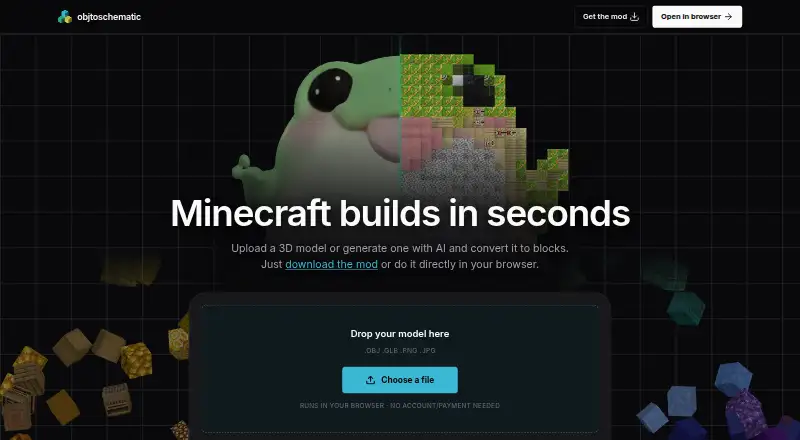
What ObjToSchematic is
ObjToSchematic turns 3D models and other inputs into Minecraft blocks. You can create a model from a text description or image, or import .glb, .splat, .obj, .png, and .jpg files. In its browser editor, choose a Wizard or Project workflow, then move, rotate, or scale a model; conversion settings regenerate its blocks after edits. The Project workflow includes voxel and block editing, multiple scene objects, Lua scripting, and project save and load. Other build tools include block palette controls, ghost block previews, a slice viewer, and lasso masking. Export builds as .litematic, .schematic, or .schem files. The browser editor supports Minecraft Java and Bedrock, while the mod supports Java Edition. The maker says conversion happens on your machine and models are never uploaded. The Free plan costs nothing, requires no account or payment, and has no cap on build size or usage. Pro adds resource packs, modded blocks, Lua scripting, custom Minecraft versions, voxel and block painting, and .glb export. The homepage directs users to a wiki and Discord community for help.
Who it suits
ObjToSchematic suits Minecraft builders who want to turn 3D models or generated concepts into blocks and export them for Java or Bedrock workflows. It also fits users who want to adjust builds in a browser or use the Java Edition mod.
What it does well
- Generates models from text descriptions or images.
- Imports .glb, .splat, .obj, .png, and .jpg files.
- Exports .litematic, .schematic, and .schem files.
- Free plan has no build-size or usage cap.
- Conversion happens locally, according to the maker.
What to know first
- The mod supports Java Edition, not Bedrock.
- Command block export is intended for small builds.
Limits
The Free plan has no cap on build size or usage. Command block exports are for small builds because each command block is limited to 32,500 characters.
Plans
| Plan | Billed and limits | Price |
|---|---|---|
| Free | No account or payment needed · no cap on build size or usage | Free |
| Pro | Resource packs · modded blocks · Lua scripting · custom Minecraft versions · voxel/block painting · .glb export | On request |
As objtoschematic.com lists them, read 8 Oct 2026. The maker's own page has the final word.
Getting started
- Open https://objtoschematic.com/ in a browser.
- Use the Free plan without an account or payment.
- Generate a model from text or an image, or import a supported file.
- Edit the model in the Wizard or Project workflow and export it in a supported Minecraft format.
- For Java Edition, use the mod; consult the wiki or Discord community for help.
Overview
ObjToSchematic turns 3D models and other inputs into Minecraft builds, with a browser editor for shaping the result. It suits builders who want to bring their own models—or generate one from text or an image—into Java or Bedrock worlds. Its free, local conversion and editing tools make it a strong starting point; command block exports are a poor fit for large builds.
Key features
ObjToSchematic accepts .glb, .splat, .obj, .png and .jpg files, then exports Minecraft formats including .litematic, .schematic and .schem. The maker says conversion happens on the user’s machine and files are never uploaded, a useful distinction for people working with private models.
The browser editor offers Wizard and Project workflows. Project mode adds voxel and block editing, multiple scene objects, Lua scripting, and project save and load. Users can move, rotate and scale models, with blocks regenerated automatically after adjustments. Palette controls, ghost block previews, a slice viewer and lasso masking give builders several ways to refine placement rather than accept a first-pass conversion.
AI model generation from a text description or image broadens the starting points beyond existing 3D files. The browser editor supports Java and Bedrock; the separate mod supports Java Edition. The maker says there is no cap on build size or usage, but command block export is intended for small builds: each command block is limited to 32,500 characters.
Compatibility is listed with MCEdit, Litematica, FAWE, Axiom and Blender. Help is directed to the wiki and Discord community.
Pricing
Free: free. No account or payment is needed, and there is no cap on build size or usage. This is unusually accommodating for a tool whose central task is converting and exporting builds; the main stated constraint is the small-build limit on command block exports.
Pro: custom pricing. It adds resource packs, modded blocks, Lua scripting, custom Minecraft versions, voxel and block painting, and .glb export. Builders who need those capabilities should weigh them against the free editor’s existing Project features; Pro is the relevant tier for the specifically listed advanced options.
Platforms
ObjToSchematic is available on the web and Windows, and is described as cross-platform. The browser editor covers both Java and Bedrock, while its mod is for Java Edition only. Its in-game placement workflow makes it more than a file converter for builders who want to position a result in Minecraft.
Who it's for
Choose ObjToSchematic if you want a no-cost route from common 3D and image inputs to Minecraft schematics, or want browser tools to adjust the conversion before exporting. It is less suitable if you need command block output for a large build, or specifically want a Bedrock mod.
Pros and cons
- Generous free limits: no account, usage cap or build-size cap makes it practical to try on substantial projects.
- Flexible input and output: it accepts five listed file types and exports three Minecraft schematic formats.
- Useful editing controls: automatic regeneration after transforms, plus voxel tools and previews, support iteration before export.
- Privacy-conscious conversion: conversion occurs on the user’s machine and models are not uploaded, according to the maker.
- Command block constraint: the 32,500-character limit per command block makes this export route unsuitable for large builds.
- Edition split: Bedrock is supported in the browser editor, but not by the listed mod.
Alternatives
Minecraft Schematic Tools is a broader directory for comparing tools in this category.
Pick AutoBuild if you want a free tool across Linux, macOS, web and Windows; its AutoBuild+ access is giveaway-only, and paid plans are unavailable. Bloxelizer is worth considering for Android or iOS access and a free toolkit that includes voxelizing, pixelizing, conversion, guides and multi-format import/export; its free plan needs no account.
SchemViewer is a free alternative for core schematic viewing on Linux, macOS, web and Windows. Litematic Converter is a free, open-source option for Linux, macOS and Windows that requires Python 3.7 or newer. SchemConvert is another free option for Linux, macOS and Windows.
Structurize is a free GPLv3 Minecraft mod for Linux, macOS and Windows; choose it if a mod is what you need. BuildSchematics Converter is a free, browser-based option with no account required. CurseForge offers a free web catalog for Minecraft mods and modpacks, with a premium tier whose price is custom pricing.
Verdict
ObjToSchematic is a strong choice for builders who want to convert 3D inputs into Minecraft builds without paying or surrendering files to a server, then refine them in a browser editor. Look elsewhere if your workflow depends on command block exports for large builds or a Bedrock mod.
Verdict
Choose ObjToSchematic if you want a free way to convert 3D inputs into Minecraft builds, with browser editing for Java and Bedrock. Look elsewhere if you need command block exports for large builds or a mod for Bedrock.
Questions
Do I need an account to use the Free plan?
No. The Free plan requires no account or payment.
Which Minecraft editions does it support?
The browser editor supports Java and Bedrock. The mod supports Java Edition.
What formats can I export?
Minecraft exports include .litematic, .schematic, and .schem.
Does the maker say models are uploaded?
No. The maker says conversion runs on the user's machine and models are never uploaded.
What does Pro add?
Pro includes resource packs, modded blocks, Lua scripting, custom Minecraft versions, voxel and block painting, and .glb export.
Facts from ObjToSchematic's own pages
- AI model generation
- Users can generate a model from a text description or an image. · objtoschematic.com, 8 Oct 2026
- Browser workflow
- The browser editor offers Wizard and Project workflows, with the Project workflow listing voxel and block editing, multiple scene objects, Lua scripting, and project save/load. · objtoschematic.com, 8 Oct 2026
- Build tools
- Features include block palette controls, ghost block previews, a slice viewer, lasso masking, and project files. · objtoschematic.com, 8 Oct 2026
- Export limitation
- The wiki says command block export is for small builds because each command block is limited to 32,500 characters. · objtoschematic.com, 8 Oct 2026
- Input and exports
- The editor accepts .glb, .splat, .obj, .png, and .jpg files and supports Minecraft exports including .litematic, .schematic, and .schem. · objtoschematic.com, 8 Oct 2026
- Integrations
- The maker lists compatibility with MCEdit, Litematica, FAWE, Axiom, and Blender. · objtoschematic.com, 8 Oct 2026
- Local conversion
- The maker says models are converted on the user's machine and never uploaded. · objtoschematic.com, 8 Oct 2026
- Maker
- The privacy notice identifies Lucas John Dower and lists Wales as the postal location. · objtoschematic.com, 8 Oct 2026
- Minecraft editions
- The browser editor supports Java and Bedrock, while the mod supports Java Edition. · objtoschematic.com, 8 Oct 2026
- Model adjustment
- Users can move, rotate, and scale a model, and conversion settings automatically regenerate the blocks after edits. · objtoschematic.com, 8 Oct 2026
- Privacy policy
- The privacy notice says the maker uses organisational and technical procedures to protect personal information, but does not guarantee that information can be fully secured. · objtoschematic.com, 8 Oct 2026
- Purpose
- ObjToSchematic converts 3D models and other inputs into Minecraft blocks. · objtoschematic.com, 8 Oct 2026
- Support
- The homepage directs users to the wiki and Discord community for help. · objtoschematic.com, 8 Oct 2026
- Usage limits
- The maker says there is no cap on build size and no usage limits. · objtoschematic.com, 8 Oct 2026
Where ObjToSchematic stands on Freedom251
- Minecraft Schematic Tools#15 of 42