Freedom251 › Minecraft Schematic Tools

MCBuild
What MCBuild is
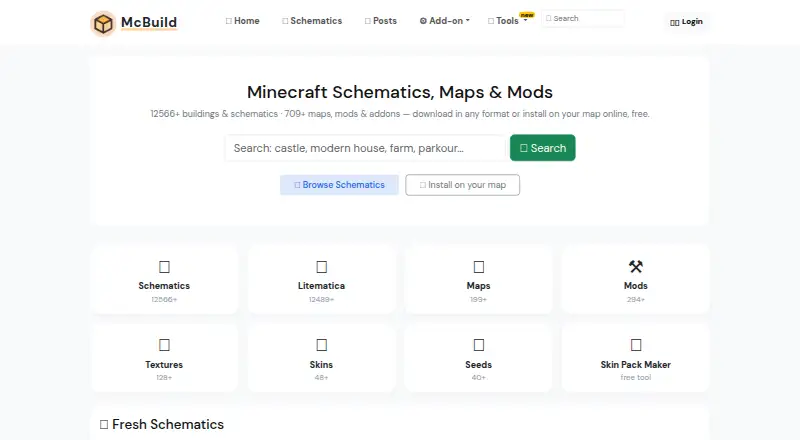
MCBuild is a free web catalog of Minecraft buildings, schematics, maps and add-ons. Its homepage lists 12,570+ buildings and schematics and 714+ maps, mods and add-ons; the published map count is 198. Map genres include adventure, parkour, survival and mini-game, and multiplayer maps are available.
Buildings can be downloaded as .litematic, .schem or .schematic files. The formats are intended for different tools: .litematic for Litematica, .schem for WorldEdit or FAWE, and .schematic for older tools including MCEdit and WorldEdit up to 1.12. An online installer can add a building to an uploaded Java or Bedrock map; zipped worlds are limited to 20 MB. Some old or modded builds may have missing or misplaced blocks if the game version lacks those blocks. The free Skin Pack Maker creates a Bedrock .mcpack from PNG skins, with up to 100 files and a 40 KB limit per file. MCBuild describes itself as an unofficial service not affiliated with Mojang AB.
Who it suits
MCBuild suits Minecraft players looking for downloadable builds, maps or add-ons, or those who want to install a building into an uploaded map. Its Skin Pack Maker may also suit Bedrock users preparing PNG skin files.
What it does well
- Catalog includes buildings, schematics, maps and add-ons.
- Online installer adds buildings to Java or Bedrock maps.
- Skin Pack Maker creates Bedrock .mcpack files.
- Downloads, installer and tools are free.
What to know first
- Uploaded zipped worlds are limited to 20 MB.
- Old or modded builds may have missing or misplaced blocks.
- Skin files are limited to 40 KB each.
Limits
The online installer accepts zipped worlds up to 20 MB. The Skin Pack Maker accepts up to 100 PNG files, with a 40 KB limit per file. Some old or modded builds may install with missing or misplaced blocks if the game version does not include them.
Plans
| Plan | Billed and limits | Price |
|---|---|---|
| Free | Installer, downloads and tools are free | Free |
As mcbuild.org lists them, read 7 Oct 2026. The maker's own page has the final word.
Getting started
- Open https://mcbuild.org/.
- Browse the catalog for a building, schematic, map, or add-on.
- Download a build in a format supported by your tool, or upload a zipped Java or Bedrock world up to 20 MB to the online installer.
- For a Bedrock skin pack, open the Skin Pack Maker and provide PNG skin files within its file limits.
MCBuild is a web-based Minecraft resource catalog for players who want ready-made builds, maps, and add-ons. It is best for people who can match a download to their game version and editing tools. Its main advantage is the choice between standalone downloads and an online installer; small world uploads and version mismatches narrow the fit.
Overview
The catalog homepage lists 12,570+ buildings and schematics and 714+ maps, mods, and add-ons. Its published map collection includes 198 maps across adventure, parkour, survival, and mini-game genres, including multiplayer maps. The catalog is broad, but players focused specifically on maps should note that the published map count is much smaller than the combined building and schematic catalog.
MCBuild is an unofficial Minecraft service and is not affiliated with Mojang AB. Its privacy policy says it may collect account, content, technical, usage, and communications data, and says it does not sell personal data. It also describes technical and organisational safeguards and limits access to people with a business need. Privacy questions and rights requests can be sent to its contact email.
Key features
Build downloads and installation
Builds are downloadable as .litematic, .schem, or .schematic files. Litematic is intended for Litematica, .schem for WorldEdit or FAWE, and the older .schematic format supports tools including MCEdit and WorldEdit up to version 1.12. This gives users several routes to a build, but choosing the wrong format for the tool or game version can make a download unusable.
The online installer can place a building directly into a Java or Bedrock map, avoiding a separate manual placement step. It accepts zipped worlds up to 20 MB, so it is suited to smaller maps rather than larger worlds. Old or modded builds may also install with missing or misplaced blocks if the required blocks are unavailable in the game version.
Bedrock skin packs
The free Skin Pack Maker turns PNG skins into a Bedrock .mcpack. It accepts up to 100 files, with a 40 KB limit per file. That is useful for assembling a modest pack in the browser, but the per-file cap matters when preparing larger skin images.
Pricing
MCBuild is free: the Free plan costs free and includes the installer, downloads, and tools. There is no paid tier described, so users can access the listed functions without a subscription. The practical constraints are the installer's 20 MB zipped-world cap and the Skin Pack Maker's 100-file and 40 KB-per-file limits.
Platforms
MCBuild is a web service. Its catalog covers Minecraft resources, while the online installer accepts Java or Bedrock maps and the Skin Pack Maker creates Bedrock skin packs. The listed Minecraft edition is Bedrock; users seeking Bedrock maps can browse adventure, parkour, survival, and mini-game releases, including multiplayer maps.
Who it's for
MCBuild suits Minecraft players looking for a large selection of buildings and schematics, especially those who want to install a build into a small Java or Bedrock world online. Bedrock players who need a simple skin-pack workflow may also benefit. It is a less suitable choice for anyone with a world over the upload limit, or for users who cannot verify that a build's blocks and file format match their game and tools.
Pros and cons
- Pro: A catalog of 12,570+ buildings and schematics plus 714+ maps, mods, and add-ons offers a wide range of starting points.
- Pro: The online installer places buildings into Java or Bedrock worlds without requiring a separate placement step.
- Pro: Free downloads, installer access, and a Bedrock skin-pack tool make the core offering available without a purchase.
- Con: Zipped world uploads stop at 20 MB, excluding larger maps from the online installation workflow.
- Con: Builds with unavailable blocks can install incorrectly, so version compatibility remains the user's responsibility.
- Con: Skin packs are limited to 100 PNG files at up to 40 KB each.
Alternatives
For a wider starting point across map sources, browse Minecraft Map Repositories; for tools focused on schematic workflows, see Minecraft Schematic Tools.
- EarthMC Map Archive is the better fit for players seeking three past world archives, with its largest listed download at 50.8 GB and downloads licensed CC BY-NC 4.0.
- MCPE-Planet Maps is a free option for Android and web users looking for worlds with no paid unlocks.
- Flamezam suits players who want free downloads without a premium tier or download queues.
- MCPECUBE Maps is worth considering for Android or web users who want maps delivered as .mcworld downloads.
- MinecraftSix offers free resource downloads, with some creators also offering optional premium versions or accepting donations.
- BorderMC Map Archive focuses on downloadable map releases; its compressed files contain terrain data but exclude player data, achievements, and statistics.
- CartoVoxel Minecraft Shape Maker is the more relevant choice for designing from 11 shapes with live 3D and layer views, plus JSON, layer guide, and Java mcfunction exports.
- Minecraft Maps Hub provides free map hosting and downloads.
Verdict
Choose MCBuild if you want a free, broad source of Minecraft builds and maps, with the added convenience of placing a build online or making a Bedrock skin pack. Its strongest case is the combination of catalog and tools; look elsewhere if your world exceeds 20 MB or you need confidence that older or modded blocks will match your game version.
Verdict
MCBuild combines a large catalog with an online map installer and a free Bedrock skin-pack tool. Check file compatibility and the 20 MB world-upload limit before using the installer.
Questions
Is MCBuild free?
Yes. The catalog, downloads, installer, and tools are free.
Which platforms does MCBuild support?
MCBuild is a web service. Its online installer accepts Java or Bedrock maps, and its Skin Pack Maker creates Bedrock .mcpack files.
What file formats are available for builds?
Builds can be downloaded as .litematic, .schem, or .schematic files.
How large can a world upload be?
The online installer accepts zipped worlds up to 20 MB.
What are the Skin Pack Maker limits?
It accepts up to 100 PNG files, with a 40 KB limit per file.
Is MCBuild affiliated with Mojang?
No. MCBuild describes itself as an unofficial Minecraft service and says it is not affiliated with Mojang AB.
Facts from MCBuild's own pages
- Build formats
- Builds can be downloaded as .litematic, .schem or .schematic files. · mcbuild.org, 7 Oct 2026
- Catalog
- MCBuild describes itself as a free catalog of Minecraft buildings, schematics, maps and add-ons. · mcbuild.org, 7 Oct 2026
- Catalog size
- The homepage lists 12,570+ buildings and schematics and 714+ maps, mods and add-ons. · mcbuild.org, 7 Oct 2026
- Installation caveat
- Some old or modded builds may install with missing or misplaced blocks when blocks are unavailable in the game version. · mcbuild.org, 7 Oct 2026
- Online installer
- Users can upload a Java or Bedrock map and install a building directly onto it online. · mcbuild.org, 7 Oct 2026
- Privacy and data
- The privacy policy says MCBuild may collect account, content, technical, usage and communications data, and says it does not sell personal data. · mcbuild.org, 7 Oct 2026
- Security
- The privacy policy says the site uses technical and organisational measures to protect personal data and limits access to people with a business need. · mcbuild.org, 7 Oct 2026
- Service status
- MCBuild states that it is an unofficial Minecraft service and is not affiliated with Mojang AB. · mcbuild.org, 7 Oct 2026
- Skin Pack Maker
- The free online tool creates a Bedrock .mcpack from PNG skins, with up to 100 files and a 40 KB per-file limit. · mcbuild.org, 7 Oct 2026
- Support
- The privacy policy directs privacy questions and rights requests to its contact email and says it aims to respond promptly. · mcbuild.org, 7 Oct 2026
- Supported tools
- .litematic files are for Litematica; .schem files are for WorldEdit or FAWE; and .schematic supports older tools including MCEdit and WorldEdit up to 1.12. · mcbuild.org, 7 Oct 2026
- Upload limit
- The online installer accepts zipped worlds up to 20 MB. · mcbuild.org, 7 Oct 2026
Where MCBuild stands on Freedom251
- Minecraft Schematic Tools#16 of 42
- Minecraft Map Repositories#13 of 25