Freedom251 › Minecraft Schematic Tools
SchemConvert
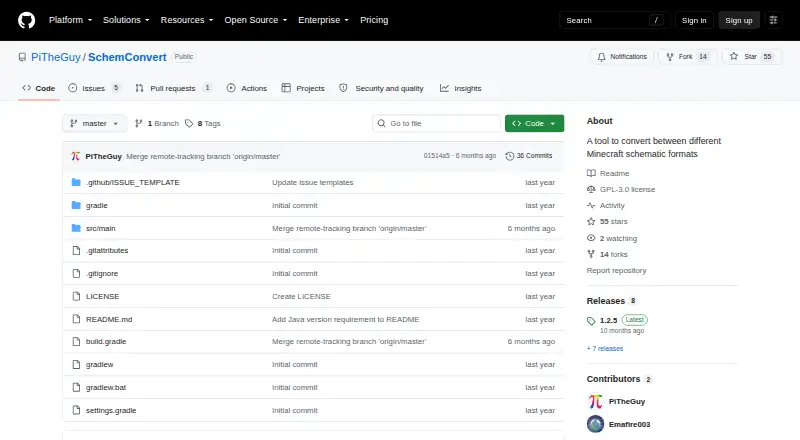
What SchemConvert is
SchemConvert converts Minecraft schematic files between .nbt, .schem, .litematic, and .bp formats. The formats are associated with different tools: .nbt is used by vanilla structure blocks, .schem by community programs including WorldEdit and MCEdit, .litematic by Litematica, and .bp by Axiom for blueprints. The application can convert multiple schematics at once, and its listed workflow is to export converted files. It runs on Linux, macOS, and Windows and requires Java 21 or later. SchemConvert is free and open source under the GPL-3.0 license. A release note mentions command-line conversion to .litematic. The repository has no published security advisories; GitHub also reports that it has no SECURITY.md file. Its scope is focused on converting and exporting the supported Minecraft schematic formats.
Who it suits
SchemConvert suits Minecraft users who need to convert supported schematic formats on Linux, macOS, or Windows, including users converting multiple files together.
What it does well
- Supports .nbt, .schem, .litematic, and .bp.
- Converts multiple schematics at once.
- Runs on Linux, macOS, and Windows.
- Free and open source under GPL-3.0.
What to know first
- Requires Java 21 or later.
- Listed workflow is export-only.
- Repository has no SECURITY.md file.
Plans
| Plan | Billed and limits | Price |
|---|---|---|
| Free | No pricing or usage limits stated | Free |
| SchemConvert Litematica to WorldEdit (third-party BuiltByBit listing by Frostxrv | one purchase · unlimited servers you own · no redistribution or resale · Paper/Purpur 1.21.11+ · Java 21+ | $4.99, paid once |
As github.com lists them, read 9 Oct 2026. The maker's own page has the final word.
Getting started
- Open the SchemConvert GitHub repository.
- Use a desktop system running Linux, macOS or Windows.
- Ensure Java 21 or later is available to run the tool.
- Convert one or more supported schematic files and export the results.
SchemConvert is a desktop utility for converting Minecraft schematics among four established file formats. It fits builders who already manage files across several Minecraft tools, especially when batch work matters. Its value is straightforward: free, cross-platform conversion, provided Java 21 or later is acceptable and you only need exporting rather than in-game placement.
Overview
SchemConvert works with .nbt, .schem, .litematic and .bp files. Those formats map to distinct parts of the Minecraft ecosystem: vanilla structure blocks, community utilities such as WorldEdit and MCEdit, Litematica, and Axiom blueprints. That makes the utility useful for moving a build between those tools without adopting a broader editing suite.
The workflow is conversion and export, not placement inside Minecraft. Users who want to position, edit or preview builds in a game environment will need another application alongside it. A Java 21-or-newer runtime is required, which is a meaningful setup requirement on machines with older Java installations.
Key features
Four-format conversion
The format coverage is focused rather than expansive. It handles the four extensions most relevant to the named vanilla, WorldEdit/MCEdit, Litematica and Axiom workflows, so it is a sensible bridge when those are the formats in your projects. It is not a universal converter for every Minecraft schematic variant.
Batch processing
SchemConvert can convert multiple schematics at once. That is the feature that most clearly improves day-to-day efficiency for creators maintaining libraries of builds or preparing a set of files for another tool. For a single occasional conversion, the advantage is less significant.
Command-line support
Release notes document command-line conversion to .litematic. This gives technically inclined users a way to incorporate that direction into repeatable workflows, while the utility remains less compelling for people seeking a graphical, in-game process.
Pricing
| Plan | Price | What it includes |
|---|---|---|
| Free | free | Open-source conversion utility with .nbt, .schem, .litematic and .bp support, batch processing and desktop availability |
The software is distributed under the GPL-3.0 license. There is no trial period because the product is free, and no seat, quota or renewal terms are given for the free plan. That makes it easy to adopt for personal projects, community work and experimentation, with no subscription decision to manage.
Platforms
SchemConvert runs on Linux, macOS and Windows desktops. All three desktop platforms receive the same stated format scope, but each installation still needs Java 21 or later. It is therefore a better fit for users comfortable installing or maintaining a modern Java runtime than for someone wanting a browser-only tool.
Who it's for
Choose SchemConvert if you exchange builds between vanilla structure blocks, WorldEdit or MCEdit, Litematica and Axiom, and want a no-cost utility that can process several files together. It also suits users who appreciate an open-source GPL-3.0 project and command-line access for .litematic conversion.
Look elsewhere if your priority is placing schematics in-game, editing them visually, supporting formats beyond the four listed, or avoiding a Java installation. The repository has no published security advisories, while GitHub reports that it has not set up a SECURITY.md file; organizations with formal security-review requirements may want that governance gap considered before standardizing on it.
Pros and cons
- Pro: Four relevant formats. It connects vanilla, community, Litematica and Axiom schematic ecosystems in one focused converter.
- Pro: Batch conversion. Multiple files can be handled in one operation, reducing repetitive work for larger collections.
- Pro: Free and open source. The GPL-3.0 distribution has no stated paid tier, quota or renewal cost.
- Con: Java 21 or later is mandatory. Older or tightly managed systems face an additional compatibility and setup step.
- Con: Export-only workflow. It does not serve as an in-game placement tool, so builders need another solution for that stage.
- Con: Narrow format scope. Projects using other schematic types will not get a universal conversion solution from this utility.
Alternatives
For a broader directory of tools, see Minecraft Schematic Tools.
- AutoBuild is worth choosing when Linux, macOS, web and Windows access matters and you want a free offering whose additional AutoBuild+ access is tied to giveaways.
- Bloxelizer suits users wanting Android, iOS and web access plus a free toolkit with voxelizing, pixelizing, conversion, guides and multi-format import/export.
- SchemViewer is the better match when viewing schematics is the primary task across desktop and web platforms.
- Litematic Converter is an alternative for a free, open-source utility built around Python 3.7 or newer.
- ObjToSchematic fits users who prefer web or Windows access and a free plan without an account or build-size or usage cap.
- Structurize is a GPLv3 Minecraft mod from the MineColonies team, making it the alternative to consider when a mod-based Minecraft workflow is preferred.
- BuildSchematics Converter is a browser-based, no-account option.
- CurseForge is aimed at finding free Minecraft mods and modpacks through a web catalog rather than performing focused schematic conversion.
Verdict
SchemConvert is a strong choice for Minecraft builders who need dependable, batch-capable conversion among .nbt, .schem, .litematic and .bp files on Linux, macOS or Windows. Its free GPL-3.0 model and focused scope are the main reasons to choose it. Look elsewhere if you need in-game placement, wider format coverage, a browser workflow or support for systems that cannot run Java 21 or later.
Verdict
SchemConvert is a focused option for converting and exporting the four listed Minecraft schematic formats, including in batches. Check the Java requirement and export-only workflow against your needs.
Questions
How much does SchemConvert cost?
It is free, with no pricing or usage limits stated.
Which file formats does it support?
It supports .nbt, .schem, .litematic and .bp.
Can it convert multiple files at once?
Yes. It supports batch conversion of multiple schematics.
Which operating systems can run SchemConvert?
It is available for desktop systems running Linux, macOS or Windows.
Does SchemConvert require Java?
Yes. It requires Java 21 or later.
Is SchemConvert open source?
Yes. The repository is published under the GPL-3.0 license.
Facts from SchemConvert's own pages
- Axiom format
- It supports .bp files used by Axiom blueprints. · github.com, 15 Oct 2026
- Batch conversion
- A release note says the tool supports converting multiple schematics at once. · github.com, 9 Oct 2026
- Blueprint format
- The README identifies .bp as the format used by Axiom for blueprints. · github.com, 9 Oct 2026
- Build system
- The project uses Gradle’s Java application plugin and Shadow plugin 8.1.1 to build an all-dependencies JAR. · raw.githubusercontent.com, 15 Oct 2026
- CLI default output
- If only a format is provided, the output file is created beside the input with the corresponding extension. · raw.githubusercontent.com, 15 Oct 2026
- CLI input
- The command-line interface requires an input file and accepts an optional output format. · raw.githubusercontent.com, 15 Oct 2026
- CLI output inference
- When no format is supplied, the program infers the output format from the output filename. · raw.githubusercontent.com, 15 Oct 2026
- Command line
- A release note mentions fixing conversion to .litematic via the command line. · github.com, 9 Oct 2026
- Dependencies
- The build declares Guava, jopt-simple 5.0.4, and Gson 2.10.1 dependencies. · raw.githubusercontent.com, 15 Oct 2026
- GUI workflow
- The maker describes downloading a JAR, selecting input and output files, and clicking Convert. · minecraftforum.net, 15 Oct 2026
- Independent listing status
- A similarly named third-party BuiltByBit plugin listing is attributed to creator Frostxrv, reports zero purchases and one download, and is marked not yet rated. · builtbybit.com, 15 Oct 2026
- Independent usage documentation
- PicoLimbo documents running SchemConvert with java -jar SchemConvert-1.2.5-all.jar and selecting input, output, and the .schem conversion type. · picolimbo.quozul.dev, 15 Oct 2026
- Java requirement
- The repository says Java 21 or newer is required. · github.com, 15 Oct 2026
- License
- The repository is publicly licensed under GNU GPL version 3.0. · github.com, 15 Oct 2026
- Limit: conversion error
- An issue reports an unexpected error when converting a .litematic file even after the user installed Java 21. · github.com, 15 Oct 2026
- Limit: folder conversion request
- An open enhancement issue requests support for using folders as input for mass conversion. · github.com, 15 Oct 2026
- Limit: legacy format
- An open issue says the application has no .schematic format selector; the maintainer described that format as old and low priority. · github.com, 15 Oct 2026
- Limit: startup confusion
- A Reddit user reported that the program flashed and closed, and the maker replied that the JAR file had to be downloaded and run. · reddit.com, 15 Oct 2026
- Limit: structure blocks
- The maker says .nbt files used with Create’s Schematicannon are limited to 48×48×48 blocks, although Create’s file-size limit may be reached first. · minecraftforum.net, 15 Oct 2026
- Limit: WorldEdit compatibility
- An issue reports that an .nbt-to-.schem conversion produced a file missing the Version tag required by WorldEdit 7.2.16. · github.com, 15 Oct 2026
- Litematica format
- It supports .litematic files used by Litematica. · github.com, 15 Oct 2026
- Litematic format
- The README identifies .litematic as the format used by Litematica. · github.com, 9 Oct 2026
- Maker
- The repository owner describes themself as someone who codes things sometimes and contributes mappings for ParchmentMC. · github.com, 9 Oct 2026
- Maker company facts
- The maker profile provides no legal company name, headquarters, founding year, employee count, or funding information. · github.com, 15 Oct 2026
Where SchemConvert stands on Freedom251
- Minecraft Schematic Tools#2 of 42