Freedom251 › Minecraft Schematic Tools
Structurize
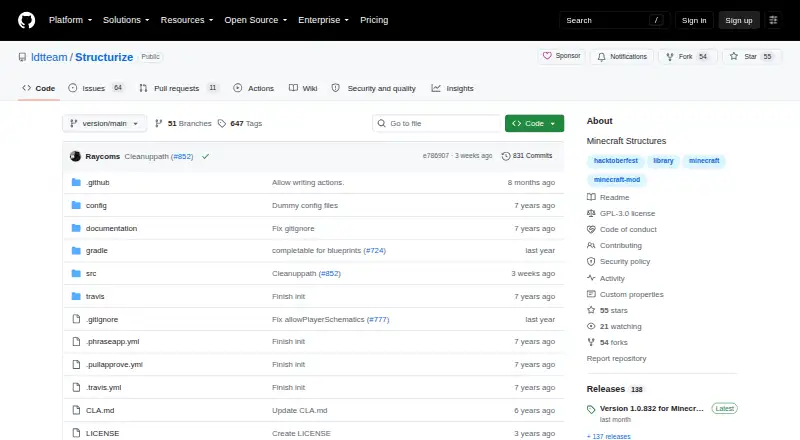
What Structurize is
Structurize is a free Minecraft mod for designing and placing structures in a Minecraft world. Its Scan Tool can capture an area or change blocks within an area, while the Build Tool provides a graphical interface to place, name, and delete scans. Finished scans are saved in a custom `structurize/scans/new` directory and can be placed with the Build Tool when they use the `.blueprint` file extension.
Client-server synchronization lets players scan structures on servers and download them locally. Configuration can also allow local structures to be pasted to a server. To reduce lag, the mod loads structures in buffers, and players or server owners can set the batch size. Structurize is required for MineColonies and is made by the same team. It is listed for client and server environments with Forge and NeoForge, and supports Linux, macOS, and Windows. The project is licensed under GNU GPL version 3 and points users to Discord for support. Using the mod requires Minecraft and a supported mod loader.
Who it suits
Structurize may suit Minecraft players or server owners who need to edit large world areas or move structure scans between client and server. It is also required for MineColonies.
What it does well
- Scan Tool captures areas and changes blocks
- Build Tool manages scans graphically
- Server scans can be downloaded locally
- Batch size can be configured
- Listed for Forge and NeoForge
What to know first
- Requires Minecraft and a supported mod loader
- Structures need the `.blueprint` extension for placement
Limits
The free plan requires Minecraft and a supported mod loader. Scans must use the `.blueprint` extension for placement, and format conversion is unavailable.
Plans
| Plan | Billed and limits | Price |
|---|---|---|
| Structurize | GPLv3 Minecraft mod; requires Minecraft and a supported mod loader | Free |
As github.com lists them, read 7 Oct 2026. The maker's own page has the final word.
Getting started
- Visit the Structurize GitHub project.
- Use Minecraft with a supported mod loader: Forge or NeoForge.
- Install the mod for a client or server environment.
- Scan an area, then use the Build Tool to manage and place scans.
Structurize is a free Minecraft mod for designing, scanning, and placing large structures inside a world. It is best suited to builders and server operators already working with Forge or NeoForge, particularly MineColonies players. Its main advantage is a managed in-game workflow; its main limitation is that it is not a general-purpose schematic conversion tool.
The mod uses its own .blueprint files and depends on Minecraft, a supported mod loader, and—when used on a server—appropriate synchronization and configuration choices.
Overview
Structurize is positioned as a server utility for editing substantial portions of a Minecraft world. The Scan Tool can capture an area or change blocks within one, turning existing builds or selected terrain into reusable work. Completed scans are saved in the custom structurize/scans/new directory and become available to the Build Tool when they use the required file extension.
The Build Tool provides a graphical, in-game way to place, name, and delete scans. A 3D preview helps users understand a structure before placement, while the in-game workflow avoids moving between Minecraft and a separate editor. That focus is useful for builders who want repeatable placement, but less suitable for anyone whose priority is converting among several schematic formats.
Key features
Scanning and reusable designs
Scanning can preserve an area as a reusable blueprint or modify blocks across a selected area. This makes the mod practical for repeating buildings and managing large edits, rather than only placing individual blocks. The workflow is tied to .blueprint files, and Structurize does not provide format conversion.
Graphical placement controls
The Build Tool combines a visual list of scans with actions to place, name, or delete them. The 3D preview is valuable when orientation and scale matter, although the feature remains centered on placement inside Minecraft rather than external design or export.
Client-server synchronization
Players can scan structures on servers and download those scans locally. When the relevant configuration allows it, local structures can also be pasted to the server. This gives server owners control over how designs move between client and server, but it also means the exact workflow depends on server settings rather than the client alone.
Buffered loading
Structurize loads structures in batches to reduce lag. Players or server owners can set the batch size in configuration, allowing the loading behavior to be adjusted for the environment. Smaller or larger batches may suit different performance needs, but the choice requires configuration rather than being entirely automatic.
MineColonies integration
Structurize is required by MineColonies. For MineColonies users, installation is therefore part of the mod ecosystem rather than an optional enhancement. Independent builders can still use it, but the strongest reason to choose it is a Minecraft workflow built around supported modded servers.
Pricing
Structurize is free. The Structurize plan costs free and is a GPLv3 Minecraft mod. There is no free trial because the product is already free, and no paid tier or recurring renewal is described.
The practical cost is the requirement for Minecraft and a supported mod loader. The free plan includes the scanning, graphical Build Tool, blueprint handling, synchronization, and buffered loading described above; it does not add format conversion beyond the supported .blueprint format.
Platforms
Structurize is available for desktop systems running Linux, macOS, or Windows. CurseForge lists support for both client and server environments and for the Forge and NeoForge mod loaders. It is an in-game mod, not a browser or mobile application. The project is licensed under GNU General Public License version 3, points users to Discord for support, and links a security policy from its GitHub repository.
Who it's for
Choose Structurize if you build on a Forge or NeoForge Minecraft setup and want to scan areas, keep reusable blueprints, preview them in 3D, and place them through a graphical in-game tool. MineColonies players are the clearest audience because MineColonies requires this mod. Server operators who need client-server scan transfer and configurable batch loading also have a direct use case.
Look elsewhere if you need a standalone editor, mobile access, browser-based work, or conversion between schematic formats. Structurize's workflow and file support are deliberately Minecraft-focused.
Pros and cons
Pros
- Complete in-game workflow: scanning, naming, previewing, and placing structures happen through Minecraft tools.
- Useful server controls: synchronization settings govern local downloads and optional server pasting.
- Adjustable loading: configurable batch size can help manage lag during large placements.
- No purchase barrier: the mod is free and GPLv3-licensed.
- Essential for MineColonies: MineColonies users need it rather than merely benefiting from it.
Cons
- Narrow file support: finished scans use .blueprint, with no format conversion.
- Loader and server dependency: use requires Minecraft with Forge or NeoForge, and server features depend on configuration.
- Desktop-only scope: it does not target mobile or web workflows.
Alternatives
For a broader starting point, browse Minecraft Schematic Tools.
- AutoBuild is another free option for Linux, macOS, Windows, and the web.
- Bloxelizer suits users wanting a freemium voxel and pixel toolkit with multi-format import and export across Android, iOS, and web.
- SchemViewer is a free viewer for Linux, macOS, Windows, and the web.
- Litematic Converter is a free open-source Python tool for conversion on desktop systems.
- ObjToSchematic is a freemium web and Windows option with a free tier that has no stated build-size or usage cap.
- SchemConvert is a free desktop alternative.
- BuildSchematics Converter is browser-based and requires no account.
- CurseForge is a freemium web catalog for Minecraft mods and modpacks, with a paid premium tier.
Verdict
Structurize is the right choice for Forge or NeoForge Minecraft builders—especially MineColonies players—who want reusable scans and controlled, visual placement without leaving the game. Its free GPLv3 license, server synchronization, and configurable buffered loading strengthen that focused role. Choose another tool if you need mobile or browser editing, broad schematic-format support, or conversion rather than in-game blueprint placement.
Verdict
Structurize provides scanning, structure placement, and configurable buffered loading for Minecraft worlds. Check the Minecraft and mod-loader requirements before using it.
Questions
How much does Structurize cost?
The listed plan costs nothing.
Is there a free plan or trial?
Yes, it has a free plan. There is no free trial.
Which platforms and mod loaders does it support?
It supports Linux, macOS, and Windows and is listed for client and server environments with Forge and NeoForge.
What file format does it use?
Its supported format is `.blueprint`. Format conversion is unavailable.
Is Structurize open source?
The project is listed under GNU GPL version 3.
Who makes Structurize?
The GitHub page says it is made by the same team that makes MineColonies.
Facts from Structurize's own pages
- Audience
- The project describes itself as a server utility mod for editing large portions of a Minecraft world. · curseforge.com, 7 Oct 2026
- Build tool
- The Build Tool lets users place, name, and delete scans through a graphical interface. · curseforge.com, 7 Oct 2026
- Client and server
- Client-server synchronization lets players scan structures on servers and download them locally, and can allow pasting local structures to the server when enabled in configuration. · curseforge.com, 7 Oct 2026
- Compatibility
- CurseForge lists the mod for client and server environments and the Forge and NeoForge mod loaders. · curseforge.com, 7 Oct 2026
- Integration
- Structurize is required for the MineColonies mod. · curseforge.com, 7 Oct 2026
- License
- The project is listed under the GNU General Public License version 3. · curseforge.com, 7 Oct 2026
- Load handling
- The mod loads structures in buffers to reduce lag, and its configuration lets players or server owners set the batch size. · curseforge.com, 7 Oct 2026
- Maker
- The GitHub page says Structurize is made by the same team that makes MineColonies. · github.com, 7 Oct 2026
- Purpose
- Structurize is a Minecraft mod for designing and placing structures. · github.com, 7 Oct 2026
- Scan files
- Finished scans are saved in a custom structurize/scans/new directory and can be placed with the Build Tool when they have the right file extension. · curseforge.com, 7 Oct 2026
- Security
- The GitHub repository links to a security policy. · github.com, 7 Oct 2026
- Structure tools
- Its Scan Tool can scan an area or change blocks in an area. · curseforge.com, 7 Oct 2026
- Support
- The project points users to its Discord for support. · curseforge.com, 7 Oct 2026
Where Structurize stands on Freedom251
- Minecraft Schematic Tools#23 of 42