Freedom251 › Minecraft Schematic Tools
Litematic Converter
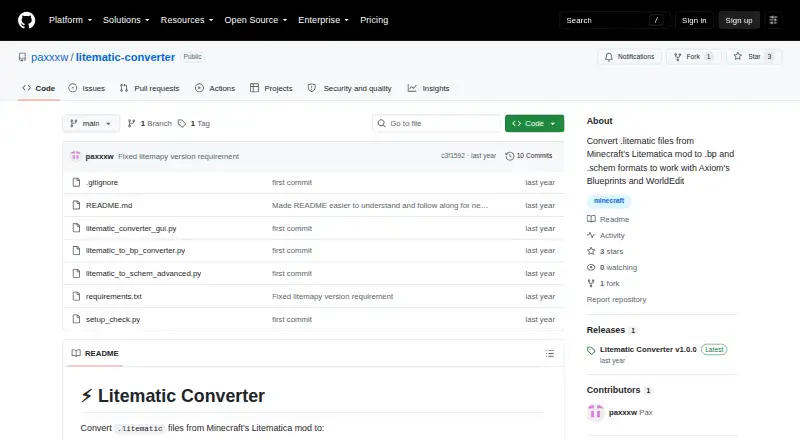
What Litematic Converter is
Litematic Converter changes Minecraft Litematica .litematic files into .bp Axiom Blueprint or .schem WorldEdit schematic formats. Its graphical interface lets users choose one file or several for batch conversion, locate Minecraft directories automatically, and follow progress through detailed logs. The .bp output provides 3D thumbnails and preserves block properties and tile entities. The .schem converter handles the modern WorldEdit format, including multiple regions and entities. Both converters support banners with custom patterns. The command-line converters handle one file at a time, so batch processing is a GUI feature. The project is free and open source for Linux, macOS, and Windows. It requires Python 3.7 or newer and the dependencies listed in requirements.txt. Users can download a release or clone the repository. For help, the project points to troubleshooting guidance and issue reporting. If input files are not found, the project advises avoiding special characters such as ampersands, percent signs, or Unicode symbols in file paths.
Who it suits
Litematic Converter suits Minecraft players who want to use Litematica schematics as Axiom Blueprints or WorldEdit schematics. The GUI is useful for batch jobs, while command-line users should expect to convert files individually.
What it does well
- GUI supports batch conversion.
- Can locate Minecraft directories automatically.
- .bp output preserves block properties and tile entities.
- .schem handles multiple regions and entities.
- Free and open source.
What to know first
- Command-line converters process one file at a time.
- Requires Python 3.7 or newer and listed dependencies.
- Special characters in paths can prevent file discovery.
Limits
The command-line converters process single files only; batch conversion is available in the GUI. The project requires Python 3.7 or newer and the dependencies in `requirements.txt`.
Plans
| Plan | Billed and limits | Price |
|---|---|---|
| Litematic Converter | Open source; Python 3.7 or newer; dependencies listed in requirements.txt | Free |
As github.com lists them, read 29 Sept 2026. The maker's own page has the final word.
Getting started
- Download a release or clone the repository from the project website.
- Install Python 3.7 or newer and the dependencies listed in `requirements.txt`.
- Open the GUI and select one or more `.litematic` files, or use a command-line converter for a single file.
- Choose `.bp` or `.schem` output and follow conversion progress in the GUI when using it.
Overview
Litematic Converter is a Minecraft file-conversion utility for builders moving Litematica designs into Axiom or WorldEdit. It is best for users who want to convert one file or a batch into those formats without paying; its main trade-off is that it requires a Python setup rather than working in a browser.
Key features
The GUI combines a file browser with batch conversion, automatic detection of Minecraft directories, and progress tracking with detailed logs. That makes it the stronger route when several files need converting: the command-line converters handle only one file at a time. The GUI’s logs also give users a useful record of conversion progress.
The output options address different building workflows. Axiom-compatible .bp files include 3D thumbnails and retain block properties and tile entities, while the modern WorldEdit .schem converter supports multiple regions and entities. Both formats handle banners with custom patterns, an important detail for builds that depend on those designs. The tool supports .litematic, .bp, and .schem files and includes a 3D preview, but its workflow is export-only; it does not provide placement functionality.
The project is open source, and users may use, modify, and distribute it. The recommended setup is to download a release or clone the repository. Either route requires Python 3.7 or newer and the dependencies in requirements.txt. If an input cannot be found, paths containing characters such as ampersands, percent signs, or Unicode symbols may be the cause. Troubleshooting guidance and issue reporting provide a route to seek help, though avoiding those path characters is the practical first step.
Pricing
Litematic Converter costs nothing. The free plan is the complete open-source utility, with Python 3.7 or newer and its listed dependencies as the setup requirements. There is no separate paid tier or trial to weigh: it suits builders who want a conversion tool at no cost and are comfortable installing its runtime, but is a poorer fit for anyone seeking a ready-to-use hosted service.
Platforms
The project is cross-platform, with Linux, macOS, and Windows support. That breadth makes it usable across the main desktop operating systems, although the Python requirement remains part of the setup on each. It is not a browser-based converter.
Who it's for
This is a focused choice for Minecraft builders who already have Litematica files and need Axiom Blueprints or WorldEdit schematics. Batch conversion and detailed logs favor users managing multiple designs through the GUI; someone converting occasional files can use the command line, but still has to process each file separately. It is not the right choice for users whose main need is placing builds in-game rather than exporting between formats.
Pros and cons
- Pros: GUI batch conversion is more practical than single-file command-line processing when handling several schematics.
- Pros: The .bp and .schem outputs preserve useful format-specific detail, including properties, tile entities, multiple regions, entities, and custom banner patterns.
- Pros: It is free, open source, and supports Linux, macOS, and Windows.
- Cons: Python 3.7 or newer and the project dependencies add setup work compared with a browser tool.
- Cons: Special characters in paths can interfere with finding inputs, and command-line use is limited to one file at a time.
- Cons: Its workflow is export-only, so it does not serve users looking for placement features.
Alternatives
Minecraft Schematic Tools is the broader directory starting point for comparing schematic software. For a browser-based converter with no account requirement, BuildSchematics Converter avoids installing Python, though its stated details are limited to browser access and no account. Bloxelizer suits readers who want mobile or web access and a wider toolkit: its free plan includes voxelizer, pixelizer, converter, build guides, and multi-format import/export, with no account needed.
Schemalook is a better fit for online viewing and browser tools; its viewer upload has a 7 MB maximum. CurseForge is an alternative for finding free Minecraft mods and modpacks through its web catalog rather than converting files. Litematica and Schematica are other free options for Linux, macOS, and Windows. MineSchematic is another free, web-based option. Nimbus AntiCheat is a separate Minecraft server anti-cheat tool, not a schematic converter.
Verdict
Choose Litematic Converter if you need free, cross-platform conversion from Litematica files to Axiom or WorldEdit formats, especially when the GUI’s batch handling and format-specific output matter. Look elsewhere if you want browser-based access without Python setup, or if you need a tool for placing builds rather than exporting them.
Verdict
Litematic Converter offers two output formats, with batch conversion in its GUI and single-file processing on the command line. It requires Python and its listed dependencies, and unusual path characters may interfere with finding inputs.
Questions
How much does Litematic Converter cost?
It is free. The listed plan is free.
Which formats does it convert?
It converts Minecraft `.litematic` files to `.bp` Axiom Blueprint or `.schem` WorldEdit formats.
Can it convert multiple files at once?
Yes. The GUI supports batch conversion of multiple files. The command-line converters process one file at a time.
Which platforms does it support?
It is available for Linux, macOS, and Windows.
Is Litematic Converter open source?
Yes. The project is open source, and users may use, modify, and distribute it.
What does it require to run?
It requires Python 3.7 or newer and the dependencies listed in `requirements.txt`.
Facts from Litematic Converter's own pages
- API and SDK
- The repository presents command-line Python scripts and a Tkinter GUI, with no public web API or SDK documentation. · github.com, 15 Oct 2026
- Audience
- The project is for users who want to use Litematica schematics as Axiom Blueprints or WorldEdit schematics. · github.com, 29 Sept 2026
- Axiom output
- The blueprint converter writes Axiom-compatible files and embeds 3D thumbnails. · github.com, 15 Oct 2026
- Banner support
- Banner blocks with custom patterns are supported. · github.com, 15 Oct 2026
- Batch conversion
- Batch conversion is available in the GUI. · github.com, 15 Oct 2026
- Block properties
- The project says block properties are preserved during conversion. · github.com, 15 Oct 2026
- Blueprint output
- The .bp converter creates Axiom-compatible files with 3D thumbnails and preserves block properties and tile entities. · github.com, 29 Sept 2026
- Command-line interface
- Separate Python commands convert one .litematic file at a time to .bp or .schem. · github.com, 15 Oct 2026
- Command-line limit
- The README limits command-line conversion examples to single files, leaving batch work to the GUI. · github.com, 15 Oct 2026
- Dependencies
- Dependencies are installed with pip from requirements.txt; the scripts use litemapy, nbtlib and Pillow. · github.com, 15 Oct 2026
- Distribution
- The recommended installation path is downloading the GitHub release source ZIP and extracting it. · github.com, 15 Oct 2026
- Entity handling
- The schematic converter reads and writes entity and block-entity data. · github.com, 15 Oct 2026
- File path caveat
- The README advises avoiding special characters such as ampersands, percent signs, or Unicode symbols in input file paths if files are not found. · github.com, 29 Sept 2026
- Folder detection
- The GUI searches common Minecraft schematic and blueprint directories automatically. · github.com, 15 Oct 2026
- GUI
- The desktop GUI lets users select one or many input files for conversion. · github.com, 15 Oct 2026
- Independent compatibility limit
- Convert.Guru says .litematic files depend on the Litematica mod ecosystem and are not natively readable by vanilla Minecraft. · convert.guru, 15 Oct 2026
- Independent conversion alternatives
- Schematicraft lists .litematic-to-.schem conversion alongside legacy schematic, NBT, Bedrock and Hytale formats. · schematicraft.com, 15 Oct 2026
- Independent file-size limit
- Schematicraft accepts files up to 8 MB without an account and says uploaded files are not retained. · schematicraft.com, 15 Oct 2026
- Independent format context
- Convert.Guru describes .litematic as gzip-compressed NBT containing block placements, block states and internal NBT data. · convert.guru, 15 Oct 2026
- Independent implementation reference
- The oriumgames schematics library acknowledges paxxxw/litematic-converter as one of its implementation sources. · github.com, 15 Oct 2026
- Independent praise
- The same Reddit thread includes users describing a desktop Litematic converter as easy to use and working on macOS. · reddit.com, 15 Oct 2026
- Independent technical warning
- The oriumgames library documents that unsupported blocks may default to air during cross-format conversion. · github.com, 15 Oct 2026
- Independent user complaint
- A Reddit conversion thread records users encountering schematic loading failures, null-pointer errors and permission errors in the broader Litematic-to-schematic tooling ecosystem. · reddit.com, 15 Oct 2026
- Independent version concern
- Reddit users report that newer Minecraft or mod versions can cause conversion or paste failures, sometimes requiring an older converter version. · reddit.com, 15 Oct 2026
Where Litematic Converter stands on Freedom251
- Minecraft Schematic Tools#1 of 42